创建索引的文档 https://www.cnblogs.com/qlqwjy/p/13520785.html
启动过程
elasticsearch.bat
可视化
kibana.bat
启动kibana会有些慢,需要等待
然后启动时可以看到ik插件的信息
之后访问http://localhost:5601/ 可以看到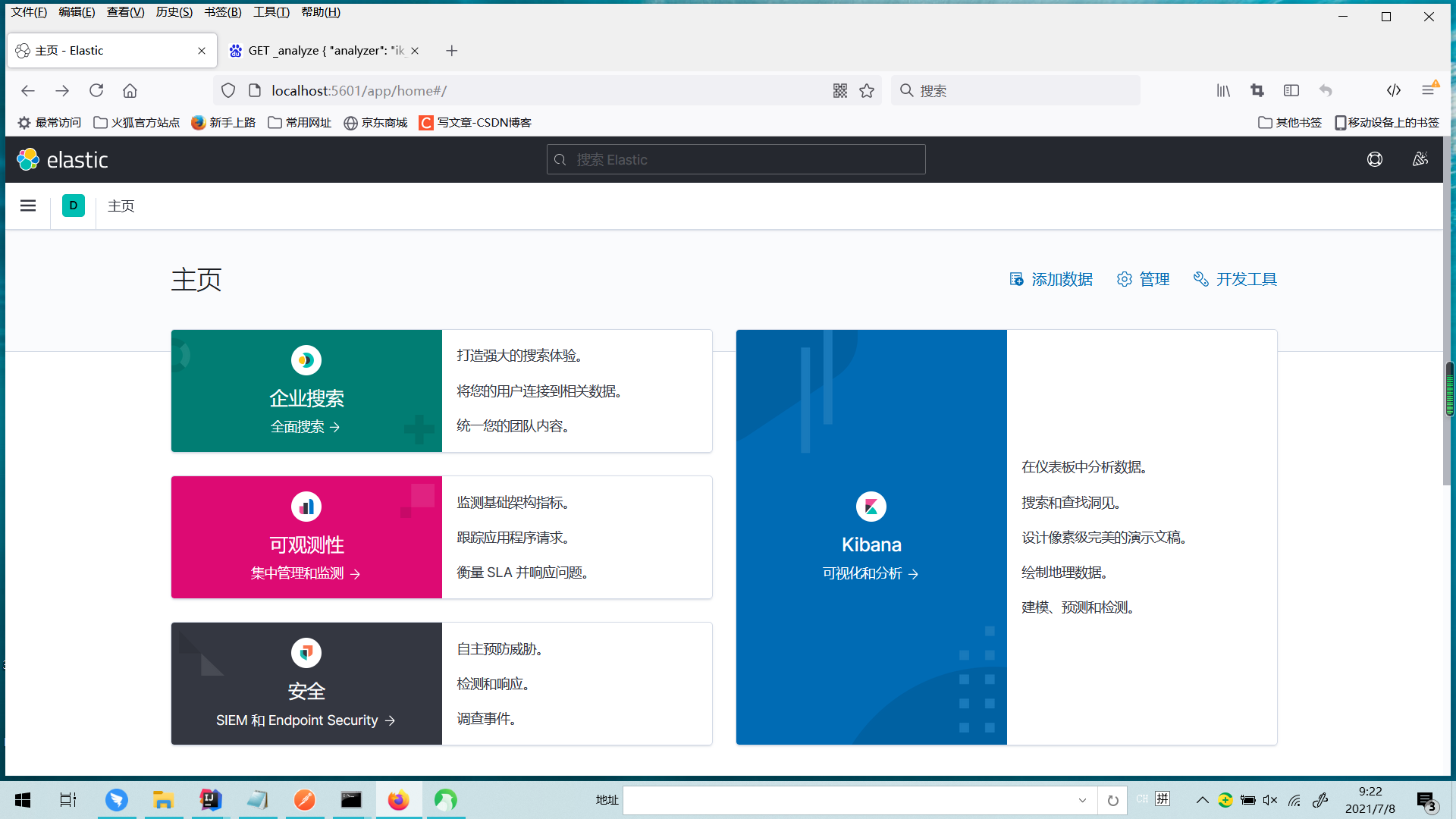
点击右边的开发工具
然后测试分词器,他有两种分词方式
GET _analyze{"analyzer": "ik_smart", "text": "中国共产党"}GET _analyze{"analyzer": "ik_max_word", "text": "中国共产党"}
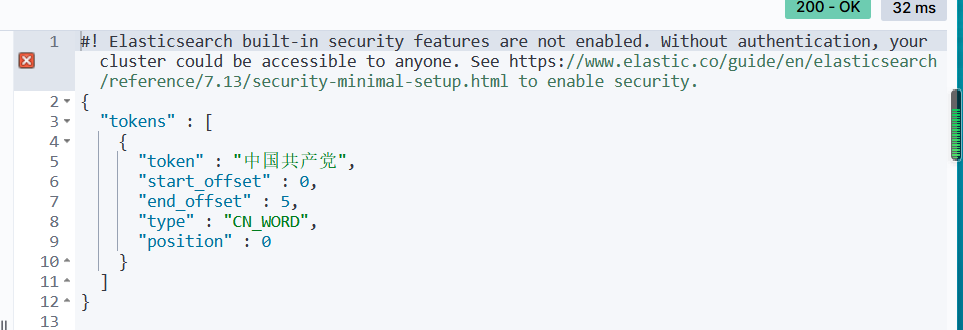
#! Elasticsearch built-in security features are not enabled. Without authentication, your cluster could be accessible to anyone. See https://www.elastic.co/guide/en/elasticsearch/reference/7.13/security-minimal-setup.html to enable security.
{
  "tokens" : [
    {
      "token" : "中国共产党",
      "start_offset" : 0,
      "end_offset" : 5,
      "type" : "CN_WORD",
      "position" : 0
    },
    {
      "token" : "中国",
      "start_offset" : 0,
      "end_offset" : 2,
      "type" : "CN_WORD",
      "position" : 1
    },
    {
      "token" : "国共",
      "start_offset" : 1,
      "end_offset" : 3,
      "type" : "CN_WORD",
      "position" : 2
    },
    {
      "token" : "共产党",
      "start_offset" : 2,
      "end_offset" : 5,
      "type" : "CN_WORD",
      "position" : 3
    },
    {
      "token" : "共产",
      "start_offset" : 2,
      "end_offset" : 4,
      "type" : "CN_WORD",
      "position" : 4
    },
    {
      "token" : "党",
      "start_offset" : 4,
      "end_offset" : 5,
      "type" : "CN_CHAR",
      "position" : 5
    }
  ]
}
分别对应如下两种
不过有的词他不识别就不会当成一个词来分,这时候需要自己定义词汇
在ik分词器的config目录下创建一个xxx.dic
将自定义的词汇放进去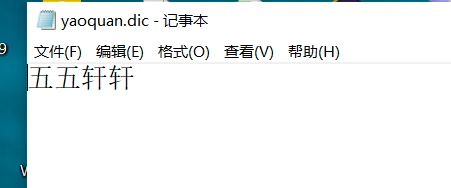
然后编辑IKAnalyzer.cfg.xml
把自己的文件指定进去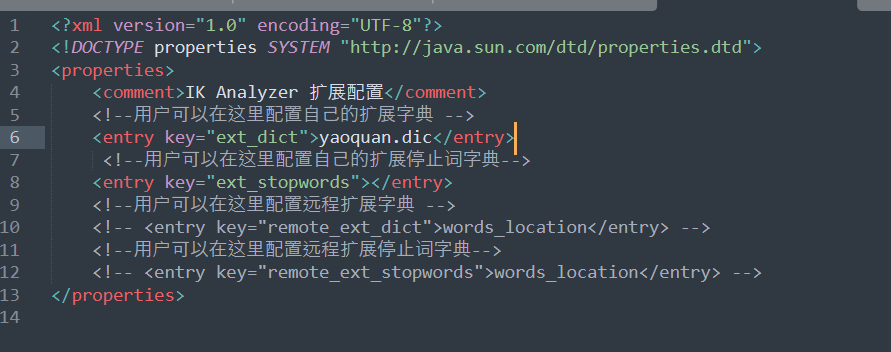
然后重启es还有kibana之后访问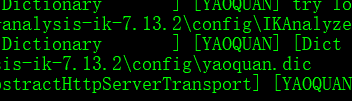
重启的时候能看得到这个文件加载了
基础测试
创建索引
首先启动elasticsearch-head
在他的目录下cmd 然后npm run start
之后访问网址
关于索引的基本操作
创建一个索引
put /索引名/~类型名~/文档id
{
请求体
}
完成了自动增加索引,数据也成功添加了
类型
字符串类型
text、keyword
数值类型
long,integer,short,byte,double,float,half float,scaled float
日期类型
date
te布尔值类型
boolean
二进制类型
binary
指定字段的类型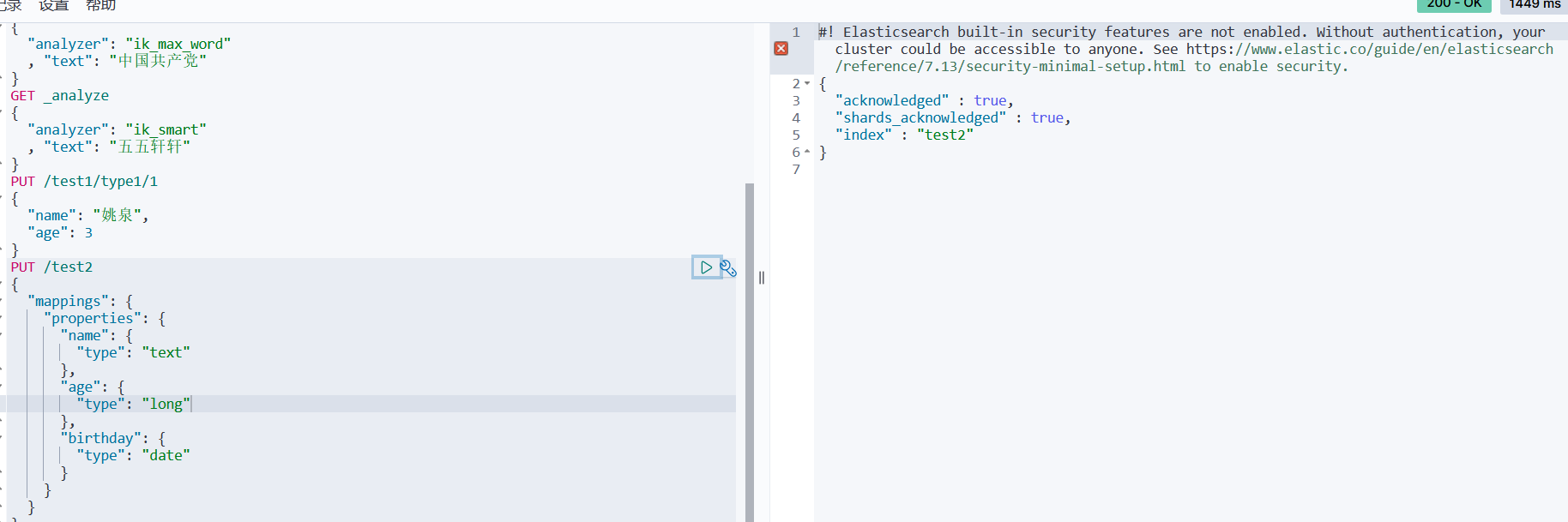
创建具体的索引规则,没有数据
获得这个规则
GET test2
查看默认的信息
#! Elasticsearch built-in security features are not enabled. Without authentication, your cluster could be accessible to anyone. See https://www.elastic.co/guide/en/elasticsearch/reference/7.13/security-minimal-setup.html to enable security.
{
  "test3" : {
    "aliases" : { },
    "mappings" : {
      "properties" : {
        "age" : {
          "type" : "long"
        },
        "birth" : {
          "type" : "date"
        },
        "name" : {
          "type" : "text",
          "fields" : {
            "keyword" : {
              "type" : "keyword",
              "ignore_above" : 256
            }
          }
        }
      }
    },
    "settings" : {
      "index" : {
        "routing" : {
          "allocation" : {
            "include" : {
              "_tier_preference" : "data_content"
            }
          }
        },
        "number_of_shards" : "1",
        "provided_name" : "test3",
        "creation_date" : "1625710390281",
        "number_of_replicas" : "1",
        "uuid" : "r-BS5cpcShe8QchpKo8QgQ",
        "version" : {
          "created" : "7130299"
        }
      }
    }
  }
}
如果自己的文档字段没有指定,那么es就会给我们默认配置字段类型
扩展:通过命令elasticsearch索引情况! 通过get_cat/ 可以获得es当前的很多信息!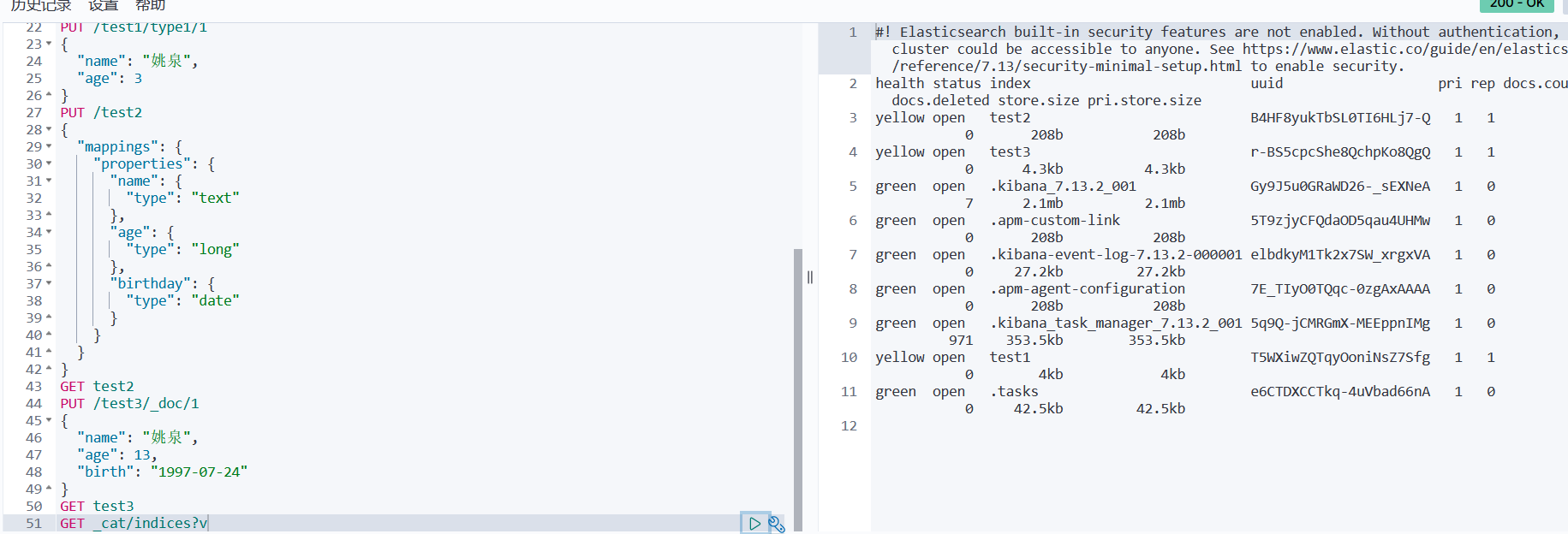
修改索引
提交还是使用put即可,
曾经的办法
现在的方法
删除
DELETE test1
通过delete 命令实现删除、根据你的请求来判断是否是删除索引还是删除文档记录
使用RESTFUL 风格是我们ES推荐大家使用的!
关于文档的基本操作(重点)
基本操作
添加数据
PUT /yaoquan/user/1
{
  "name":"姚泉",
  "age": 25,
  "desc": "今天把这玩意整完",
  "tags": ["嘴欠","点背","技术菜"]
}
获取数据GET
更新数据 PUT
Post _update,推荐使用这种
修改时如果只改一个别的没定义,可能会置空,所以需要指定是修改操作
简单的搜索
GET yaoquan/user/1
简单的条件查询,可以根据
GET yaoquan/user/_search?q=name:张三
复杂操作
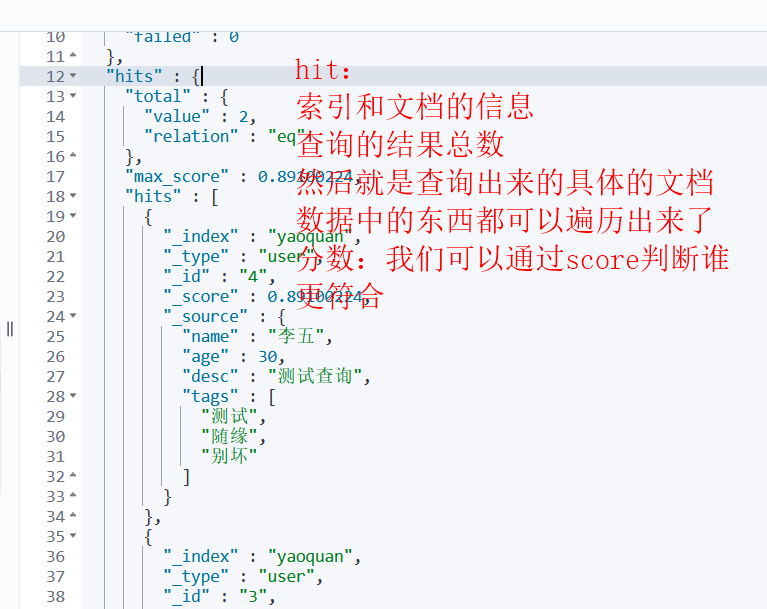
结果过滤,在_source里面指定,默认是所有的字段
我们之后使用java操作es,所有的方法和对象就是这里的key
排序
排序查询时,”_score” : null, 就没有权重了
分页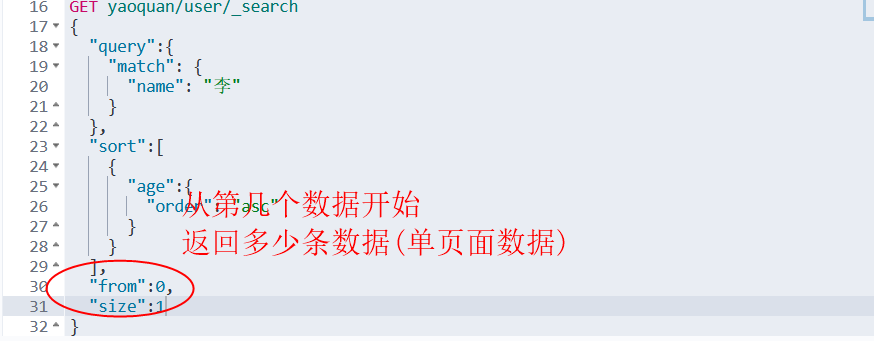
数据下标还是从0开始的,和学的所有数据结构是一样的
/search/{current}/{pagesize}
布尔值查询
must 所有的条件都要符合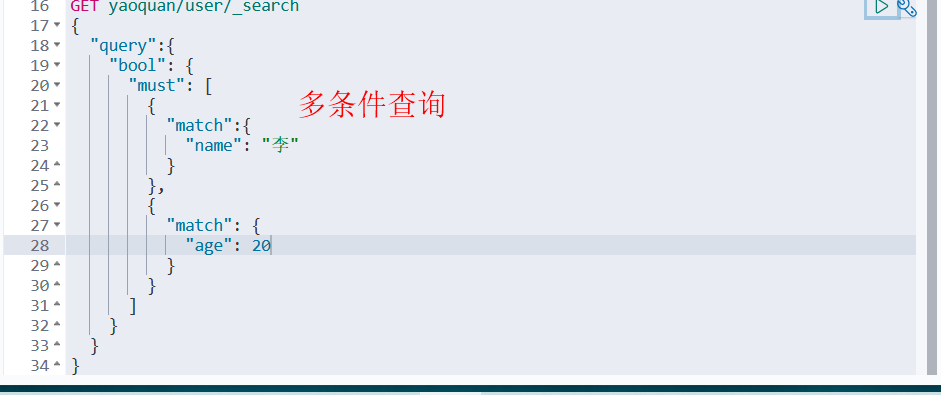
should 对应sql的or
must_not 对应sql的not
过滤器filter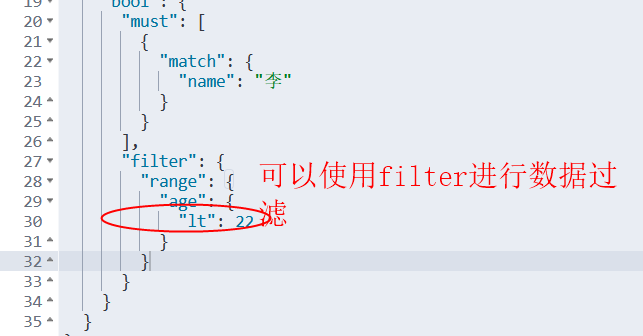
gt 大于 gte大于等于
lt小于 lte小于等于
匹配多个条件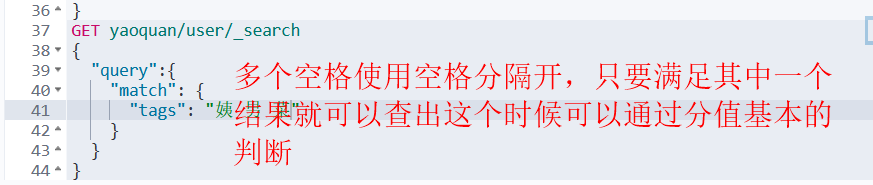
精确查询!
term查询时直接通过倒排索引指定的词条进程精确的查找的
关于分词:
term,直接查询精确的
match,会使用分词器解析!(先分析文档,然后再通过分析的文档进行查询)
两个类型 text keyword
keyword不会被拆分的
多个值匹配精确查询
高亮查询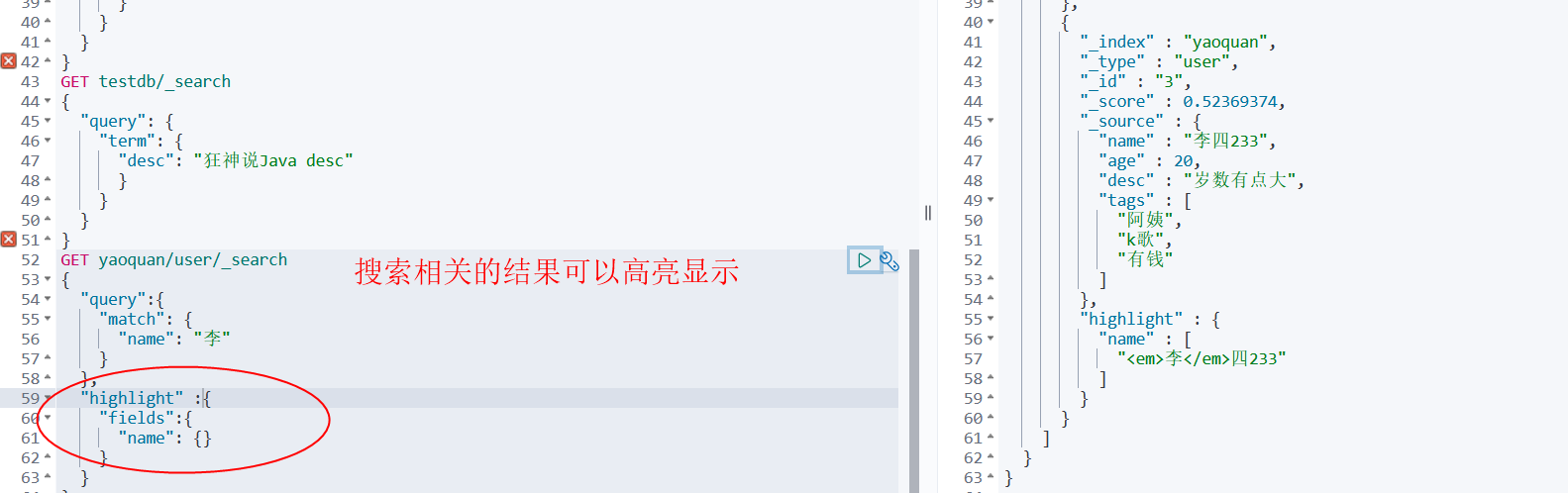
自定义搜索高亮条件
集成SpringBoot
导包
        <dependency>
            <groupId>org.elasticsearch.client</groupId>
            <artifactId>elasticsearch-rest-high-level-client</artifactId>
            <version>7.13.2</version>
        </dependency>
只导这个就够用,版本和下载的es版本一致
此时maven部分版本还是不对
再此处加上版本信息再刷新就好了
编写配置类
package com.dx.dx_iteminfo.config;

import org.apache.http.HttpHost;
import org.elasticsearch.client.RestClient;
import org.elasticsearch.client.RestHighLevelClient;
import org.springframework.context.annotation.Bean;
import org.springframework.context.annotation.Configuration;

@Configuration
public class ElasticSearchClientConfig {

    @Bean
    public RestHighLevelClient restHighLevelClient(){
        RestHighLevelClient client = new RestHighLevelClient(
                RestClient.builder(
                        new HttpHost("127.0.0.1", 9200, "http")
                )
        );
                return client;
    }
}
测试类
    @Autowired
    @Qualifier("restHighLevelClient")
    private RestHighLevelClient client;
    @Test
    public void testElasticSearch() throws IOException {
        // 解决elasticsearch启动保存问题
        System.setProperty("es.set.netty.runtime.available.processors", "false");
        // 1 测试索引的创建
        CreateIndexRequest request = new CreateIndexRequest("kuang_index");
        // 2 客户端执行请求 IndicesClient,请求后获得响应
        CreateIndexResponse createIndexResponse =
                client.indices().create(request, RequestOptions.DEFAULT);
        System.out.println(createIndexResponse);
    }
此时通过可视化能看到自己创建的索引并且控制器有返回对象的值则代表成功
具体的测试
创建索引
    @Test
    public void testElasticSearch() throws IOException {
        // 1 测试索引的创建
        CreateIndexRequest request = new CreateIndexRequest("kuang_index");
        // 2 客户端执行请求 IndicesClient,请求后获得响应
        CreateIndexResponse createIndexResponse =
                client.indices().create(request, RequestOptions.DEFAULT);
        System.out.println(createIndexResponse);
    }
判断索引是否存在
    @Test
    public void testExistIndex() throws IOException{
        GetIndexRequest request = new GetIndexRequest("kuang_index2");
        boolean exists = client.indices().exists(request, RequestOptions.DEFAULT);
        System.out.println(exists);
    }
删除索引
    @Test
    public void testDeleteIndex() throws IOException{
        DeleteIndexRequest request = new DeleteIndexRequest("kuang_index");
        AcknowledgedResponse delete = client.indices().delete(request, RequestOptions.DEFAULT);
        System.out.println(delete.isAcknowledged());
    }
创建文档
crud文档
    // 添加文档
    @Test
    public void testAddDocument() throws IOException{
        // 创建对象
        Student student = new Student("姚泉", 3);
        // 创建请求
        IndexRequest request = new IndexRequest("kuang_index");
        // 规则 put/kuang_index/_doc/1
        request.id("1");
//        request.timeout(TimeValue.timeValueSeconds(1));
//        request.timeout("1s");
        // 将我们的student放入
        request.source(new Gson().toJson(student), XContentType.JSON);
        // 客户端发送请求, 获取响应结果
        IndexResponse index = client.index(request, RequestOptions.DEFAULT);
        System.out.println(index.toString());
        System.out.println(index.status());
    }
获取文档
    // 获取文档,判断是否存在 get /index/doc/1
    @Test
    public void testIsExists() throws IOException{
        GetRequest getRequest = new GetRequest("kuang_index", "1");
        // 不获取返回的_source 的上下文
        getRequest.fetchSourceContext(new FetchSourceContext(false));
        getRequest.storedFields("_none_");
        boolean exists = client.exists(getRequest, RequestOptions.DEFAULT);
        System.out.println(exists);
    }
获得文档信息
    // 获得文档的信息
    @Test
    public void testGetDocument() throws IOException{
        GetRequest getRequest = new GetRequest("kuang_index", "1");
        GetResponse getResponse = client.get(getRequest, RequestOptions.DEFAULT);
        System.out.println(getResponse.getSourceAsString()); // 打印文档的内容
        System.out.println(getResponse); // 返回的全部内容和命令是一样的
    }
更新文档信息
    // 更新文档的信息
    @Test
    public void testUpdateDocument() throws IOException{
        UpdateRequest updateRequest = new UpdateRequest("kuang_index", "1");
        Student student = new Student("更新", 1);
        updateRequest.doc(new Gson().toJson(student), XContentType.JSON);
        UpdateResponse updateResponse = client.update(updateRequest, RequestOptions.DEFAULT);
        System.out.println(updateResponse.status());
    }
删除文档记录
    // 删除文档记录
    @Test
    public void testDeleteDocument() throws IOException{
        DeleteRequest request = new DeleteRequest("kuang_index", "1");
        DeleteResponse deleteResponse = client.delete(request, RequestOptions.DEFAULT);
        System.out.println(deleteResponse.status());
    }
批量操作
    // 特殊的,真的项目一般都会批量插入数据
    @Test
    public void testBulkRequest() throws IOException{
        BulkRequest bulkRequest = new BulkRequest();

        ArrayList<Student> studentArrayList = new ArrayList<>();
        studentArrayList.add(new Student("1", 1));
        studentArrayList.add(new Student("2", 2));
        studentArrayList.add(new Student("3", 3));
        studentArrayList.add(new Student("4", 4));
        studentArrayList.add(new Student("5", 5));
        studentArrayList.add(new Student("6", 6));
        studentArrayList.add(new Student("7", 7));
        // 批处理请求
        for (int i = 0 ; i < studentArrayList.size() ; i++){
            // 批量更新和批量删除,就在这里修改对应请求就可以了
            // id不设置就会随机
            bulkRequest.add(new IndexRequest("kuang_index")
                    .id("" + (i+1))
                    .source(new Gson().toJson(studentArrayList.get(i)), XContentType.JSON)
            );
        }
        BulkResponse bulkResponse = client.bulk(bulkRequest, RequestOptions.DEFAULT);
        System.out.println(bulkResponse.hasFailures()); // 是否失败
    }
查询
    // 查询
    // SearchRequest 搜索请求
    // SearchSourceBuilder 条件构造
    // HighlightBuilder 构建高亮
    // TermQueryBuilder 精确查询
    // MatchAllQueryBUilder
    // xxx QueryBuilder 对应我们刚才看到的命令
    @Test
    public void testSearch() throws IOException{
        SearchRequest searchRequest = new SearchRequest("kuang_index");
        // 构建搜索条件
        SearchSourceBuilder sourceBuilder = new SearchSourceBuilder();
        // 查询条件,我们可以使用 QueryBUilders 工具来实现
        // QueryBuilders.termQuery 精确
        // QueryBuilders.matchALLQueryBuilder = QueryBuilders.matchALLQuery() 匹配所有
        TermQueryBuilder termQueryBuilder = QueryBuilders.termQuery("name","1");
        sourceBuilder.query(termQueryBuilder);
        searchRequest.source(sourceBuilder);
        SearchResponse searchResponse = client.search(searchRequest, RequestOptions.DEFAULT);
        System.out.println(new Gson().toJson(searchResponse.getHits()));
        System.out.println("====================");
        for (SearchHit documentFields : searchResponse.getHits().getHits()){
            System.out.println(documentFields.getSourceAsMap());
        }
    }
自定义mapping和settings
    public Map<String, Object> addMappings(){
        Map<String, Object> mappingsMap = new TreeMap<>();
        Map<String, Object> properties = new TreeMap<>();
        Map<String, Object> id = new TreeMap<>();
        id.put("type", "keyword");
        id.put("store", "true");
        id.put("index", "true");
        properties.put("id", id);
        Map<String, Object> itemId = new TreeMap<>();
        itemId.put("type", "keyword");
        itemId.put("store", "true");
        itemId.put("index", "true");
        properties.put("itemid", itemId);
        Map<String, Object> title = new TreeMap<>();
        title.put("type", "text");
        title.put("store", "true");
        title.put("index", "true");
        title.put("analyzer", "text_complex_index");
        title.put("search_analyzer", "text_complex");
        JSONArray copyTo = new JSONArray();
        copyTo.add("search_text");
        copyTo.add("search4maxword_text");
        title.put("copy_to", copyTo);
        title.put("norms", "true");
        JSONObject fields = new JSONObject(true);
        Map<String, Object> keyWord = new TreeMap<>();
        keyWord.put("type", "keyword");
        fields.put("keyword", keyWord);
        title.put("fields", fields);
        properties.put("title", title);
        Map<String, Object> lastUpdateTime = new TreeMap<>();
        lastUpdateTime.put("type", "long");
        lastUpdateTime.put("store", "true");
        lastUpdateTime.put("index", "true");
        properties.put("last_update_time", lastUpdateTime);
        Map<String, Object> itemModifyTime = new TreeMap<>();
        itemModifyTime.put("type", "long");
        itemModifyTime.put("store", "true");
        itemModifyTime.put("index", "true");
        properties.put("item_modify_time", itemModifyTime);
        Map<String, Object> createTime = new TreeMap<>();
        createTime.put("type", "long");
        createTime.put("store", "true");
        createTime.put("index", "true");
        properties.put("create_time", createTime);
        Map<String, Object> itemTags = new TreeMap<>();
        itemTags.put("type", "text");
        itemTags.put("store", "true");
        itemTags.put("index", "true");
        itemTags.put("analyzer", "text_complex_index");
        itemTags.put("search_analyzer", "text_complex");
        JSONArray copyTo1 = new JSONArray();
        copyTo1.add("search_text1");
        copyTo1.add("search4maxword_text1");
        itemTags.put("copy_to", copyTo1);
        itemTags.put("norms", "true");
        properties.put("item_tags", itemTags);
        Map<String, Object> cateId = new TreeMap<>();
        cateId.put("type", "text");
        cateId.put("store", "true");
        cateId.put("index", "true");
        cateId.put("analyzer", "text_payload");
        cateId.put("norms", "true");
        properties.put("cateid", cateId);
        Map<String, Object> price = new TreeMap<>();
        price.put("type", "long");
        price.put("store", "true");
        price.put("index", "true");
        properties.put("price", price);
        Map<String, Object> version = new TreeMap<>();
        version.put("type", "long");
        version.put("store", "true");
        version.put("index", "true");
        properties.put("version", version);
        Map<String, Object> itemScore = new TreeMap<>();
        itemScore.put("type", "long");
        itemScore.put("store", "true");
        itemScore.put("index", "true");
        properties.put("item_score", itemScore);
        Map<String, Object> searchText = new TreeMap<>();
        searchText.put("type", "text");
        searchText.put("store", "false");
        searchText.put("index", "true");
        searchText.put("analyzer", "text_complex_index");
        searchText.put("search_analyzer", "text_complex");
        searchText.put("norms", "true");
        properties.put("search_text", searchText);
        Map<String, Object> searchText1 = new TreeMap<>();
        searchText1.put("type", "text");
        searchText1.put("store", "false");
        searchText1.put("index", "true");
        searchText1.put("analyzer", "text_complex_index");
        searchText1.put("search_analyzer", "text_complex");
        searchText1.put("norms", "true");
        properties.put("search_text1", searchText1);
        Map<String, Object> searchText2 = new TreeMap<>();
        searchText2.put("type", "text");
        searchText2.put("store", "false");
        searchText2.put("index", "true");
        searchText2.put("analyzer", "text_complex_index");
        searchText2.put("search_analyzer", "text_complex");
        searchText2.put("norms", "true");
        properties.put("search_text2", searchText2);
        Map<String, Object> search4MaxWordText = new TreeMap<>();
        search4MaxWordText.put("type", "text");
        search4MaxWordText.put("store", "false");
        search4MaxWordText.put("index", "true");
        search4MaxWordText.put("analyzer", "text_maxword");
        search4MaxWordText.put("search_analyzer", "text_maxword");
        search4MaxWordText.put("norms", "true");
        properties.put("search4maxword_text", search4MaxWordText);
        Map<String, Object> search4MaxWordText1 = new TreeMap<>();
        search4MaxWordText1.put("type", "text");
        search4MaxWordText1.put("store", "false");
        search4MaxWordText1.put("index", "true");
        search4MaxWordText1.put("analyzer", "text_maxword");
        search4MaxWordText1.put("search_analyzer", "text_maxword");
        search4MaxWordText1.put("norms", "true");
        properties.put("search4maxword_text1", search4MaxWordText1);
        Map<String, Object> text = new TreeMap<>();
        text.put("type", "text");
        text.put("store", "false");
        text.put("index", "true");
        text.put("analyzer", "text_complex_index");
        text.put("search_analyzer", "text_complex");
        text.put("norms", "true");
        properties.put("text", text);
        Map<String, Object> title1 = new TreeMap<>();
        title1.put("type", "text");
        title1.put("store", "false");
        title1.put("index", "true");
        title1.put("analyzer", "standard_text");
        title1.put("search_analyzer", "standard_text");
        title1.put("norms", "true");
        properties.put("title1", title1);
        mappingsMap.put("properties", properties);
        return mappingsMap;
    }

    public static void settings(CreateIndexRequest request) {
        try {
            XContentBuilder builder = XContentFactory.jsonBuilder();
            builder.startObject()
                    .startObject("index")
                    .field("number_of_shards", 5)
                    .field("number_of_replicas", 1)
                    .endObject()
                    .startObject("analysis")
                    .startObject("filter")
                    .startObject("stop_filter")
                    .field("type", "stop")
                    .field("stopwords_path", "stopwords.txt")
                    .field("ignore_case", "true")
                    .endObject()
                    .startObject("synonym_filter")
                    .field("type", "synonym")
                    .field("synonyms_path", "synonyms.txt")
                    .field("ignore_case", "true")
                    .field("expand","true")
                    .endObject()
                    .startObject("pinyin_filter")
                    .field("type", "pinyin")
                    .field("keep_first_letter", "false")
                    .field("keep_separate_first_letter", "false")
                    .field("keep_full_pinyin", "false")
                    .field("keep_joined_full_pinyin", "true")
                    .field("keep_original", "true")
                    .field("limit_first_letter_length", 16)
                    .field("lowercase", "true")
                    .endObject()
                    .endObject()
                    .startObject("analyzer")
                    .startObject("text_anto")
                    .field("type", "custom")
                    .field("tokenizer", "keyword")
                    .field("filter", "lowercase")
                    .endObject()
                    .startObject("text_complex_index")
                    .field("type", "custom")
                    .field("tokenizer", "ik_max_word")
                    .field("filter", "pinyin_filter,stop_filter,synonym_filter,lowercase")
                    .endObject()
                    .startObject("text_complex")
                    .field("type", "custom")
                    .field("tokenizer", "ik_smart")
                    .field("filter", "stop_filter,synonym_filter,lowercase")
                    .endObject()
                    .startObject("text_maxword")
                    .field("type", "custom")
                    .field("tokenizer", "ik_max_word")
                    .field("filter", "stop_filter,synonym_filter,lowercase")
                    .endObject()
                    .startObject("text_payload")
                    .field("type", "custom")
                    .field("tokenizer", "whitespace")
                    .endObject()
                    .startObject("standard_text")
                    .field("type", "custom")
                    .field("tokenizer", "standard")
                    .field("filter", "lowercase")
                    .endObject()
                    .endObject()
                    .endObject()
                    .endObject();
            request.settings(builder);
        } catch (IOException e) {
            e.printStackTrace();
        }
    }

若有收获,就点个赞吧
0 人点赞


