With Excel go online and becomes Excel for Microsoft 365, it comes with a new way to cooperate called Threaded Comments.
What are Threaded Comments and Notes
Threaded Comments is a discussion that people can create, reply and solve, so in some way it works like a todo task that need discussion.
Notes is the name for the comments on ealier (desktop) versions of Excel. And it is like a “one-direction” message that you want others to notice, and they can’t reply.
| Excel for Microsoft 365 | Excel for Desktop | |
|---|---|---|
| Threaded Comments | Create, Read, Reply, Delete and Solve | ReadOnly and Delete |
| Notes | Create, Read, Delete and Transform to Threaded Comments | Read, Create and Delete |
Threaded Comments
Comments among people that threaded up.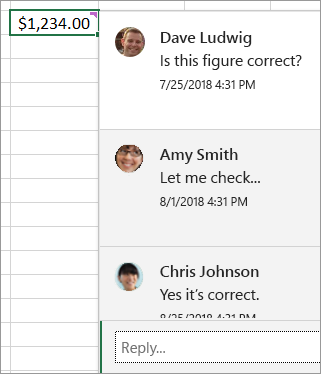
Notes
Little yellow background note with an arrow point to a cell.
Others can add more text below your previous, but there no way to tell others’ modification unless others add their names and modify time.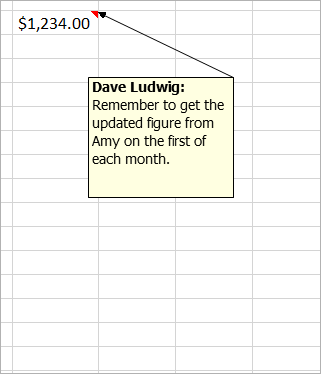
Referenced:
- The difference between threaded comments and notes: https://support.microsoft.com/en-us/office/the-difference-between-threaded-comments-and-notes-75a51eec-4092-42ab-abf8-7669077b7be3

若有收获,就点个赞吧
0 人点赞


