Representing information as bits
At the smallest scale in the computer, information is stored as bits and bytes.
Bit
- a “bit” is atomic: the smallest unit of storage
- a bit stores just a 0 or 1
- …
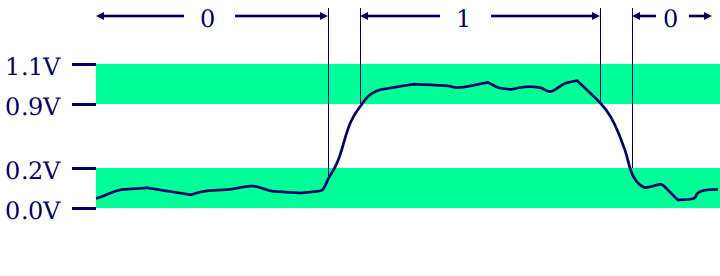
Why bits? Electronic Implementation
- Easy to store with bistable elements
- Reliably transmitted on noisy and inaccurate wires
Encoding Byte Values
Rather than accessing individual bits in memory, most computers use blocks of
8 bits, or bytes, as the smallest addressable unit of memory.
Byte
- byte = 8 bits
- Binary:
to
- Decimal:
to
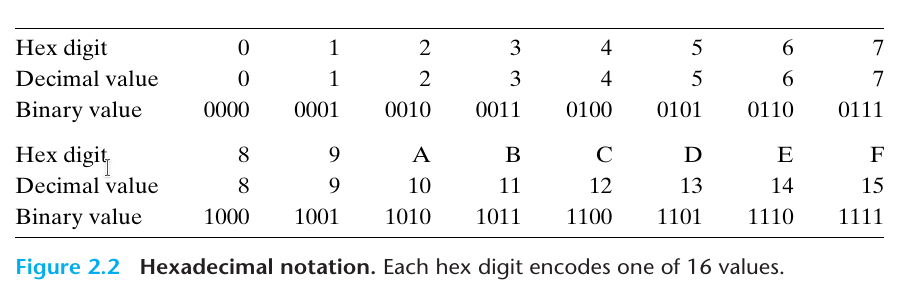
- Hexadecimal:
to
- Base 16 number representation
- Use characters ‘0’ to ‘9’ and ‘A’ to ‘F’
- Write
in C as
- 0xFA1D37B
- 0xfa1d37b
Bit-level manipulations
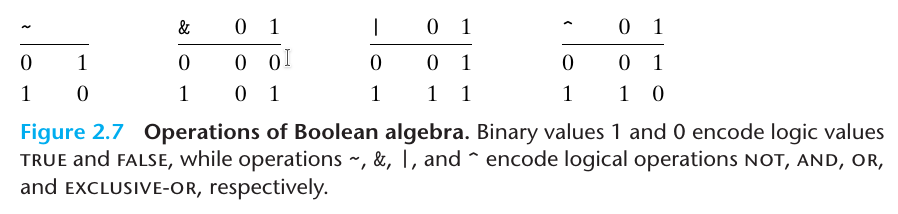
Since binary values are at the core of how computers encode, store, and manipu-
late information, a rich body of mathematical knowledge has evolved around the
study of the values 0 and 1. This started with the work of George Boole (1815–
1864) around 1850 and thus is known as Boolean algebra. Boole observed that by
encoding logic values true and false as binary values 1 and 0, he could formulate
an algebra that captures the basic principles of logical reasoning.
Bit-level Operations in C
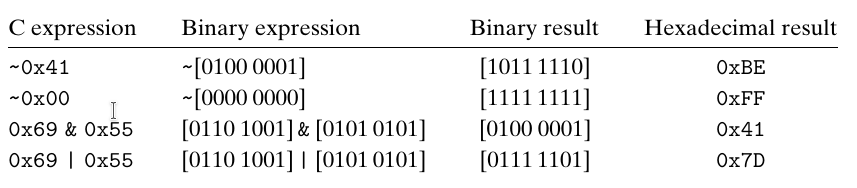
As we can see, the best way to determine the effect of a bit-level expression is to expand the hexadecimal to their binary representations.
Note: there are some features contrast to logic operations (&&, ||, !)
- View 0 as “False”
- Anything nonzero as “True”
- Always return 0 or 1
- Early termination
Shift Operations in C
Left Shift: x << y
- Shift bit-vector x left y positions
- Throw away extra bits on left
- Fill with 0 on right | Argument x | 01100010 | | —- | —- | | << 3 | 0010000 | | Log. >> 2 | 00011000 | | Arith. >> 2 | (00)011000 |
Right Shift: x >> y
- Shift bit-vector x right y positions
- Throw away extra bits on right
- Logical shift
- Fill with 0 on left
- Arithmetic shift
- Replicate most significant bit on left | Argument x | 10100010 | | —- | —- | | << 3 | 00010000 | | Log. >> 2 | 00101000 | | Arith. >> 2 | (11)101000 |
Undefined Behavior
- Shift amount < 0 or
word size
Integer Representations
In this section, we describe two different ways bits can be used to encode integers—
one that can only represent nonnegative numbers, and one that can represent
negative, zero, and positive numbers.
Unsigned Encodings
Definition of unsigned encoding for vector :
%3D%5Csum%7Bi%3D0%7D%5E%7Bw-1%7Dx_i%202%5Ei%0A#card=math&code=B2U_w%28%5Cvec%7Bx%7D%29%3D%5Csum%7Bi%3D0%7D%5E%7Bw-1%7Dx_i%202%5Ei%0A&height=47&width=128)
Note: Function  is a bijection
Two’s-Complement Encodings
Definition of two’s-complement encoding for vector :
%3D-x%7Bw-1%7D2%5E%7Bw-1%7D%2B%5Csum%7Bi%3D0%7D%5E%7Bw-2%7Dxi%202%5Ei%0A#card=math&code=B2T_w%28%5Cvec%7Bx%7D%29%3D-x%7Bw-1%7D2%5E%7Bw-1%7D%2B%5Csum_%7Bi%3D0%7D%5E%7Bw-2%7Dx_i%202%5Ei%0A&height=47&width=218)
Note: Function  is a bijection and most significant bit indicates sign (0 for nonnegative and 1 for negative)
Conversion and Casting
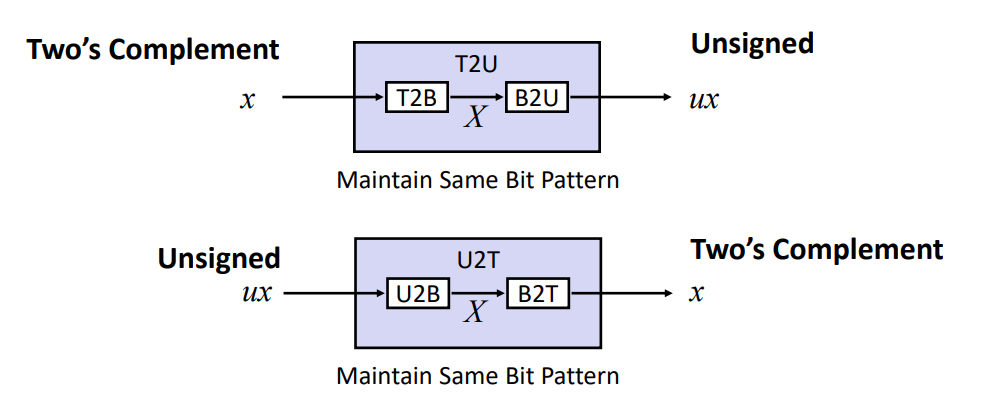
- Bit pattern is maintained
- But reinterpreted
- Can have unexpected effects: adding or subtracting
- Expression containing signed and unsigned int
Expanding and Truncating
Sign Extension
Given bits signed integer x, convert it to
bits integer with same value
Make
copies of sign bit:
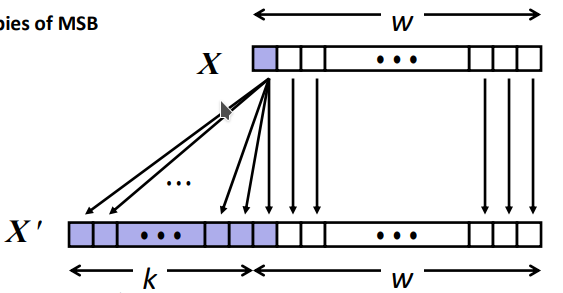
- Unsigned: zeros added
- Signed: sign extension
- Both yield expected result
Truncation
Given bits signed or unsigned integer x, convert it to
bits integer
with same value for “small enough” x
Drop top
bits:
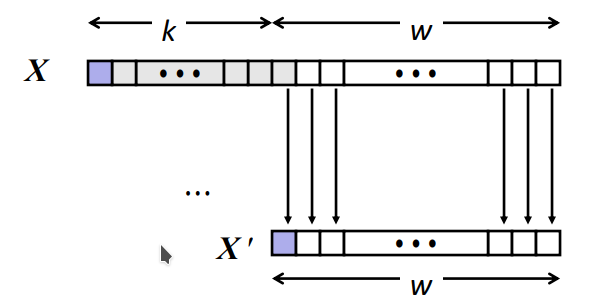
- Unsigned/signed: bits are truncated
- Result reinterpreted
- Unsigned: mod operation
- Signed: similar to mod
- For small numbers yields expected behavior

若有收获,就点个赞吧
0 人点赞


