常用方法
centos7解决git每次都要输入账号密码的问题
- 配置用户名邮箱
git config —global user.name “用户名”
git config —global user.email “邮箱”
查找.gitconfig文件位置
find / -name .gitconfig
打开.gitconfig文件

- 加入下面的代码
[credential]
helper = store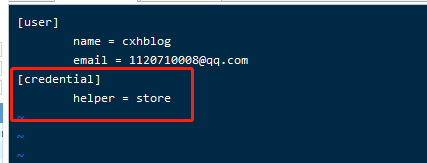
- 切换到项目根目录,执行下面命令
git config —global credential.helper store
- 按平常git命令执行pull或者push,输入账号密码,第一次需要,往后就不需要了
安装应用
软连接 sudo ln -s /opt/node/bin/yarn /usr/local/bin/yarn
sudo ln -s /opt/node/bin/yarn /usr/local/bin/yarn
ubuntu系列的apt-get的命令小汇总
在Ubuntu下,apt-get近乎是最常用的shell命令之一了,因为他是Ubuntu通过新立得安装软件的常用工具命令。
本文列举了常用的APT命令参数:
apt-cache search package 搜索软件包
apt-cache show package 获取包的相关信息,如说明、大小、版本等
sudo apt-get install package 安装包
sudo apt-get install package —reinstall 重新安装包
sudo apt-get -f install 修复安装
sudo apt-get remove package 删除包
sudo apt-get remove package —purge 删除包,包括配置文件等
sudo apt-get update 更新源
sudo apt-get upgrade 更新已安装的包
sudo apt-get dist-upgrade 升级系统
apt-cache depends package 了解使用该包依赖那些包
apt-cache rdepends package 查看该包被哪些包依赖
sudo apt-get build-dep package 安装相关的编译环境
apt-get source package 下载该包的源代码
sudo apt-get clean && sudo apt-get autoclean 清理无用的包
sudo apt-get check 检查是否有损坏的依赖
查看ubuntu 内核 arch
安装node
curl -sL https://deb.nodesource.com/setup_10.x | sudo -E bash -
sudo apt-get install -y nodejs
Ubuntu通过PPA方式安装稳定版qBittorrent 下载器
- 添加源 ```
- sudo add-apt-repository ppa:qbittorrent-team/qbittorrent-stable ```
- 安装成功添加源后,更新包的信息,再安装 qBittorrent webui: ```
- sudo apt-get update
- sudo apt-get install qbittorrent-nox ```
启动
qbittorrent-nox
启动后,在浏览器中输入
http://ip 地址:8080,即可打开 qBittorrent 的网页端。- 默认的用户名是
admin,默认密码为adminadmin。 - 如果要使用其他端口,只需在启动命令中加入
--webui-port=XXXX参数,其中XXXX为端口号:- 记得需要开放防火墙的8080端口 ```
- qbittorrent-nox —webui-port=XXXX ```
在后台运行qBittorrent
1. nohup qbittorrent-nox &

若有收获,就点个赞吧
0 人点赞


