该方法适用于VL版的windows和office,激活后180天过期,过期可重复此方法激活。
1、一键激活脚本
管理员身份命令行运行:
slmgr /skms kms.v0v.bid && slmgr /ato
或者以管理员身份运行如下bat文件:
mrxn_net_kms.zip
2、windows手动激活
如果激活失败,可手动进行。以windows 10 专业版(Professional)为例,打开cmd(管理员)
1、查看版本:
wmic os get caption
2、获取通用批量许可密钥 (GVLK):
Windows https://docs.microsoft.com/zh-cn/windows-server/get-started/kmsclientkeys
3、安装秘钥:
slmgr /ipk xxxxx-xxxxx-xxxxx-xxxxx
4、检查KMS激活服务器可用性
nc kms.netnr.eu.org 1688
KMS激活服务器列表:
kms.mrxn.netkms.netnr.eu.org
5、windows激活:
slmgr /skms kms.netnr.eu.orgslmgr /ato
总结下来:
slmgr.vbs /upkslmgr /ipk W269N-WFGWX-YVC9B-4J6C9-T83GXslmgr /skms kms.netnr.eu.orgslmgr /atoslmgr.vbs -dlv
3、office手动激活
命令汇总:
cd C:/Program Files (x86)/Microsoft Office/Office16cscript ospp.vbs /dstatuscscript ospp.vbs /inpkey:XQNVK-8JYDB-WJ9W3-YJ8YR-WFG99cscript ospp.vbs /sethst:kms.cangshui.netcscript ospp.vbs /act
过程步骤:
1、查看版本,你的OFFICE必须是VOL版本,否则无法激活。64位的就是C:\Program Files\Microsoft Office\Office16。office16是office2016,office15就是2013,office14就是2010。然后目录对的话,该目录下面应该有个OSPP.VBS。
cd C:\Program Files\Microsoft Office\Office16cscript ospp.vbs /dstatus
2、通用批量许可密钥 (GVLK):
office2016-2019 https://technet.microsoft.com/zh-cn/library/dn385360(v=office.16).aspx.aspx)
office2013 https://technet.microsoft.com/ZH-CN/library/dn385360.aspx
office2010 https://technet.microsoft.com/ZH-CN/library/ee624355(v=office.14).aspx.aspx)
3、安装密钥
cscript ospp.vbs /inpkey:xxxxx-xxxxx-xxxxx-xxxxx
4、检查KMS服务器可用性
可用性检查:
nc kms.03k.org 1688
KMS服务器列表:
kms.03k.orgxykz.f3322.orgkms.chinancce.comkms.lotro.cccy2617.jios.orgkms.shuax.com
5、office激活:
cscript ospp.vbs /sethst:kms.03k.orgcscript ospp.vbs /act
如果提示看到successful的字样,那么就是激活成功了,重新打开office就好。
4、一键搭建kms激活服务端
1、安装kms-server-deploy
wget https://raw.githubusercontent.com/Mr-xn/kms-server-deploy/master/kms-server-deploy.sh && bash kms-server-deploy.sh
vlmcsd Github主页:https://github.com/Wind4/vlmcsd
kms-server-deploy.zip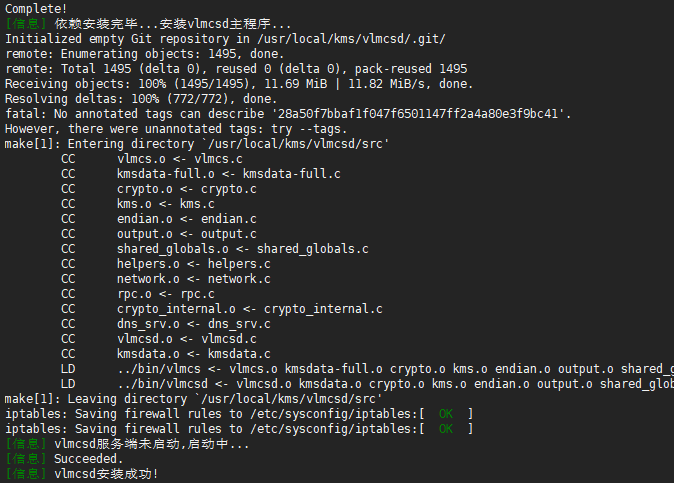
安装运行成功后会出现如下进程:
ps -aux | grep vlmcsd

5、激活失败的原因可能有哪些?
1、你的系统/OFFICE是否是批量VL版本
2、是否以管理员权限运行CMD
3、你的系统/OFFICE是否修改过KEY/未安装GVLK KEY
4、检查你的网络连接
5、本地的解析不对,或网络问题(点击检查服务器是否能连上)
6、根据出错代码自己搜索出错原因
7、0x80070005错误一般是你没用管理员权限运行CMD

若有收获,就点个赞吧
0 人点赞


