RestTemplate 是SpringBoot提供的一个Rest远程调用工具
它的常用方法:
- getForObject() - 执行get请求
- postForObject() - 执行post请求
之前的系统结构是浏览器直接访问后台服务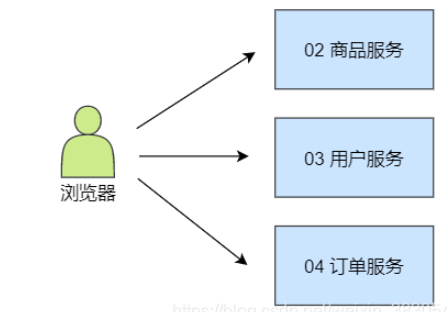
后面我们通过一个Demo项目演示 Spring Cloud 远程调用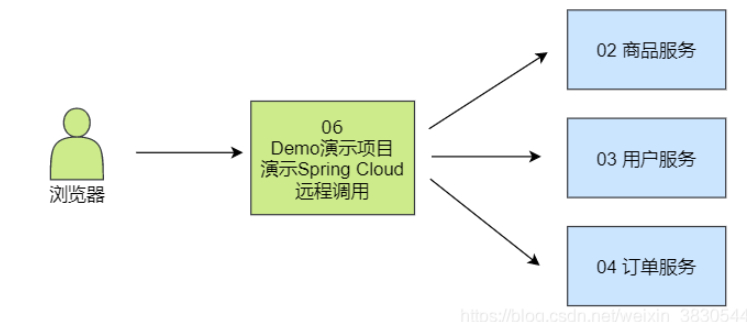
下面我们先不使用ribbon, 单独使用RestTemplate来执行远程调用
- 新建 ribbon 项目
- pom.xml
- application.yml
- 主程序
- controller
- 启动,并访问测试
pom.xml
server: port: 3001
eureka: client: service-url: defaultZone: http://eureka1:2001/eureka, http://eureka2:2002/eureka
<a name="Xxrd7"></a>## 主程序- 创建 `RestTemplate` 实例`RestTemplate` 是用来调用其他微服务的工具类,封装了远程调用代码,提供了一组用于远程调用的模板方法,例如:`getForObject()`、`postForObject()` 等```java@EnableDiscoveryClient@SpringBootApplicationpublic class Sp06RibbonApplication {//创建 RestTemplate 实例,并存入 spring 容器@Beanpublic RestTemplate getRestTemplate() {return new RestTemplate();}
RibbonController
@RestController
public class RibbonController {
    @Autowired
    private RestTemplate rt;

    @GetMapping("/item-service/{orderId}")
    public JsonResult<List<Item>> getItems(@PathVariable String orderId) {
        //向指定微服务地址发送 get 请求,并获得该服务的返回结果
        //{1} 占位符,用 orderId 填充
        return rt.getForObject("http://localhost:8001/{1}", JsonResult.class, orderId);
    }

    @PostMapping("/item-service/decreaseNumber")
    public JsonResult decreaseNumber(@RequestBody List<Item> items) {
        //发送 post 请求
        return rt.postForObject("http://localhost:8001/decreaseNumber", items, JsonResult.class);
    }

若有收获,就点个赞吧
0 人点赞


