背景
主数据项目使用NiFi作为实时数据分发技术底座过程中,遇到了如下工程问题:
- DataFlow变更与协作:1)由于需求的不稳定性,需要频繁的变更(增加、修改、删除)DataFlow中的Processor。有时候需要回到到历史某个时间节点的版本。2)团队协作开发,可能误操作,导致已调试正常的DataFlow无法工作。
- DataFlow多环境管理:1)项目DataFlow中开发了上百个Processor,其中Kafka、数据库操作的Processor依赖了大量的环境配置,即使视同NiFi提供的Variables管理环境配置。在测试、开发、集成、生产环境中保持DataFlow的一致性,也是有挑战的任务。有时候紧急处理问题,在某一个环境修改某个Processor group或者Processor的配置,通过Template导出、导入的方式同步变更的Group/Processor。存在重复配置问题。工作量较大。
为了解决以上问题,尝试过通过NiFi Rest API自动导入导出,并替换变量。但是维护也不太方便。随着使用深入,发现NiFi社区已有较为成熟的解决方案:NiFi Registry。
NiFi Registry
NiFi Registry就是为解决上述问题而生。
Registry—a subproject of Apache NiFi—is a complementary application that provides a central location for storage and management of shared resources across one or more instances of NiFi and/or MiNiFi. Specific goals for the initial thrust of the Registry effort include:
- Implementation of a Flow Registry for storing and managing versioned flows
- Integration with NiFi to allow storing, retrieving, and upgrading versioned flows from a Flow Registry
- Administration of the Registry for defining users, groups, and policies
Future efforts may include capabilities to support additional registry concepts as they are identified by the community.
使用方式
版本控制
NiFi版本控制的逻辑和svn、git逻辑类似,将Dataflow操作过程z
- 参考[1] NiFi Registry安装 安装NiFi Registry服务。增加Bucket:md,mdtest,mduat。
- 参考[3] Automate workflow deployment in Apache NiFi with the NiFi Registry。按one Registry to rule them all配置测试环境及生产环境NiFi Registy。

Controller setting->Registry Client:http://10.10.14.171:18080
- 选择Processor Group->右键Start version control

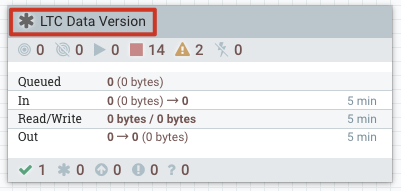
- 成功后,Processor Group左上角有绿色勾如下图所示:

- 如果Processor Group内有Processor新增、禁用,版本状态发生变化
多环境发布
- 测试环境中创建Processor Group,增加Processor,完成测试后,提交到版本控制到指定的Bucket。

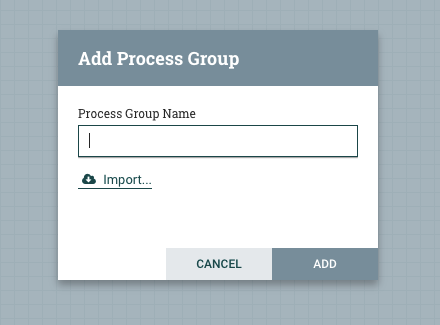
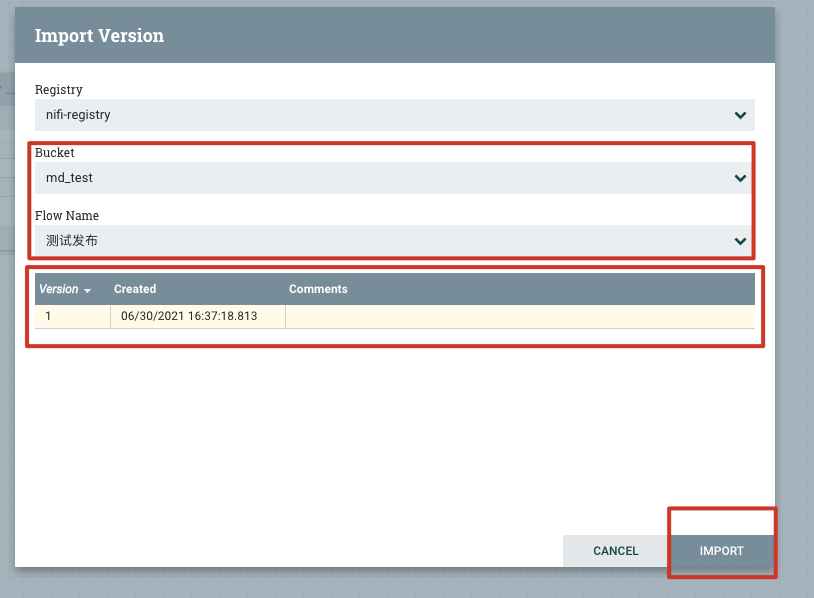
- 生产环境中,新建Processor Group,选择import导入测试环境提交的版本。
参考文档
[1] NiFi Registry安装
NiFi Registry官网
[3] Automate workflow deployment in Apache NiFi with the NiFi Registry

若有收获,就点个赞吧
0 人点赞


