一、IO流概述
学习IO流时,主要掌握如何new流对象,以及调用该流对象的方法实现读写。
1.何为IO?
Java的IO流是实现输入输出的基础,它可以方便地实现数据的输入输出操作,在Java中把不同的输入输出源(键盘、文件、网络连接等)抽象表达为“流”,通过流的方式允许Java程序使用相同的方式来访问不同的输入输出源。Java把所有传统的流类型(类或抽象类)都放在java.io包中,用以实现输入输出功能。
2.IO流分类
2.1 输入流和输出流
以内存为参照,按照流的流向来分:
- 输入流:往内存中去,只能从中读取数据,而不能向其写入数据。
输出流:从内存中出来,只能向其写入数据,而不能从中读取数据。
2.2 字节流和字符流
按照操作的数据单元不同,分为:
字节流:一次读取一个字节,即8个二进制位,这种流是万能的,可以读取任何类型的文件,如文本文件、图片、声音文件、视频文件等。
- 字符流:一次读取一个字符,只能读取纯文本文件,不能读取图片、声音文件、视频文件等。
字节流主要由InputStream和OutputStream作为基类,而字符流主要由Reader和Writer作为基类。
2.3 节点流和处理流
可以从\向一个特定的IO设备读\写数据的流,称为节点流,节点流也被称为低级流。当使用节点流进行输入输出时,程序直接连接到实际的数据源,和实际的输入输出节点连接。
处理流则用于对一个已存在的流进行连接或封装,通过封装后的流来实现数据读写功能。处理流也被称为高级流、包装流。当使用处理流进行输入输出时,程序并不会直接连接到实际的数据源,没有和实际的输入输出节点连接。
使用处理流好处:只用使用相同的处理流,程序就可以采用完全相同的输入输出代码来访问不同的数据源,随着处理流所包装节点流的变化,程序实际访问的数据源也发生变化。既可以消除不同节点流的实现差异,也可以提供更方便的方法来完成输入输出功能。
3.流的四大家族
Java把所有设备的有序数据抽象成流模型,Java的IO流设涉及40多个类,它们都是从如下4个抽象基类派生出来的:
- java.io.InputStream 字节输入流基类
- java.io.OutputStream 字节输出流基类
- java.io.Reader 字符输入流基类
- java.io.Writer 字符输出流基类
注:在Java中类名以Stream结尾的都是字节流,以Reader\Writer结尾的都是字符流。
特点:
- 以上四大类都是抽象类,它们都实现了java.io.closeable接口,有close()方法,即所有流都是可关闭的,在使用完流之后一定要关闭,不然会占用很多资源。
所有输出流都实现了java.io.Flushable接口,都是可刷新的,都有flush()方法。输出流在最终输出之后,一定要调用flush()方法刷新,将管道当中剩余未输出的数据强行输出完(清空管道),如果没有flush()可能会丢失数据。
4.java.io中的16个流
4.1 文件操作流
java.io.FileInputStream (掌握)
- java.io.FileOutputStream (掌握)
- java.io.FileWriter
-
4.2 转换流(将字节流转换成字符流)
java.io.InputStreamReader
-
4.3 缓冲流
java.io.BufferedInputStream
- java.io.BufferedOutputStream
- java.io.BufferedWriter
-
4.4 数据流
java.io.DataInputStream
-
4.5 对象流
java.io.ObjectInputStream (掌握)
java.io.ObjectOutputStream (掌握)
4.5 标准输出流
java.io.PrintWriter
-
二、字节流
1.路径名问题
反斜杠是转义字符,在IDEA中复制路径会自动加上一个反斜杠形成双反斜杠。或者使用\来代替反斜杠。
IDEA中默认的当前路径是Project项目所在的根目录。2.FileInputStream
File类可以使用文件名路径字符序列来创建File实例,该文件路径字符序列既可以是绝对路径,也可以是相对路径。一旦创建了File对象后,就可以调用File对象的方法来操作文件和目录。
读取文件的几个方法: int read():从输入流中一次读取一个字节。
- int read(byte[ ] b):从输入流中将最多b.length个字节的数据读入到一个byte[ ]数组中,返回读取到的字节数量。
int read(byte[ ] b,int off,int len):从输入流中将最多len个字节的数据读入到一个byte数组中。
2.1 FileInputStream初步
class Test{public static void main(String[] args) {//1.创建文件对象FileInputStream fis = null;try {//IDEA中会自动会文件路径中的单斜杆加上双斜杆或用反斜杆fis = new FileInputStream("F:\\JavaCode\\test");//test文件中保存了abcde//fis = new FileInputStream("F:/JavaCode/test");//2.开始读该文件int readData = fis.read();//返回的是编码值System.out.println(readData);//97readData = fis.read();//调用一次read()方法,读指针往后移动一位,直到读空返回-1System.out.println(readData);//98} catch (FileNotFoundException e) {e.printStackTrace();} catch (IOException e) {e.printStackTrace();} finally {//3.在finally语句块中确保一定关闭流对象//关闭流的前提是不为空,避免空指针异常if (fis != null){try {fis.close();} catch (IOException e) {e.printStackTrace();}}}}}
2.2 FileInputStream循环读
```java class Test{ public static void main(String[] args) {
FileInputStream fis = null;try {fis = new FileInputStream("F:/JavaCode/test");//循环方式读/*while(true){int readData = fis.read();if (readData == -1){break;}System.out.println(readData);}*///改造循环int readData = 0;while ((readData = fis.read()) != -1){System.out.println(readData);}} catch (FileNotFoundException e) {e.printStackTrace();} catch (IOException e) {e.printStackTrace();} finally {if (fis != null){try {fis.close();} catch (IOException e) {e.printStackTrace();}}}
} }
<a name="xcTWw"></a>### 2.3 FileInputStream最终版(掌握)前面两种方式采用read()方法读取文件,一次读取一个字节,内存和硬盘交互太频繁,时间都耗费在与硬盘交互上了,实际不采用前面两种方式,而是采用数组进行读取。```javaclass Test{public static void main(String[] args) {FileInputStream fis = null;try {fis = new FileInputStream("test");//采用相对路径//采用byte数组读取byte[] bytes = new byte[4];int readCount = fis.read(bytes);//返回读取到的字节数量System.out.println(readCount);//4System.out.println(new String(bytes));//abcd,将字节数组全部转换为字符串//String(byte[] bytes):将字节数组转换为字符串readCount = fis.read(bytes);System.out.println(readCount);//1System.out.println(new String(bytes));//ebcd,将字节数组全部转换为字符串//不应该全部转换,应该读取到多少个字节转换多少个字节//String(byte[] bytes, int off, int len):从指定位置将len长度字节转换为字符串System.out.println(new String(bytes,0,readCount));//ereadCount = fis.read(bytes);System.out.println(readCount);//-1,一个字节都没有读取到返回-1} catch (FileNotFoundException e) {e.printStackTrace();} catch (IOException e) {e.printStackTrace();} finally {if (fis != null){try {fis.close();} catch (IOException e) {e.printStackTrace();}}}}}
class Test{public static void main(String[] args) {FileInputStream fis = null;try {fis = new FileInputStream("test");byte[] bytes = new byte[4];/*while (true){int readCount = fis.read(bytes);if (readCount == -1){break;}System.out.print(new String(bytes,0,readCount));}*/int readCount = 0;while ((readCount = fis.read(bytes)) != -1){System.out.print(new String(bytes,0,readCount));}} catch (FileNotFoundException e) {e.printStackTrace();} catch (IOException e) {e.printStackTrace();} finally {if (fis != null){try {fis.close();} catch (IOException e) {e.printStackTrace();}}}}}//abcde
3.FileInputStream其余常用方法
- int available():返回流当中剩余的没有读到的字节数量。
long skip(long n):从输入流中跳过并丢弃n个字节的数据。
class Test{public static void main(String[] args) {FileInputStream fis = null;try {fis = new FileInputStream("test");System.out.println("总字节数量:" + fis.available());//5//int readByte = fis.read();//读取一个字节//System.out.println("还剩下多少个字节没有读:" + fis.available());//4byte[] bytes = new byte[fis.available()];//byte数组不能创建太大,所以这种方式适合大文件读取System.out.println(new String(bytes));//不需要循环,直接读一次就可以了} catch (FileNotFoundException e) {e.printStackTrace();} catch (IOException e) {e.printStackTrace();} finally {if (fis != null){try {fis.close();} catch (IOException e) {e.printStackTrace();}}}}}
class Test{public static void main(String[] args) {FileInputStream fis = null;try {fis = new FileInputStream("test");fis.skip(3);//跳过3个字节不读System.out.println(fis.read());//100,d的字节码} catch (FileNotFoundException e) {e.printStackTrace();} catch (IOException e) {e.printStackTrace();} finally {if (fis != null){try {fis.close();} catch (IOException e) {e.printStackTrace();}}}}}
4.FileOutputStream
文件字节输出流,将数据写到文件。
class Test{public static void main(String[] args) {FileOutputStream fos = null;try {//1.创建一个文件对象,文件如果不存在则先创建一个文件//这种方式会先把文件清空再写入//fos = new FileOutputStream("myfile");//相对路径,会在Project目录下新建一个文件//以追加的方式在文件末尾写入,不会清空原文件fos = new FileOutputStream("myfile", true);//2.开始写byte[] bytes = {97, 98, 99, 100, 101};fos.write(bytes);//将该数组全部写进文件fos.write(bytes,0,2);//将该数组前2个字节写进文件String s = "国庆快乐";byte[] bs = s.getBytes(StandardCharsets.UTF_8);//将字符串转换为byte数组fos.write(bs);//3.写完之后一定要刷新fos.flush();} catch (FileNotFoundException e) {e.printStackTrace();} catch (IOException e) {e.printStackTrace();} finally {if (fos != null){try {fos.close();} catch (IOException e) {e.printStackTrace();}}}}}
三、文件复制
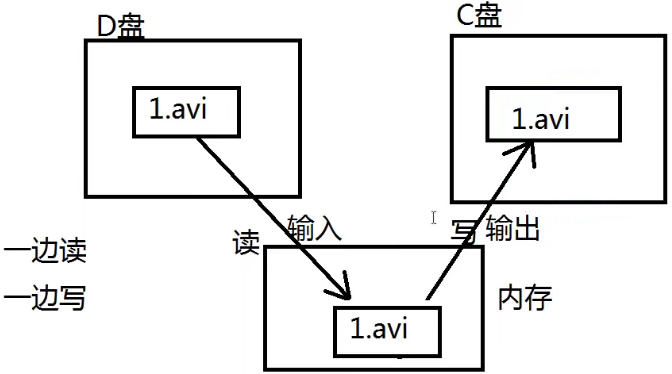
1.文件复制原理
2.代码实现
class Test{public static void main(String[] args) {FileInputStream fis = null;FileOutputStream fos = null;try {fis = new FileInputStream("myfile");//创建一个输入流对象fos = new FileOutputStream("myfile1");//创建一个输出流对象//核心:一边读一边写byte[] bytes = new byte[1024 * 1024];//一次最多复制1MBint readCount = 0;while ((readCount = fis.read(bytes)) != -1){fos.write(bytes,0,readCount);}fos.flush();//刷新} catch (FileNotFoundException e) {e.printStackTrace();} catch (IOException e) {e.printStackTrace();} finally {if (fis != null){try {fis.close();} catch (IOException e) {e.printStackTrace();}}if (fos != null){try {fos.close();} catch (IOException e) {e.printStackTrace();}}}}}
四、字符流
1.FileReader
文件字符输入流,只能读取普通文本,读取文本时比较方便、快捷。
class Test{public static void main(String[] args) {FileReader reader = null;try {//创建文件字符输入流reader = new FileReader("test");//开始读char[] chars = new char[4];//一次读取4个字符int readCount = 0;while ((readCount = reader.read(chars)) != -1){System.out.println(new String(chars,0,readCount));}} catch (FileNotFoundException e) {e.printStackTrace();} catch (IOException e) {e.printStackTrace();} finally {if (reader != null){try {reader.close();} catch (IOException e) {e.printStackTrace();}}}}}
2.FileWriter
文件字符输出流,只能输出普通文本。
class Test{public static void main(String[] args) {FileWriter out = null;try {//创建文件字符输出流out = new FileWriter("test");//开始写char[] chars = {'H','e','l','l','o'};//一次读取4个字符out.write(chars);//写入一个字符数组out.write("\n");out.write("world!");//写入一个字符串out.flush();//刷新} catch (FileNotFoundException e) {e.printStackTrace();} catch (IOException e) {e.printStackTrace();} finally {if (out != null){try {out.close();} catch (IOException e) {e.printStackTrace();}}}}}
3.复制普通文本文件
class Test{public static void main(String[] args) {FileReader in = null;FileWriter out = null;try {in = new FileReader("test");out = new FileWriter("test01");//一边读一边写char[] chars = new char[1024 * 1024];int readCount = 0;if ((readCount = in.read(chars)) != -1){out.write(chars,0,readCount);}out.flush();} catch (FileNotFoundException e) {e.printStackTrace();} catch (IOException e) {e.printStackTrace();} finally {if (in != null){try {in.close();} catch (IOException e) {e.printStackTrace();}}if (out != null){try {out.close();} catch (IOException e) {e.printStackTrace();}}}}}
五、缓冲流
1.BufferedReader
带有缓冲区的字符输入流,使用这些流的时候,不需要自定义char数组或者byte数组,自带缓冲。
class Test{public static void main(String[] args) throws IOException {FileReader reader = new FileReader("test");//节点流BufferedReader bufferedReader = new BufferedReader(reader);//处理流String s = bufferedReader.readLine();//读一行,但不带换行符,读空返回nullSystem.out.println(s);s = null;while ((s = bufferedReader.readLine()) != null){System.out.println(s);}bufferedReader.close();//关闭最外层的处理流即可}}
2.字节流转换为字符流
class Test{public static void main(String[] args) throws IOException {//字节输入流FileInputStream in = new FileInputStream("test");//字节输入流转换为字符输入流InputStreamReader reader = new InputStreamReader(in);//in是节点流,reader是处理流//该改造方法只能传一个字符输入流作为参数BufferedReader bufferedReader = new BufferedReader(reader);//reader是节点流,bufferedReader是处理流bufferedReader.close();//关闭最外层的处理流即可}}
3.BufferedWriter
class Test{public static void main(String[] args) throws IOException {//带有缓冲区的字符输出流BufferedWriter out = new BufferedWriter(new FileWriter("test",true));out.write("abc");out.flush();out.close();}}

若有收获,就点个赞吧
0 人点赞


