HttpWebRequest:
命名空间: System.Net,这是.NET创建者最初开发用于使用HTTP请求的标准类。使用HttpWebRequest可以让开发者控制请求/响应流程的各个方面,如 timeouts, cookies, headers, protocols。另一个好处是HttpWebRequest类不会阻塞UI线程。例如,当您从响应很慢的API服务器下载大文件时,您的应用程序的UI不会停止响应。HttpWebRequest通常和WebResponse一起使用,一个发送请求,一个获取数据。HttpWebRquest更为底层一些,能够对整个访问过程有个直观的认识,但同时也更加复杂一些。
//POST方法public static string HttpPost(string Url, string postDataStr){HttpWebRequest request = (HttpWebRequest)WebRequest.Create(Url);request.Method = "POST";request.ContentType = "application/x-www-form-urlencoded";Encoding encoding = Encoding.UTF8;byte[] postData = encoding.GetBytes(postDataStr);request.ContentLength = postData.Length;Stream myRequestStream = request.GetRequestStream();myRequestStream.Write(postData, 0, postData.Length);myRequestStream.Close();HttpWebResponse response = (HttpWebResponse)request.GetResponse();Stream myResponseStream = response.GetResponseStream();StreamReader myStreamReader = new StreamReader(myResponseStream, encoding);string retString = myStreamReader.ReadToEnd();myStreamReader.Close();myResponseStream.Close();return retString;}//GET方法public static string HttpGet(string Url, string postDataStr){HttpWebRequest request = (HttpWebRequest)WebRequest.Create(Url + (postDataStr == "" ? "" : "?") + postDataStr);request.Method = "GET";request.ContentType = "text/html;charset=UTF-8";HttpWebResponse response = (HttpWebResponse)request.GetResponse();Stream myResponseStream = response.GetResponseStream();StreamReader myStreamReader = new StreamReader(myResponseStream, Encoding.GetEncoding("utf-8"));string retString = myStreamReader.ReadToEnd();myStreamReader.Close();myResponseStream.Close();return retString;}
WebClient:
命名空间System.Net,WebClient是一种更高级别的抽象,是HttpWebRequest为了简化最常见任务而创建的,使用过程中你会发现他缺少基本的header,timeoust的设置,不过这些可以通过继承httpwebrequest来实现。相对来说,WebClient比WebRequest更加简单,它相当于封装了request和response方法,不过需要说明的是,Webclient和WebRequest继承的是不同类,两者在继承上没有任何关系。使用WebClient可能比HttpWebRequest直接使用更慢(大约几毫秒),但却更为简单,减少了很多细节,代码量也比较少。
public class WebClientHelper{public static string DownloadString(string url){WebClient wc = new WebClient();//wc.BaseAddress = url; //设置根目录wc.Encoding = Encoding.UTF8; //设置按照何种编码访问,如果不加此行,获取到的字符串中文将是乱码string str = wc.DownloadString(url);return str;}public static string DownloadStreamString(string url){WebClient wc = new WebClient();wc.Headers.Add("User-Agent", "Mozilla/5.0 (Windows NT 10.0; Win64; x64) AppleWebKit/537.36 (KHTML, like Gecko) Chrome/76.0.3809.132 Safari/537.36");Stream objStream = wc.OpenRead(url);StreamReader _read = new StreamReader(objStream, Encoding.UTF8); //新建一个读取流,用指定的编码读取,此处是utf-8string str = _read.ReadToEnd();objStream.Close();_read.Close();return str;}public static void DownloadFile(string url, string filename){WebClient wc = new WebClient();wc.DownloadFile(url, filename); //下载文件}public static void DownloadData(string url, string filename){WebClient wc = new WebClient();byte [] bytes = wc.DownloadData(url); //下载到字节数组FileStream fs = new FileStream(filename, FileMode.Create);fs.Write(bytes, 0, bytes.Length);fs.Flush();fs.Close();}public static void DownloadFileAsync(string url, string filename){WebClient wc = new WebClient();wc.DownloadFileCompleted += DownCompletedEventHandler;wc.DownloadFileAsync(new Uri(url), filename);Console.WriteLine("下载中。。。");}private static void DownCompletedEventHandler(object sender, AsyncCompletedEventArgs e){Console.WriteLine(sender.ToString()); //触发事件的对象Console.WriteLine(e.UserState);Console.WriteLine(e.Cancelled);Console.WriteLine("异步下载完成!");}public static void DownloadFileAsync2(string url, string filename){WebClient wc = new WebClient();wc.DownloadFileCompleted += (sender, e) =>{Console.WriteLine("下载完成!");Console.WriteLine(sender.ToString());Console.WriteLine(e.UserState);Console.WriteLine(e.Cancelled);};wc.DownloadFileAsync(new Uri(url), filename);Console.WriteLine("下载中。。。");}}
HttpClient:
HttpClient是.NET4.5引入的一个HTTP客户端库,其命名空间为 System.Net.Http ,.NET 4.5之前我们可能使用WebClient和HttpWebRequest来达到相同目的。HttpClient利用了最新的面向任务模式,使得处理异步请求非常容易。它适合用于多次请求操作,一般设置好默认头部后,可以进行重复多次的请求,基本上用一个实例可以提交任何的HTTP请求。HttpClient有预热机制,第一次进行访问时比较慢,所以不应该用到HttpClient就new一个出来,应该使用单例或其他方式获取HttpClient的实例
单例模式:
单例模式(Singleton Pattern)这种类型的设计模式属于创建型模式,它提供了一种创建对象的最佳方式。
这种模式涉及到一个单一的类,该类负责创建自己的对象,同时确保只有单个对象被创建。这个类提供了一种访问其唯一的对象的方式,可以直接访问,不需要实例化该类的对象。
单例创建步骤:1、定义静态私有对象;2、定义私有构造函数;3、提供公共获取对象方法;
单例模式一般分为两种实现模式:懒汉模式、饿汉模式(以下为Java代码实现)
懒汉模式: 默认不会实例化,什么时候用什么时候new
public class Singleton {private static Singleton instance = null;private Singleton (){}public static Singleton getInstance() {if (instance == null) {instance = new Singleton();}return instance;}}
这种方式是最基本的实现方式,这种实现最大的问题就是不支持多线程。因为没有加锁 synchronized,所以严格意义上它并不算单例模式。
这种方式 lazy loading 很明显,不要求线程安全,在多线程不能正常工作。
饿汉模式: 类初始化时,会立即加载该对象,线程天生安全,调用效率高
public class Singleton {private static Singleton instance = new Singleton();private Singleton (){}public static Singleton getInstance() {return instance;}}
双检锁/双重校验锁(DCL,即 double-checked locking):这种方式采用双锁机制,安全且在多线程情况下能保持高性能
public class Singleton {private volatile static Singleton singleton;private Singleton (){}public static Singleton getSingleton() {if (singleton == null) {synchronized (Singleton.class) {if (singleton == null) {singleton = new Singleton();}}}return singleton;}}
HttpClient:
public class HttpClientHelper{private static readonly object LockObj = new object();private static HttpClient client = null;public HttpClientHelper() {GetInstance();}public static HttpClient GetInstance(){if (client == null){lock (LockObj){if (client == null){client = new HttpClient();}}}return client;}public async Task<string> PostAsync(string url, string strJson)//post异步请求方法{try{HttpContent content = new StringContent(strJson);content.Headers.ContentType = new System.Net.Http.Headers.MediaTypeHeaderValue("application/json");//由HttpClient发出异步Post请求HttpResponseMessage res = await client.PostAsync(url, content);if (res.StatusCode == System.Net.HttpStatusCode.OK){string str = res.Content.ReadAsStringAsync().Result;return str;}elsereturn null;}catch (Exception ex){return null;}}public string Post(string url, string strJson)//post同步请求方法{try{HttpContent content = new StringContent(strJson);content.Headers.ContentType = new System.Net.Http.Headers.MediaTypeHeaderValue("application/json");//client.DefaultRequestHeaders.Connection.Add("keep-alive");//由HttpClient发出Post请求Task<HttpResponseMessage> res = client.PostAsync(url, content);if (res.Result.StatusCode == System.Net.HttpStatusCode.OK){string str = res.Result.Content.ReadAsStringAsync().Result;return str;}elsereturn null;}catch (Exception ex){return null;}}public string Get(string url){try{var responseString = client.GetStringAsync(url);return responseString.Result;}catch (Exception ex){return null;}}}
HttpClient有预热机制,第一次请求比较慢;可以通过初始化前发送一次head请求解决:
_httpClient = new HttpClient() { BaseAddress = new Uri(BASE_ADDRESS) };//帮HttpClient热身_httpClient.SendAsync(new HttpRequestMessage {Method = new HttpMethod("HEAD"),RequestUri = new Uri(BASE_ADDRESS + "/") }).Result.EnsureSuccessStatusCode();
三者区别列表: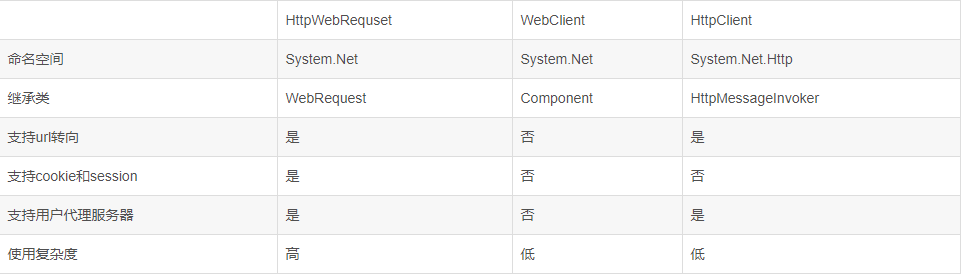

若有收获,就点个赞吧
0 人点赞


