React 组件生命周期
组件挂载阶段
- 组件被创建然后插入 DOM 中
- 生命周期方法
- constructor 设置组件的初始配置
- render 解析 JSX,在界面上展示
- componentDidMount 组件挂载完毕调用
- 发送网络请求
- 添加定时器
- 添加事件监听
- 获取DOM元素 ```jsx import React, { Component } from ‘react’
class App extends Component { constructor () { super()
// 初始化状态this.state = {count: 0}// 改变 this 指向this.handler = this.handler.bind(this)
}
handler() { console.log(this) } // 解析JSX render () { console.log(‘render执行了’) return (
组件挂载
export default App
<a name="O1Qor"></a>### 组件更新阶段- 当数据更新之后,组件需要被重新渲染- 外部传入的 props,以及自身管理的状态- 生命周期方法- shouldComponentUpdate(nextProps, nextState)- 返回一个布尔值,决定组件是否更新,默认返回true- 如果次方法返回 false 那么后续的方法不会在执行- render 解析JSX,渲染DOM- componentDidUpdate 组件更新完成之后执行```jsx// App.jsimport React, { Component } from 'react'import About from './About'class App extends Component {constructor () {super()// 初始化状态this.state = {count: 0}// 改变 this 指向this.handler = this.handler.bind(this)}handler() {console.log(this)this.setState({count: this.state.count + 1})}// 解析JSXrender () {console.log('render执行了')return (<div><h1>组件组件更新</h1><div>{this.state.count}</div><button onClick={this.handler}>点击</button><About /></div>)}// 挂载完毕componentDidMount() {console.log('componentDidMount执行了, 挂载完成')// setInterval(() => {// this.setState({// count: this.state.count + 1// })// },1000)}// 数据更新触发shouldComponentUpdate(nextProps, nextState) {console.log('shouldComponentUpdate执行了')console.log(nextProps, nextState)return true}}export default App
import React, { Component, PureComponent } from 'react'//PureComponent 该组件的数据更新 才重新更新class About extends PureComponent {constructor() {super()this.state = {count: 10}}handler = () => {this.setState({count: this.state.count + 5})}render() {console.log('About组件执行了 render')return (<div><hr /><h2>About组件内容</h2><div>{this.state.count}</div><button onClick={this.handler}>点击</button></div>);}// shouldComponentUpdate(nextProps, nextState) {// // 数据更新才重新渲染界面 已不被推荐使用// if (nextState.count === this.state.count) return false// return true// }}export default About
组件卸载阶段
- 将组件从 DOM 上删除
- 生命周期方法
- componentWillUnmount ```jsx // App.js import React, { Component } from ‘react’ import About from ‘./About’
class App extends Component { constructor () { super() // 初始化状态 this.state = { isShow: true } }
// 解析JSX render () { console.log(‘render执行了’) return (
组件销毁
{this.state.isShow &&}
export default App
```jsx// Abput.jsimport React, { PureComponent } from 'react'//PureComponent 该组件的数据更新 才重新更新class About extends PureComponent {render() {return (<div><hr /><h2>About组件内容</h2></div>);}foo = () => {console.log('about组件中的click操作触发')}componentDidMount () {// 当 about 组件挂载完毕就可以执行 DOM 相关操作//添加事件监听window.addEventListener('click', this.foo)}// 组件卸载之前执行componentWillUnmount(){window.removeEventListener('click', this.foo)}}export default About
React 发送 ajax请求
import React, { Component } from "react";import axios from "axios";class App extends Component {constructor() {super();this.state = {msg: "",};}render() {return <div>当前数据:{this.state.msg}</div>;}async componentDidMount() {const data = await axios.get("http://localhost:2021/api/welcome").then((res) => res.data);this.setState(data);}}export default App;
React 请求转发
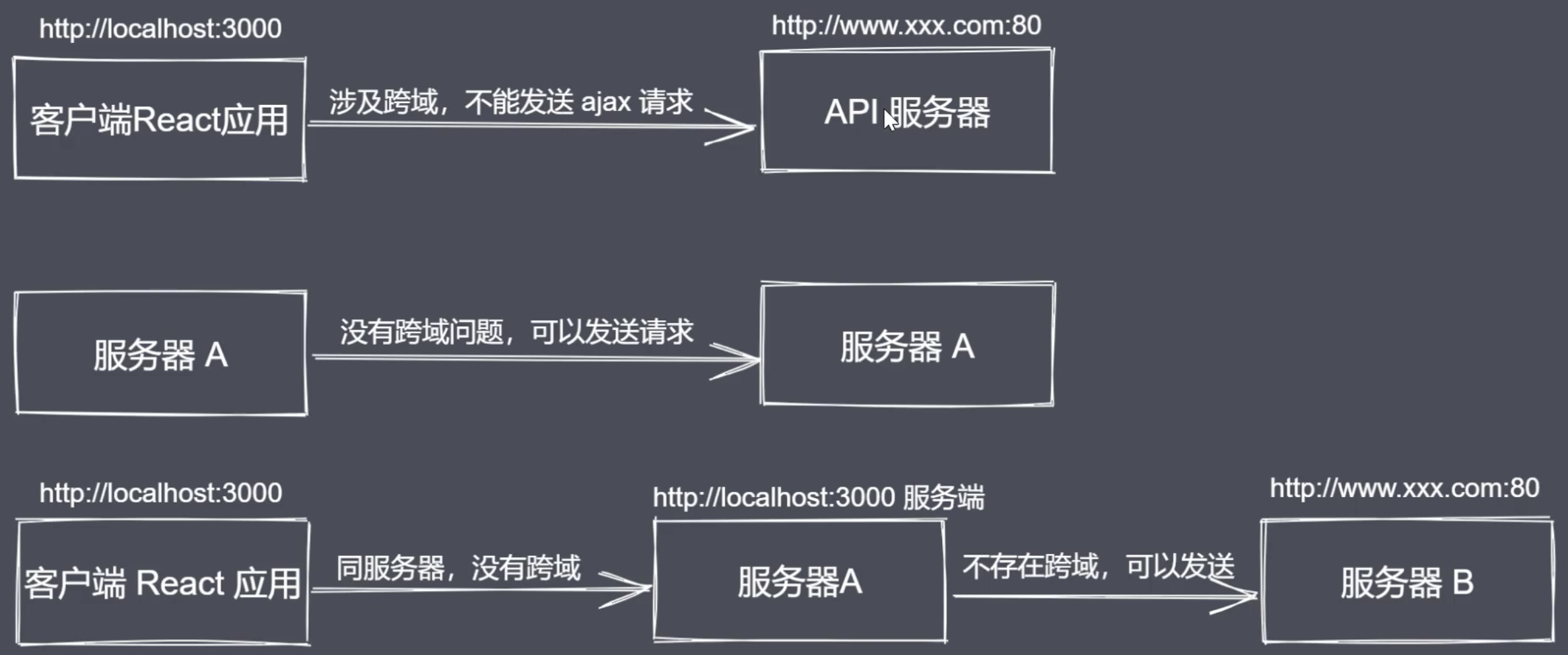
- 数据会存在不同的服务器
- 服务器与服务端是不存在跨域问题
- 客户端应用发请求给同源的服务端,服务端将请求转发给 API 服务器端, API 服务器将数据处理之后返回给… 客户端应用
方式一
package.json 配置需要请求的服务器地址
"proxy": "http://localhost:2021"
App.js
async componentDidMount() {const data = await axios.get("/api/welcome").then((res) => res.data);this.setState(data);}
方式二
- 安装依赖包
npm install http-proxy-middleware -D - 新建文件 src/setupProxy.js ```javascript import { createProxyMiddleware } from ‘http-proxy-middleware’
module.exports = app => { app.use(‘/api’, createProxyMiddleware({ target: ‘http://loaclhost:2021‘, changeOrigin: true })) }
- 发送请求```jsxasync componentDidMount() {const data = await axios.get("/api/welcome").then((res) => res.data);this.setState(data);}
React中 mock 数据
public/api/article.json
[{"id": 1,"title": "文章一"},{"id": 2,"title": "文章二"}]
请求数据 ```jsx import React, { Component } from “react”; import axios from “axios”;
class App extends Component {
constructor() { super(); this.state = { articles: [] } }
getArticle = async () => { const articles = await axios.get(‘api/article.json’).then(response => response.data)
this.setState({articles}) } render() { return (
-
{
this.state.articles.map(article => (
- {article.title} )) }
}
export default App;
<a name="7DMmG"></a>## Redux- Redux 是一个数据管理框架,提供了一个 store 的统一数据存储仓库- store 就像是 一个数据管理 中间人,让组件之间无需再直接进行数据传递<a name="02sQT"></a>### 工作流程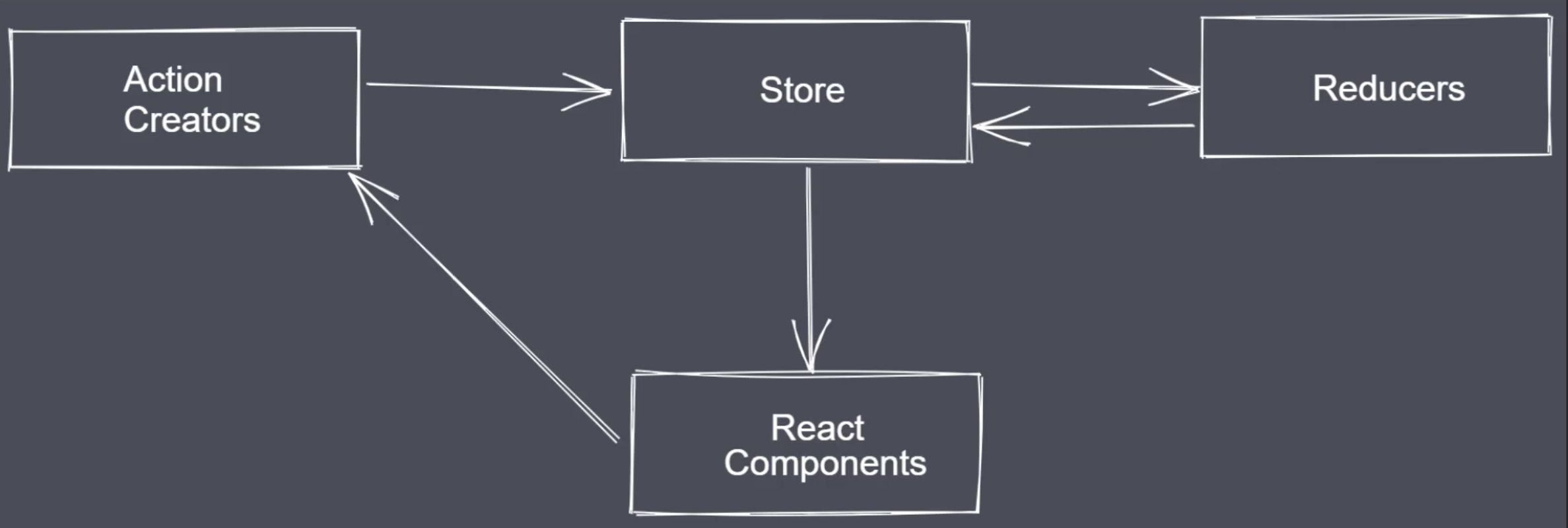- Store- 对象类型- 负责存储数据,更新视图- Action Creators- 对象类型- 存储数据的操作行为- Reducers- 函数类型- 接收 Action 行为,处理数据,将处理之后的数据返回给 Store<a name="QDInA"></a>### 创建 store及 reducer- 安装依赖包 `npm install redux react-redux -D`- src/index.js```jsximport { createStore } from 'redux'import CounterReducer from './Store/Reducer/Counter.reducer'const store = createStore(CounterReducer)
- src/Store/Reducer/Counter.reducer.js
export default () => {return {count: 0}}
获取 store
- src/index.js ```jsx
import { createStore } from ‘redux’ import CounterReducer from ‘./Store/Reducer/Counter.reducer’
import { Provider } from ‘react-redux’
const store = createStore(CounterReducer)
ReactDOM.render(
- src/Components/Counter.js```jsximport React, { Component } from 'react'import {connect} from 'react-redux'function Counter (props) {return (<div><button>+1</button><div>{props.count}</div><button>-1</button></div>)}const mapStateToProps = state => ({count: state.count})// 第一次调用指明传递什么数据// 第二次调用指明传递给哪个组件export default connect(mapStateToProps)(Counter)
组件修改 store 数据
src/Components/Counter.js
function Counter (props) {return (<div><button onClick={() => {props.dispatch({type: 'increment'})}}>+1</button><div>{props.count}</div><button onClick={() => {props.dispatch({type: 'decrement'})}}>-1</button></div>)}
src/Store/Reducer/Counter.reducer.js ```jsx const initialState = { count: 0 }
export default (state=initialState, action) => { console.log(action) switch (action.type) { case ‘increment’ : return { count: state.count + 1 } case ‘decrement’ : return { count: state.count - 1 } default : return state } return state }
<a name="mfkdG"></a>### action 传递参数- src/Components/Counter.js```jsx<button onClick={() => {props.dispatch({type: 'increment_n', payload: 5})}}>+5</button>
- src/Store/Reducer/Counter.reducer.js
case 'increment_n' :return {count: state.count + action.payload}
提取 action 代码为函数
- src/Components/Counter.js ```jsx import React from ‘react’ import {connect} from ‘react-redux’
function Counter (props) { return (
const mapStateToProps = state => ({ count: state.count })
const mapDispatchToProps = dispatch => ({ increment() { dispatch({type: ‘increment’}) }, increment_n(payload){ dispatch({type: ‘increment_n’, payload}) }, decrement() { dispatch({type: ‘decrement’}) } })
// 第一次调用指明传递什么数据 // 第二次调用指明传递给哪个组件 export default connect(mapStateToProps, mapDispatchToProps)(Counter)
<a name="t2jnC"></a>### 自动生成 action 触发函数- src/Store/Actions/Counter.actions.js```jsxexport const increment = () => ({type: 'increment'})export const decrement = () => ({type: 'decrement'})export const increment_n = (payload) => ({type: 'increment_n', payload})
- src/Components/Counter.js ```jsx import React from ‘react’ import {connect} from ‘react-redux’
import { bindActionCreators } from ‘redux’ import * as counterActions from ‘../Store/Actions/Counter.actions’
function Counter (props) { return (
const mapStateToProps = state => ({ count: state.count })
const mapDispatchToProps = dispatch => ({ …bindActionCreators(counterActions,dispatch) })
// 第一次调用指明传递什么数据 // 第二次调用指明传递给哪个组件 export default connect(mapStateToProps, mapDispatchToProps)(Counter)
<a name="lOk7T"></a>### 设置 action 类型常量- Store/Action_types/Counter.actions.types.js```javascriptexport const INCREMENT = 'increment'export const DECREMENT = 'decrement'export const INCREMENT_N = 'increment_n'
- src/Store/Actions/Counter.actions.js ```javascript import { DECREMENT, INCREMENT, INCREMENT_N } from “../Action_types/Counter.actions.types”
export const increment = () => ({type: INCREMENT}) export const decrement = () => ({type: DECREMENT}) export const increment_n = (payload) => ({type: INCREMENT_N, payload})
- src/Store/Reducer/Counter.reducer.js```javascriptimport { DECREMENT, INCREMENT, INCREMENT_N } from "../Action_types/Counter.actions.types"const initialState = {count: 0}export default (state = initialState, action) => {console.log(action)switch (action.type) {case INCREMENT :return {count: state.count + 1}case DECREMENT :return {count: state.count - 1}case INCREMENT_N:return {count: state.count + action.payload}default :return state}return state}
reducer 拆分与合并
src/Reducer
- Counter.reducer.js
- Person.reducer.js
- index.js ```javascript import {combineReducers} from ‘redux’ import counterReducer from ‘./Counter.reducer’ import personReducer from ‘./Person.reducer’
export default combineReducers({ counter: counterReducer, person: personReducer }) ```
redux 工作流程
- 创建 store 管理 reducer ```javascript import { createStore } from ‘redux’
// 3 定义初始数据 const initialState = { content: [‘默认数据’] }
// 2 创建 reducer function reducer (state = initialState, action) { // state: reducer 当中处理完数据之后返回给 store 进行存储的数据 // action: store 传递给 reducer 的具体指令 switch(action.type) { case ‘addContent’: return { content: [ …state.content, action.content ] } default: return state } }
// 1 创建 store 存储数据 const store = createStore(reducer)
- 利用 provider 将 store 向后传递```jsximport { Provider } from 'react-redux'ReactDOM.render(<React.StrictMode><Provider store={store}><App /></Provider></React.StrictMode>,document.getElementById('root'));
- 在具体的组件当中使用 content 方法获取 store 里保存的数据,通过组件 的 Props 进行访问 ```javascript import { connect } from ‘react-redux’
// 从 store 当中获取当前组件需要的数据 const mapStateToProps = state => ({ content: state.content })
export default connect(mapStateToProps)(App)
- 渲染拿到的数据和修改```jsxclass App extends Component {constructor() {super()this.myRef = React.createRef()}handler = () => {// 获取 input 输入框输入内容const content = this.myRef.current.value// 调用 dispatch 方法将输入内容传给 action,在 reducer 当中进行处理this.props.dispatch({type: 'addContent',content})// 更新界面this.myRef.current.value = ''}render () {return (<div><input type="text" placeholder="请输入标题" ref={this.myRef}/><button onClick={this.handler}>新增</button><hr /><ul>{this.props.content.map((item, index) => (<li key={index}>{item}</li>))}</ul></div>)}}
代码优化
- 拆分合并所有的 reducer 交给 store 统一管理
- 让 react 自动创建 action 执行的函数
- 将 action 类型使用的字符串定义为常量后 需要使用就有提示
redux 中间键
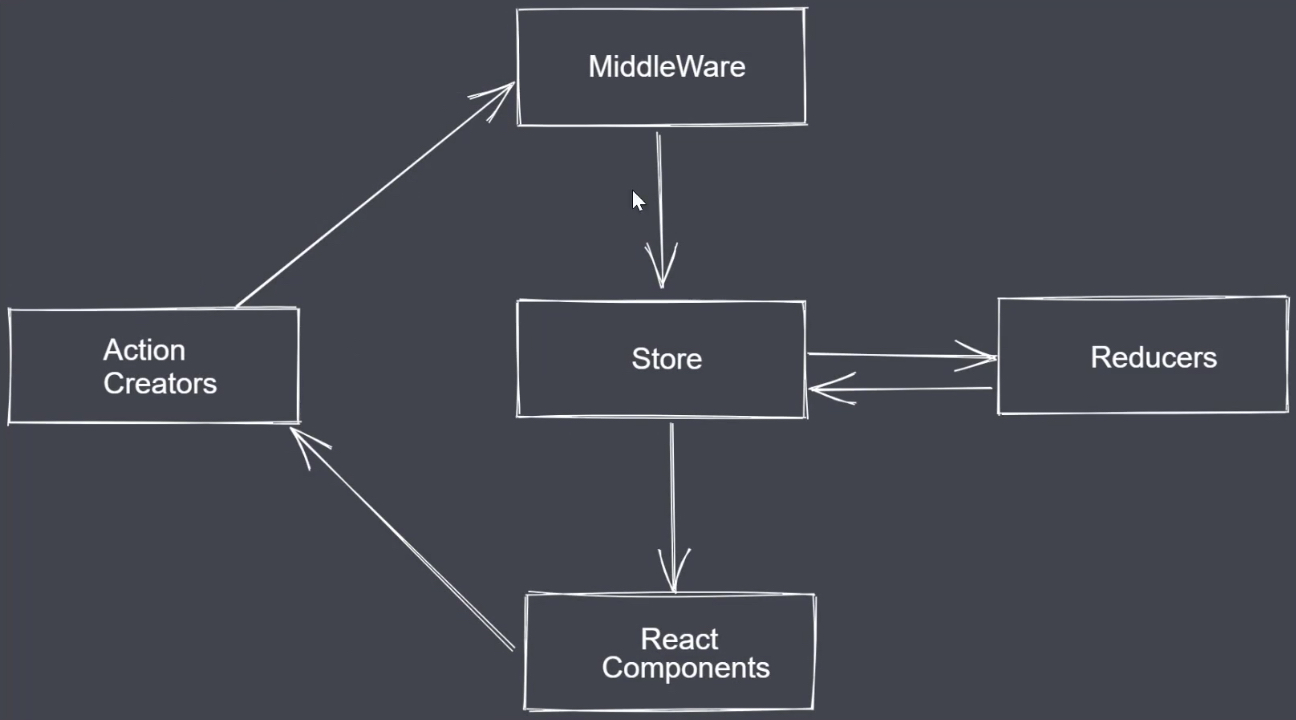
import { createStore, applyMiddleware } from 'redux'function reducer(state, action) {console.log(action)return state}// 中间键函数function middle ({getState, dispatch}) {return function (next) {return function (action) {// 此处可以完成异步操作setTimeout(() => {//自定义数据action.payload = 100// 异步操作执行完成之后,需要将 action 交给 store 继续往后传递return next(action)},2000)}}}// 创建 store 存储数据const store = createStore(reducer, applyMiddleware(middle))store.dispatch({type: 'test'})
redux-thunk 异步解决方案
- 安装插件
npm install redux-thunk - 注册中间件 ```jsx import { createStore, applyMiddleware } from ‘redux’
import thunk from ‘redux-thunk’
// 创建 store 存储数据 const store = createStore(totalReducer, applyMiddleware(thunk))
- 使用中间件```javascriptimport axios from 'axios'// export const getPersons = (payload) => ({type: 'getPersons', payload})export const getPersons = () => async (dispatch) => {let persons = await axios.get('http://localhost:2021/api/getUsers').then(response => response.data)dispatch({type: 'loadPersonSuccess', payload: persons})}
redux-saga 异步解决方案
- 安装插件
npm install redux-saga -D - 注册中间件 src/index.js ```jsx import React from ‘react’; import ReactDOM from ‘react-dom’; import App from ‘./App’; import { createStore, applyMiddleware} from ‘redux’ import { Provider } from ‘react-redux’ import totalReducer from ‘./store/Reducers’ import createSagaMiddleware from ‘redux-saga’ import personSaga from ‘./store/Saga/person.saga’
const sagaMiddleware = createSagaMiddleware()
// 创建 store 存储数据 const store = createStore(totalReducer, applyMiddleware(sagaMiddleware)) sagaMiddleware.run(personSaga)
ReactDOM.render(
- 书写中间件逻辑 src/store/Saga/person.saga.js```javascriptimport {takeEvery, put} from 'redux-saga/effects'import axios from 'axios'function * loadPerson () {let persons = yield axios.get('http://localhost:2021/api/getUsers').then(response => response.data)yield put({type:'load_person_success', payload:persons})}export default function * personSaga() {yield takeEvery('load_person', loadPerson)}
- reducer逻辑 src/store/Reducers/person.reducer.js ```javascript
// 定义初始数据 const initialState = { person: [] }
// 创建 reducer function reducer (state = initialState, action) { switch(action.type) { case ‘load_person_success’: return { person: action.payload } default: return state } }
export default reducer
- action逻辑 src/store/Actions/person.actions.js```javascriptexport const load_person = () => ({type: 'load_person'})
- 使用数据 App.js ```jsx import React, { Component } from ‘react’ import { connect } from ‘react-redux’ import { bindActionCreators } from ‘redux’ import * as personActions from ‘./store/Actions/person.actions’
class App extends Component {
handler = () => { this.props.load_person() }
render () { console.log(this.props) return (
// 从 store 当中获取当前组件需要的数据 const mapStateToProps = state => ({ person: state.personReducer.person })
const mapDispatchToProps = (dispatch) => ({ …bindActionCreators(personActions, dispatch) })
export default connect(mapStateToProps, mapDispatchToProps)(App)
<a name="zoLCu"></a>#### redux-saga 拆分与合并- saga/root.saga.js```javascriptimport { all } from 'redux-saga/effects'import personSaga from './person.saga'export default function * rootSaga () {yield all([personSaga()])}
- index.js ```javascript import rootSaga from ‘./store/Saga/root.saga’
sagaMiddleware.run(rootSaga)
<a name="AJVQT"></a>### 简化 action与 reducer- 安装插件 `npm install redux-actions -D`- Store/Actions/counter.actions.js```javascriptimport {createAction} from 'redux-actions'// export const increment = () => ({type: 'increment'})// export const decrement = () => ({type: 'decrement'})export const increment_action = createAction('increment')export const decrement_action = createAction('decrement')
- Store/Reducers/counter.reducer.js ```javascript import { handleActions as createReducer} from ‘redux-actions’ import {increment_action, decrement_action} from ‘../Actions/counter.actions’ const initialState = { count: 0 }
const counterReducer = createReducer({ [increment_action]: (state, action) => ({count: state.count + 1}), [decrement_action]: (state, action) => ({count: state.count - 1}) }, initialState)
export default counterReducer ```

若有收获,就点个赞吧
0 人点赞


