配置互信
# 创建ansible用户[root@node1 ~]# useradd ansibleuser && echo "123456" | passwd --stdin ansibleuser# 授权sudo权限[root@node1 ~]# usermod -g root ansibleuser[root@node1 ~]# echo 'ansibleuser ALL=(ALL) NOPASSWD:ALL' >> /etc/sudoers && grep 'ansibleuser' /etc/sudoers# 管理机创建公钥[root@node1 ~]# su - ansibleuser[ansibleuser@node1 ~]$ ssh-keygen -t rsaGenerating public/private rsa key pair.Enter file in which to save the key (/home/ansibleuser/.ssh/id_rsa):Created directory '/home/ansibleuser/.ssh'.Enter passphrase (empty for no passphrase):Enter same passphrase again:Your identification has been saved in /home/ansibleuser/.ssh/id_rsa.Your public key has been saved in /home/ansibleuser/.ssh/id_rsa.pub.The key fingerprint is:6a:f5:60:9a:2a:ba:49:6a:13:0b:fe:50:9f:a4:8e:2a ansibleuser@node1The key's randomart image is:+--[ RSA 2048]----+| || || || || . . S ||... + .* o ||ooo. o= . ||E*= o ||X+o+. |+-----------------+# 传输公钥[ansibleuser@node1 ~]$ ssh-copy-id -i /home/ansibleuser/.ssh/id_rsa.pub ansibleuser@'172.18.15.182'The authenticity of host '172.18.15.182 (172.18.15.182)' can't be established.ECDSA key fingerprint is 39:19:5d:bf:17:97:31:48:63:70:ec:8c:8a:d2:9f:f9.Are you sure you want to continue connecting (yes/no)? yes/bin/ssh-copy-id: INFO: attempting to log in with the new key(s), to filter out any that are already installed/bin/ssh-copy-id: INFO: 1 key(s) remain to be installed -- if you are prompted now it is to install the new keysansibleuser@172.18.15.182's password:Number of key(s) added: 1Now try logging into the machine, with: "ssh 'ansibleuser@172.18.15.182'"and check to make sure that only the key(s) you wanted were added.# 测试连接[ansibleuser@node1 ~]$ ssh 172.18.15.182Last login: Wed Oct 14 01:01:20 2020 from 172.18.15.183[ansibleuser@node3 ~]$ exitlogoutConnection to 172.18.15.182 closed.[ansibleuser@node1 ~]$
安装ansible
yum install ansible或者pip install ansible
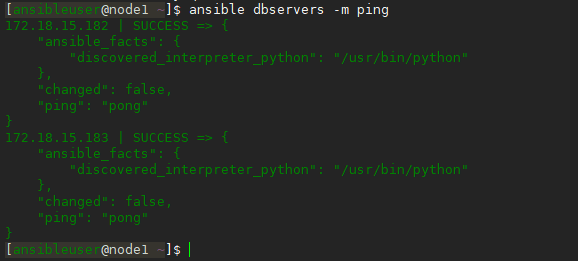
检验ansible
[ansibleuser@node1 ~]$ sudo vim /etc/ansible/hosts[dbservers]172.18.15.182172.18.15.183

若有收获,就点个赞吧
0 人点赞


