docker启动mysql
docker run —name mysql -e MYSQL_ROOT_PASSWORD=123qwe -d mysql
映射端口
docker rm -f mysql
映射本机的3303端口到docker的3306端口
docker run —name mysql -p 3303:3306 -e MYSQL_ROOT_PASSWORD=123qwe -e MYSQL_DATABASE=xdml -d mysql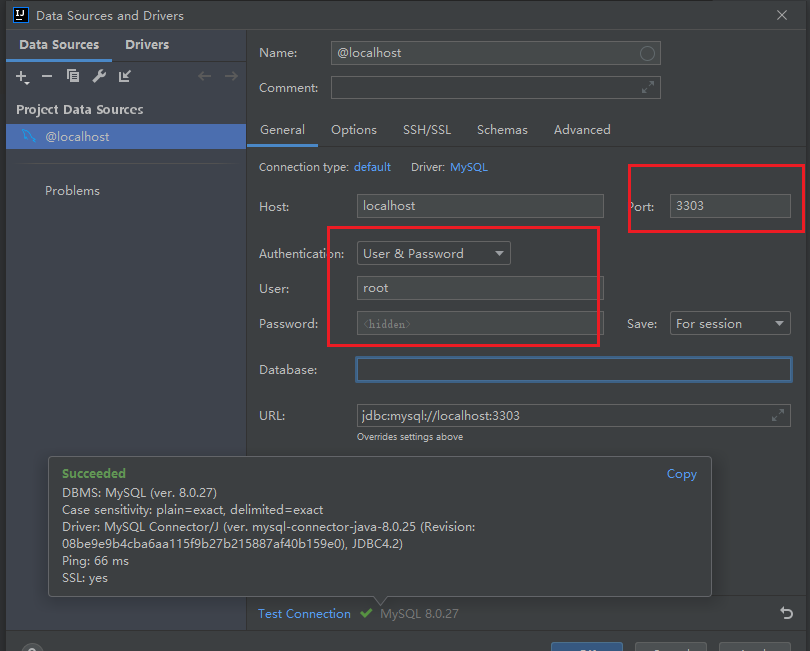
查看进程
docker ps
杀掉进程
docker rm -f 51b (container id的前三位)
启动:
docker run
设置数据库
新建一个controller包,新建一个authcontroller
加注解,加GETMAPPING
响应:返回一个字节流 JSON
后端返回的是一个对象,所以需要写一个Result对象
加一个ResponseBody注解
Application和Controller要在同一个package下
例如,application是hello.application
那么controller就要在hello.xxxx包下面
万里长征第一步:返回同一个JSON
@RestControllerpublic class AuthController {@GetMapping("/auth")public Object auth() {return new Result();}private static class Result {public String getStatus(){return "ok";}public Boolean isLogin(){return false;}}}
Get 请求localhost:8080/auth就可以得到 “{“status”:”ok”,”login”:false}”
处理Post
@PostMapping("/auth/login")public void login(@RequestBody String usernameAndPassword){System.out.println(usernameAndPassword);}
注意啊注意啊,发送过来的JSON是字符串,所以这里的类型是String
所以可以用Map, Springboot可以直接反序列化为Map
@PostMapping("/auth/login")public void login(@RequestBody Map<String, Object> usernameAndPassword){System.out.println(usernameAndPassword);}
增加鉴权
@Configuration@EnableWebSecuritypublic class WebSecurityConfig extends WebSecurityConfigurerAdapter {}
这样会拦截所有请求
修改拦截的配置
@Configuration@EnableWebSecuritypublic class WebSecurityConfig extends WebSecurityConfigurerAdapter {@Overrideprotected void configure(HttpSecurity http) throws Exception {http.authorizeRequests().antMatchers("/", "/auth/**").permitAll();}}
post里需要禁止csrf
有两类对象
一类是存储数据的
一类是提供服务的,这种需要声明Bean
找不到服务
解决办法:加一个@Service注解
碰到问题:
java.lang.IllegalArgumentException: There is no PasswordEncoder mapped for the id “null”
Cookie
cookie跟着域名走,同一域名下的所有请求都会带上cookie
httponly 只有浏览器发起的才带cookie, JS自己写的请求不带cookie
用户登录后set cookie
try {authenticationManager.authenticate(token);SecurityContextHolder.getContext().setAuthentication(token);return new Result("success","登录成功",true, new User(1, "张三","",password, Instant.now(), Instant.now()));} catch (BadCredentialsException e) {return new Result("fail", "密码不正确",false);}
SecurityContextHolder.getContext().setAuthentication(token);
就是把用户信息(cookie)保存在内存的某个地方
权威的cookie资料:rfc cookie
登录以后每次发请求都带有cookie
怎么有条件的返回数据?
怎么连接数据库?
User模型和数据库里的表的列的顺序要完全一致,否则报错
数据库表的下划线 created_at 怎么才能直接映射为User模型里的createdAt呢
增加一行配置
mybatis.configuration.map-underscore-to-camel-case=true

数据库返回时间与前端显示时间差8个小时问题
修改之前,数据库的时间是:2021-11-07 23:10:55
前端返回显示的时间是:2021-11-07 15:10:55Z 【UTC时间】
发现从数据库里取出来, new User时就已经是UTC时间了,
所以只需要把UTC时间转换成GMT+8时间即可:
把类型从Instant 修改为ZonedDateTime, 然后增加注解修改timezone即可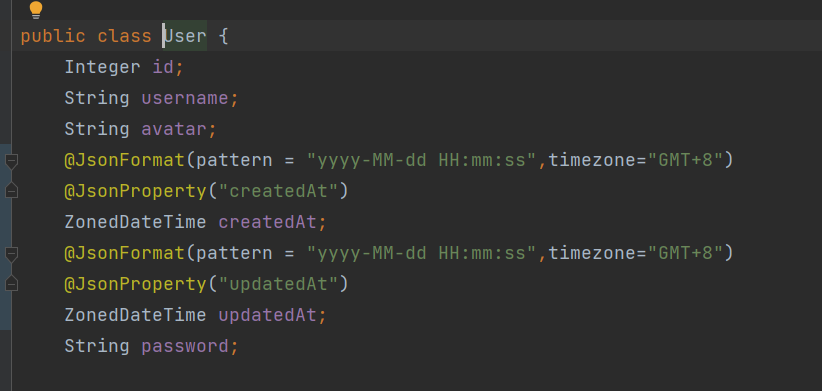
public class User {Integer id;String username;String avatar;@JsonFormat(pattern = "yyyy-MM-dd HH:mm:ss",timezone="GMT+8")@JsonProperty("createdAt")ZonedDateTime createdAt;@JsonFormat(pattern = "yyyy-MM-dd HH:mm:ss",timezone="GMT+8")@JsonProperty("updatedAt")ZonedDateTime updatedAt;String password;
修改前的代码是:
public class User {Integer id;String username;String avatar;Instant createdAt;Instant updatedAt;String password;
数据库约束Unique保证数据原子性
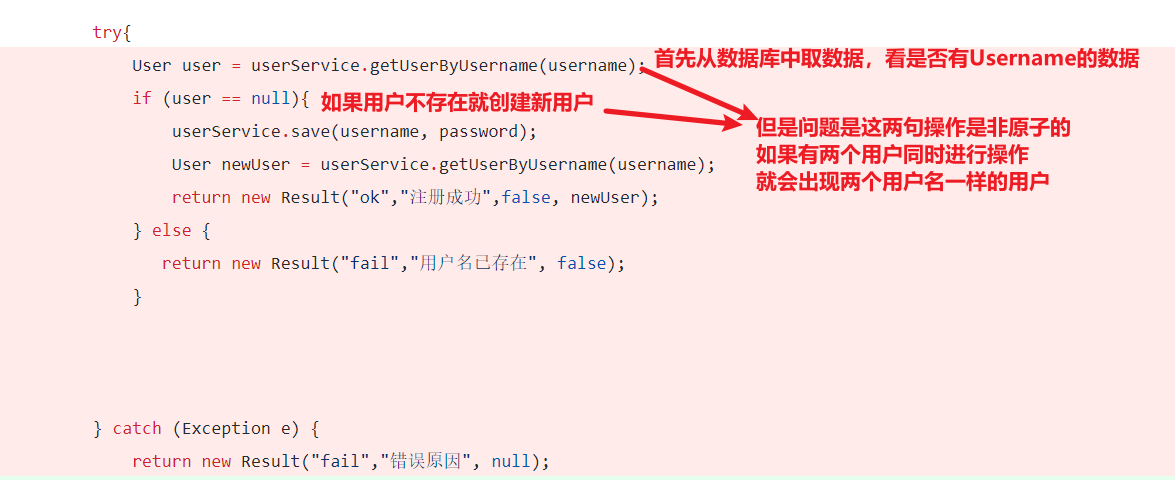
解决方案:
在数据库中设置username列为Unique,如果出现重名就会抛出DuplicateKeyException异常
代码:
https://github.com/dandanloveJM/spring-boot-blog/commit/568124348aec20ab83e372a521ffc9bffd9abef2

若有收获,就点个赞吧
0 人点赞


