替换字段名
const replaceKeys = (obj, rules = {}) => {const keys = Object.keys(rules);return Object.keys(obj).reduce((acc, key) => {acc[keys.includes(key) ? rules[key] : key] = obj[key];return acc;}, {});};
区间随机数
export function random(a: number, b: number): number {return a + (b - a) * Math.random();}
export function firstOf<T>(array: T[]) {return array[0];}export function lastOf<T>(array: T[]) {return array[array.length - 1];}export function isFlatArray<T>(array: (T | T[])[]): array is T[] {return !array.some(Array.isArray);}export function unique<T>(array: T[]): T[] {return Array.from(new Set(array));}
统计出现次数
export const dateCountBy = () => {const dates = {}data.forEach(item => {if (!dates[item.date]) {dates[item.date] = { date: item.date, value: 1 }} else {dates[item.date] = { date: item.date, value: dates[item.date].value + 1 }}})return dates}
格式转换 @example [[1, 2, 3], [‘a’, ‘b’, ‘c’]] => [[1, ‘a’], [2, ‘b’], [3, ‘c’]]
/*** @example [[1, 2, 3], ['a', 'b', 'c']] => [[1, 'a'], [2, 'b'], [3, 'c']]*/export function transpose<T>(matrix: T[][]): T[][] {const row = matrix.length;const col = matrix[0].length;// Note: new Array(col).fill(new Array(row)) is not ok!!!// Because in this case it will fill new Array(col) with the same array: new Array(row).const transposed = new Array(col).fill(0).map(() => new Array(row));for (let i = 0; i < col; i++) {for (let j = 0; j < row; j++) {transposed[i][j] = matrix[j][i];}}return transposed;}
通过url截取视频首帧
export const getVideoFirstBase64 = (url) => {return new Promise(function (resolve, reject) {let dataURL = '';let video = document.createElement("video");video.setAttribute('autoplay', true);video.setAttribute('muted', true);video.setAttribute('preload', true);video.setAttribute('useCORS', true);video.setAttribute('crossOrigin', 'Anonymous'); //处理跨域video.setAttribute('src', url);video.addEventListener('loadeddata', function () {video.setAttribute('muted', true);video.pause();let canvas = document.createElement("canvas");let width = video.videoWidth;let height = video.videoHeight;canvas.width = width;canvas.height = height;canvas.getContext("2d").drawImage(video, 0, 0, width, height);dataURL = canvas.toDataURL('image/png');resolve(dataURL);});video.onerror = function () {video.onerror = null;reject()}})}
base64tofile 上传
export const dataURLtoFile = (base64, filename) => {var arr = base64.split(','), mime = arr[0].match(/:(.*?);/)[1],bstr = atob(arr[1]), n = bstr.length, u8arr = new Uint8Array(n);while(n--){u8arr[n] = bstr.charCodeAt(n);}// TODO filename记得加后缀return new File([u8arr], filename, {type:mime});}
无参数调用IOS 和 Android 方法
export function isAndroid(): boolean {return /android/.test(navigator.userAgent.toLowerCase());}export function isIOS(): boolean {return /ios|iphone|ipad|ipod/.test(navigator.userAgent.toLowerCase());}/// not params/// options: {/// ios: { func: '', data: null },/// android: { func: '', data: null }// }const utils = (options) => {const { ios, android } = optionsif(isIOS()){window.webkit.messageHandlers[ios.func].postMessage(ios.data)}if(isAndroid){window.android[android.func](android.data)}}
// 判断Android系统的正则ANDROID_REGEXP = /(Android)\s+([\d.]+)/i// 判断iOS系统的正则IOS_REGEXP = /\(i[^;]+;( U;)? cpu.+mac os x/i// 判断移动端正则MOBILE_REGEXP = /AppleWebKit.*Mobile.*/i// 判断苹果产品系列正则APPLE_REGEXP = /(iPhone|iPad|iPod|iOS|Mac OS X)/i// 判断iPad正则IPAD_REGEXP = /(iPad).*OS\s([\d_]+)/i// 判断iPhone正则IPHONE_REGEXP = /(iPhone\sOS)\s([\d_]+)/i// 判断QQ APP正则QQ_REGEXP = /QQ\/([\d.]+)/i// 判断微信正则WEI_XIN_REGEXP = /micromessenger/i// 判断企业微信正则WEI_XIN_WORK_REGEXP = /wxwork\/.* MicroMessenger/i// 判断微博正则WEI_BO_REGEXP = /WeiBo/i// 判断支付宝正则ALIPAY_REGEXP = /AlipayClient/iexport const isServer: boolean = Vue.prototype.$isServer; // 是否是服务端渲染export function isAndroid(): boolean {/* istanbul ignore next */return isServer ? false : /android/.test(navigator.userAgent.toLowerCase());}export function isIOS(): boolean {/* istanbul ignore next */return isServer ? false : /ios|iphone|ipad|ipod/.test(navigator.userAgent.toLowerCase());}
// 判断两个对象是否相等export const isObjectEqual = (a, b) => {var aProps = Object.getOwnPropertyNames(a);var bProps = Object.getOwnPropertyNames(b);if (aProps.length !== bProps.length) {return false;}for (var i = 0; i < aProps.length; i++) {var propName = aProps[i];if (a[propName] !== b[propName]) {return false;}}return true;}
reset-scroll
/** scroll.js */type ScrollElement = HTMLElement | Window;// get nearest scroll element// http://w3help.org/zh-cn/causes/SD9013// http://stackoverflow.com/questions/17016740/onscroll-function-is-not-working-for-chromeconst overflowScrollReg = /scroll|auto/i;export function getScrollEventTarget(element: HTMLElement, rootParent: ScrollElement = window) {let node = element;while (node &&node.tagName !== 'HTML' &&node.nodeType === 1 &&node !== rootParent) {const { overflowY } = window.getComputedStyle(node);if (overflowScrollReg.test(<string>overflowY)) {if (node.tagName !== 'BODY') {return node;}// see: https://github.com/youzan/vant/issues/3823const { overflowY: htmlOverflowY } = window.getComputedStyle(<Element>node.parentNode);if (overflowScrollReg.test(<string>htmlOverflowY)) {return node;}}node = <HTMLElement>node.parentNode;}return rootParent;}export function getScrollTop(element: ScrollElement): number {return 'scrollTop' in element ? element.scrollTop : element.pageYOffset;}export function setScrollTop(element: ScrollElement, value: number) {'scrollTop' in element ? (element.scrollTop = value) : element.scrollTo(element.scrollX, value);}export function getRootScrollTop(): number {return window.pageYOffset || document.documentElement.scrollTop || document.body.scrollTop || 0;}export function setRootScrollTop(value: number) {setScrollTop(window, value);setScrollTop(document.body, value);}// get distance from element top to page topexport function getElementTop(element: ScrollElement) {return ((element === window ? 0 : (<HTMLElement>element).getBoundingClientRect().top) +getRootScrollTop());}export function getVisibleHeight(element: ScrollElement) {return element === window? element.innerHeight: (<HTMLElement>element).getBoundingClientRect().height;}// Use/*** Hack for iOS12 page scroll* https://developers.weixin.qq.com/community/develop/doc/00044ae90742f8c82fb78fcae56800*/import { isIOS as checkIsIOS } from '../validate/system';import { getRootScrollTop, setRootScrollTop } from './scroll';const isIOS = checkIsIOS();/* istanbul ignore next */export function resetScroll() {if (isIOS) {setRootScrollTop(getRootScrollTop());}}
截图
/* h5截图按钮, 截图成功回调 */dom.on('click', function (data) {var pictureData = data.paramData.base64var downloadElement = document.createElement('a')downloadElement.setAttribute('href', pictureData)var fileName = Date.now() + '.png'downloadElement.setAttribute('download', fileName)downloadElement.click()pictureData = null})
对象成员分组2
let group = [{spid:1,gysid:'a',spname:'商品1',price:2},{spid:2,gysid:'a',spname:'商品2',price:5},{spid:3,gysid:'b',spname:'商品3',price:3},{spid:4,gysid:'c',spname:'商品4',price:7},{spid:5,gysid:'c',spname:'商品5',price:6}]function groupBy(originArr, property){return originArr.reduce((accumulator, currentValue)=>{let key = currentValue[property]if(!accumulator[key]){accumulator[key] = []}accumulator[key].push(currentValue)return accumulator},{})}console.log(groupBy(group, 'gysid'))
const camelizeRE = /-(\w)/g;// 驼峰export function camelize(str: string): string {return str.replace(camelizeRE, (_, c) => c.toUpperCase());}// 补零export function padZero(num: number | string, targetLength = 2): string {let str = num + '';while (str.length < targetLength) {str = '0' + str;}return str;}
export function isNumber(value: string): boolean {return /^\d+(\.\d+)?$/.test(value);}export function isNaN(value: any): boolean {if (Number.isNaN) {return Number.isNaN(value);}// eslint-disable-next-line no-self-comparereturn value !== value;}
// 事件委托// elem.addEventListener('click',function(e){// var event=e||window.event,// target = event.target||event.srcElement;// console.log(target.innerText);// },false);// 回文字符串 -- 低性能function run(input) {if (typeof input !== 'string') return falsereturn (input.split('').reverse().join('') === input)}// 回文字符串 -- 高性能const palindrome = str => {// str = "abaaba"if (typeof str !== 'string') return falselet len = str.lengthfor (let i = 0; i < len / 2; ++i) {if (str[i] !== str[len - i - 1]) {return false}}return true}/*** @param {string} str* @returns {Boolean}*/export function isString(str) {if (typeof str === 'string' || str instanceof String) {return true}return false}/*** Empty is true* @param {(Object|string|number)}* @returns {Boolean}*/export function isEmpty(value) {return (value === undefined ||value === null ||(typeof value === 'object' && Object.keys(value).length === 0) ||(typeof value === 'string' && value.trim().length === 0))}/*** @param {Array} arg* @returns {Boolean}*/export function isArray(arg) {if (typeof Array.isArray === 'undefined') {return Object.prototype.toString.call(arg) === '[object Array]'}return Array.isArray(arg)}/*** @param {string} path* @returns {Boolean}*/export function isExternal(path) {return /^(https?:|mailto:|tel:)/.test(path)}export function formatDate(date, fmt) {if (/(y+)/.test(fmt)) {fmt = fmt.replace(RegExp.$1,(date.getFullYear() + '').substr(4 - RegExp.$1.length))}let o = {'M+': date.getMonth() + 1,'d+': date.getDate(),'h+': date.getHours(),'m+': date.getMinutes(),'s+': date.getSeconds()}for (let k in o) {if (new RegExp(`(${k})`).test(fmt)) {let str = o[k] + ''fmt = fmt.replace(RegExp.$1,RegExp.$1.length === 1 ? str : padLeftZero(str))}}return fmt}/*** Parse the time to string* @param {(Object|string|number)} time* @param {string} cFormat* @returns {string}*/export function parseTime(time, cFormat) {if (arguments.length === 0) {return null}const format = cFormat || '{y}-{m}-{d} {h}:{i}:{s}'let dateif (typeof time === 'object') {date = time} else {if (typeof time === 'string' && /^[0-9]+$/.test(time)) {time = parseInt(time)}if (typeof time === 'number' && time.toString().length === 10) {time = time * 1000}date = new Date(time)}const formatObj = {y: date.getFullYear(),m: date.getMonth() + 1,d: date.getDate(),h: date.getHours(),i: date.getMinutes(),s: date.getSeconds(),a: date.getDay()}const time_str = format.replace(/{(y|m|d|h|i|s|a)+}/g, (result, key) => {let value = formatObj[key]// Note: getDay() returns 0 on Sundayif (key === 'a') {return ['日', '一', '二', '三', '四', '五', '六'][value]}if (result.length > 0 && value < 10) {value = '0' + value}return value || 0})return time_str}/*** @param {number} time* @param {string} option* @returns {string}*/export function formatTime(time, option) {if (('' + time).length === 10) {time = parseInt(time) * 1000} else {time = +time}const d = new Date(time)const now = Date.now()const diff = (now - d) / 1000if (diff < 30) {return '刚刚'} else if (diff < 3600) {// less 1 hourreturn Math.ceil(diff / 60) + '分钟前'} else if (diff < 3600 * 24) {return Math.ceil(diff / 3600) + '小时前'} else if (diff < 3600 * 24 * 2) {return '1天前'}if (option) {return parseTime(time, option)} else {return (d.getMonth() +1 +'月' +d.getDate() +'日' +d.getHours() +'时' +d.getMinutes() +'分')}}/*** @param {string} url* @returns {Object}*/export function getQueryObject(url) {url = url == null ? window.location.href : urlconst search = url.substring(url.lastIndexOf('?') + 1)const obj = {}const reg = /([^?&=]+)=([^?&=]*)/gsearch.replace(reg, (rs, $1, $2) => {const name = decodeURIComponent($1)let val = decodeURIComponent($2)val = String(val)obj[name] = valreturn rs})return obj}/*** @param {string} input value* @returns {number} output value*/export function byteLength(str) {// returns the byte length of an utf8 stringlet s = str.lengthfor (var i = str.length - 1; i >= 0; i--) {const code = str.charCodeAt(i)if (code > 0x7f && code <= 0x7ff) s++else if (code > 0x7ff && code <= 0xffff) s += 2if (code >= 0xdc00 && code <= 0xdfff) i--}return s}/*** @param {Array} actual* @returns {Array}*/export function cleanArray(actual) {const newArray = []for (let i = 0; i < actual.length; i++) {if (actual[i]) {newArray.push(actual[i])}}return newArray}/*** @param {Object} json* @returns {Array}*/export function param(json) {if (!json) return ''return cleanArray(Object.keys(json).map(key => {if (json[key] === undefined) return ''return encodeURIComponent(key) + '=' + encodeURIComponent(json[key])})).join('&')}/*** @param {string} url* @returns {Object}*/export function param2Obj(url) {const search = url.split('?')[1]if (!search) {return {}}return JSON.parse('{"' +decodeURIComponent(search).replace(/"/g, '\\"').replace(/&/g, '","').replace(/=/g, '":"').replace(/\+/g, ' ') +'"}')}/*** @param {string} val* @returns {string}*/export function html2Text(val) {const div = document.createElement('div')div.innerHTML = valreturn div.textContent || div.innerText}/*** Merges two objects, giving the last one precedence* @param {Object} target* @param {(Object|Array)} source* @returns {Object}*/export function objectMerge(target, source) {if (typeof target !== 'object') {target = {}}if (Array.isArray(source)) {return source.slice()}Object.keys(source).forEach(property => {const sourceProperty = source[property]if (typeof sourceProperty === 'object') {target[property] = objectMerge(target[property], sourceProperty)} else {target[property] = sourceProperty}})return target}/*** @param {HTMLElement} element* @param {string} className*/export function toggleClass(element, className) {if (!element || !className) {return}let classString = element.classNameconst nameIndex = classString.indexOf(className)if (nameIndex === -1) {classString += '' + className} else {classString =classString.substr(0, nameIndex) +classString.substr(nameIndex + className.length)}element.className = classString}/*** @param {string} type* @returns {Date}*/export function getTime(type) {if (type === 'start') {return new Date().getTime() - 3600 * 1000 * 24 * 90} else {return new Date(new Date().toDateString())}}/*** @param {Function} func* @param {number} wait* @param {boolean} immediate* @return {*}*/export function debounce(func, wait, immediate) {let timeout, args, context, timestamp, resultconst later = function() {const last = +new Date() - timestampif (last < wait && last > 0) {timeout = setTimeout(later, wait - last)} else {timeout = null// 如果设定为immediate===true,因为开始边界已经调用过了此处无需调用if (!immediate) {result = func.apply(context, args)if (!timeout) context = args = null}}}return function(...args) {context = thistimestamp = +new Date()const callNow = immediate && !timeoutif (!timeout) timeout = setTimeout(later, wait)if (callNow) {result = func.apply(context, args)context = args = null}return result}}/*** This is just a simple version of deep copy* Has a lot of edge cases bug* If you want to use a perfect deep copy, use lodash's _.cloneDeep* @param {Object} source* @returns {Object}*/export function deepClone(source) {if (!source && typeof source !== 'object') {throw new Error('error arguments', 'deepClone')}const targetObj = source.constructor === Array ? [] : {}Object.keys(source).forEach(keys => {if (source[keys] && typeof source[keys] === 'object') {targetObj[keys] = deepClone(source[keys])} else {targetObj[keys] = source[keys]}})return targetObj}/*** @param {Array} arr* @returns {Array}*/export function uniqueArr(arr) {return Array.from(new Set(arr))}/*** @returns {string}*/export function createUniqueString() {const timestamp = +new Date() + ''const randomNum = parseInt((1 + Math.random()) * 65536) + ''return (+(randomNum + timestamp)).toString(32)}/*** Check if an element has a class* @param {HTMLElement} elm* @param {string} cls* @returns {boolean}*/export function hasClass(ele, cls) {return !!ele.className.match(new RegExp('(\\s|^)' + cls + '(\\s|$)'))}/*** Add class to element* @param {HTMLElement} elm* @param {string} cls*/export function addClass(ele, cls) {if (!hasClass(ele, cls)) ele.className += ' ' + cls}/*** Remove class from element* @param {HTMLElement} elm* @param {string} cls*/export function removeClass(ele, cls) {if (hasClass(ele, cls)) {const reg = new RegExp('(\\s|^)' + cls + '(\\s|$)')ele.className = ele.className.replace(reg, ' ')}}// 补0function padLeftZero(str) {// 例如 传入9 则为009 substr(1) 返回 09return ('00' + str).substr(str.length)}// 兼容低版本浏览器 NodeList的for)if (window.NodeList && !NodeList.prototype.forEach) {NodeList.prototype.forEach = function(callback, thisArg) {thisArg = thisArg || windowfor (let i = 0; i < this.length; i++) {callback.call(thisArg, this[i], i, this)}}}/*查看对象属性配置*///列出对象的属性.function listProperties(obj) {var newLine = '<br />'var names = Object.getOwnPropertyNames(obj)for (var i = 0; i < names.length; i++) {var prop = names[i]document.write(prop + newLine)// 列出对象的属性配置(descriptor)动用getOwnPropertyDescriptor函数。var descriptor = Object.getOwnPropertyDescriptor(obj, prop)for (var attr in descriptor) {document.write('...' + attr + ': ' + descriptor[attr])document.write(newLine)}document.write(newLine)}}/*兼容*/window.requestAnimationFrame = (function() {return (window.requestAnimationFrame ||window.webketRequestAnimationFrame ||window.mozRequestAnimationFrame ||function(callback) {window.setTimeout(callback, 1000 / 60)})})()window.cancelAnimationFrame = (function() {return (window.cancelAnimationFrame ||window.webketCancelAnimationFrame ||window.mozCancelAnimationFrame ||function(timerId) {window.clearTimeout(timerId)})})()/*extend inherit 原型圣杯模式 思想:function f(){}f.prototype=parent.prototype;son.prototype=new f()*/function extend(Sub, Sup) {//Sub表示子类,Sup表示超类// 首先定义一个空函数var F = function() {}// 设置空函数的原型为超类的原型F.prototype = Sup.prototype// 实例化空函数,并把超类原型引用传递给子类Sub.prototype = new F()// 重置子类原型的构造器为子类自身Sub.prototype.constructor = Sub// 在子类中保存超类的原型,避免子类与超类耦合Sub.sup = Sup.prototypeif (Sup.prototype.constructor === Object.prototype.constructor) {// 检测超类原型的构造器是否为原型自身Sup.prototype.constructor = Sup}}var inherit = (function() {var F = function() {}return function(target, origin) {F.prototype = origin.prototypetarget.prototype = new F()target.prototype.construct = target // 把target原型的构造函数修复为target 原本为new f-->orgin.__proto__target.prototype.uber = origin.prototype // 找到Target的真正原型}})()/* 接上更好的写法 */var EventUtil = {getEvent: function(event) {return event ? event : window.event},getTarget: function(event) {return event.target || event.srcElement},/* 绑定事件 */addEvent: function(elem, eType, fn) {if (elem.addEventListener) {elem.addEventListener(eType, fn, false)} else if (elem.attachEvent) {elem.attachEvent('on' + eType, function() {fn.call(elem)})} else {elem['on' + eType] = fn}},/*阻止默认事件 */cancelHanlder: function(event) {if (event.prevenDefault) {event.prevenDefault()} else {event.returnValue = false}},/*阻止冒泡事件 bubble*/stopBubble: function(event) {if (event.stopPropagation) {event.stopPropagation()} else {event.cancelBubble = true/* IE */}},// 解绑事件removeEvent: function(elem, type, handler) {if (elem.removeEventListener) {elem.removeEventListener(type, handler, false)} else if (elem.detachEvent) {elem.detachEvent('on' + type, handler)} else {elem['on' + type] = false}}}/* ---end--- *//* 兼容 滚动条滚动距离 */function getScrolloffset() {if (window.pageXOffset) {return {X: window.pageXOffset,Y: window.pageYOffset}} else {return {X: document.body.scrollLeft + document.documentElement.scrollLeft,Y: document.body.scrollTop + document.documentElement.scrollTop}}}/* 兼容 滚动条滚动距离 结束*//* 兼容 获取视口尺寸(不加边框) */function getViewportOffset() {if (window.innerWidth) {return {W: window.innerWidth,H: window.innerHeight}} else {/* 怪异模式 混杂模式 去掉<docType html> 怪异模式向下兼容*/if (document.compatMode === 'backcompat') {return {W: document.body.clientWidth,H: document.body.clientHeight}} else {return {W: document.documentElement.clientWidth,H: document.documentElement.clientHeight}}}}/* 兼容 获取视口尺寸 结束 *//* 模仿系统的insertBefore()写出insetafter() insetBefore(A,B)即insert A,Befor B思想:在谁后面插入即在下一个兄弟节点前面插入,最后一个节点直接oppdenChild() */Element.prototype.insertAfter = function(targetNode, afterNode) {var beforNode = afterNode.nextElementSiblingif (beforNode == null) {this.appendChild(targetNode)} else {this.insertBefore(targetNode, beforNode)}}/* insertAfter结束*//* 兄弟节点sibling 兼容 */function retSibling(ele, no) {while (ele && no) {// no>0时下一个兄弟if (no > 0) {if (0 && ele.nextElementSibling) {ele.nextElementSibling} else {for (ele.nextSibling; ele && ele.nodeType === 1; ele.nextSibling);}}// no<0时上一个兄弟else {if (0 && ele.previousSibling) {ele.previousSibling} else {for (ele.previousSibling;ele && ele.nodeType === 1;ele.previousSibling);}}}return ele}/* 兄弟节点sibling 兼容结束 *//* 封装返回元素ele的第num层的父级元素节点 */function retParent(element, num) {while (element && num) {element = element.parentElementnum--}return element}/* 第num层的父级元素节点 结束 *//* 不用children实现元素节点遍历 */function retElementChild(node) {var arr = [],children = node.ChildNodes(),len = children.lengthfor (var i = 0; i < len; i++) {if (children[i].nodeType === 1) {arr.push(children[i])}}return arr}/* 不用children实现元素节点遍历结束 *//* 获取样式兼容 */function getStyle(ele, prop) {if (ele.currentStyle) {return ele.currentStyle[prop]} else {return getComputedStyle(ele, false)[prop]}}/* getComputedStyle(ele,null);第二个参数可以获取为元素获取样式兼容结束 *//* 封装重用class */function getByClass(ele, sClass) {var oEle = ele.getElementsByTagName('*'), //获取所有的\oResult = [],len = oEle.lengthfor (var i = 0; i < len; i++) {if (oEle[i].className == sClass) {/* return oEle[i]; 这样一次只能选出一个class (class可以重名)*/oResult.push(oEle[i])}}return oResult //返回多个class}/* 封装重用class结束 *///拖拽函数 drag.init(ele)var drag = {init: function(dom) {this.dom = domthis.bandEvent()},bandEvent: function() {this.dom.onmousedown = this.mouseDown.bind(this)},mouseDown: function(e) {var event = e || window.eventdocument.onmousemove = this.mouseMove.bind(this)document.onmouseup = this.mouseUp.bind(this)this.disX = e.clientX - this.dom.offsetLeftthis.disY = e.clientY - this.dom.offsetTop},mouseMove: function(e) {var event = e || window.eventthis.dom.style.top = e.clientY - this.disY + 'px'this.dom.style.left = e.clientX - this.disX + 'px'},mouseUp: function() {document.onmousemove = nulldocument.onmouseup = null}}/* 运动开始 */function startMove(obj, json, fn) {clearInterval(obj.timer)obj.timer = setInterval(function() {var bStop = true //这一次运动就结束了——所有的值都到达了for (var attr in json) {//1.取当前的值var iCur = 0if (attr == 'opacity') {iCur = parseInt(parseFloat(getStyle(obj, attr)) * 100)} else {iCur = parseInt(getStyle(obj, attr))}//2.算速度var iSpeed = (json[attr] - iCur) / 8iSpeed = iSpeed > 0 ? Math.ceil(iSpeed) : Math.floor(iSpeed)//3.检测停止if (iCur != json[attr]) {bStop = false}if (attr == 'opacity') {obj.style.filter = 'alpha(opacity:' + (iCur + iSpeed) + ')'obj.style.opacity = (iCur + iSpeed) / 100} else {obj.style[attr] = iCur + iSpeed + 'px'}}if (bStop) {clearInterval(obj.timer)if (fn) {fn()}}}, 30)}/* 运动结束 */// 弹性运动function startMove(dom, iTarget) {clearInterval(dom.timer)var iSpeed = 0,a = 0,u = 0.8dom.timer = setInterval(function() {a = (iTarget - dom.offsetLeft) / 5iSpeed = 0.8 * (iSpeed + a)if (Math.abs(iSpeed) < 1 && dom.offsetLeft === iTarget) {dom.style.left = iTarget + 'px'clearInterval(dom.timer)}dom.style.left = dom.offsetLeft + iSpeed + 'px'}, 30)}// 深度克隆function deepClone(Target, Origin) {var Origin = Origin || {}for (var prop in Target) {if (Target.hasOwnProperty(prop)) {if (Target[prop] !== 'null' && typeof Target[prop] === 'object') {if (Object.prototype.toString.call(Target[prop]) === '[object Array]') {Origin[prop] = []} else {Origin[prop] = {}}//Origin[prop] = Object.prototype.toString.call(Target[prop]) === '[object Array]' ? [] :{}//deepClone(Target[prop], Origin[prop])} else {Origin[prop] = Target[prop]}}}return Origin}//Origin深度克隆Target//// var obj = {// name : 'wang',// age : 21,// card : ['gongshang','youzheng'],// school : {// middle : '69',// high : 'songlei',// university : 'haligong'// }// }// var Cobj = {// }// deepClone(obj,Cobj);// type类型判断 jQuery内部有 $.type// ie6 null object Object.prototype.toString.call(Target) 返回[ object Object ]function type(Target) {var template = {'[object Array]': 'array','[object Object]': 'object','[object String]': 'string - object','[object Nember]': 'number - object','[object Boolean]': 'boolean - object'}// ie6兼容if (Target == null) {return 'null'} else if (typeof Target == 'object') {return template[Object.prototype.toString.call(Target)]} else {return typeof Target}};(function(root, factory) {if (typeof module === 'object' && typeof module.exports === 'object') {module.exports = factory()} else {root.DN = root.$ = factory()}// this =window})(this, function() {var DN = {type: function(obj) {if (obj == null) {return obj + ' '} else {return typeof obj === 'object' || typeof obj === 'function'? class2type[Object.prototype.toString.call(obj)] || 'object': typeof obj}}}var class2type = {}'Boolean Number String Error Object Array Aate RegExp Function'.split(' ').map(function(item, index) {//统一大小写class2type['[object' + item + ']'] = item.toLocaleLowerCase()})return DN})/*异步加载 */function loadScript(url, callback) {var aScript = document.createElement('script')aScript.type = 'text/javaScript'/* aScript.src=url; */if (aScript.readyState) {aScript.onreadyStateChange = function() {if (aScript.readyState == 'complete' || aScript.readyState == 'loaded') {callback()}}} else {aScript.onload = function() {callback()}}aScript.src = url/* 防止瞬间加载完毕不执行 onreadystatechange 所以在底部 */document.head.appendChild(aScript)}/*异步加载 结束*///管理cookievar manageCookie = {//存 (名字,值,过期时间)setCookie: function(name, value, iDay) {var oDate = new Date()oDate.setDate(oDate.getDate() + iDay) //计算机当前时间iDay天后cookie过期document.cookie = name + '=' + value + ';expires=' + oDatereturn this},//删除cookie (要删除的名称 '1'是随便写)removeCookie: function(iName) {return this.setCookie(iName, '1', -2)},//取cookie(取谁的值)getCookie: function(name, callback) {//cookie值规律,通过 ; 和空格分隔的 ( username=123;expires=30 .......)var arr = document.cookie.split('; ') //通过 ; 和空格分隔cookie为数组/*arr->['username=123','password=admin',...]*/for (var i = 0; i < arr.length; i++) {var arr2 = arr[i].split('=') //通过=号把arr分隔成 名称,值 然后判断参数name与名称if (name == arr2[0]) {callback(arr2[1]) //返回对应的值return this}}callback('cookie not find')return this}}//数组去重Array.prototype.unique1 = function() {var tmpArr = []for (var i = 0; i < this.length; i++) {if (tmpArr.indexOf(this[i]) == -1) {tmpArr.push(this[i])}}return tmpArr}Array.form(new set([2, 2, 2, 12, 4, 5]))const newArr = [...new Set([2, 2, 2, 12, 4, 5])]Array.prototype.unique2 = function() {var tmpArr = [] //结果数组for (var i = 0; i < this.length; i++) {if (this.indexOf(this[i]) == i) {tmpArr.push(this[i])}}return tmpArr}Array.prototype.unique3 = function() {var tmpArr = [],hash = {}for (var i = 0; i < this.length; i++) {if (!hash[this[i]]) {hash[this[i]] = truetmpArr.push(this[i])}}return tmpArr}// let a = ['1', '2', '3', 1,NaN,NaN,undefined,undefined,null,null, 'a', 'b', 'b'];const unique = arr => {var obj = {}arr.forEach(value => {obj[value] = 0 //这步新添加一个属性,并赋值,如果不赋值的话,属性会添加不上去})return Object.keys(obj) //`Object.keys(对象)`返回这个对象可枚举属性组成的数组,这个数组就是去重后的数组}console.log(unique(a)) //["1", "2", "3", "NaN", "undefined", "null", "a", "b"]//防抖(在这个时间段内没有触发事件的时候才执行回调)// immediate 立即的function debounce(callback, wait, immediate) {var timer = nullvar debounced = function() {var _this = thisvar _argus = argumentsclearTimeout(timer)if (immediate) {if (!timer) {callback.apply(_this, _argus)timer = setTimeout(function() {timer = null}, wait)}} else {timer = setTimeout(function() {callback.apply(_this, _argus)}, wait)}}debounced.cancel = function() {clearTimeout(timer)timer = null}return debounced}//节流(在这个时间段只触发一次回调)function throttle(callback, wait) {var lastTime = 0return function() {var nowTime = +new Date()if (lastTime - nowTime > wait) {callback.apply(this, arguments)lastTime = nowTime}}}//动态脚本function loadScript(url) {var script = document.createElement('script')script.type = 'text/javascript'script.src = urldocument.body.appendChild(script)}function loadScriptString(code) {var script = document.createElement('script')script.type = 'text/javascript'try {script.appendChild(document.createTextNode(code))} catch (ex) {script.text = code}document.body.appendChild(script)}//动态样式function loadStyles(url) {var link = document.createElement('link')link.rel = 'stylesheet'link.type = 'text/css'link.herf = urlvar head = document.getElementsByTagName('head')[0]head.appendChild(link)}function loadStylesString(css) {var style = document.createElement('style')style.type = 'text/css'try {style.appendChild(document.createTextNode(css))} catch (ex) {style.styleSheet.cssText = css}var head = document.getElementsByTagName('head')[0]head.appendChild(style)}var CookieUtil = {get: function(name) {var cookieName = encodeURIComponent(name) + '=',cookieStart = document.cookie.indexOf(cookieName),cookieValue = null,cookieEndif (cookieStart > -1) {cookieEnd = document.cookie.indexOf(';', cookieStart)if (cookieEnd == -1) {cookieEnd = document.cookie.length}cookieValue = decodeURIComponent(document.cookie.substring(cookieStart + cookieName.length, cookieEnd))}return cookieValue},set: function(name, value, expires, path, domain, secure) {var cookieText = encodeURIComponent(name) + '=' + encodeURIComponent(value)if (expires instanceof Date) {cookieText += '; expires=' + expires.toGMTString()}if (path) {cookieText += '; path=' + path}if (domain) {cookieText += '; domain=' + domain}if (secure) {cookieText += '; secure'}document.cookie = cookieText},unset: function(name, path, domain, secure) {this.set(name, '', new Date(0), path, domain, secure)}}/**// 设置 cookieCookieUtil.set('name', 'lai');CookieUtil.set('sex', 'man');// 读取 cookieCookieUtil.get('name'); // 'lai'CookieUtil.get('sex'); // 'man'// 删除 cookieCookieUtil.unset('name');CookieUtil.unset('sex');// 设置 cookie,包括它的路径、域、失效日期CookieUtil.set('name', 'lai', '/', 'www.laixiangran.cn', new Date());*/
isMobile, isEmail, isDate
export function isMobile(value: string): boolean {value = value.replace(/[^-|\d]/g, '');return /^((\+86)|(86))?(1)\d{10}$/.test(value) || /^0[0-9-]{10,13}$/.test(value);}/* eslint-disable */export function isEmail(value: string): boolean {const reg = /^((([a-z]|\d|[!#\$%&'\*\+\-\/=\?\^_`{\|}~]|[\u00A0-\uD7FF\uF900-\uFDCF\uFDF0-\uFFEF])+(\.([a-z]|\d|[!#\$%&'\*\+\-\/=\?\^_`{\|}~]|[\u00A0-\uD7FF\uF900-\uFDCF\uFDF0-\uFFEF])+)*)|((\x22)((((\x20|\x09)*(\x0d\x0a))?(\x20|\x09)+)?(([\x01-\x08\x0b\x0c\x0e-\x1f\x7f]|\x21|[\x23-\x5b]|[\x5d-\x7e]|[\u00A0-\uD7FF\uF900-\uFDCF\uFDF0-\uFFEF])|(\\([\x01-\x09\x0b\x0c\x0d-\x7f]|[\u00A0-\uD7FF\uF900-\uFDCF\uFDF0-\uFFEF]))))*(((\x20|\x09)*(\x0d\x0a))?(\x20|\x09)+)?(\x22)))@((([a-z]|\d|[\u00A0-\uD7FF\uF900-\uFDCF\uFDF0-\uFFEF])|(([a-z]|\d|[\u00A0-\uD7FF\uF900-\uFDCF\uFDF0-\uFFEF])([a-z]|\d|-|\.|_|~|[\u00A0-\uD7FF\uF900-\uFDCF\uFDF0-\uFFEF])*([a-z]|\d|[\u00A0-\uD7FF\uF900-\uFDCF\uFDF0-\uFFEF])))\.)+(([a-z]|[\u00A0-\uD7FF\uF900-\uFDCF\uFDF0-\uFFEF])|(([a-z]|[\u00A0-\uD7FF\uF900-\uFDCF\uFDF0-\uFFEF])([a-z]|\d|-|\.|_|~|[\u00A0-\uD7FF\uF900-\uFDCF\uFDF0-\uFFEF])*([a-z]|[\u00A0-\uD7FF\uF900-\uFDCF\uFDF0-\uFFEF])))$/i;return reg.test(value);}import { isNaN } from './number';export function isDate(date: Date): boolean {return (Object.prototype.toString.call(date) === '[object Date]' && !isNaN(date.getTime()));}
urlToBase64
urlToBase64(url) {return new Promise ((resolve,reject) => {let image = new Image();image.onload = function() {let canvas = document.createElement('canvas');canvas.width = canvas.naturalWidth;canvas.height = canvas.naturalHeight;// 将图片插入画布并开始绘制canvas.getContext('2d').drawImage(image, 0, 0);let result = canvas.toDataURL('image/png')resolve(result);};// CORS 策略,会存在跨域问题https://stackoverflow.com/questions/20424279/canvas-todataurl-securityerrorimage.setAttribute("crossOrigin",'Anonymous');image.src = url;// 图片加载失败的错误处理image.onerror = () => {reject(newError('图片流异常'));});}
base64ToBlob
base64ToBlob ({b64data = '', contentType = '', sliceSize = 512} = {}) {return new Promise((resolve, reject) => {// 使用 atob() 方法将数据解码let byteCharacters = atob(b64data);let byteArrays = [];for (let offset = 0; offset < byteCharacters.length; offset += sliceSize) {let slice = byteCharacters.slice(offset, offset + sliceSize);let byteNumbers = [];for (let i = 0; i < slice.length; i++) {byteNumbers.push(slice.charCodeAt(i));}// 8 位无符号整数值的类型化数组。内容将初始化为 0。// 如果无法分配请求数目的字节,则将引发异常。byteArrays.push(newUint8Array(byteNumbers));}let result = new Blob(byteArrays, {type: contentType})result = Object.assign(result,{// jartto: 这里一定要处理一下 URL.createObjectURLpreview: URL.createObjectURL(result),name: `图片示例.png`});resolve(result)})}
blobToBase64
blobToBase64(blob) {return new Promise((resolve, reject) => {const fileReader = new FileReader();fileReader.onload = (e) => {resolve(e.target.result);};// readAsDataURLfileReader.readAsDataURL(blob);fileReader.onerror = () => {reject(newError('文件流异常'));};});}
返回对象指定的键值
// 返回对象指定的键值function GetKeys(obj = {}, keys = []) {return Object.keys(obj).reduce((items, item) => (keys.includes(item) && (items[item] = obj[item]), items), {});}const target = { a: 1, b: 2, c: 3, d: 4 };const keyword = ["a", "d"];GetKeys(target, keyword);// { a: 1, d: 4 }
字符串翻转
// 字符串翻转function ReverseStr(str = "") {return str.split("").reduceRight((items, item) => items + item);}const str = "reduce最牛逼";ReverseStr(str);// "逼牛最ecuder"
对象成员特殊分组
// 对象成员特殊分组function Group(arr = [], key) {return key ? arr.reduce((t, v) => (!t[v[key]] && (t[v[key]] = []), t[v[key]].push(v), t), {}) : {};}const arr = [{ area: "GZ", name: "YZW", age: 27 },{ area: "GZ", name: "TYJ", age: 25 },{ area: "SZ", name: "AAA", age: 23 },{ area: "FS", name: "BBB", age: 21 },{ area: "SZ", name: "CCC", age: 19 }];// 以地区area作为分组依据Group(arr, "area");//{ GZ: Array(2), SZ: Array(2), FS: Array(1) }
数组分割 例: chunk([1, 2, 3, 4, 5], 2) -> [[1, 2], [3, 4], [5]]
// 数组分割function Chunk(arr = [], size = 1) {return arr.length ? arr.reduce((items, item) => {return items[items.length - 1].length === size? items.push([item]) : items[items.length - 1].push(item), items}, [[]]): [];}const arr = [1, 2, 3, 4, 5];Chunk(arr, 2);// [[1, 2], [3, 4], [5]]
react should update
var { List, Map } = Immutable;var is = Immutable.is.bind(Immutable);function shallowEqualImmutable(objA, objB) {if (objA === objB || is(objA, objB)) {return true;}if (typeof objA !== 'object' || objA === null ||typeof objB !== 'object' || objB === null) {return false;}var keysA = Object.keys(objA);var keysB = Object.keys(objB);if (keysA.length !== keysB.length) {return false;}// Test for A's keys different from B.var bHasOwnProperty = Object.prototype.hasOwnProperty.bind(objB);for (var i = 0; i < keysA.length; i++) {if (!bHasOwnProperty(keysA[i]) || !is(objA[keysA[i]], objB[keysA[i]])) {return false;}}return true;}
把字符串转成以分为单位的整数。
/*** tozhCN 把字符串转成以分为单位的整数。* @memberof module:money* @param {number|string} num 金额* @returns {string} 中文大写的金额, 标准会计格式* @runkit true* @example* tozhCN(500.3);* // => 伍佰元叁角整*/function tozhCN(num: string | number): string {if (typeof num === 'number') {num = String(num);}if (!/^(0|[1-9]\d*)(\.\d+)?$/.test(num)) {throw new Error(`非法数据: ${JSON.stringify(num)}`);}let unit = '京亿万仟佰拾兆万仟佰拾亿仟佰拾万仟佰拾元角分';let str: string = '';num += '00';const pos = num.indexOf('.');if (pos >= 0) {num = num.substring(0, pos) + num.substr(pos + 1, 2);}unit = unit.substr(unit.length - num.length);for (let i = 0, len = num.length; i < len; i++) {str +='零壹贰叁肆伍陆柒捌玖'.charAt(Number(num.charAt(i))) + unit.charAt(i);}return str.replace(/零(仟|佰|拾|角)/g, '零').replace(/(零)+/g, '零').replace(/零(兆|万|亿|元)/g, '$1').replace(/(兆|亿)万/g, '$1').replace(/(京|兆)亿/g, '$1').replace(/(京)兆/g, '$1').replace(/(京|兆|亿|仟|佰|拾)(万?)(.)仟/g, '$1$2零$3仟').replace(/^元零?|零分/g, '').replace(/(元|角)$/g, '$1整');}
模板字符串替代方案
function parseStringTemplate(str, obj) {let parts = str.split(/\$\{(?!\d)[\wæøåÆØÅ]*\}/);let args = str.match(/[^{\}]+(?=})/g) || [];let parameters = args.map(argument => obj[argument] || (obj[argument] === undefined ? "" : obj[argument]));return String.raw({ raw: parts }, ...parameters);}undefinedparseStringTemplate("[ActiveX 控件自动提示]未启用,请手动启用!${a}", { a: "<div class='repair' onclick='writereg()'>可点击一键修复</div>"})"[ActiveX 控件自动提示]未启用,请手动启用!<div class='repair' onclick='writereg()'>可点击一键修复</div>"
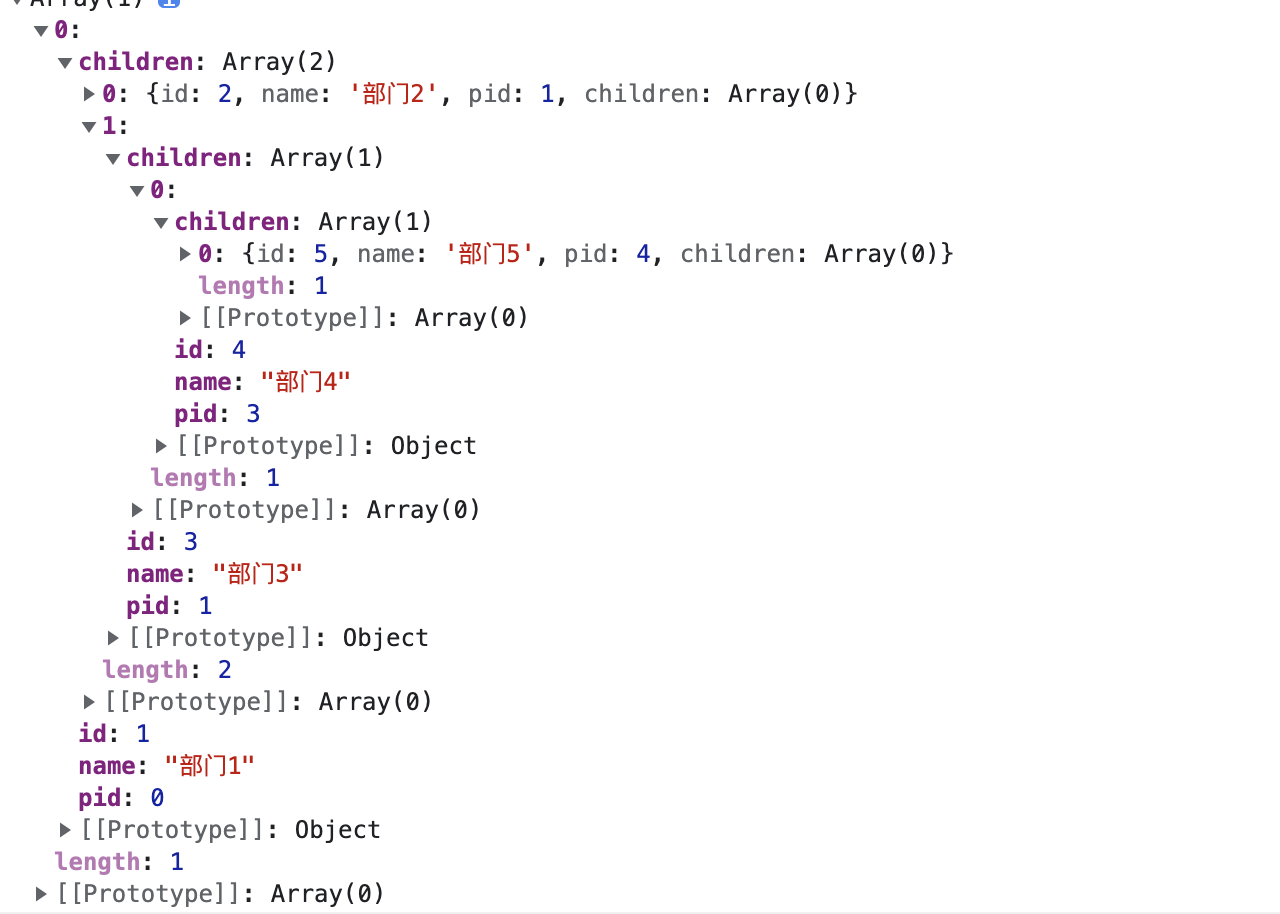
扁平数据转tree
function arrayToTree(items) {const result = []; // 存放结果集const itemMap = {}; //for (const item of items) {const id = item.id;const pid = item.pid;if (!itemMap[id]) {itemMap[id] = {children: [],}}itemMap[id] = {...item,children: itemMap[id]['children']}const treeItem = itemMap[id];if (pid === 0) {result.push(treeItem);} else {if (!itemMap[pid]) {itemMap[pid] = {children: [],}}itemMap[pid].children.push(treeItem)}}return result;}const arr = [{id: 1, name: '部门1', pid: 0},{id: 2, name: '部门2', pid: 1},{id: 3, name: '部门3', pid: 1},{id: 4, name: '部门4', pid: 3},{id: 5, name: '部门5', pid: 4},]// 格式如下图
LRU cache
class LRUCache {constructor(lenght) {this.length = lenght; // 存储长度this.data = new Map(); // 存储数据}// 存储数据,通过键值对的方式set(key, value) {const data = this.data;if (data.has(key)) {data.delete(key)}data.set(key, value);// 如果超出了容量,则需要删除最久的数据if (data.size > this.length) {const delKey = data.keys().next().value;data.delete(delKey);}}// 获取数据get(key) {const data = this.data;// 未找到if (!data.has(key)) {return null;}const value = data.get(key); // 获取元素data.delete(key); // 删除元素data.set(key, value); // 重新插入元素}}const lruCache = new LRUCache(5);// 超出了容量 就删除最早的数据lruCache.set('name', '小猪课堂');lruCache.set('age', 22);lruCache.set('sex', '男');lruCache.set('height', 176);lruCache.set('weight', '100');lruCache.set('height1', 176);lruCache.set('weight2', '100');console.log(lruCache);// sex, height, weight, height1, weight2

若有收获,就点个赞吧
0 人点赞


