web3.js官方文档:https://web3js.readthedocs.io/
eth官方api:https://etherscan.io/apis
web3js奇客网:https://www.qikegu.com/docs/5127
rcpUrl获取:https://infura.io/dashboard
一、介绍
开发以太坊区块链应用程序,涉及到以下部分:
- 智能合约开发 – 使用solidity语言编写代码,部署到区块链。
- 网站或客户端开发 – 与区块链中的智能合约进行交互,读写数据。
在进行网站或客户端开发时,就需要用到web3.js。web3.js库是一个javascript库,可以让你执行很多与区块链进行交互的任务,例如:
- 以太币转账
- 读写智能合约中的数据
- 创建智能合约
与Ajax类似,可以使用Web3.js读写以太坊区块链。
区块链网络是一个点对点的对等网络,网络由各个节点相互连接构成,智能合约的代码与数据存储在区块链中。
使用web3.js可以向区块链网络中某个以太坊节点发出请求,与区块链网络进行交互。
此过程如下图所示: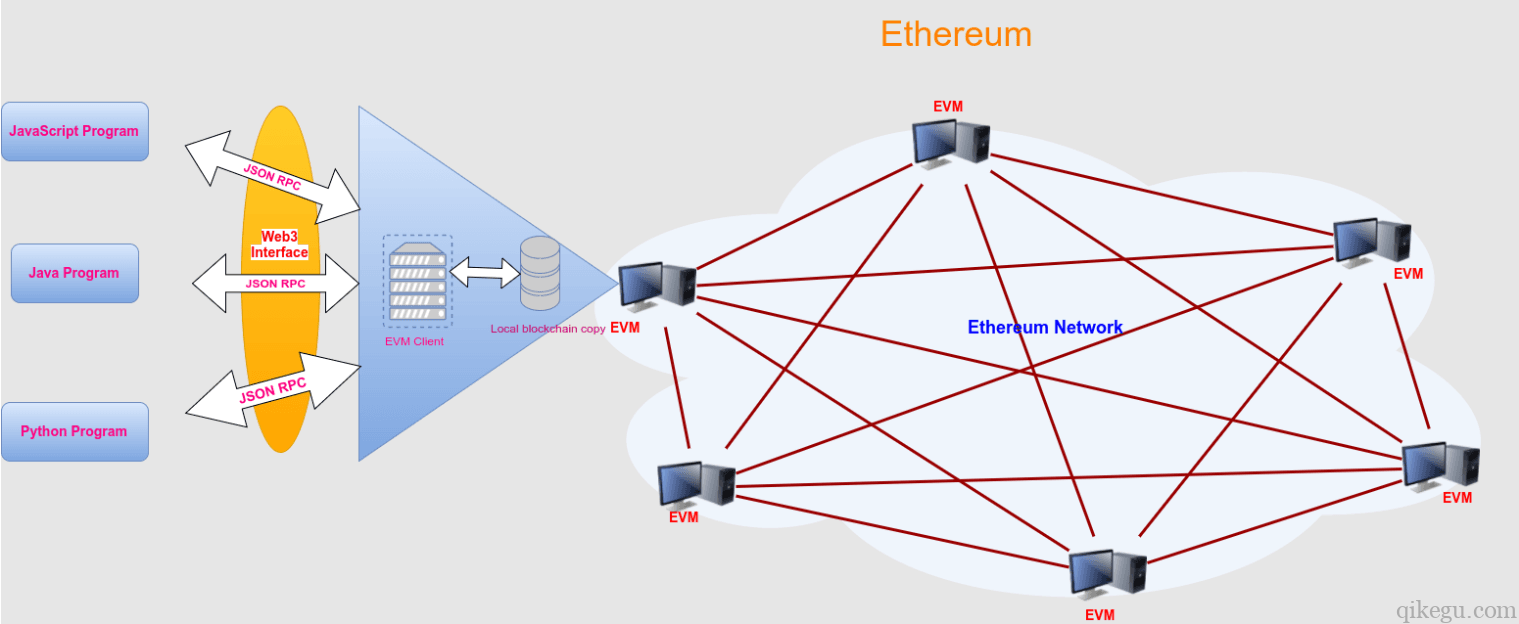
web3.js使用JSON RPC与Ethereum区块链通信(JSON RPC即JSON远程调用),对区块链网络进行数据读写。这有点像使用jQuery ajax库来读写web服务器上的数据。
二、环境搭建
安装 引入
npm install web3import Web3 from 'web3'
连接以太坊节点
要访问以太坊网络,需要连接到Ethereum节点。
有几种方法可以做到这一点,可以使用Geth或Parity运行自己的Ethereum节点。但这需要从区块链下载大量数据并保持同步,很麻烦。
比较方便的方法是,使用Infura访问Ethereum节点。Infura是一个免费提供Ethereum节点的服务。
在Infura上注册账号,创建项目,在项目详情页上可以查看API KEY: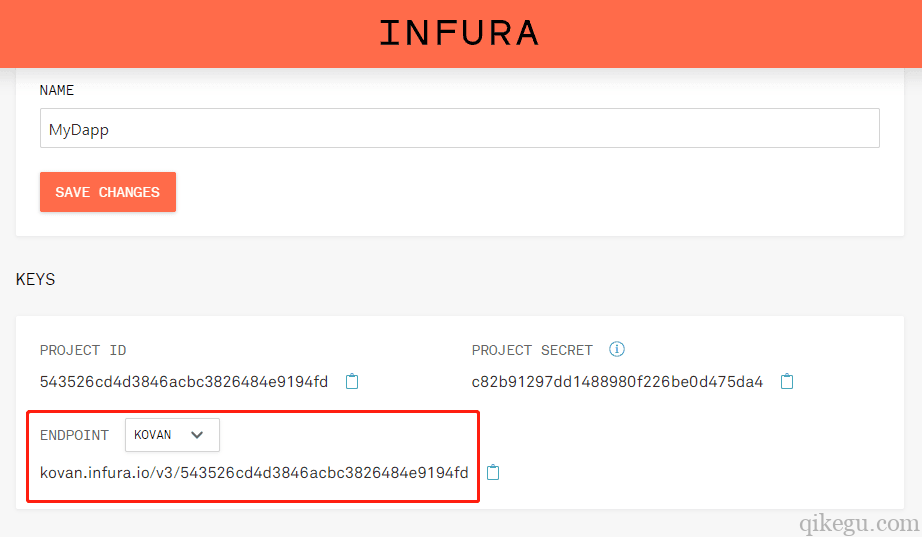
使用API KEY,就可以访问以太坊网络节点。
三、访问区块链网络,读取余额
1、使用Infura URL,创建Web3连接。声明Infura URL变量:
2、确保使用之前获得的实际Infura API密钥替换此处的YOUR_INFURA_API_KEY。创建Web3连接:
3、读取余额
const rpcURL = "https://kovan.infura.io/v3/YOUR_INFURA_API_KEY"const web3 = new Web3(rpcURL)const address = "0x03118E2c88676d31ee397E1eEf7789fECfbC40b9"// 读取address中的余额,余额单位是weiweb3.eth.getBalance(address, (err, wei) => {// 余额单位从wei转换为etherbalance = web3.utils.fromWei(wei, 'ether')console.log("balance: " + balance)})
4、获取测试eth
https://gitter.im/kovan-testnet/faucet
https://ethdrop.dev/
四、智能合约对象
1、介绍
智能合约对象是javascript中对智能合约的表示,可以使用智能合约对象访问智能合约。
对象可以使用web3.eth.Contract()函数获得,此函数需要2个参数: 智能合约ABI、智能合约地址。
ABI代表“Abstract Binary Interface/抽象二进制接口”,它是一个JSON数组,是面向以太坊虚拟机的可执行文件,类似于windows 平台上的二进制可执行文件。
2、获取ABI
获取ABI方法:(可以不填写ApiKey)
const fetch = require('node-fetch');fetch('https://api.etherscan.io/api?module=contract&action=getabi&address={填入合约地址}&apikey={填入你的ApiKey}', {method: 'get',}).then(response => response.json().then(data => console.log(data)));
这里有一个ABI的例子,这个例子是OmiseGo通证的ABI,它实现了ERC-20通证标准。
const abi = [{"constant":true,"inputs":[],"name":"mintingFinished","outputs":[{"name":"","type":"bool"}],"payable":false,"type":"function"},{"constant":true,"inputs":[],"name":"name","outputs":[{"name":"","type":"string"}],"payable":false,"type":"function"},{"constant":false,"inputs":[{"name":"_spender","type":"address"},{"name":"_value","type":"uint256"}],"name":"approve","outputs":[],"payable":false,"type":"function"},{"constant":true,"inputs":[],"name":"totalSupply","outputs":[{"name":"","type":"uint256"}],"payable":false,"type":"function"},{"constant":false,"inputs":[{"name":"_from","type":"address"},{"name":"_to","type":"address"},{"name":"_value","type":"uint256"}],"name":"transferFrom","outputs":[],"payable":false,"type":"function"},{"constant":true,"inputs":[],"name":"decimals","outputs":[{"name":"","type":"uint256"}],"payable":false,"type":"function"},{"constant":false,"inputs":[],"name":"unpause","outputs":[{"name":"","type":"bool"}],"payable":false,"type":"function"},{"constant":false,"inputs":[{"name":"_to","type":"address"},{"name":"_amount","type":"uint256"}],"name":"mint","outputs":[{"name":"","type":"bool"}],"payable":false,"type":"function"},{"constant":true,"inputs":[],"name":"paused","outputs":[{"name":"","type":"bool"}],"payable":false,"type":"function"},{"constant":true,"inputs":[{"name":"_owner","type":"address"}],"name":"balanceOf","outputs":[{"name":"balance","type":"uint256"}],"payable":false,"type":"function"},{"constant":false,"inputs":[],"name":"finishMinting","outputs":[{"name":"","type":"bool"}],"payable":false,"type":"function"},{"constant":false,"inputs":[],"name":"pause","outputs":[{"name":"","type":"bool"}],"payable":false,"type":"function"},{"constant":true,"inputs":[],"name":"owner","outputs":[{"name":"","type":"address"}],"payable":false,"type":"function"},{"constant":true,"inputs":[],"name":"symbol","outputs":[{"name":"","type":"string"}],"payable":false,"type":"function"},{"constant":false,"inputs":[{"name":"_to","type":"address"},{"name":"_value","type":"uint256"}],"name":"transfer","outputs":[],"payable":false,"type":"function"},{"constant":false,"inputs":[{"name":"_to","type":"address"},{"name":"_amount","type":"uint256"},{"name":"_releaseTime","type":"uint256"}],"name":"mintTimelocked","outputs":[{"name":"","type":"address"}],"payable":false,"type":"function"},{"constant":true,"inputs":[{"name":"_owner","type":"address"},{"name":"_spender","type":"address"}],"name":"allowance","outputs":[{"name":"remaining","type":"uint256"}],"payable":false,"type":"function"},{"constant":false,"inputs":[{"name":"newOwner","type":"address"}],"name":"transferOwnership","outputs":[],"payable":false,"type":"function"},{"anonymous":false,"inputs":[{"indexed":true,"name":"to","type":"address"},{"indexed":false,"name":"value","type":"uint256"}],"name":"Mint","type":"event"},{"anonymous":false,"inputs":[],"name":"MintFinished","type":"event"},{"anonymous":false,"inputs":[],"name":"Pause","type":"event"},{"anonymous":false,"inputs":[],"name":"Unpause","type":"event"},{"anonymous":false,"inputs":[{"indexed":true,"name":"owner","type":"address"},{"indexed":true,"name":"spender","type":"address"},{"indexed":false,"name":"value","type":"uint256"}],"name":"Approval","type":"event"},{"anonymous":false,"inputs":[{"indexed":true,"name":"from","type":"address"},{"indexed":true,"name":"to","type":"address"},{"indexed":false,"name":"value","type":"uint256"}],"name":"Transfer","type":"event"}]
你可以在Etherscan上,找到关于这个通证的更多细节,包括它的ABI及地址。我们将在这个示例的其余部分中使用这个智能合约ABI。
3、获取智能合约地址
可以在非小号、币安等平台查询代币的智能合约地址
OmiseGo通证智能合约的地址:
const address = "0xd26114cd6EE289AccF82350c8d8487fedB8A0C07"
4、创建智能合约对象
有了ABI和地址,就可以创建OmiseGo通证智能合约的Javascript对象:
const contract = new web3.eth.Contract(abi, address)
5、调用智能合约读函数
智能合约对象的methods属性下,包含了对应智能合约的所有函数。要调用智能合约中的某个函数,例如myFunction(),可以使用contract.methods.myFunction()的方式调用。
由于OmiseGo通证智能合约实现了ERC-20标准,应该已经实现了这些函数:totalSupply()、name()、symbol()和balanceOf()
const Web3 = require('web3')const rpcURL = '' // Your RCP URL goes hereconst web3 = new Web3(rpcURL)const abi = [{"constant":true,"inputs":[],"name":"mintingFinished","outputs":[{"name":"","type":"bool"}],"payable":false,"type":"function"},{"constant":true,"inputs":[],"name":"name","outputs":[{"name":"","type":"string"}],"payable":false,"type":"function"},{"constant":false,"inputs":[{"name":"_spender","type":"address"},{"name":"_value","type":"uint256"}],"name":"approve","outputs":[],"payable":false,"type":"function"},{"constant":true,"inputs":[],"name":"totalSupply","outputs":[{"name":"","type":"uint256"}],"payable":false,"type":"function"},{"constant":false,"inputs":[{"name":"_from","type":"address"},{"name":"_to","type":"address"},{"name":"_value","type":"uint256"}],"name":"transferFrom","outputs":[],"payable":false,"type":"function"},{"constant":true,"inputs":[],"name":"decimals","outputs":[{"name":"","type":"uint256"}],"payable":false,"type":"function"},{"constant":false,"inputs":[],"name":"unpause","outputs":[{"name":"","type":"bool"}],"payable":false,"type":"function"},{"constant":false,"inputs":[{"name":"_to","type":"address"},{"name":"_amount","type":"uint256"}],"name":"mint","outputs":[{"name":"","type":"bool"}],"payable":false,"type":"function"},{"constant":true,"inputs":[],"name":"paused","outputs":[{"name":"","type":"bool"}],"payable":false,"type":"function"},{"constant":true,"inputs":[{"name":"_owner","type":"address"}],"name":"balanceOf","outputs":[{"name":"balance","type":"uint256"}],"payable":false,"type":"function"},{"constant":false,"inputs":[],"name":"finishMinting","outputs":[{"name":"","type":"bool"}],"payable":false,"type":"function"},{"constant":false,"inputs":[],"name":"pause","outputs":[{"name":"","type":"bool"}],"payable":false,"type":"function"},{"constant":true,"inputs":[],"name":"owner","outputs":[{"name":"","type":"address"}],"payable":false,"type":"function"},{"constant":true,"inputs":[],"name":"symbol","outputs":[{"name":"","type":"string"}],"payable":false,"type":"function"},{"constant":false,"inputs":[{"name":"_to","type":"address"},{"name":"_value","type":"uint256"}],"name":"transfer","outputs":[],"payable":false,"type":"function"},{"constant":false,"inputs":[{"name":"_to","type":"address"},{"name":"_amount","type":"uint256"},{"name":"_releaseTime","type":"uint256"}],"name":"mintTimelocked","outputs":[{"name":"","type":"address"}],"payable":false,"type":"function"},{"constant":true,"inputs":[{"name":"_owner","type":"address"},{"name":"_spender","type":"address"}],"name":"allowance","outputs":[{"name":"remaining","type":"uint256"}],"payable":false,"type":"function"},{"constant":false,"inputs":[{"name":"newOwner","type":"address"}],"name":"transferOwnership","outputs":[],"payable":false,"type":"function"},{"anonymous":false,"inputs":[{"indexed":true,"name":"to","type":"address"},{"indexed":false,"name":"value","type":"uint256"}],"name":"Mint","type":"event"},{"anonymous":false,"inputs":[],"name":"MintFinished","type":"event"},{"anonymous":false,"inputs":[],"name":"Pause","type":"event"},{"anonymous":false,"inputs":[],"name":"Unpause","type":"event"},{"anonymous":false,"inputs":[{"indexed":true,"name":"owner","type":"address"},{"indexed":true,"name":"spender","type":"address"},{"indexed":false,"name":"value","type":"uint256"}],"name":"Approval","type":"event"},{"anonymous":false,"inputs":[{"indexed":true,"name":"from","type":"address"},{"indexed":true,"name":"to","type":"address"},{"indexed":false,"name":"value","type":"uint256"}],"name":"Transfer","type":"event"}]const address = '0xd26114cd6EE289AccF82350c8d8487fedB8A0C07'const contract = new web3.eth.Contract(abi, address)//查看现有OmiseGo通证的总供应量: 140245398245132780789239631contract.methods.totalSupply().call((err, result) => { console.log(result) })//查看OmiseGo通证的名称: OMGTokencontract.methods.name().call((err, result) => { console.log(result) })//查看OmiseGo通证的标志: OMGcontract.methods.symbol().call((err, result) => { console.log(result) })//查看给定账户的余额: 22620364140612904305860contract.methods.balanceOf('0xd26114cd6EE289AccF82350c8d8487fedB8A0C07').call((err, result) => { console.log(result) })
- tips:这里调用方法只能调用读操作函数,不能调用写操作函数,写操作函数会改变区块链状态,调用写函数被视为交易。
五、交易操作
区块链中,交易操作是指会把数据写入区块链,改变区块链状态的操作。例如,以太币转账、调用写数据的智能合约函数,以及部署智能合约,这些操作都会改变区块链状态,被看作是交易。
1、安装ethereumjs-tx
根据区块链工作原理,创建交易时,会签署交易然后向网络广播。为了签署交易,我们使用JavaScript库ethereumjs-tx。
安装ethereumjs-tx
npm install ethereumjs-tx
使用这个库的目的是,可以在本地签署交易。
要在本地签署交易,可以在本地运行自己的以太坊节点,这样就不必使用ethereumjs-tx库了。但是,如前所述,本地运行节点比较麻烦,需要同步区块链数据,相当繁琐,所以我们使用了Infura托管的远程节点。
如果在远程节点签署交易,就需要让远程节点管理我们的私钥,这是有风险的。所以最终我们选择了ethereumjs-tx来签署本地交易。
2、准备账号
接下来,我们将创建交易,签署交易,然后广播交易。
(1)引入ethereumjs-tx
var Transaction = require('ethereumjs-tx').Transaction
(2)创建web3链接
const web3 = new Web3('https://ropsten.infura.io/YOUR_INFURA_API_KEY')
(3)创建新账号
web3.eth.accounts.create()
(4)把私钥设置为环境变量
把私钥设为环境变量,然后从代码中读取环境变量。这样就可以避免把私钥硬编码到源文件中,私钥是禁止公开的。
在Windows下设置环境变量:
> SET PRIVATE_KEY_1='b75e2bcaec74857cf9bb6636d66a04784d4c0fcfd908f4a2bc213428eba5af0d'> SET PRIVATE_KEY_2='ac0adfdbaeb0770a479e79aac78779d82fdc2f9262e0c8f751ae70fb63ef6196'
在linux/mac下设置环境变量:
sudo vi ~/.bash_profile$ export PRIVATE_KEY_1='b75e2bcaec74857cf9bb6636d66a04784d4c0fcfd908f4a2bc213428eba5af0d'$ export PRIVATE_KEY_2='ac0adfdbaeb0770a479e79aac78779d82fdc2f9262e0c8f751ae70fb63ef6196'
(5)声明账号和key
为了使用私钥对交易进行签名,必须使用缓冲区将它们转换成二进制数据字符串,缓冲区是NodeJS中的全局模块。
const account1 = "0xc519cAB4dB0B3DdF6E55d44b97A99D5Ff491F494";const account2 = "0xff96B8B43ECd6C49805747F94747bFfa3A960b69";const privateKey1 = Buffer.from(process.env.PRIVATE_KEY_1)const privateKey2 = Buffer.from(process.env.PRIVATE_KEY_2)
3、执行交易
准备好了账号,就可以执行转账交易了。
交易可分为3个步骤:
- 构建交易对象
- 签署交易
- 广播交易
(1)构建交易对象
const txObject = {nonce: web3.utils.toHex(txCount),to: account2,value: web3.utils.toHex(web3.utils.toWei('0.1', 'ether')),gasLimit: web3.utils.toHex(21000),gasPrice: web3.utils.toHex(web3.utils.toWei('10', 'gwei'))}参数解释:nonce – 这是账号的前一个交易计数。这个值必须是十六进制,可以使用Web3.js的web3.utils.toHex()转换。to – 目标账户。value – 要发送的以太币金额。这个值必须以十六进制表示,单位必须是wei。我们可以使用Web3.js工具web3.utils.toWei()转换单位。gasLimit – 交易能消耗Gas的上限。像这样的基本交易总是要花费21000单位的Gas。gasPrice – Gas价格,这里是 10 Gwei。
注意,这个交易对象中没有from字段。当使用account1的私钥签署这个交易时,它将被推算出来。
现在为nonce变量赋值,可以使用web3.eth.getTransactionCount()函数获取交易nonce。将构建交易对象的代码封装在一个回调函数中,如下所示:
web3.eth.getTransactionCount(account1, (err, txCount) => {const txObject = {nonce: web3.utils.toHex(txCount),to: account2,value: web3.utils.toHex(web3.utils.toWei('0.1', 'ether')),gasLimit: web3.utils.toHex(21000),gasPrice: web3.utils.toHex(web3.utils.toWei('10', 'gwei'))}})
(2)签署交易
const tx = new Tx(txObject)tx.sign(privateKey1)const serializedTx = tx.serialize()const raw = '0x' + serializedTx.toString('hex')
这里使用etheremjs-tx库来创建一个新的Tx对象,然后使用这个库与privateKey1签署交易。接着,序列化交易并转换为十六进制字符串,以便将其传递给Web3。
(3)广播交易
最后广播交易,可以使用web3.eth.sendSignedTransaction()函数将这个已签名的序列化交易发送到测试网络,如下所示:
web3.eth.sendSignedTransaction(raw, (err, txHash) => {console.log('txHash:', txHash)})
完成交易
4、总结
var Tx = require('ethereumjs-tx').Transactionconst Web3 = require('web3')const web3 = new Web3('https://ropsten.infura.io/v3/YOUR_INFURA_API_KEY')const account1 = '0xf4Ab5314ee8d7AA0eB00b366c52cEEccC62d6B4B' // Your account address 1const account2 = '0xff96B8B43ECd6C49805747F94747bFfa3A960b69' // Your account address 2const pk1 = 'b75e2bcaec74857cf9bb6636d66a04784d4c0fcfd908f4a2bc213428eba5af0d' // 实际项目中应该从process.env.PRIVATE_KEY_1中读取const pk2 = 'ac0adfdbaeb0770a479e79aac78779d82fdc2f9262e0c8f751ae70fb63ef6196' // 实际项目中应该从process.env.PRIVATE_KEY_2中读取const privateKey1 = Buffer.from(pk1, 'hex')const privateKey2 = Buffer.from(pk2, 'hex')web3.eth.getTransactionCount(account1, (err, txCount) => {// 创建交易对象const txObject = {nonce: web3.utils.toHex(txCount),to: account2,value: web3.utils.toHex(web3.utils.toWei('0.1', 'ether')),gasLimit: web3.utils.toHex(21000),gasPrice: web3.utils.toHex(web3.utils.toWei('10', 'gwei'))}// 签署交易const tx = new Tx(txObject, { chain: 'ropsten', hardfork: 'petersburg' })tx.sign(privateKey1)const serializedTx = tx.serialize()const raw = '0x' + serializedTx.toString('hex')// 广播交易web3.eth.sendSignedTransaction(raw, (err, txHash) => {console.log('txHash:', txHash)// 可以去ropsten.etherscan.io查看交易详情})})
运行后输出
txHash: 0x4167cc0e35a750032be89f3c319026a5e7b2f0f93ac5c659a660e85a88053edf
可以去etherscan,查看交易详情
六、部署智能合约
七、调用智能合约写函数
八、智能合约事件
九、区块查询
十、常用工具
十一、连接bsc测试链
网络名称: BSC TEST
RPC URL:
https://data-seed-prebsc-1-s1.binance.org:8545/
https://data-seed-prebsc-2-s1.binance.org:8545/
https://data-seed-prebsc-1-s2.binance.org:8545/
https://data-seed-prebsc-2-s2.binance.org:8545/
https://data-seed-prebsc-1-s3.binance.org:8545/
https://data-seed-prebsc-2-s3.binance.org:8545/
链 ID: 97
符号: BNB
测试网浏览器 URL: https://testnet.bscscan.com/
测试网水龙头 URL: https://testnet.binance.org/faucet-smart
[
](https://blog.csdn.net/weixin_40042498/article/details/118399810)
向测试链钱包注入测试 BNB/USDT/DOGE
- USDT: 0x6cd2Bf22B3CeaDfF6B8C226487265d81164396C5
- DOGE: 0xD4af6aBBF19E677660D7982551b337Db06519C7A

若有收获,就点个赞吧
0 人点赞


