某一个K8S节点在容器Build或者创建的时候报如下错误:
OCI runtime create failed: container_linux.go:380: starting container process caused: process_linux.go:402: getting the final child's pid from pipe caused: EOF: unknown
系统信息:
# uname -aLinux node-1 3.10.0-1160.49.1.el7.x86_64 #1 SMP Tue Nov 30 15:51:32 UTC 2021 x86_64 x86_64 x86_64 GNU/Linux# docker versionClient: Docker Engine - CommunityVersion: 19.03.8API version: 1.40Go version: go1.12.17Git commit: afacb8bBuilt: Wed Mar 11 01:27:04 2020OS/Arch: linux/amd64Experimental: falseServer: Docker Engine - CommunityEngine:Version: 20.10.10API version: 1.41 (minimum version 1.12)Go version: go1.16.9Git commit: e2f740dBuilt: Mon Oct 25 07:43:13 2021OS/Arch: linux/amd64Experimental: falsecontainerd:Version: 1.4.11GitCommit: 5b46e404f6b9f661a205e28d59c982d3634148f8runc:Version: 1.0.2GitCommit: v1.0.2-0-g52b36a2docker-init:Version: 0.19.0GitCommit: de40ad0
接着查看Message日志,发现如下错误:
Jun  8 11:04:35 node-1 kernel: runc:[1:CHILD]: page allocation failure: order:6, mode:0xc0d0
Jun  8 11:04:35 node-1 kernel: kmem_cache_create(nf_conntrack_48971) failed with error -12
Jun  8 11:04:35 node-1 kernel: CPU: 13 PID: 187290 Comm: runc:[1:CHILD] Tainted: G               ------------ T 3.10.0-1160.49.1.el7.x86_64 #1
Jun  8 11:04:35 node-1 kernel: Hardware name: HPE ProLiant DL388 Gen10/ProLiant DL388 Gen10, BIOS U30 11/13/2019
Jun  8 11:04:35 node-1 kernel: Call Trace:
Jun  8 11:04:35 node-1 kernel: [<ffffffffa0183539>] dump_stack+0x19/0x1b
Jun  8 11:04:35 node-1 kernel: [<ffffffff9fbe5e87>] kmem_cache_create+0x187/0x1b0
Jun  8 11:04:35 node-1 kernel: [<ffffffffc02e3de0>] nf_conntrack_init_net+0x100/0x270 [nf_conntrack]
Jun  8 11:04:35 node-1 kernel: [<ffffffffc02e46e4>] nf_conntrack_pernet_init+0x14/0x150 [nf_conntrack]
Jun  8 11:04:35 node-1 kernel: [<ffffffffa004b0d4>] ops_init+0x44/0x150
Jun  8 11:04:35 node-1 kernel: [<ffffffffa004b29b>] setup_net+0xbb/0x170
Jun  8 11:04:35 node-1 kernel: [<ffffffffa004ba35>] copy_net_ns+0xb5/0x180
Jun  8 11:04:35 node-1 kernel: [<ffffffff9facb0d9>] create_new_namespaces+0xf9/0x180
Jun  8 11:04:35 node-1 kernel: [<ffffffff9facb31a>] unshare_nsproxy_namespaces+0x5a/0xc0
Jun  8 11:04:35 node-1 kernel: [<ffffffff9fa9a77b>] SyS_unshare+0x1cb/0x340
Jun  8 11:04:35 node-1 kernel: [<ffffffffa0195f92>] system_call_fastpath+0x25/0x2a
Jun  8 11:04:35 node-1 kernel: Unable to create nf_conn slab cache
Jun  8 11:04:35 node-1 kubelet: E0608 11:04:34.865705    9632 remote_runtime.go:105] RunPodSandbox from runtime service failed: rpc error: code = Unknown desc = failed to start sandbox container for pod "rsk-fms-598dcb7bdb-hg5t4": Error response from daemon: OCI runti
me create failed: container_linux.go:380: starting container process caused: process_linux.go:402: getting the final child's pid from pipe caused: EOF: unknown
其中关键信息如下:
Jun  8 11:04:35 node-1 kernel: runc:[1:CHILD]: page allocation failure: order:6, mode:0xc0d0
Jun  8 11:04:35 node-1 kernel: kmem_cache_create(nf_conntrack_48971) failed with error -12
......
Jun  8 11:04:35 node-1 kernel: Unable to create nf_conn slab cache
......
发现kmem_cache_create(nf_conntrack_48994) failed with error -12引起,slab cache无法创建,进而导致closed fifo。
刚开始以为内存不足导致分配失败,查看主机内存,发现非常充裕。
# free -m
              total        used        free      shared  buff/cache   available
Mem:         257466      196277       18369        5460       42820       54870
Swap:             0           0           0
内存充足,但是提示cache创建失败,可能就和内存碎片有关。
可以通过slabtop和 cat /proc/slabinfo查看系统slab信息。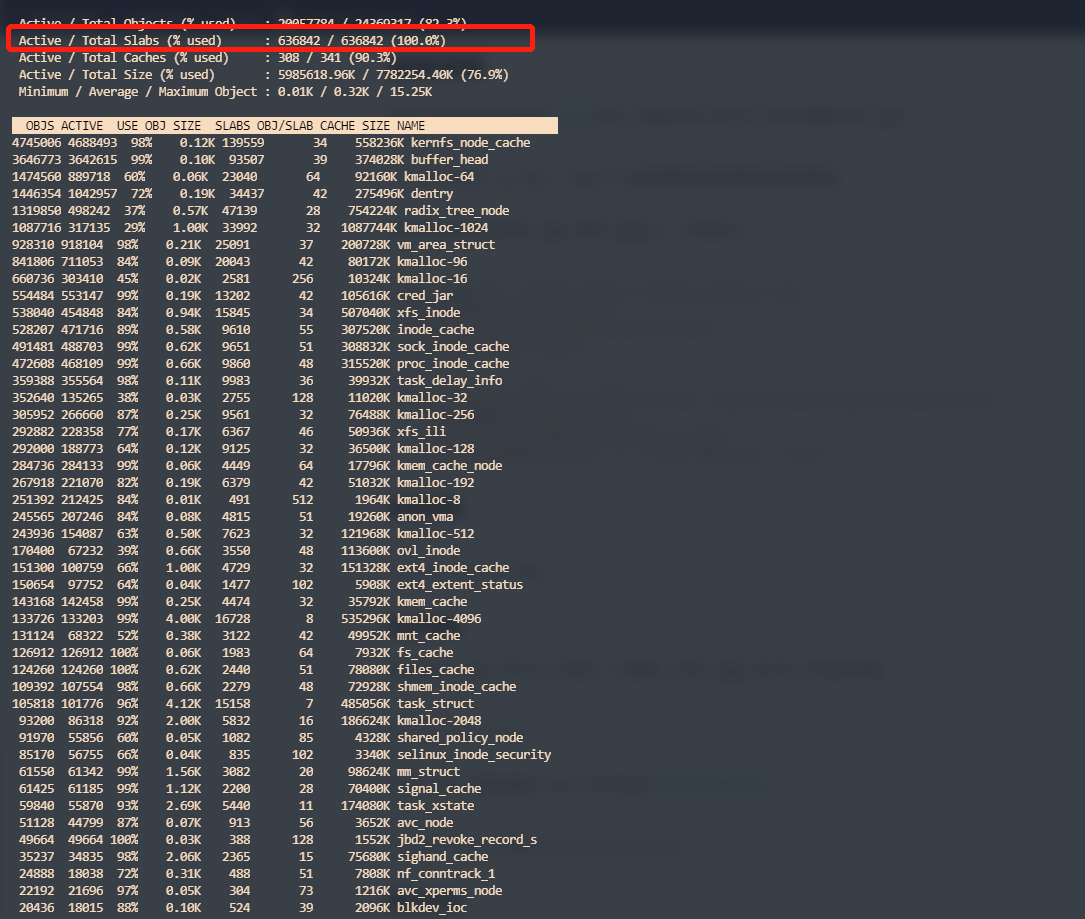
刚开始以为是上图红色部分是100%导致的,但是查看正常节点,发现这一栏都是100%,随即把这个导致的原因排除。
Linux的内存管理除了slab还有buddy,slab主要是解决外部碎片的,buddy则主要解决内部碎片。在新建cache的时候,slab需要依赖buddy来为之分配page,在释放cache的时候,slab也需要buddy来回收page。
下面我们再看看buddy的信息,通过cat /proc/buddyinfo命令查看。
# cat /proc/buddyinfo
Node 0, zone      DMA      0      1      0      1      1      1      1      0      1      1      3
Node 0, zone    DMA32    845   1286   1416   1030    755    562    403    241    149      0      0
Node 0, zone   Normal 104076 127563  70473  24828   7589   1506    176   5550   5297      0      0
Node 1, zone   Normal 108359 115466  52431  12910   3762    796    185     69   1147      0      0
可以发现碎片很多,10W多个单page,10W多个双page,而在正常机器上则很少。
# cat /proc/buddyinfo
Node 0, zone      DMA      1      0      0      1      2      1      1      0      1      1      3
Node 0, zone    DMA32   3826   2834   1174    361     82     24      7      3      0      0      0
Node 0, zone   Normal   2856   1703   1329    243     61      0      0      0      0      0      0
临时解决办法就是把cache drop掉。
echo 3 > /proc/sys/vm/drop_caches
当然,还可以调整内存的规整方式,即把低阶的page合并成高阶的。
echo 1 > /proc/sys/vm/compact_memory
或者
sysctl -w vm.compact_memory=1
当然这种开销会比较大。
最后在查看资料中,发现这是一个内核Bug。
Further investigation indicates that I'm probably hitting this kernel bug: OOM but no swap used. – Mark Feb 24 at 21:36
For anyone else who's experiencing this issue, the bug appears to have been fixed somewhere between 4.9.12 and 4.9.18.

– Mark Apr 11 at 20:23
最好的办法就是升级内核来解决。

若有收获,就点个赞吧
0 人点赞


