using System;using System.Collections.Generic;using System.Linq;using System.Text;using System.Threading.Tasks;using System.Xml;namespace _03创建XML{class Program{static void Main(string[] args){//通过代码来创建XML文档//1、引用命名空间//2、创建XML文档对象XmlDocument doc = new XmlDocument();//3、创建第一个行描述信息,并且添加到doc文档中XmlDeclaration dec = doc.CreateXmlDeclaration("1.0", "utf-8", null);doc.AppendChild(dec);//4、创建根节点XmlElement books = doc.CreateElement("Books");//将根节点添加到文档中doc.AppendChild(books);//5、给根节点Books创建子节点XmlElement book1 = doc.CreateElement("Book");//将book添加到根节点books.AppendChild(book1);//6、给Book1添加子节点XmlElement name1 = doc.CreateElement("Name");name1.InnerText = "金瓶梅";book1.AppendChild(name1);XmlElement price1 = doc.CreateElement("Price");price1.InnerText = "10";book1.AppendChild(price1);XmlElement des1 = doc.CreateElement("Des");des1.InnerText = "好看";book1.AppendChild(des1);XmlElement book2 = doc.CreateElement("Book");books.AppendChild(book2);XmlElement name2 = doc.CreateElement("Name");name2.InnerText = "金瓶梅";book2.AppendChild(name2);XmlElement price2= doc.CreateElement("Price");price2.InnerText = "10";book2.AppendChild(price2);XmlElement des2 = doc.CreateElement("Des");des2.InnerText = "好看";book2.AppendChild(des2);doc.Save("Books.xml");Console.WriteLine("保存成功");Console.ReadKey();}}}
最后保存的位置在
E:\VS2019_workspace\ConsoleApp1\bin\Debug\netcoreapp3.1\Books.xml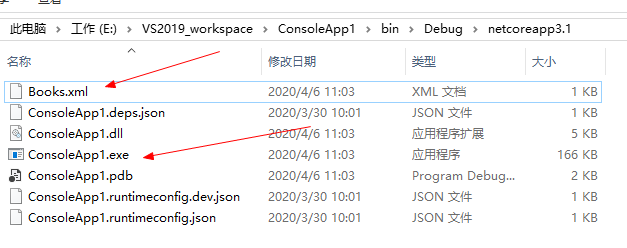
<?xml version="1.0" encoding="utf-8"?><Books><Book><Name>金瓶梅</Name><Price>10</Price><Des>好看</Des></Book><Book><Name>金瓶梅</Name><Price>10</Price><Des>好看</Des></Book></Books>

若有收获,就点个赞吧
0 人点赞


