1. Arthas(阿尔萨斯) 能为你做什么?

Arthas 是Alibaba开源的Java诊断工具,深受开发者喜爱。当你遇到以下类似问题而束手无策时,Arthas可以帮助你解决:
- 这个类从哪个 jar 包加载的?为什么会报各种类相关的 Exception?
- 我改的代码为什么没有执行到?难道是我没 commit?分支搞错了?
- 遇到问题无法在线上 debug,难道只能通过加日志再重新发布吗?
- 线上遇到某个用户的数据处理有问题,但线上同样无法 debug,线下无法重现!
- 是否有一个全局视角来查看系统的运行状况?
- 有什么办法可以监控到JVM的实时运行状态?
- 怎么快速定位应用的热点,生成火焰图?
Arthas支持JDK 6+,支持Linux/Mac/Winodws,采用命令行交互模式,同时提供丰富的 Tab 自动补全功能,进一步方便进行问题的定位和诊断。
2. Arthas安装
2.1 Windows安装
下载arthas-boot.jar,然后用java -jar的方式启动:
// 在windows中直接执行,如果没有curl,则需要安装。安装后重启cmd窗口curl -O https://alibaba.github.io/arthas/arthas-boot.jarjava -jar arthas-boot.jar
使用阿里云镜像下载
java -jar arthas-boot.jar --repo-mirror aliyun --use-http
2.2 Linux安装
与Linux一样,可以直接使用curl进行下载安装。
如果是离线环境,可以直接下载安装jar,然后上传到服务器上。
3. 快速入门一:attach一个进程
实现目标:
执行一个jar
java -jar arthas-demo.jar通过arthas进行attach一个进程:启动arthas,然后选择你要连接的程序,之后会启动arthas,就可以了。
- 如果要使用web浏览器进行操作,可以在arthas启动后,根据启动端口在浏览器中进行访问:http://locaohost:3658 ,网址在arthas启动的时候会给出

- 进行几种常见的命令操作,我们通过help可以看到常用命令。
[arthas@135024]$ help
help         Display Arthas Help
auth         Authenticates the current session
keymap       Display all the available keymap for the specified connection.
sc           Search all the classes loaded by JVM
sm           Search the method of classes loaded by JVM
classloader  Show classloader info
jad          Decompile class
getstatic    Show the static field of a class
monitor      Monitor method execution statistics, e.g. total/success/failure count, average rt, fail rate, etc.
stack        Display the stack trace for the specified class and method
thread       Display thread info, thread stack
trace        Trace the execution time of specified method invocation.
watch        Display the input/output parameter, return object, and thrown exception of specified method invocation
tt           Time Tunnel
jvm          Display the target JVM information
perfcounter  Display the perf counter information.
ognl         Execute ognl expression.
mc           Memory compiler, compiles java files into bytecode and class files in memory.
redefine     Redefine classes. @see Instrumentation#redefineClasses(ClassDefinition...)
retransform  Retransform classes. @see Instrumentation#retransformClasses(Class...)
dashboard    Overview of target jvm's thread, memory, gc, vm, tomcat info.
dump         Dump class byte array from JVM
heapdump     Heap dump
options      View and change various Arthas options
cls          Clear the screen
reset        Reset all the enhanced classes
version      Display Arthas version
session      Display current session information
sysprop      Display, and change the system properties.
sysenv       Display the system env.
vmoption     Display, and update the vm diagnostic options.
logger       Print logger info, and update the logger level
history      Display command history
cat          Concatenate and print files
base64       Encode and decode using Base64 representation
echo         write arguments to the standard output
pwd          Return working directory name
mbean        Display the mbean information
grep         grep command for pipes.
tee          tee command for pipes.
profiler     Async Profiler. https://github.com/jvm-profiling-tools/async-profiler
vmtool       jvm tool
stop         Stop/Shutdown Arthas server and exit the console.
4. 常用命令
- dashboard
- 通过thread命令获取arthas-demo.jar的MainClass
- 通过jad反编译MainClass
- watch:监视某个方法的执行情况。监视返回值和请求参数
- watch 的参数比较多,主要是因为它能在 4 个不同的场景观察对象
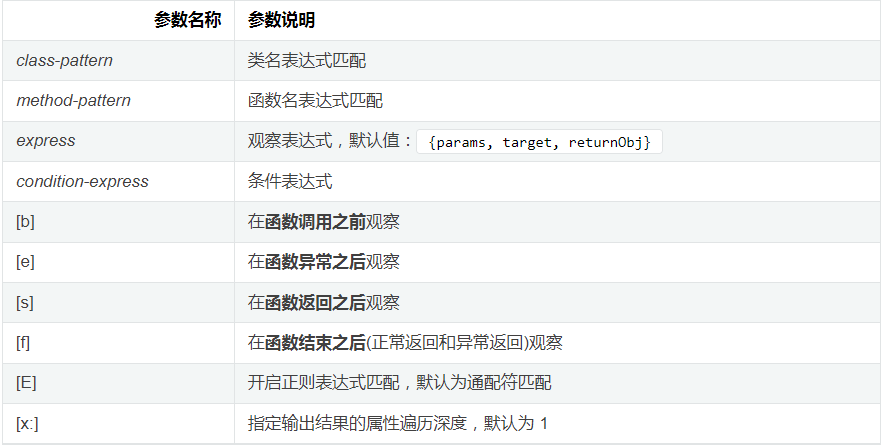
- 这里重点要说明的是观察表达式,观察表达式的构成主要由 ognl 表达式组成,所以你可以这样写”{params,returnObj}”,只要是一个合法的 ognl 表达式,都能被正常支持。
- trace:

5. 基础命令
- help:显示所有的命令的帮助命令
- cat:显示文件的内容。与Linux的命令是一致的。
grep:匹配查找。和linux里的grep命令类似,但它只能用于管道命令,可以使用的参数如下:
| 参数名 | 参数用途 | | —- | —- | | -n | 显示行号 | | -i | 忽略大小写查找 | | -m 行数 | 最大显示行数,要与查询字符串一起使用 | | -e “正则表达式” | 使用正则表达式查找 |pwd:显示当前所在路径
- cls:清屏
- session:查看当前session信息
- reset:重置增强类,将被Arthas增强的类全部还原。
- version:输出当前目标java进程所加载的arthas的版本
- history:展示历史命令
- quit:退出当前arthas的客户端。其余arthas客户端不受影响
- stop:关闭arthas服务器,所有arthas的客户端都会关闭
- keymap:显示Arthas的快捷键列表以及自定义快捷键
6. JVM相关的命令
- dashboard:仪表盘。

thread:线程相关
- 作用:查看当前JVM线程的堆栈信息
- 参数说明
| 参数名称 | 参数说明 | | —- | —- | | d | 线程id | | [n:] | 指定最忙的前N个线程并打印堆栈。 | | [b] | 找出当前阻塞其他线程的线程 | | [i ] | 指定cpu占比统计的采样间隔,单位为毫秒 |
jvm:jvm相关。查看当前JVM信息。
- sysporp:查看和修改JVM相关的属性。
- 查看单个属性:sysporp user.country
- 修改jvm的参数:sysprop user.country CN —-表示将用户国家修改为 CN。就是键值对的方式进行修改。
- sysenv:查看当前JVM的环境属性
- 查看全部:sysenv
- 查看单个属性:sysenv JAVA_HOME

- vmoption:显示、更新所有VM诊断相关的参数
- vmoption:查看全部
- vmoption PringGC: 查看GC的参数

- getstatic:查看类的静态属性。语法: getstatic 类名 属性名。
- 这里我们可以看到:我们获取类的静态变量,属性值是 @String类型的 accessToken

- 这里我们可以看到:我们获取类的静态变量,属性值是 @String类型的 accessToken
- ognl:执行ognl表达式,这是从3.0.5版本新增的功能。


若有收获,就点个赞吧
0 人点赞


