- SVG(可伸缩矢量图形 (Scalable Vector Graphics))
- SVG 用来定义用于网络的基于矢量的图形
- SVG 使用 XML 格式定义图形
- SVG 图像在放大或改变尺寸的情况下其图形质量不会有所损失
直接在HTML里面嵌入SVG代码
<svg xmlns="http://www.w3.org/2000/svg" version="1.1"><circle cx="100" cy="50" r="40" stroke="black" stroke-width="2" fill="red" /></svg>
SVG矩形 -
例一
<svg xmlns="http://www.w3.org/2000/svg" version="1.1"><rectwidth="300"height="100"style="fill: rgb(0, 0, 255); stroke-width: 1; stroke: rgb(0, 0, 0)"/></svg>
解析
- rect 元素的
width和height属性可定义矩形的高度和宽度 style属性用来定义 CSS 属性- CSS 的
fill属性定义矩形的填充颜色(rgb 值、颜色名或者十六进制值) - CSS 的
stroke-width属性定义矩形边框的宽度 -
例二
<svg xmlns="http://www.w3.org/2000/svg" version="1.1"><rectx="50"y="20"width="150"height="150"style="fill: blue;stroke: pink;stroke-width: 5;fill-opacity: 0.1;stroke-opacity: 0.9;"/></svg>
解析
x属性定义矩形的左侧位置(例如,x=”0” 定义矩形到浏览器窗口左侧的距离是 0px)y属性定义矩形的顶端位置(例如,y=”0” 定义矩形到浏览器窗口顶端的距离是 0px)- CSS 的
fill-opacity属性定义填充颜色透明度(合法的范围是:0 - 1) CSS 的
stroke-opacity属性定义轮廓颜色的透明度(合法的范围是:0 - 1)例三
<svg xmlns="http://www.w3.org/2000/svg" version="1.1"><rectx="50"y="20"width="150"height="150"style="fill: blue;stroke: pink;stroke-width: 5;opacity: 0.9"/></svg>
解析
CSS
opacity属性用于定义了元素的透明值 (范围: 0 到 1)。例四
<svg xmlns="http://www.w3.org/2000/svg" version="1.1"><rectx="50"y="20"rx="20"ry="20"width="150"height="150"style="fill: red; stroke: black; stroke-width: 5; opacity: 0.5"/></svg>
解析
rx和ry属性可使矩形产生圆角。
SVG圆形 -
<svg xmlns="http://www.w3.org/2000/svg" version="1.1"><circlecx="100"cy="50"r="40"stroke="black"stroke-width="2"fill="red"/></svg>
解析
cx和cy属性定义圆点的x和y坐标。如果省略cx和cy,圆的中心会被设置为(0, 0)r属性定义圆的半径
SVG椭圆 -
<svg xmlns="http://www.w3.org/2000/svg" version="1.1"><ellipsecx="300"cy="80"rx="100"ry="50"style="fill: yellow; stroke: purple; stroke-width: 2"/></svg>
解析
CX属性定义的椭圆中心的x坐标CY属性定义的椭圆中心的y坐标RX属性定义的水平半径RY属性定义的垂直半径
SVG直线 -
<svg xmlns="http://www.w3.org/2000/svg" version="1.1"><linex1="0"y1="0"x2="200"y2="200"style="stroke: rgb(255, 0, 0); stroke-width: 2"/></svg>
解析
x1属性在 x 轴定义线条的开始y1属性在 y 轴定义线条的开始x2属性在 x 轴定义线条的结束y2属性在 y 轴定义线条的结束
SVG多边形 -
三边型如下,四边形同理
<svg height="210" width="500"><polygonpoints="200,10 250,190 160,210"style="fill: lime; stroke: purple; stroke-width: 1"/></svg>
解析
-
星型
<svg height="210" width="500"><polygonpoints="100,10 40,198 190,78 10,78 160,198"style="fill: lime;stroke: purple;stroke-width: 5;fill-rule: evenodd;"/></svg>
解析
points属性定义五个角fill-rule属性有两个值nonzero|evenodd,用于确定一个形状的内部(即可被填充的区域)
SVG多段线 -
<svg xmlns="http://www.w3.org/2000/svg" version="1.1"><polylinepoints="20,20 40,25 60,40 80,120 120,140 200,180"style="fill: none; stroke: black; stroke-width: 3"/></svg>
楼梯线
<svg xmlns="http://www.w3.org/2000/svg" version="1.1"><polylinepoints="0,40 40,40 40,80 80,80 80,120 120,120 120,160"style="fill: white; stroke: red; stroke-width: 4"/></svg>
SVG 路径 -
定义路径数据的命令
- M = moveto
- L = lineto
- H = horizontal lineto
- V = vertical lineto
- C = curveto
- S = smooth curveto
- Q = quadratic Bézier curve
- T = smooth quadratic Bézier curveto
- A = elliptical Arc
Z = closepath
<svg xmlns="http://www.w3.org/2000/svg" version="1.1"><path d="M150 0 L75 200 L225 200 Z" /></svg>
解析
path属性用来定义一个路径
- 从150 0开始连线到75 200,再连线到225 200,最后闭合路径
二次方贝塞尔曲线(复杂曲线)
<svgxmlns="http://www.w3.org/2000/svg"version="1.1"height="400"width="450"><pathid="lineAB"d="M 100 350 l 150 -300"stroke="red"stroke-width="3"fill="none"/><pathid="lineBC"d="M 250 50 l 150 300"stroke="red"stroke-width="3"fill="none"/><path d="M 175 200 l 150 0" stroke="green" stroke-width="3" fill="none" /><pathd="M 100 350 q 150 -300 300 0"stroke="blue"stroke-width="5"fill="none"/><!-- Mark relevant points --><g stroke="black" stroke-width="3" fill="black"><circle id="pointA" cx="100" cy="350" r="3" /><circle id="pointB" cx="250" cy="50" r="3" /><circle id="pointC" cx="400" cy="350" r="3" /></g><!-- Label the points --><gfont-size="30"font="sans-serif"fill="black"stroke="none"text-anchor="middle"><text x="100" y="350" dx="-30">A</text><text x="250" y="50" dy="-10">B</text><text x="400" y="350" dx="30">C</text></g></svg>
SVG文本 -
旋转的文本
<svg xmlns="http://www.w3.org/2000/svg" version="1.1"><text x="0" y="15" fill="red" transform="rotate(30 20,40)">I love SVG</text></svg>
路径上的文字
<svgxmlns="http://www.w3.org/2000/svg"version="1.1"xmlns:xlink="http://www.w3.org/1999/xlink"><defs><path id="path1" d="M75,20 a1,1 0 0,0 100,0" /></defs><text x="10" y="100" style="fill: red"><textPath xlink:href="#path1">I love SVG I love SVG</textPath></text></svg>
解析
defs元素允许我们定义以后需要重复使用的图形元素。
<svg xmlns="http://www.w3.org/2000/svg" version="1.1"><text x="10" y="20" style="fill: red">Several lines:<tspan dx="10" dy="45">First line</tspan><tspan dx="10" dy="45">Second line</tspan></text></svg>
解析
tspan元素可以包含不同的格式和位置,可以安排任何分小组与tspan元素的数量
SVG Stroke属性
<svg xmlns="http://www.w3.org/2000/svg" version="1.1"><g fill="none"><path stroke="red" d="M5 20 l215 0" /><path stroke="black" d="M5 40 l215 0" /><path stroke="blue" d="M5 60 l215 0" /></g></svg>
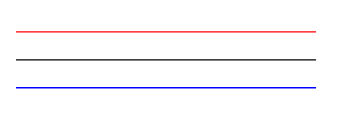
stroke-width
定义当前对象的轮廓的宽度
<svg xmlns="http://www.w3.org/2000/svg" version="1.1"><g fill="none" stroke="black"><path stroke-width="2" d="M5 20 l215 0" /><path stroke-width="14" d="M5 40 l215 0" /><path stroke-width="6" d="M5 60 l215 0" /></g></svg>
stroke-linecap
定义不同类型的开放路径的终结
<svgwidth="120"height="120"viewPort="0 0 120 120"version="1.1"xmlns="http://www.w3.org/2000/svg"><linestroke-linecap="butt"x1="30"y1="30"x2="30"y2="90"stroke="black"stroke-width="20"/><linestroke-linecap="round"x1="60"y1="30"x2="60"y2="90"stroke="black"stroke-width="20"/><linestroke-linecap="square"x1="90"y1="30"x2="90"y2="90"stroke="black"stroke-width="20"/><path d="M30,30 L30,90 M60,30 L60,90 M90,30 L90,90" stroke="white" /></svg>
stroke-dasharray
用于创建虚线,,用于控制描边的点划线的图案规范
<svg xmlns="http://www.w3.org/2000/svg" version="1.1"><g fill="none" stroke="black" stroke-width="4"><path stroke-dasharray="5,5" d="M5 20 l215 0" /><path stroke-dasharray="10,10" d="M5 40 l215 0" /><path stroke-dasharray="20,10,5,5,5,10" d="M5 60 l215 0" /></g></svg>
SVG 滤镜
通过
filter元素进行定义,定义在defs元素里
feGaussianBlur 模糊
创建模糊效果
<p><b>Note: </b>Internet Explorer and Safari do not support SVG filters yet!</p><svg xmlns="http://www.w3.org/2000/svg" version="1.1"><defs><filter id="f1" x="0" y="0"><feGaussianBlur in="SourceGraphic" stdDeviation="15" /></filter></defs><rectwidth="90"height="90"stroke="green"stroke-width="3"fill="yellow"filter="url(#f1)"/></svg>
解析
<filter>元素id属性定义一个滤镜的唯一名称<feGaussianBlur>元素定义模糊效果in="SourceGraphic"这个部分定义了由整个图像创建效果stdDeviation属性定义模糊量<rect>元素的滤镜属性用来把元素链接到”f1”滤镜阴影 feOffset + feBlend实例
例一用于创建阴影效果
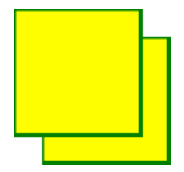
<p><b>Note: </b>Internet Explorer and Safari do not support SVG filters yet!</p><svg xmlns="http://www.w3.org/2000/svg" version="1.1"><defs><filter id="f1" x="0" y="0" width="200%" height="200%"><feOffset result="offOut" in="SourceGraphic" dx="20" dy="20" /><feBlend in="SourceGraphic" in2="offOut" mode="normal" /></filter></defs><rectwidth="90"height="90"stroke="red"stroke-width="5"fill="blue"filter="url(#f1)"/></svg>
- feOffset:负责定义位移
- feBlend:负责样式
例二
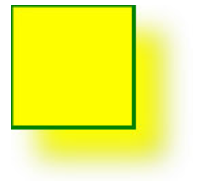
<p><b>Note: </b>Internet Explorer and Safari do not support SVG filters yet!</p><svg xmlns="http://www.w3.org/2000/svg" version="1.1"><defs><filter id="f1" x="0" y="0" width="200%" height="200%"><feOffset result="offOut" in="SourceGraphic" dx="20" dy="20" /><feGaussianBlur result="blurOut" in="offOut" stdDeviation="10" /><feBlend in="SourceGraphic" in2="blurOut" mode="normal" /></filter></defs><rectwidth="90"height="90"stroke="green"stroke-width="3"fill="yellow"filter="url(#f1)"/></svg>
<feGaussianBlur>元素的stdDeviation属性定义了模糊量
SVG 线性渐变 -
元素用于定义线性渐变。 标签必须嵌套在 的内部。 标签是definitions的缩写,它可对诸如渐变之类的特殊元素进行定义。
线性渐变可以定义为水平,垂直或角渐变:
- 当y1和y2相等,而x1和x2不同时,可创建水平渐变
- 当x1和x2相等,而y1和y2不同时,可创建垂直渐变
当x1和x2不同,且y1和y2不同时,可创建角形渐变
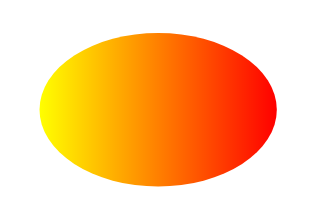
<svg xmlns="http://www.w3.org/2000/svg" version="1.1"><defs><linearGradient id="grad1" x1="0%" y1="0%" x2="100%" y2="0%"><stopoffset="0%"style="stop-color: rgb(255, 255, 0); stop-opacity: 1"/><stopoffset="100%"style="stop-color: rgb(255, 0, 0); stop-opacity: 1"/></linearGradient></defs><ellipse cx="200" cy="70" rx="85" ry="55" fill="url(#grad1)" /></svg>
解析
标签的id属性可为渐变定义一个唯一的名称 标签的X1,X2,Y1,Y2属性定义渐变开始和结束位置 - 渐变的颜色范围可由两种或多种颜色组成。每种颜色通过一个
标签来规定。offset属性用来定义渐变的开始和结束位置。 - 填充属性把 ellipse 元素链接到此渐变
SVG 放射性渐变 -
<svg xmlns="http://www.w3.org/2000/svg" version="1.1"><defs><radialGradient id="grad1" cx="50%" cy="50%" r="50%" fx="50%" fy="50%"><stopoffset="0%"style="stop-color: rgb(255, 255, 255); stop-opacity: 0"/><stopoffset="100%"style="stop-color: rgb(0, 0, 255); stop-opacity: 1"/></radialGradient></defs><ellipse cx="200" cy="70" rx="85" ry="55" fill="url(#grad1)" /></svg>

解析
<radialGradient>标签的 id 属性可为渐变定义一个唯一的名称CX,CY和r属性定义的最外层圆和Fx和Fy定义的最内层圆- 渐变颜色范围可以由两个或两个以上的颜色组成。每种颜色用一个
<stop>标签指定。 offset属性用来定义渐变色开始和结束- 填充属性把
ellipse元素链接到此渐变

若有收获,就点个赞吧
0 人点赞


