配置文件在 cd /usr/local/nginx/conf/nginx.conf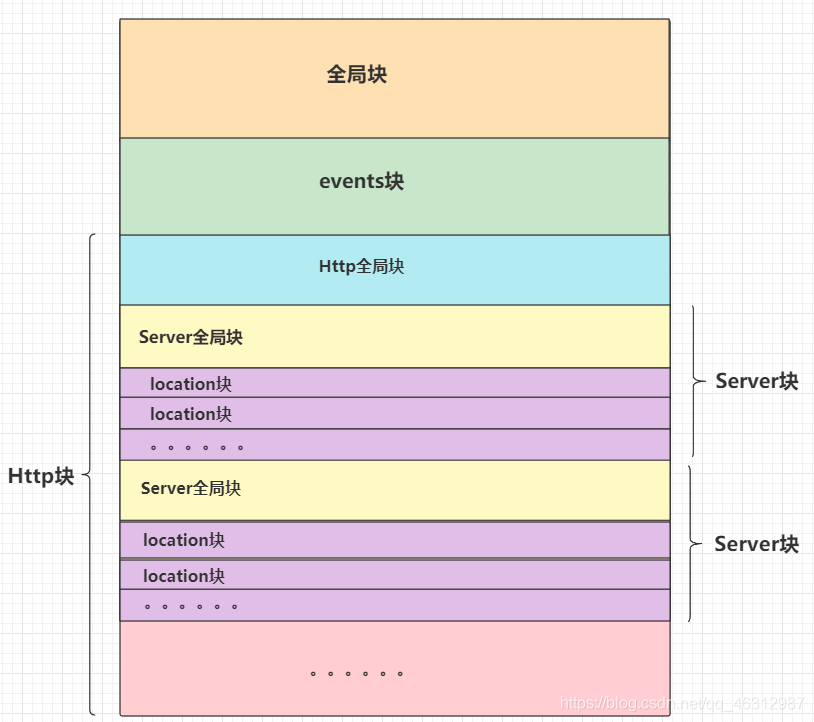
配置文件分为全局块、events块、http块
- 全局块:从配置文件到events块之间的内容,主要会设置一些影响nginx服务器整体运行的配置命令
- events:涉及的指令主要影响nginx服务器与用户的网络连接
- http:http包括http全局块和server块,设定http服务器,利用它的反向代理功能提供负载均衡支持
# Nginx用户及组:用户组。window下不指定#user nobody;# 表示nginx可支持的并发数,越大,支持并发量越多# 工作进程:数目。根据硬件调整,通常等于CPU数量或者2倍于CPU。worker_processes 1;# 错误日志:存放路径。#error_log logs/error.log;#error_log logs/error.log notice;#error_log logs/error.log info;# pid(进程标识符):存放路径#pid logs/nginx.pid;# worker_rlimit_nofile 204800;events {# nginx支持的最大连接数是多少。根据硬件调整,和前面工作进程配合起来用,# 尽量大,但是别把cpu跑到100%就行。每个进程允许的最多连接数,# 理论上每台nginx服务器的最大连接数为。worker_processes*worker_connectionsworker_connections 1024;accept_mutex on; #设置网路连接序列化,防止惊群现象发生,默认为onmulti_accept on; #设置一个进程是否同时接受多个网络连接,默认为off#事件驱动模型,select|poll|kqueue|epoll|resig|/dev/poll|eventport# 使用epoll的I/O 模型。linux建议epoll,FreeBSD建议采用kqueue,window下不指定。# use epoll;# keepalive超时时间。# keepalive_timeout 60;# 客户端请求头部的缓冲区大小# client_header_buffer_size 4k;}http {# 设定mime类型,类型由mime.type文件定义 文件扩展名与文件类型映射表include mime.types;default_type application/octet-stream; #默认文件类型,默认为text/plain#access_log off; #取消服务日志# 日志格式设置log_format myFormat '$remote_addr–$remote_user [$time_local] $request $status $body_bytes_sent $http_referer $http_user_agent $http_x_forwarded_for';access_log log/access.log myFormat; #combined为日志格式的默认值# 用了log_format指令设置了日志格式之后,需要用access_log指令指定日志文件的存放路径;#access_log logs/access.log main;sendfile on; #允许sendfile方式传输文件,默认为off,可以在http块,server块,location块。sendfile_max_chunk 100k; #每个进程每次调用传输数量不能大于设定的值,默认为0,即不设上限。keepalive_timeout 65; #连接超时时间,默认为75s,可以在http,server,location块。#tcp_nopush on;#keepalive_timeout 0;# server_names_hash_bucket_size 128;#gzip on;error_page 404 https://www.baidu.com; #错误页upstream mysvr {server 127.0.0.1:7878;server 192.168.10.121:3333 backup; #热备}server {keepalive_requests 120; #单连接请求上限次数。listen 80; # 监听端口号server_name localhost; #监听地址#charset koi8-r;#access_log logs/host.access.log main;location / { # #请求的url过滤,正则匹配,~为区分大小写,~*为不区分大小写。# root html; #根目录# index index.html index.htm; #设置默认页proxy_pass http://mysvr; #请求转向mysvr 定义的服务器列表deny 127.0.0.1; #拒绝的ipallow 172.18.5.54; #允许的ip}#error_page 404 /404.html;# redirect server error pages to the static page /50x.html#error_page 500 502 503 504 /50x.html;location = /50x.html {root html;}# proxy the PHP scripts to Apache listening on 127.0.0.1:80##location ~ \.php$ {# proxy_pass http://127.0.0.1;#}# pass the PHP scripts to FastCGI server listening on 127.0.0.1:9000##location ~ \.php$ {# root html;# fastcgi_pass 127.0.0.1:9000;# fastcgi_index index.php;# fastcgi_param SCRIPT_FILENAME /scripts$fastcgi_script_name;# include fastcgi_params;#}# deny access to .htaccess files, if Apache's document root# concurs with nginx's one##location ~ /\.ht {# deny all;#}}# another virtual host using mix of IP-, name-, and port-based configuration##server {# listen 8000;# listen somename:8080;# server_name somename alias another.alias;# location / {# root html;# index index.html index.htm;# }#}# HTTPS server##server {# listen 443 ssl;# server_name localhost;# ssl_certificate cert.pem;# ssl_certificate_key cert.key;# ssl_session_cache shared:SSL:1m;# ssl_session_timeout 5m;# ssl_ciphers HIGH:!aNULL:!MD5;# ssl_prefer_server_ciphers on;# location / {# root html;# index index.html index.htm;# }#}}
全局块
user nobody;
Nginx用户及组:用户组。window下不指定worker_processes 1;
表示nginx可支持的并发数,越大,支持并发量越多
工作进程:数目。根据硬件调整,通常等于CPU数量或者2倍于CPU。
error_log logs/error.log;error_log logs/error.log notice;error_log logs/error.log info;
错误日志:存放路径。<br />`pid logs/nginx.pid;`<br /> pid(进程标识符):存放路径<br />`worker_rlimit_nofile 204800;`<br /> 指定进程可以打开的最大描述符:数目。这个指令是指当一个nginx进程打开的最多文件描述符数目,理论值应该是最多打开文件数(ulimit -n)与nginx进程数相除,但是nginx分配请求并不是那么均匀,所以最好与ulimit -n 的值保持一致。<br /> 现在在linux 2.6内核下开启文件打开数为65535,worker_rlimit_nofile就相应应该填写65535。<br /> 这是因为nginx调度时分配请求到进程并不是那么的均衡,所以假如填写10240,总并发量达到3-4万时就有进程可能超过10240了,这时会返回502错误。
events块
worker_connections 1024;
nginx支持的最大连接数是多少。根据硬件调整,和前面工作进程配合起来用,尽量大,但是别把cpu跑到100%就行。每个进程允许的最多连接数,理论上每台nginx服务器 的最大连接数为。worker_processes*worker_connectionsuse epoll;
使用epoll的I/O 模型。linux建议epoll,FreeBSD建议采用kqueue,window下不指定。
与apache相类,nginx针对不同的操作系统,有不同的事件模型
keepalive_timeout 60;
keepalive超时时间。client_header_buffer_size 4k;
客户端请求头部的缓冲区大小。这个可以根据你的系统分页大小来设置,一般一个请求头的大小不会超过1k,不过由于一般系统分页都要大于1k,所以这里设置为分页大小。
但也有client_header_buffer_size超过4k的情况,但是client_header_buffer_size该值必须设置为“系统分页大小”的整倍数。open_file_cache max=65535 inactive=60s;
这个将为打开文件指定缓存,默认是没有启用的,max指定缓存数量,建议和打开文件数一致,inactive是指经过多长时间文件没被请求后删除缓存。open_file_cache_valid 80s;
这个是指多长时间检查一次缓存的有效信息。open_file_cache_min_uses 1;
open_file_cache指令中的inactive参数时间内文件的最少使用次数,如果超过这个数字,文件描述符一直是在缓存中打开的,如上例,如果有一个文件在inactive时间内一次没被使用,它将被移除。
http
http全局块
include mime.types;
设定mime类型,类型由mime.type文件定义default_type application/octet-stream;
log_format main '$remote_addr - $remote_user [$time_local] "$request" ''$status $body_bytes_sent "$http_referer" ''"$http_user_agent" "$http_x_forwarded_for"';log_format log404 '$status [$time_local] $remote_addr $host$request_uri $sent_http_location';
日志格式设置。<br /> 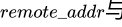http_x_forwarded_for用以记录客户端的ip地址;<br /> $remote_user:用来记录客户端用户名称;<br /> $time_local: 用来记录访问时间与时区;<br /> $request: 用来记录请求的url与http协议;<br /> $status: 用来记录请求状态;成功是200,<br /> $body_bytes_sent :记录发送给客户端文件主体内容大小;<br /> $http_referer:用来记录从那个页面链接访问过来的;<br /> $http_user_agent:记录客户浏览器的相关信息;
#access_log logs/access.log main;#access_log logs/host.access.404.log log404;
用了logformat指令设置了日志格式之后,需要用access_log指令指定日志文件的存放路径;server_names_hash_bucket_size 128;
保存服务器名字的hash表是由指令server_names_hash_max_size 和server_names_hash_bucket_size所控制的。参数hash bucket size总是等于hash表的大小,并且是一路处理器缓存大小的倍数。在减少了在内存中的存取次数后,使在处理器中加速查找hash表键值成为可能。如果hash bucket size等于一路处理器缓存的大小,那么在查找键的时候,最坏的情况下在内存中查找的次数为2。第一次是确定存储单元的地址,第二次是在存储单元中查找键 值。因此,如果Nginx给出需要增大hash max size 或 hash bucket size的提示,那么首要的是增大前一个参数的大小.client_header_buffer_size 4k;
客户端请求头部的缓冲区大小。这个可以根据你的系统分页大小来设置,一般一个请求的头部大小不会超过1k,不过由于一般系统分页都要大于1k,所以这里设置为分页大小。分页大小可以用命令getconf PAGESIZE取得。large_client_header_buffers 8 128k;
客户请求头缓冲大小。nginx默认会用client_header_buffer_size这个buffer来读取header值,如果header过大,它会使用large_client_header_buffers来读取。open_file_cache max=102400 inactive=20s;
这个指令指定缓存是否启用open_file_cache_errors
语法:open_file_cache_errors on | off 默认值:open_file_cache_errors off 使用字段:http, server, location 这个指令指定是否在搜索一个文件是记录cache错误.open_file_cache_min_uses
语法:open_file_cache_min_uses number 默认值:open_file_cache_min_uses 1 使用字段:http, server, location 这个指令指定了在open_file_cache指令无效的参数中一定的时间范围内可以使用的最小文件数,如果使用更大的值,文件描述符在cache中总是打开状态.open_file_cache_valid
语法:open_file_cache_valid time 默认值:open_file_cache_valid 60 使用字段:http, server, location 这个指令指定了何时需要检查open_file_cache中缓存项目的有效信息.client_max_body_size 300m;
设定通过nginx上传文件的大小sendfile on;
sendfile指令指定 nginx 是否调用sendfile 函数(zero copy 方式)来输出文件,对于普通应用,必须设为on。如果用来进行下载等应用磁盘IO重负载应用,可设置为off,以平衡磁盘与网络IO处理速度,降低系统uptime。tcp_nopush on;
此选项允许或禁止使用socke的TCP_CORK的选项,此选项仅在使用sendfile的时候使用proxy_connect_timeout 90;
`后端服务器连接的超时时间发起握手等候响应超时时间proxy_read_timeout 180;
连接成功后等候后端服务器响应时间其实已经进入后端的排队之中等候处理(也可以说是后端服务器处理请求的时间)proxy_send_timeout 180;
后端服务器数据回传时间_就是在规定时间之内后端服务器必须传完所有的数据proxy_buffer_size 256k;
设置从被代理服务器读取的第一部分应答的缓冲区大小,通常情况下这部分应答中包含一个小的应答头,默认情况下这个值的大小为指令proxy_buffers中指定的一个缓冲区的大小,不过可以将其设置为更小proxy_buffers 4 256k;
设置用于读取应答(来自被代理服务器)的缓冲区数目和大小,默认情况也为分页大小,根据操作系统的不同可能是4k或者8kproxy_busy_buffers_size 256kproxy_temp_file_write_size 256k;
设置在写入proxy_temp_path时数据的大小,预防一个工作进程在传递文件时阻塞太长proxy_temp_path /data0/proxy_temp_dir;
proxy_temp_path和proxy_cache_path指定的路径必须在同一分区proxy_cache_path /data0/proxy_cache_dir levels=1:2 keys_zone=cache_one:200m inactive=1d max_size=30g;
设置内存缓存空间大小为200MB,1天没有被访问的内容自动清除,硬盘缓存空间大小为30GB。keepalive_timeout 65;
keepalive超时时间。tcp_nodelay on;
client_body_buffer_size 512k;
如果把它设置为比较大的数值,例如256k,那么,无论使用firefox还是IE浏览器,来提交任意小于256k的图片,都很正常。如果注释该指令,使用默认的client_body_buffer_size设置,也就是操作系统页面大小的两倍,8k或者16k,问题就出现了。无论使用firefox4.0还是IE8.0,提交一个比较大,200k左右的图片,都返回500 Internal Server Error错误proxy_intercept_errors on;
表示使nginx阻止HTTP应答代码为400或者更高的应答。gzip on;
server块
这块和虚拟主机有密切关系,虚拟主机从用户角度看,和一台独立的硬件主机是完全一样的,该技术的产生是为了节省互联网服务器硬件成本。每个 http 块可以包括多个 server 块,而每个 server 块就相当于一个虚拟主机。而每个 server 块也分为全局 server 块,以及可以同时包含多个 locaton 块。
server全局块
最常见的配置是本虚拟机主机的监听配置和本虚拟主机的名称或 IP 配置。
listen 80;
nginx当前监听的端口号server_name localhost;
当前主机名称charset koi8-r;access_log logs/host.access.log main;

若有收获,就点个赞吧
0 人点赞


