项目需求
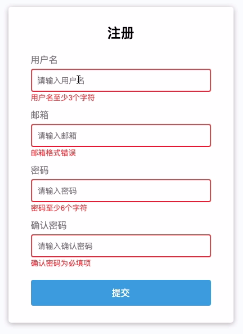


基础功能实现, 直接上代码
HTML部分:
<!DOCTYPE html><html lang="en"><head><meta charset="UTF-8"><meta name="viewport" content="width=device-width, initial-scale=1.0"><title>Form Validator</title><link rel="stylesheet" href="style.css"></head><body><div class="container"><form action="" id="form" class="form"><h2>注册</h2><div class="form-control"><label for="username">姓名</label><input type="text" id="username" placeholder="请输入用户名"><small>错误提示</small></div><div class="form-control"><label for="email">邮箱</label><input type="text" id="email" placeholder="请输入邮箱"><small>错误提示</small></div><div class="form-control success"><label for="password">密码</label><input type="password" id="password" placeholder="请输入密码"><small>错误提示</small></div><div class="form-control"><label for="password2">确认密码</label><input type="password" id="password2" placeholder="请输入确认密码"><small>错误提示</small></div><button>提交</button></form></div><script src="script.js"></script></body></html>
CSS部分:
:root {--success-color: #2ecc71;--error-color: #e74c3c;}* {margin: 0;padding: 0;box-sizing: border-box;}body {background-color: #f9f6fb;font-family: Arial, Helvetica, sans-serif;display: flex;align-items: center;justify-content: center;min-height: 100vh;}.container {background-color: #fff;border-radius: 5px;box-shadow: 0 2px 10px rgba(0, 0, 0, 0.3);}h2 {text-align: center;margin: 0 0 20px 0;}.form {padding: 30px 40px;}.form-control {margin-bottom: 20px;padding-bottom: 10px;position: relative;width: 400px;}.form-control label {color: #777;display: block;margin-bottom: 5px;}.form-control input {width: 100%;border: 2px solid #f0f0f0;border-radius: 4px;display: block;font-size: 14px;padding: 10px;}.form-control input:focus {border-color: #777;outline: 0;}.form-control.success input {border-color: var(--success-color);}.form-control.error input {border-color: var(--error-color);}.form-control small {color: var(--error-color);position: absolute;left: 0;bottom: -8px;visibility: hidden;}.form-control.error small {visibility: visible;}.form button {cursor: pointer;background-color: #3498db;border: 2px solid #3498db;border-radius: 4px;width: 100%;display: block;padding: 10px;margin-top: 20px;font-size: 16px;color: #fff;}
JS部分:
//获取元素// const document = window.documentconst form = document.getElementById('form')const username = document.getElementById('username')const email = document.getElementById('email')const password = document.getElementById('password')const password2 = document.getElementById('password2')//输入处理函数function showError(input, message){const formControl = input.parentElementformControl.className = 'form-control error'const small = formControl.querySelector('small')small.innerText = message}function showSuccess(input){const formControl = input.parentElementformControl.className = 'form-control success'}//邮箱验证正则function isValidEmail(email){const re = /^([A-Za-z0-9_\-\.])+\@([A-Za-z0-9_\-\.])+\.([A-Za-z]{2,4})$/;return re.test(String(email))}//添加事件监听form.addEventListener('submit', function(e){e.preventDefault()// console.log(username.value)if(username.value === ''){showError(username, '用户名为必填项')console.log(1)}else{showSuccess(username)}if(email.value === ''){showError(email, '邮箱为必填项')}else if (!isValidEmail(email.value)){showError(email, '邮箱格式错误')}else{showSuccess(email)}if(password.value === ''){showError(password, '密码为必填项')console.log(1)}else{showSuccess(password)console.log(2)}if(password2.value === ''){showError(password2, '确认密码为必填项')console.log(1)}else{showSuccess(password2)console.log(2)}})
重构
封装输入校验函数, 减少重复代码. 在此基础上, 让错误提示语有更多细节.
//邮箱验证正则function isValidEmail(email){const re = /^([A-Za-z0-9_\-\.])+\@([A-Za-z0-9_\-\.])+\.([A-Za-z]{2,4})$/;return re.test(String(email))}//提取控件关键字function getKeywords(input){return input.placeholder.slice(3)}//校验输入内容function checkRequired(inputArr){inputArr.forEach(function (input) {// console.log(input.value)if (input.value.trim() === '') { //用trim()方法去除字符串首尾空格showError(input, `${getKeywords(input)}为必填项`)} else {showSuccess(input)}})}//添加事件监听form.addEventListener('submit', function(e){e.preventDefault()checkRequired([username, email, password, password2])})
剩余功能实现
最后完善用户名与密码的长度要求, 封装邮箱校验函数, 完成密码匹配功能.
//获取元素// const document = window.documentconst form = document.getElementById('form')const username = document.getElementById('username')const email = document.getElementById('email')const password = document.getElementById('password')const password2 = document.getElementById('password2')//结果显示函数function showError(input, message){const formControl = input.parentElementformControl.className = 'form-control error'const small = formControl.querySelector('small')small.innerText = message}function showSuccess(input){const formControl = input.parentElementformControl.className = 'form-control success'}//邮箱校验function checkEmail(input){const re = /^([A-Za-z0-9_\-\.])+\@([A-Za-z0-9_\-\.])+\.([A-Za-z]{2,4})$/;// return re.test(String(email))// const result = re.test(String(email))if (re.test(input.value.trim())) {showSuccess(input)} else {showError(input, '邮箱格式错误')}}//提取控件关键字function getKeywords(input){return input.placeholder.slice(3)}//校验输入内容function checkRequired(inputArr){inputArr.forEach(function (input) {// console.log(input.value)if (input.value.trim() === '') { //用trim()方法去除字符串首尾空格showError(input, `${getKeywords(input)}为必填项`)} else {showSuccess(input)}})}//字符长度校验function checkLength(input, min, max) {if (input.value.length < min){showError(input, `${getKeywords(input)}至少${min}个字符`)} else if (input.value.length > max){showError(input, `${getKeywords(input)}至多${max}个字符`)} else {showSuccess(input)}}//验证密码匹配function checkPasswordMatch(input1, input2){if (input1.value !== input2.value){showError(input2, '密码不匹配')}}//添加事件监听form.addEventListener('submit', function(e){e.preventDefault()checkRequired([username, email, password, password2])checkLength(username, 3, 15)checkLength(password, 6, 12)checkEmail(email)checkPasswordMatch(password, password2)})

若有收获,就点个赞吧
0 人点赞


