程序的性能
- 时间复杂度
- 空间复杂度
时间复杂度
什么是时间复杂度?
简单来说,时间复杂度是一个函数,这个函数定性地描述了算法的运行时间。假设算法的数据规模为n,该算法的操作单元数量就是函数f(n),随着数据规模n的增加,算法执行时间的增长率和f(n)的增长率相同,这个增长趋势就叫做算法的渐进时间复杂度,简称时间复杂度,时间复杂度记作O(f(n))。O表示上界,算法在最坏情况下运行时间的上界时,O就是任意数据输入的运行时间的上界。
Markdown 和快捷键全覆盖
💡 Tips:语雀支持全功能 markdown 语法,可以点击文档编辑页右下角小键盘查看全部支持的语法和快捷键。
- 支持导入导出
markdown文件。 - 支持自动识别粘贴的
markdown格式内容转换为富文本。行内代码
💡 Tips:可通过 markdown 语法(
+ `code` ++空格)或者快捷键ctrl/cmd+E快速插入行内代码。
代码块
💡 Tips:输入
/代码块或点击上方工具栏点击上方工具栏,选择「代码块」、插入代码卡片。
代码块同时支持多种颜色主题:
export default class QuickSort extends Sort {sort(originalArray) {const array = [...originalArray];if (array.length <= 1) {return array;}// Init left and right arrays.const leftArray = [];const rightArray = [];// Take the first element of array as a pivot.const pivotElement = array.shift();const centerArray = [pivotElement];// Split all array elements between left, center and right arrays.while (array.length) {const currentElement = array.shift();// Call visiting callback.this.callbacks.visitingCallback(currentElement);if (this.comparator.equal(currentElement, pivotElement)) {centerArray.push(currentElement);} else if (this.comparator.lessThan(currentElement, pivotElement)) {leftArray.push(currentElement);} else {rightArray.push(currentElement);}}// Sort left and right arrays.const leftArraySorted = this.sort(leftArray);const rightArraySorted = this.sort(rightArray);return leftArraySorted.concat(centerArray, rightArraySorted);}}
export default class QuickSort extends Sort {sort(originalArray) {const array = [...originalArray];if (array.length <= 1) {return array;}// Init left and right arrays.const leftArray = [];const rightArray = [];// Take the first element of array as a pivot.const pivotElement = array.shift();const centerArray = [pivotElement];// Split all array elements between left, center and right arrays.while (array.length) {const currentElement = array.shift();// Call visiting callback.this.callbacks.visitingCallback(currentElement);if (this.comparator.equal(currentElement, pivotElement)) {centerArray.push(currentElement);} else if (this.comparator.lessThan(currentElement, pivotElement)) {leftArray.push(currentElement);} else {rightArray.push(currentElement);}}// Sort left and right arrays.const leftArraySorted = this.sort(leftArray);const rightArraySorted = this.sort(rightArray);return leftArraySorted.concat(centerArray, rightArraySorted);}}
export default class QuickSort extends Sort {sort(originalArray) {const array = [...originalArray];if (array.length <= 1) {return array;}// Init left and right arrays.const leftArray = [];const rightArray = [];// Take the first element of array as a pivot.const pivotElement = array.shift();const centerArray = [pivotElement];// Split all array elements between left, center and right arrays.while (array.length) {const currentElement = array.shift();// Call visiting callback.this.callbacks.visitingCallback(currentElement);if (this.comparator.equal(currentElement, pivotElement)) {centerArray.push(currentElement);} else if (this.comparator.lessThan(currentElement, pivotElement)) {leftArray.push(currentElement);} else {rightArray.push(currentElement);}}// Sort left and right arrays.const leftArraySorted = this.sort(leftArray);const rightArraySorted = this.sort(rightArray);return leftArraySorted.concat(centerArray, rightArraySorted);}}
数学公式
💡 Tips:输入
/公式或点击上方工具栏点击上方工具栏,选择「公式」、插入公式卡片。
 ,也支持块级嵌入。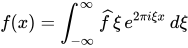
画板
💡 Tips:输入
/画板或点击上方工具栏,选择「画板」、绘制流程图、架构图等各种图形。
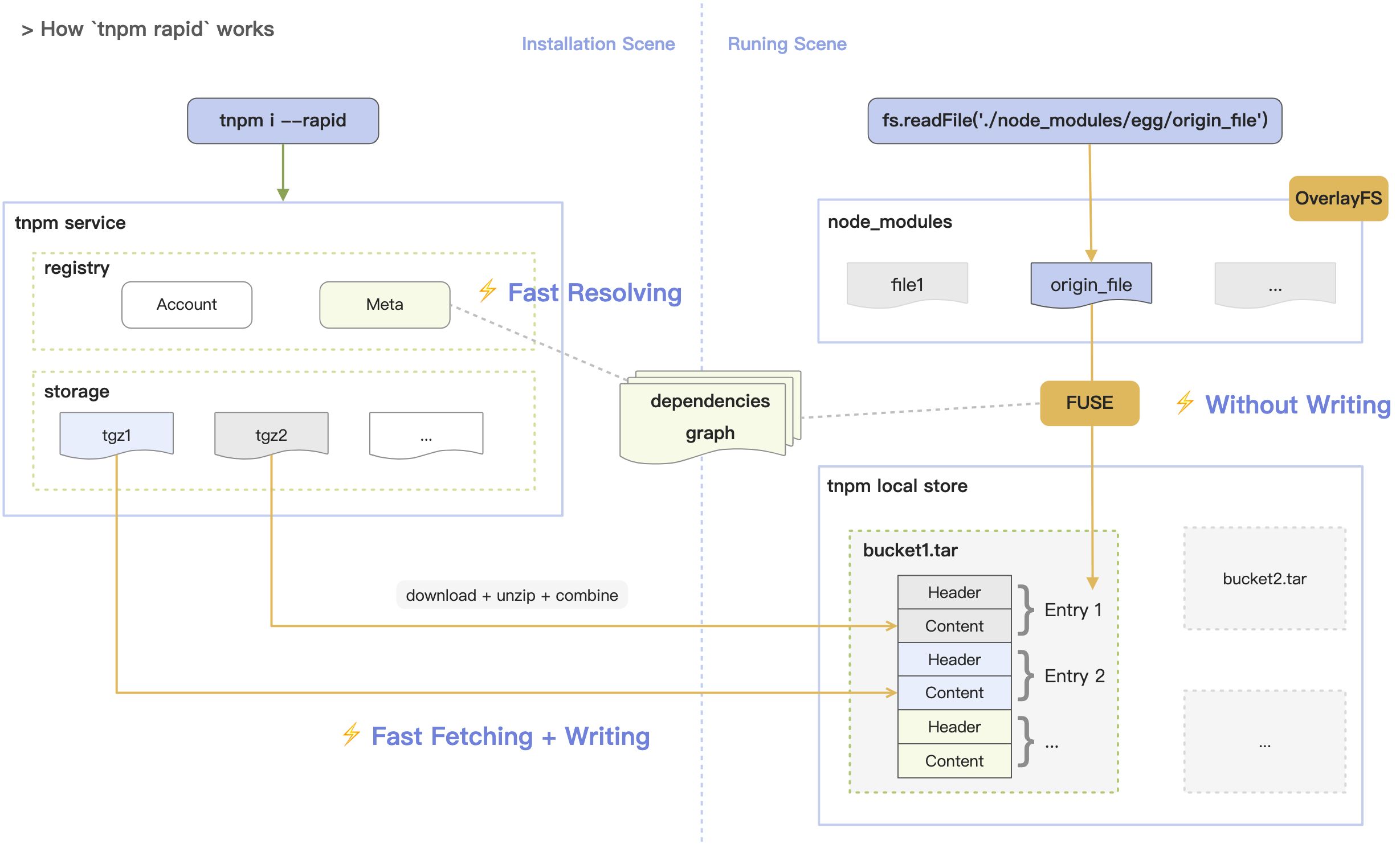

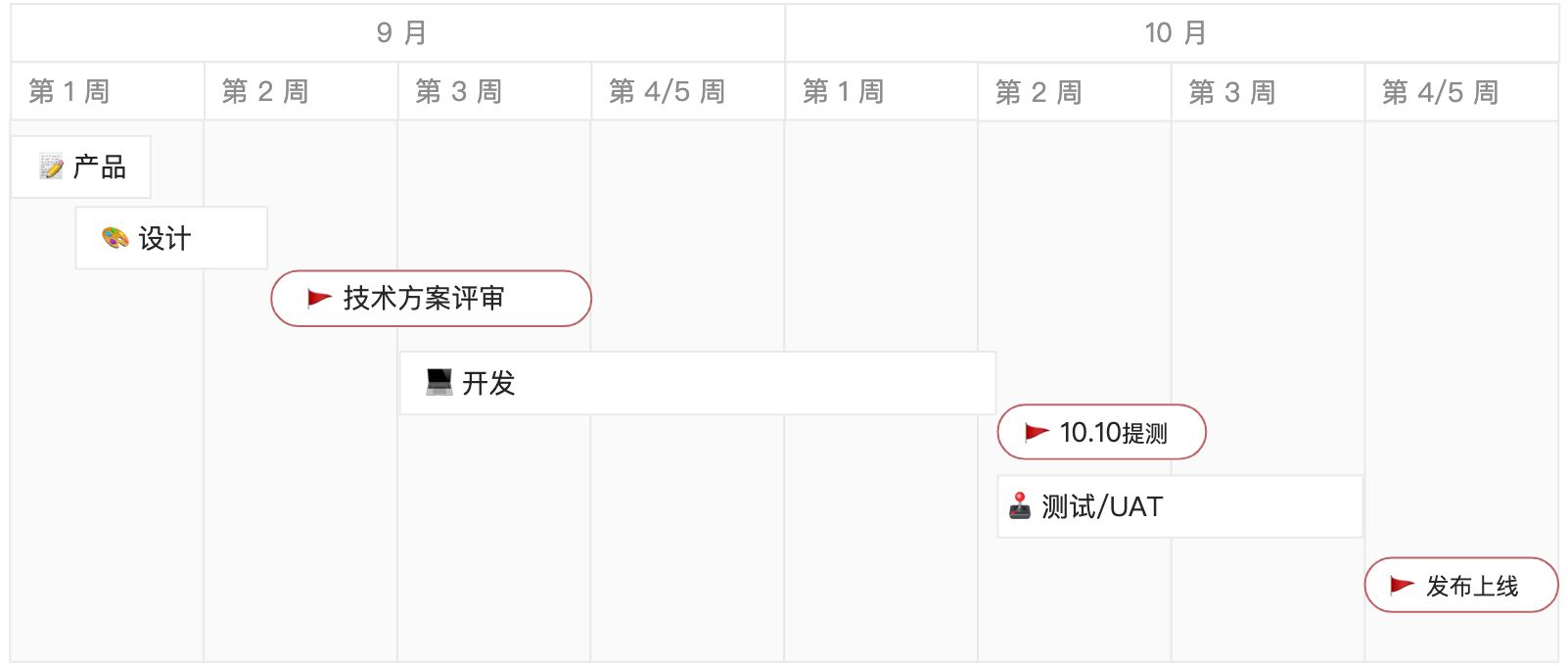
用户键入baidu.com后发生了什么?
💡 Tips:输入
/文本绘图点击上方工具栏,选择「文本绘图」、插入文本绘图卡片。
支持 plantuml、mermaid 等多种格式,点击预览可看到图形。具体代码样式见说明文档。
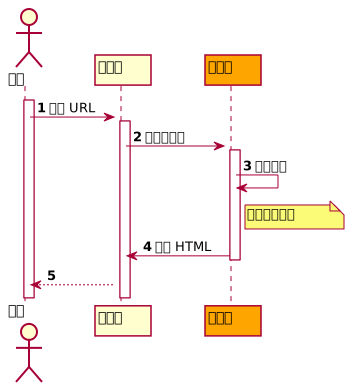


若有收获,就点个赞吧
0 人点赞


