第一部分 电商分析-核心交易
1.业务需求
本主题是电商系统业务中最关键的业务,电商运营活动都是围绕这个主题展开
选取的指标:订单数,商品数,支付金额。对这些指标按销售区域,商品类型分析
2.业务数据库表结构

业务数据库:数据源
- 交易订单表(trade_orders)
- 订单产品表(order_product)
- 产品信息表(product_info)
- 产品分类表(product_category)
- 商家店铺表(shops)
- 商家地域组织表(shop_admin_org)
- 支付方式(payments)
交易订单表
记录订单的信息
CREATE TABLE `lagou_trade_orders` (`orderId` bigint(11) NOT NULL AUTO_INCREMENT COMMENT '订单id',`orderNo` varchar(20) NOT NULL COMMENT '订单编号',`userId` bigint(11) NOT NULL COMMENT '用户id',`status` tinyint(4) NOT NULL DEFAULT '-2' COMMENT '订单状态 -3:用户拒收 -2:未付款的订单 -1:用户取消 0:待发货 1:配送中 2:用户确认收货',`productMoney` decimal(11,2) NOT NULL COMMENT '商品金额',`totalMoney` decimal(11,2) NOT NULL COMMENT '订单金额(包括运费)',`payMethod` tinyint(4) NOT NULL DEFAULT '0' COMMENT '支付方式,0:未知;1:支付宝,2:微信;3、现金;4、其他',`isPay` tinyint(4) NOT NULL DEFAULT '0' COMMENT '是否支付 0:未支付 1:已支付',`areaId` int(11) NOT NULL COMMENT '区域最低一级',`tradeSrc` tinyint(4) NOT NULL DEFAULT '0' COMMENT '订单来源 0:商城 1:微信 2:手机版 3:安卓App 4:苹果App',`tradeType` int(11) DEFAULT '0' COMMENT '订单类型',`isRefund` tinyint(4) NOT NULL DEFAULT '0' COMMENT '是否退款 0:否 1:是',`dataFlag` tinyint(4) NOT NULL DEFAULT '1' COMMENT '订单有效标志 -1:删除 1:有效',`createTime` varchar(25) NOT NULL COMMENT '下单时间',`payTime` varchar(25) DEFAULT NULL COMMENT '支付时间',`modifiedTime` timestamp NOT NULL DEFAULT '0000-00-00 00:00:00' COMMENT'订单更新时间',PRIMARY KEY (`orderId`)) ENGINE=InnoDB AUTO_INCREMENT=355 DEFAULT CHARSET=utf8;
订单产品表
记录订单中购买产品的信息,包括产品的数量,单价等
CREATE TABLE `lagou_order_product` (`id` bigint(11) NOT NULL AUTO_INCREMENT,`orderId` bigint(11) NOT NULL COMMENT '订单id',`productId` bigint(11) NOT NULL COMMENT '商品id',`productNum` bigint(11) NOT NULL DEFAULT '0' COMMENT '商品数量',`productPrice` decimal(11,2) NOT NULL DEFAULT '0.00' COMMENT '商品价格',`money` decimal(11,2) DEFAULT '0.00' COMMENT '付款金额',`extra` text COMMENT '额外信息',`createTime` varchar(25) DEFAULT NULL COMMENT '创建时间',PRIMARY KEY (`id`),KEY `orderId` (`orderId`),KEY `goodsId` (`productId`)) ENGINE=InnoDB AUTO_INCREMENT=1260 DEFAULT CHARSET=utf8;
产品信息表
记录产品的详细信息:对应商家ID,商品属性(是否上新,是否上架)
CREATE TABLE `lagou_product_info` (`productId` bigint(11) NOT NULL AUTO_INCREMENT COMMENT '商品id',`productName` varchar(200) NOT NULL COMMENT '商品名称',`shopId` bigint(11) NOT NULL COMMENT '门店ID',`price` decimal(11,2) NOT NULL DEFAULT '0.00' COMMENT '门店价',`isSale` tinyint(4) NOT NULL DEFAULT '1' COMMENT '是否上架 0:不上架 1:上架',`status` tinyint(4) NOT NULL DEFAULT '0' COMMENT '是否新品 0:否 1:是',`categoryId` int(11) NOT NULL COMMENT 'goodsCatId 最后一级商品分类ID',`createTime` varchar(25) NOT NULL,`modifyTime` datetime DEFAULT NULL ON UPDATE CURRENT_TIMESTAMP COMMENT'修改时间',PRIMARY KEY (`productId`),KEY `shopId` (`shopId`) USING BTREE,KEY `goodsStatus` (`isSale`)) ENGINE=InnoDB AUTO_INCREMENT=115909 DEFAULT CHARSET=utf8;
产品分类表
CREATE TABLE `lagou_product_category` (`catId` int(11) NOT NULL AUTO_INCREMENT COMMENT '品类ID',`parentId` int(11) NOT NULL COMMENT '父ID',`catName` varchar(20) NOT NULL COMMENT '分类名称',`isShow` tinyint(4) NOT NULL DEFAULT '1' COMMENT '是否显示 0:隐藏 1:显示',`sortNum` int(11) NOT NULL DEFAULT '0' COMMENT '排序号',`isDel` tinyint(4) NOT NULL DEFAULT '1' COMMENT '删除标志 1:有效 -1:删除',`createTime` varchar(25) NOT NULL COMMENT '建立时间',`level` tinyint(4) DEFAULT '0' COMMENT '分类级别,共3级',PRIMARY KEY (`catId`),KEY `parentId` (`parentId`,`isShow`,`isDel`)) ENGINE=InnoDB AUTO_INCREMENT=10442 DEFAULT CHARSET=utf8;
共分为三个级别
-- 第一级产品目录select catName, catid from lagou_product_category where level = 1;-- 查看电脑、办公的子类(查看二级目录)select catName, catid from lagou_product_category where level = 2 and parentId = 32;-- 查看电脑整机的子类(查看三级目录)select catName, catid from lagou_product_category where level = 3 and parentId = 10250;
商家店铺表
记录店铺的详细信息
CREATE TABLE `lagou_shops` (`shopId` int(11) NOT NULL AUTO_INCREMENT COMMENT '商铺ID,自增',`userId` int(11) NOT NULL COMMENT '商铺联系人ID',`areaId` int(11) DEFAULT '0',`shopName` varchar(100) DEFAULT '' COMMENT '商铺名称',`shopLevel` tinyint(4) NOT NULL DEFAULT '1' COMMENT '店铺等级',`status` tinyint(4) NOT NULL DEFAULT '1' COMMENT '商铺状态',`createTime` date DEFAULT NULL,`modifyTime` datetime DEFAULT NULL COMMENT '修改时间',PRIMARY KEY (`shopId`),KEY `shopStatus` (`status`)) ENGINE=InnoDB AUTO_INCREMENT=105317 DEFAULT CHARSET=utf8;
商家地域组织表
记录店铺所属区域
CREATE TABLE `lagou_shop_admin_org` (`id` int(11) NOT NULL AUTO_INCREMENT COMMENT '组织ID',`parentId` int(11) NOT NULL COMMENT '父ID',`orgName` varchar(100) NOT NULL COMMENT '组织名称',`orgLevel` tinyint(4) NOT NULL DEFAULT '1' COMMENT '组织级别1;总部及大区级部门;2:总部下属的各个部门及基部门;3:具体工作部门',`isDelete` tinyint(4) NOT NULL DEFAULT '0' COMMENT '删除标志,1:删除;0:有效',`createTime` varchar(25) DEFAULT NULL COMMENT '创建时间',`updateTime` varchar(25) DEFAULT NULL COMMENT '最后修改时间',`isShow` tinyint(4) NOT NULL DEFAULT '1' COMMENT '是否显示,0:是 1:否',`orgType` tinyint(4) NOT NULL DEFAULT '1' COMMENT '组织类型,0:总裁办;1:研发;2:销售;3:运营;4:产品',PRIMARY KEY (`id`),KEY `parentId` (`parentId`)) ENGINE=InnoDB AUTO_INCREMENT=100332 DEFAULT CHARSET=utf8;
支付方式表
记录支付方式
CREATE TABLE `lagou_payments` (`id` int(11) NOT NULL,`payMethod` varchar(20) DEFAULT NULL,`payName` varchar(255) DEFAULT NULL,`description` varchar(255) DEFAULT NULL,`payOrder` int(11) DEFAULT '0',`online` tinyint(4) DEFAULT NULL,PRIMARY KEY (`id`),KEY `payCode` (`payMethod`)) ENGINE=InnoDB DEFAULT CHARSET=utf8;
3.数据的导入
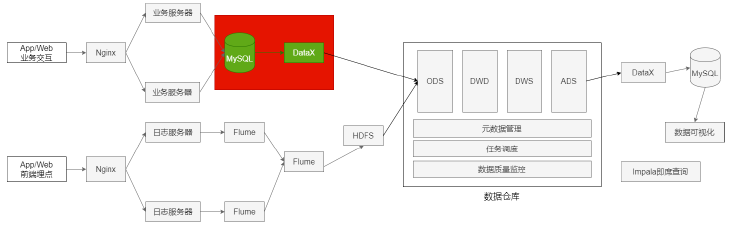
Mysql导出:全量导出,增量导出(导出前一天的数据)
业务数据保存在MySQL中,每日凌晨导入上一天的表数据。
表数据量少,采用全量方式导出MySQL
表数据量大,而且根据字段能区分出每天新增数据,采用增量方式导出MySQL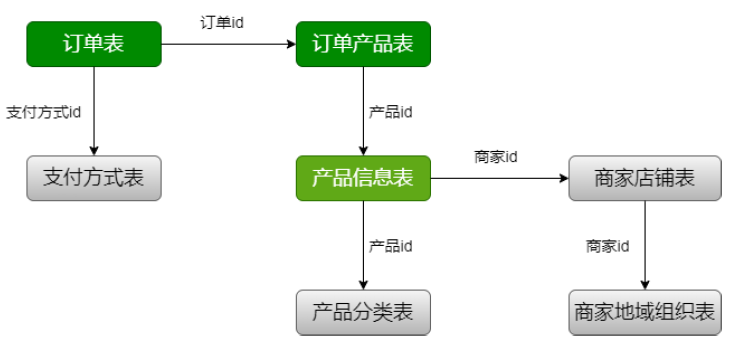
增量表3张:
订单表 lagou_trade_orders
订单产品表 lagou_order_produce
产品信息表lagou_product_info
全量表4张:
产品分类表lagou_product_category
商家店铺表lagou_shops
商家地域组织表lagou_shop_admin_org
支付方式表lagou_payment
3.1全量数据导入
Mysql->HDFS->Hive
MysqlReader->HDFSWriter
3.1.1产品分类表
hive建表ods.ods_trade_product_category
drop table if exists ods.ods_trade_product_category;create table ods.ods_trade_product_category(catId int,parentId int,catName string,isShow tinyint,sortNum int,isDel tinyint,createTime string,level tinyint)comment '产品分类表'partitioned by (dt string)row format delimited fields terminated by ',';
/data/lagoudw/json/product_category.json
{"job": {"setting": {"speed": {"channel": 1}},"content": [{"reader": {"name": "mysqlreader","parameter": {"username": "hive","password": "12345678","column": ["catId","parentId","catName","isShow","sortNum","isDel","createTime","level"],"connection": [{"table": ["lagou_product_category"],"jdbcUrl": ["jdbc:mysql://linux123:3306/ebiz"]}]}},"writer": {"name": "hdfswriter","parameter": {"defaultFS": "hdfs://linux121:9000","fileType": "text","path": "/user/hive/warehouse/ods.db/ods_trade_product_category/dt=$do_date","fileName": "product_category_$do_date","column": [{"name": "catId","type": "INT"},{"name": "parentId","type": "INT"},{"name": "catName","type": "STRING"},{"name": "isShow","type": "TINYINT"},{"name": "sortNum","type": "INT"},{"name": "isDel","type": "TINYINT"},{"name": "createTime","type": "STRING"},{"name": "level","type": "TINYINT"}],"writeMode": "append","fieldDelimiter": ","}}}]}}
数据量小的表没有必要使用多个channel;使用多个channel会生成多个小文件
执行命令之前要在HDFS上创建对应的目录:/user/data/trade.db/product_category/dt=yyyy-mm-dd
do_date='2020-07-01'
# 创建目录
hdfs dfs -mkdir -p /user/hive/warehouse/ods.db/ods_trade_product_category/dt=$do_date
# 数据迁移
python $DATAX_HOME/bin/datax.py -p "-Ddo_date=$do_date" /data/lagoudw/json/product_category.json
# 加载数据
hive -e "alter table ods.ods_trade_product_category add partition(dt='$do_date')"
3.1.2商家店铺表
lagou_shops====>ods.ods_trade_shops
hive建表
drop table if exists ods.ods_trade_shops;
create table ods.ods_trade_shops(
 shopId int,
 userId int,
 areaId int,
 shopName string,
 shopLevel tinyint,
 status tinyint,
 createTime string,
 modifyTime string
 )comment '商家店铺表'
 partitioned by (dt string)
 row format delimited fields terminated by ',';
/data/lagoudw/json/shops.json
{
  "job": {
    "setting": {
      "speed": {
        "channel": 1
      },
      "errorLimit": {
        "record": 0
      }
    },
    "content": [
      {
        "reader": {
          "name": "mysqlreader",
          "parameter": {
            "username": "hive",
            "password": "12345678",
            "column": [
              "shopId",
              "userId",
              "areaId",
              "shopName",
              "shopLevel",
              "status",
              "createTime",
              "modifyTime"
            ],
            "connection": [
              {
                "table": [
                  "lagou_shops"
                ],
                "jdbcUrl": [
                  "jdbc:mysql://linux123:3306/ebiz"
                ]
              }
            ]
          }
        },
        "writer": {
          "name": "hdfswriter",
          "parameter": {
            "defaultFS": "hdfs://linux121:9000",
            "fileType": "text",
            "path": "/user/hive/warehouse/ods.db/ods_trade_shops/dt=$do_date",
            "fileName": "shops_$do_date",
            "column": [
              {
                "name": "shopId",
                "type": "INT"
              },
              {
                "name": "userId",
                "type": "INT"
              },
              {
                "name": "areaId",
                "type": "INT"
              },
              {
                "name": "shopName",
                "type": "STRING"
              },
              {
                "name": "shopLevel",
                "type": "TINYINT"
              },
              {
                "name": "status",
                "type": "TINYINT"
              },
              {
                "name": "createTime",
                "type": "STRING"
              },
              {
                "name": "modifyTime",
                "type": "STRING"
              }
            ],
            "writeMode": "append",
            "fieldDelimiter": ","
          }
        }
      }
    ]
  }
}
do_date='2020-07-02'
# 创建目录
hdfs dfs -mkdir -p /user/hive/warehouse/ods.db/ods_trade_shops/dt=$do_date
# 数据迁移
python $DATAX_HOME/bin/datax.py -p "-Ddo_date=$do_date"
/data/lagoudw/json/shops.json
# 加载数据
hive -e "alter table ods.ods_trade_shops add partition(dt='$do_date')"
3.1.3商家地域组织表
lagou_shop_admin_org—>ods.ods_trade_shop_admin_org
hive建表
dorp table if exists ods.ods_trade_shop_admin_org;
create table ods.ods_trade_shop_admin_org(
  id int,
  parentId int,
  orgName string,
  orgLevel tinyint,
  isDelete tinyint,
  createTime string,
  updateTime string,
  isShow tinyint,
  orgType tinyint
  )comment '商家地域组织表'
  partitioned by (dt string)
  row format delimited fields terminated by ',';
/data/lagoudw/json/shop_org.json
{
  "job": {
    "setting": {
      "speed": {
        "channel": 1
      },
      "errorLimit": {
        "record": 0
      }
    },
    "content": [
      {
        "reader": {
          "name": "mysqlreader",
          "parameter": {
            "username": "hive",
            "password": "12345678",
            "column": [
              "id",
              "parentId",
              "orgName",
              "orgLevel",
              "isDelete",
              "createTime",
              "updateTime",
              "isShow",
              "orgType"
            ],
            "connection": [
              {
                "table": [
                  "lagou_shop_admin_org"
                ],
                "jdbcUrl": [
                  "jdbc:mysql://linux123:3306/ebiz"
                ]
              }
            ]
          }
        },
        "writer": {
          "name": "hdfswriter",
          "parameter": {
            "defaultFS": "hdfs://linux121:9000",
            "fileType": "text",
            "path": "/user/hive/warehouse/ods.db/ods_trade_shop_admin_org/dt=$do_date",
            "fileName": "shop_admin_org_$do_date.dat",
            "column": [
              {
                "name": "id",
                "type": "INT"
              },
              {
                "name": "parentId",
                "type": "INT"
              },
              {
                "name": "orgName",
                "type": "STRING"
              },
              {
                "name": "orgLevel",
                "type": "TINYINT"
              },
              {
                "name": "isDelete",
                "type": "TINYINT"
              },
              {
                "name": "createTime",
                "type": "STRING"
              },
              {
                "name": "updateTime",
                "type": "STRING"
              },
              {
                "name": "isShow",
                "type": "TINYINT"
              },
              {
                "name": "orgType",
                "type": "TINYINT"
              }
            ],
            "writeMode": "append",
            "fieldDelimiter": ","
          }
        }
      }
    ]
  }
}
do_date='2020-07-01'
# 创建目录
hdfs dfs -mkdir -p /user/hive/warehouse/ods.db/ods_trade_shop_admin_org/dt=$do_date
# 数据迁移
python $DATAX_HOME/bin/datax.py -p "-Ddo_date=$do_date" /data/lagoudw/json/shop_org.json
# 加载数据
hive -e "alter table ods.ods_trade_shop_admin_org add partition(dt='$do_date')"
3.1.4支付方式表
Hive建表
drop table if exists ods.ods_trade_payments;
create table ods.ods_trade_payments(
  id int,
  payMethod string,
  payName string,
  description string,
  payOrder int,
  online tinyint
  ) comment '支付方式表'
partitioned by (dt string)
row format delimited fields terminated by ',';
payments.json
{
  "job": {
    "setting": {
      "speed": {
        "channel": 1
      },
      "errorLimit": {
        "record": 0
      }
    },
    "content": [
      {
        "reader": {
          "name": "mysqlreader",
          "parameter": {
            "username": "hive",
            "password": "12345678",
            "column": [
              "id",
              "payMethod",
              "payName",
              "description",
              "payOrder",
              "online"
            ],
            "connection": [
              {
                "table": [
                  "lagou_payments"
                ],
                "jdbcUrl": [
                  "jdbc:mysql://linux123:3306/ebiz"
                ]
              }
            ]
          }
        },
        "writer": {
          "name": "hdfswriter",
          "parameter": {
            "defaultFS": "hdfs://linux121:9000",
            "fileType": "text",
            "path": "/user/hive/warehouse/ods.db/ods_trade_payments",
            "fileName": "payments_$do_date.dat",
            "column": [
              {
                "name": "id",
                "type": "INT"
              },
              {
                "name": "payMethod",
                "type": "STRING"
              },
              {
                "name": "payName",
                "type": "STRING"
              },
              {
                "name": "description",
                "type": "STRING"
              },
              {
                "name": "payOrder",
                "type": "INT"
              },
              {
                "name": "online",
                "type": "TINYINT"
              }
            ],
            "writeMode": "append",
            "fieldDelimiter": ","
          }
        }
      }
    ]
  }
}
do_date='2020-07-01'
#创建目录
hdfs dfs -mkdir -p /user/hive/warehouse/ods.db/ods_trade_payments/dt=2020-07-01
# 数据迁移
python $DATAX_HOME/bin/datax.py -p "-Ddo_date=2020-07-01" /data/lagoudw/json/payments.json
3.2增量数据导入
增量表:
- 订单表 lagou_trade_orders
- 订单产品表 lagou_order_produce
- 产品信息表 lagou_product_info
初始数据装载(执行一次),可以将前面的全量加载作为初始数据装载
每日加载增量数据(每日数据形成分区)
3.2.1订单表
lagou_trade_orders ———>ods.ods_trade_orders
hive建表
drop table if exists ods.ods_trade_orders;
create table ods.ods_trade_orders(
  orderId int,
  orderNo string,
  userId bigint,
  status tinyint,
  productMoney float,
  totalMoney float,
  payMethod tinyint,
  isPay tinyint,
  areaId int,
  tradeSrc tinyint,
  tradeType int,
  isRefund tinyint,
  dataFlag tinyint,
  createTime string,
  payTime string,
  modifiedTime string
  ) comment '订单表'
  partitioned by (dt string)
  row format delimited fields terminated by ','
  location '/user/data/trade.db/orders/';
/data/lagoudw/json/orders.json
条件的选择,选择时间字段modifiedTime
{
  "job": {
    "setting": {
      "speed": {
        "channel": 1
      },
      "errorLimit": {
        "record": 0
      }
    },
    "content": [
      {
        "reader": {
          "name": "mysqlreader",
          "parameter": {
            "username": "hive",
            "password": "12345678",
            "connection": [
              {
                "querySql": [
                  "select orderId, orderNo, userId, status,
                  productMoney, totalMoney, payMethod, isPay,
                  areaId, tradeSrc,tradeType,isRefund, dataFlag,
                  createTime, payTime, modifiedTime
                  from lagou_trade_orders where date_format(modifiedTime, '%Y-%m-%d')='$do_date'"
                ],
                "jdbcUrl": [
                  "jdbc:mysql://linux123:3306/ebiz"
                ]
              }
            ]
          }
        },
        "writer": {
          "name": "hdfswriter",
          "parameter": {
            "defaultFS": "hdfs://linux121:9000",
            "fileType": "text",
            "path": "/user/data/trade.db/orders/dt=$do_date",
            "fileName": "orders_$do_date",
            "column": [
              {
                "name": "orderId",
                "type": "INT"
              },
              {
                "name": "orderNo",
                "type": "STRING"
              },
              {
                "name": "userId",
                "type": "BIGINT"
              },
              {
                "name": "status",
                "type": "TINYINT"
              },
              {
                "name": "productMoney",
                "type": "Float"
              },
              {
                "name": "totalMoney",
                "type": "Float"
              },
              {
                "name": "payMethod",
                "type": "TINYINT"
              },
              {
                "name": "isPay",
                "type": "TINYINT"
              },
              {
                "name": "areaId",
                "type": "INT"
              },
              {
                "name": "tradeSrc",
                "type": "TINYINT"
              },
              {
                "name": "tradeType",
                "type": "INT"
              },
              {
                "name": "isRefund",
                "type": "TINYINT"
              },
              {
                "name": "dataFlag",
                "type": "TINYINT"
              },
              {
                "name": "createTime",
                "type": "STRING"
              },
              {
                "name": "payTime",
                "type": "STRING"
              },
              {
                "name": "modifiedTime",
                "type": "STRING"
              }
            ],
            "writeMode": "append",
            "fieldDelimiter": ","
          }
        }
      }
    ]
  }
}
do_date='2020-07-12'
# 创建目录
hdfs dfs -mkdir -p /user/data/trade.db/orders/dt=$do_date
# 数据迁移
python $DATAX_HOME/bin/datax.py -p "-Ddo_date=$do_date"
/data/lagoudw/json/orders.json
# 加载数据
hive -e "alter table ods.ods_trade_orders add partition(dt='$do_date')"
3.2.2订单明细表
lagou_order_product ——>ods.ods_trade_order_product
hive建表
drop table if exists ods.ods_trade_order_product;
create table ods.ods_trade_order_product(
  id int,
  orderId int,
  productId int,
  productNum int,
  productPrice float,
  money float,
  extra string,
  createTime string,
  type string
) comment '订单明细表'
partitioned by (dt string)
row format delimited fields terminated by ','
location '/user/data/trade.db/order_product/';
/data/lagoudw/json/order_product.json
{
  "job": {
    "setting": {
      "speed": {
        "channel": 1
      },
      "errorLimit": {
        "record": 0
      }
    },
    "content": [
      {
        "reader": {
          "name": "mysqlreader",
          "parameter": {
            "username": "hive",
            "password": "12345678",
            "connection": [
              {
                "querySql": [
                  "select id, orderId, productId, productNum,productPrice, money, extra, createTime from lagou_order_product where date_format(createTime, '%Y-%m-%d') = '$do_date' "
                ],
                "jdbcUrl": [
                  "jdbc:mysql://linux123:3306/ebiz"
                ]
              }
            ]
          }
        },
        "writer": {
          "name": "hdfswriter",
          "parameter": {
            "defaultFS": "hdfs://linux121:9000",
            "fileType": "text",
            "path": "/user/data/trade.db/order_product/dt=$do_date",
            "fileName": "order_product_$do_date.dat",
            "column": [
              {
                "name": "id",
                "type": "INT"
              },
              {
                "name": "orderId",
                "type": "INT"
              },
              {
                "name": "productId",
                "type": "INT"
              },
              {
                "name": "productNum",
                "type": "INT"
              },
              {
                "name": "productPrice",
                "type": "Float"
              },
              {
                "name": "money",
                "type": "Float"
              },
              {
                "name": "extra",
                "type": "STRING"
              },
              {
                "name": "createTime",
                "type": "STRING"
              }
            ],
            "writeMode": "append",
            "fieldDelimiter": ","
          }
        }
      }
    ]
  }
}
do_date='2020-07-12'
# 创建目录
hdfs dfs -mkdir -p /user/data/trade.db/order_product/dt=$do_date
# 数据迁移
python $DATAX_HOME/bin/datax.py -p "-Ddo_date=$do_date" /data/lagoudw/json/order_product.json
# 加载数据
hive -e "alter table ods.ods_trade_order_product add
partition(dt='$do_date')"
3.2.3产品明细表
lagou_product_info ===>ods.ods_trade_product_info
hive建表
drop table if exists ods.ods_trade_product_info;
create table ods.ods_trade_product_info(
  productId bigint,
  productName string,
  shopId string,
  price float,
  isSale tinyint,
  status tinyint,
  categoryId string,
  createTime string,
  modifyTime string
  )comment '产品明细表'
partitioned by (dt string)
row format delimited fields terminated by ','
location '/user/data/trade.db/product_info/';
/data/lagoudw/json/product_info.json
{
  "job": {
    "setting": {
      "speed": {
        "channel": 1
      },
      "errorLimit": {
        "record": 0
      }
    },
    "content": [
      {
        "reader": {
          "name": "mysqlreader",
          "parameter": {
            "username": "hive",
            "password": "12345678",
            "connection": [
              {
                "querySql": [
                  "select productid, productname, shopid, price,issale, status, categoryid, createtime, modifytime from lagou_product_info where date_format(modifyTime, '%Y-%m-%d') = '$do_date' "
                ],
                "jdbcUrl": [
                  "jdbc:mysql://linux123:3306/ebiz"
                ]
              }
            ]
          }
        },
        "writer": {
          "name": "hdfswriter",
          "parameter": {
            "defaultFS": "hdfs://linux121:9000",
            "fileType": "text",
            "path": "/user/data/trade.db/product_info/dt=$do_date",
            "fileName": "product_info_$do_date.dat",
            "column": [
              {
                "name": "productid",
                "type": "BIGINT"
              },
              {
                "name": "productname",
                "type": "STRING"
              },
              {
                "name": "shopid",
                "type": "STRING"
              },
              {
                "name": "price",
                "type": "FLOAT"
              },
              {
                "name": "issale",
                "type": "TINYINT"
              },
              {
                "name": "status",
                "type": "TINYINT"
              },
              {
                "name": "categoryid",
                "type": "STRING"
              },
              {
                "name": "createTime",
                "type": "STRING"
              },
              {
                "name": "modifytime",
                "type": "STRING"
              }
            ],
            "writeMode": "append",
            "fieldDelimiter": ","
          }
        }
      }
    ]
  }
}
do_date='2020-07-12'
# 创建目录
hdfs dfs -mkdir -p /user/data/trade.db/product_info/dt=$do_date
# 数据迁移
python $DATAX_HOME/bin/datax.py -p "-Ddo_date=$do_date" /data/lagoudw/json/product_info.json
# 加载数据
hive -e "alter table ods.ods_trade_product_info add partition(dt='$do_date')"
5.缓慢变化维与周期性事实表
5.1缓慢变化维
SCD(Slowly Changing Dimensions):在现实世界中,维度的属性随着时间的流失发生缓慢的变化(缓慢是相对事实表而言)
处理维度表的历史变化信息的问题称为处理缓慢变化维问题即SCD问题,常见的方式为:
1.保留原始值
2.直接覆盖
3.增加新属性列
在维度表中增加新的一列,原先属性列存放上一版本的属性值,当前属性列存放当前版本的属性值,还可以增加一列记录变化的时间
缺点:只能记录最后一次变化的信息。
4.快照表(实际项目中最常用)
每天保留一份全量数据。
简单高效。缺点是信息重复,浪费磁盘空间
适用范围:维表不能太大
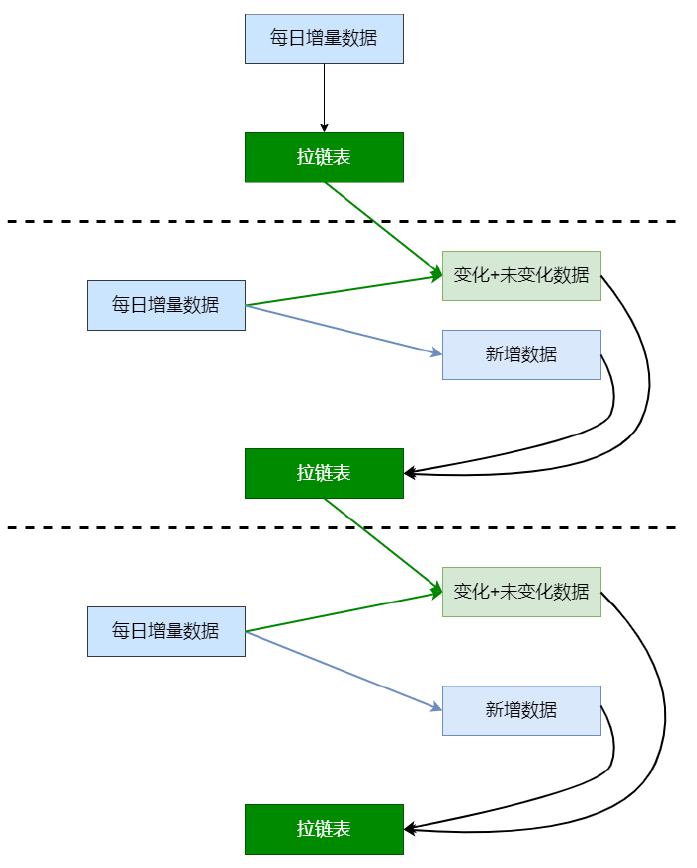
5.拉链表(面试最常考)
适用于:表的数据量大,数据会发生新增变化,但数据发生变化的百分比不大,且是缓慢变化的。
主要目的:节省磁盘空间
适用场景:
- 表的数据量大
- 表中部分字段会被更新
- 表中记录变量的比例不高
- 需要保留历史信息
5.2维表拉链表应用案例
1.创建表和加载数据
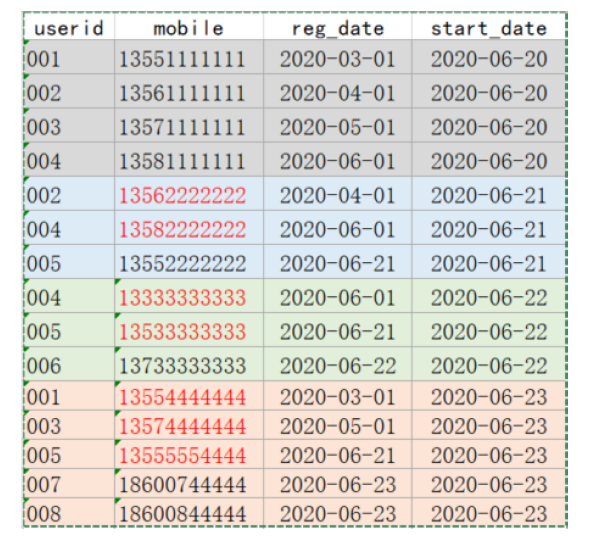
动态分区相关参数-- 用户信息 DROP TABLE IF EXISTS test.userinfo; CREATE TABLE test.userinfo( userid STRING COMMENT '用户编号', mobile STRING COMMENT '手机号码', regdate STRING COMMENT '注册日期') COMMENT '用户信息' PARTITIONED BY (dt string) row format delimited fields terminated by ','; -- 拉链表(存放用户历史信息) -- 拉链表不是分区表;多了两个字段start_date、end_date DROP TABLE IF EXISTS test.userhis; CREATE TABLE test.userhis( userid STRING COMMENT '用户编号', mobile STRING COMMENT '手机号码', regdate STRING COMMENT '注册日期', start_date STRING, end_date STRING) COMMENT '用户信息拉链表' row format delimited fields terminated by ','; -- 数据(/data/lagoudw/data/userinfo.dat) 001,13551111111,2020-03-01,2020-06-20 002,13561111111,2020-04-01,2020-06-20 003,13571111111,2020-05-01,2020-06-20 004,13581111111,2020-06-01,2020-06-20 002,13562222222,2020-04-01,2020-06-21 004,13582222222,2020-06-01,2020-06-21 005,13552222222,2020-06-21,2020-06-21 004,13333333333,2020-06-01,2020-06-22 005,13533333333,2020-06-21,2020-06-22 006,13733333333,2020-06-22,2020-06-22 001,13554444444,2020-03-01,2020-06-23 003,13574444444,2020-05-01,2020-06-23 005,13555554444,2020-06-21,2020-06-23 007,18600744444,2020-06-23,2020-06-23 008,18600844444,2020-06-23,2020-06-23 -- 静态分区数据加载(略) /data/lagoudw/data/userinfo0620.dat 001,13551111111,2020-03-01 002,13561111111,2020-04-01 003,13571111111,2020-05-01 004,13581111111,2020-06-01 load data local inpath '/data/lagoudw/data/userinfo0620.dat' into table test.userinfo partition(dt='2020-06-20'); -- 动态分区数据加载:分区的值是不固定的,由输入数据确定 -- 创建中间表(非分区表) drop table if exists test.tmp1; create table test.tmp1 as select * from test.userinfo; -- tmp1 非分区表,使用系统默认的字段分割符'\001',需要改为','分割 alter table test.tmp1 set serdeproperties('field.delim'=','); -- 向中间表加载数据 load data local inpath '/data/lagoudw/data/userinfo.dat' into table test.tmp1; -- 从中间表向分区表加载数据,设置动态分区模式为不严格 set hive.exec.dynamic.partition.mode=nonstrict; insert into table test.userinfo partition(dt) select * from test.tmp1;
hive.exec.dynamic.partition:表示开启动态分区功能
从hive0.9.0版本开始默认都为true
hive.exec.dynamic.partition.mode:动态分区模式
strict:最少需要一个是静态分区
nonstrict:可以全部是动态分区
默认是strict
hive.exec.max.dynamic.partitions:最大动态分区个数,超出报错
默认:1000
hive.exec.max.dynamic.partitions.pernode:每个mapper/reduce可以允许创建的最大动态分区个数,超出报错
默认:100
hive.exec.max.created.files:一个MR job可以创建的最大文件个数,超出报错
默认:1000002.拉链表实现
userinfo(分区表)=> userid,mobile,regdate=> 每日变更的数据(修改的+新增的)/历史数据(第一天的数据)
usehis(拉链表)=> 多了两个字段start_date/end_date ```sql — 步骤: — 1、userinfo初始化(2020-06-20)。获取历史数据 001,13551111111,2020-03-01,2020-06-20 002,13561111111,2020-04-01,2020-06-20 003,13571111111,2020-05-01,2020-06-20 004,13581111111,2020-06-01,2020-06-20 — 2、初始化拉链表(2020-06-20)。userinfo => userhis insert overwrite table test.userhis select userid, mobile, regdate, dt as start_date, ‘9999-12-31’ as end_date from test.userinfo where dt=’2020-06-20’; 001,13551111111,2020-03-01,2020-06-20,9999-12-31 002,13561111111,2020-04-01,2020-06-20,9999-12-31 003,13571111111,2020-05-01,2020-06-20,9999-12-31 004,13581111111,2020-06-01,2020-06-20,9999-12-31 — 3、次日新增数据(2020-06-21);获取新增数据 002,13562222222,2020-04-01,2020-06-21 004,13582222222,2020-06-01,2020-06-21 005,13552222222,2020-06-21,2020-06-21 — 4、构建拉链表(userhis)(2020-06-21)【核心】 userinfo(2020-06-21) +userhis => userhis — userinfo: 新增数据 — userhis:历史数据 — 第一步:处理新增数据【userinfo】(处理逻辑与加载历史数据类似) select userid, mobile, regdate, dt as start_date, ‘9999-12-31’ as end_date from test.userinfo where dt=’2020-06-21’; 002,13562222222,2020-04-01,2020-06-21,9999-12-31 004,13582222222,2020-06-01,2020-06-21,9999-12-31 005,13552222222,2020-06-21,2020-06-21,9999-12-31 — 第二步:处理历史数据【userhis】(历史包括两部分:变化的、未变化的) — 变化的:start_date:不变;end_date:传入日期-1 — 未变化的:不做处理 — 观察数据 select A.userid, B.userid, B.mobile, B.regdate, B.start_Date, B.end_date from (select * from test.userinfo where dt=’2020-06-21’) A right join test.userhis B on A.userid=B.userid;
a.userid b.userid b.mobile b.regdate b.start_date b.end_date NULL 001 13551111111 2020-03-01 2020-06-20 9999-12-31 002 002 13561111111 2020-04-01 2020-06-20 9999-12-31 NULL 003 13571111111 2020-05-01 2020-06-20 9999-12-31 004 004 13581111111 2020-06-01 2020-06-20 9999-12-31 — 编写SQL,处理历史数据 select B.userid, B.mobile, B.regdate, B.start_Date, case when B.end_date=’9999-12-31’ and A.userid is not null then date_add(‘2020-06-21’, -1) else B.end_date end as end_date from (select * from test.userinfo where dt=’2020-06-21’) A right join test.userhis B
on A.userid=B.userid;
b.userid b.mobile b.regdate b.start_date end_date 001 13551111111 2020-03-01 2020-06-20 9999-12-31 002 13561111111 2020-04-01 2020-06-20 2020-06-20 003 13571111111 2020-05-01 2020-06-20 9999-12-31 004 13581111111 2020-06-01 2020-06-20 2020-06-20 — 最终的处理(新增+历史数据) insert overwrite table test.userhis select userid, mobile, regdate, dt as start_date, ‘9999-12-31’ as end_date from test.userinfo where dt=’2020-06-21’ union all select B.userid, B.mobile, B.regdate, B.start_Date, case when B.end_date=’9999-12-31’ and A.userid is not null then date_add(‘2020-06-21’, -1) else B.end_date end as end_date from (select * from test.userinfo where dt=’2020-06-21’) A right join test.userhis B on A.userid=B.userid;
处理拉链表的脚本<br />/data/lagoudw/data/test/userzipper.sh
```shell
#!/bin/bash
source /etc/profile
if [ -n "$1" ] ;then
do_date=$1
else
do_date=`date -d "-1 day" +%F`
fi
sql="
insert overwrite table test.userhis
select userid, mobile, regdate, dt as start_date, '9999-12-31' as
end_date
from test.userinfo
where dt='$do_date'
union all
select B.userid,
B.mobile,
B.regdate,
B.start_Date,
case when B.end_date='9999-12-31' and A.userid is not null
then date_add('$do_date', -1)
else B.end_date
end as end_date
from (select * from test.userinfo where dt='$do_date') A
right join test.userhis B
on A.userid=B.userid;
"
hive -e "$sql"
拉链表的使用:
-- 查看拉链表中最新数据(2020-06-23以后的数据)
select * from userhis where end_date='9999-12-31';
-- 查看拉链表中给定日期数据("2020-06-22")
select * from userhis where start_date <= '2020-06-22' and end_date >='2020-06-22';
-- 查看拉链表中给定日期数据("2020-06-21")
select * from userhis where start_date <= '2020-06-21' and end_date >='2020-06-21';
-- 查看拉链表中给定日期数据("2020-06-20")
select * from userhis where start_date <= '2020-06-20' and end_date >='2020-06-20';
3.拉链表的回滚
06-22拉链表数据:
001 13551111111 2020-03-01 2020-06-20 9999-12-31
002 13561111111 2020-04-01 2020-06-20 2020-06-20
002 13562222222 2020-04-01 2020-06-21 9999-12-31
003 13571111111 2020-05-01 2020-06-20 9999-12-31
004 13581111111 2020-06-01 2020-06-20 2020-06-20
004 13582222222 2020-06-01 2020-06-21 2020-06-21
004 13333333333 2020-06-01 2020-06-22 9999-12-31
005 13552222222 2020-06-21 2020-06-21 2020-06-21
005 13533333333 2020-06-21 2020-06-22 9999-12-31
006 13733333333 2020-06-22 2020-06-22 9999-12-31
06-23拉链表数据:
001 13551111111 2020-03-01 2020-06-20 2020-06-22
001 13554444444 2020-03-01 2020-06-23 9999-12-31
002 13561111111 2020-04-01 2020-06-20 2020-06-20
002 13562222222 2020-04-01 2020-06-21 9999-12-31
003 13571111111 2020-05-01 2020-06-20 2020-06-22
003 13574444444 2020-05-01 2020-06-23 9999-12-31
004 13581111111 2020-06-01 2020-06-20 2020-06-20
004 13582222222 2020-06-01 2020-06-21 2020-06-21
004 13333333333 2020-06-01 2020-06-22 9999-12-31
005 13552222222 2020-06-21 2020-06-21 2020-06-21
005 13533333333 2020-06-21 2020-06-22 2020-06-22
005 13555554444 2020-06-21 2020-06-23 9999-12-31
006 13733333333 2020-06-22 2020-06-22 9999-12-31
007 18600744444 2020-06-23 2020-06-23 9999-12-31
008 18600844444 2020-06-23 2020-06-23 9999-12-31
06-23拉链表的状态,假设回滚到2020-06-22(rollback_date)
- end_date<rollback_date。该行数据在rollback_date之前产生,需要原样保留
- start_date<=rollback_date<=end_date。数据在rollback之后产生,需要修改,将end_date改为9999-12-31
- 其他数据都删掉不用管

编码
1.处理end_date<rollback_date的数据
select userid, mobile, regdate, start_date, end_date, '1' as tag
from test.userhis
where end_date < '2020-06-22';
2.处理start_date<=rollback_date<=end_date的数据,设置end_date=9999-12-31
select userid,mobile,regdate,start_date,'9999-12-31' as end_date , '2' as tag
from test.userhis
where start_date<='2020-06-22' and end_date>='2020-06-22';
3.将前面两步的数据写入临时表tmp(拉链表),对应脚本如下
/data/lagoudw/data/test/zippertmp.sh
#!/bin/bash
source /etc/profile
if [ -n "$1" ] ;then
do_date=$1
else
do_date=`date -d "-1 day" +%F`
fi
sql="
drop table test.tmp;
create table test.tmp as
select userid, mobile, regdate, start_date, end_date, '1' as tag
from test.userhis
where end_date < '$do_date'
union all
select userid, mobile, regdate, start_date, '9999-12-31' as end_date, '2'
as tag
from test.userhis
where start_date <= '$do_date' and end_date >= '$do_date';
"
hive -e "$sql"
逐天回滚,检查数据
方案二:保存一段时间的增量数据userinfo,定期对拉链表做备份(如一个月做一次备份);如需回滚,直接在备份的拉链表上重跑增量数据,处理简单。
5.3周期性事实表
有如下订单表,06-20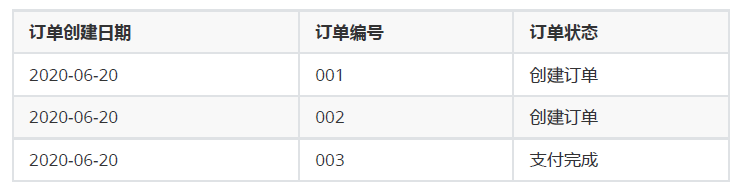
06-21,新增004 005,修改001
06-22,新增006,修改003 005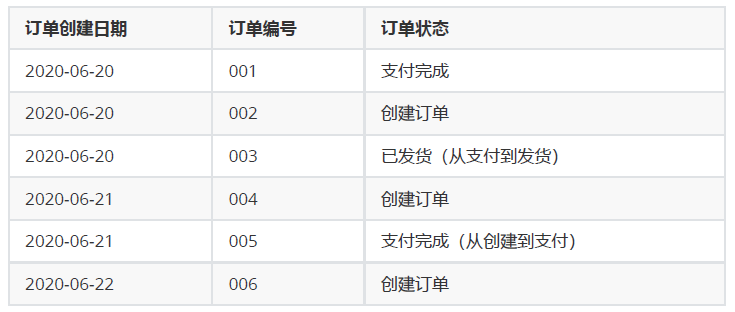
订单事实表处理方法:
- 只保留一份全量数据,数据和6月22号的记录一样,无法查看6月21日订单001的状态
- 每天都保留一份全量。可以找到所有历史信息,但数据量大,重复信息多,存储有较大浪费
使用拉链表保存历史信息,历史拉链表既能满足保存历史数据,也能节省存储资源
1.前提条件
- 订单表的刷新频率为一天,当天获取前一天的增量数据;
- 如果一个订单在一天内有多次状态变化,只记录最后一个状态信息;
- 订单状态包括:创建,支付,完成;
- 创建时间和修改时间只取到天;
ods层订单表ods_orders,数据按日分区,存放每天的增量数据;
DROP TABLE test.ods_orders;
CREATE TABLE test.ods_orders(
orderid INT,
createtime STRING,
modifiedtime STRING,
status STRING
) PARTITIONED BY (dt STRING)
row format delimited fields terminated by ',';
dwd层订单拉链表,存放订单的历史状态数据;
DROP TABLE test.dwd_orders;
CREATE TABLE test.dwd_orders(
orderid INT,
createtime STRING,
modifiedtime STRING,
status STRING,
start_date STRING,
end_date STRING
)
row format delimited fields terminated by ',';
2.周期性事实表拉链表实现
全量初始化
-- 数据文件order1.dat
001,2020-06-20,2020-06-20,创建
002,2020-06-20,2020-06-20,创建
003,2020-06-20,2020-06-20,支付
load data local inpath '/data/lagoudw/data/order1.dat' into table
test.ods_orders partition(dt='2020-06-20');
INSERT overwrite TABLE test.dwd_orders
SELECT orderid, createtime, modifiedtime, status,
createtime AS start_date,
'9999-12-31' AS end_date
FROM test.ods_orders
WHERE dt='2020-06-20';
--------------------------------------------------------------------------
orderid   createtime    modifiedtime  status   start_date       end_date
1       2020-06-20      2020-06-20      创建    2020-06-20      9999-12-31
2       2020-06-20      2020-06-20      创建    2020-06-20      9999-12-31
3       2020-06-20      2020-06-20      支付    2020-06-20      9999-12-31
增量抽取
-- 数据文件order2.dat
001,2020-06-20,2020-06-21,支付
004,2020-06-21,2020-06-21,创建
005,2020-06-21,2020-06-21,创建
load data local inpath '/data/lagoudw/data/order2.dat' into table
test.ods_orders partition(dt='2020-06-21');
增量刷新历史数据
-- 拉链表中的数据分两部实现:新增数据(ods_orders)、历史数据(dwd_orders)
-- 处理新增数据
SELECT orderid,
createtime,
modifiedtime,
status,
modifiedtime AS start_date,
'9999-12-31' AS end_date
FROM test.ods_orders
where dt='2020-06-21';
--------------------------------------------------------------------------
orderid createtime      modifiedtime    status  start_date      end_date
1       2020-06-20      2020-06-21      支付    2020-06-21      9999-12-31
4       2020-06-21      2020-06-21      创建    2020-06-21      9999-12-31
5       2020-06-21      2020-06-21      创建    2020-06-21      9999-12-31
-- 处理历史数据。历史数据包括:有修改、无修改的数据
-- ods_orders 与 dwd_orders 进行表连接
-- 连接上,说明数据被修改
-- 未连接上,说明数据未被修改
select A.orderid,
A.createtime,
A.modifiedtime,
A.status,
A.start_date,
case when B.orderid is not null and A.end_date>'2020-06-21'
then '2020-06-20'
else A.end_date
end end_date
from test.dwd_orders A
left join (select * from test.ods_orders where dt='2020-06-21') B
on A.orderid=B.orderid;
a.orderid       a.createtime    a.modifiedtime  a.status        a.start_date    end_date
1       2020-06-20      2020-06-20      创建    2020-06-20      2020-06-20
2       2020-06-20      2020-06-20      创建    2020-06-20      9999-12-31
3       2020-06-20      2020-06-20      支付    2020-06-20      9999-12-31
-------------------------------------------------------------------------------
-- 用以上信息覆写拉链表
insert overwrite table test.dwd_orders
SELECT orderid,
createtime,
modifiedtime,
status,
modifiedtime AS start_date,
'9999-12-31' AS end_date
FROM test.ods_orders
where dt='2020-06-21'
union all
select A.orderid,
A.createtime,
A.modifiedtime,
A.status,
A.start_date,
case when B.orderid is not null and A.end_date>'2020-06-21'
then '2020-06-20'
else A.end_date
end end_date
from dwd_orders A
left join (select * from ods_orders where dt='2020-06-21') B
on A.orderid=B.orderid;
5.4拉链表小结
6.DIM层建表数据加载
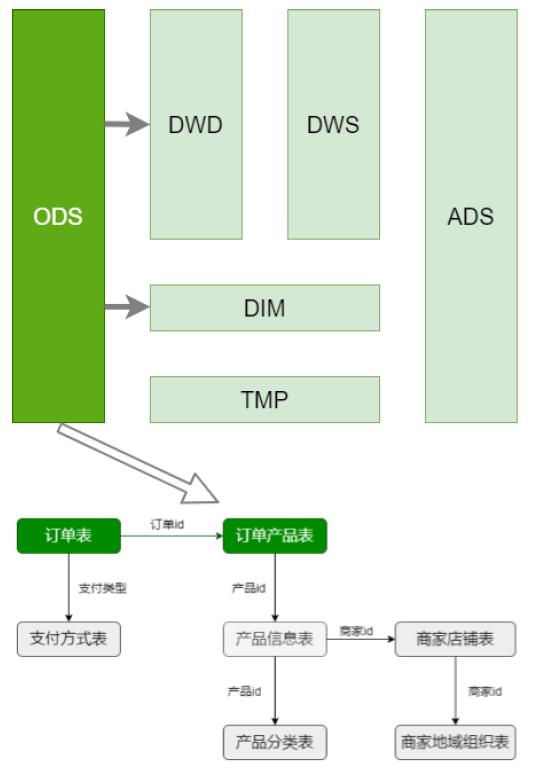
事实表:订单表,订单产品表
维表:支付方式表,产品信息表,商家店铺表,产品分类表,商家地域组织表
处理维表方式:
小表使用每日快照:支付方式表,商家店铺表,商家地域组织表,产品分类表
大表使用拉链表:产品信息表
6.1商品分类表
为了方便查询,对商品分类维度表做了逆规范化处理,省略无关信息,做成宽表
建表
DROP TABLE IF EXISTS dim.dim_trade_product_cat;
create table if not exists dim.dim_trade_product_cat(
firstId int, -- 一级商品分类id
firstName string, -- 一级商品分类名称
secondId int, -- 二级商品分类Id
secondName string, -- 二级商品分类名称
thirdId int, -- 三级商品分类id
thirdName string -- 三级商品分类名称
)
partitioned by (dt string)
STORED AS PARQUET;
数据加载:
/data/lagoudw/script/trade/dim_load_product_cat.sh
#!/bin/bash
source /etc/profile
if [ -n "$1" ]
then
do_date=$1
else
do_date=`date -d "-1 day" +%F`
fi
sql="
insert overwrite table dim.dim_trade_product_cat
partition(dt='$do_date')
select
t1.catid, -- 一级分类id
t1.catname, -- 一级分类名称
t2.catid, -- 二级分类id
t2.catname, -- 二级分类名称
t3.catid, -- 三级分类id
t3.catname -- 三级分类名称
from
-- 商品三级分类数据
(select catid, catname, parentid
from ods.ods_trade_product_category
where level=3 and dt='$do_date') t3
left join
-- 商品二级分类数据
(select catid, catname, parentid
from ods.ods_trade_product_category
where level=2 and dt='$do_date') t2
on t3.parentid = t2.catid
left join
-- 商品一级分类数据
(select catid, catname, parentid
from ods.ods_trade_product_category
where level=1 and dt='$do_date') t1
on t2.parentid = t1.catid;
"
hive -e "$sql"
sh dim_load_product_cat.sh 2020-07-01
6.2商品地域组织表
商家店铺表,商家地域组织表 ==>一张维表
同样进行逆规范化设计,将表拉宽
每行数据包括:商家信息、城市信息、地域信息。信息中包括id和name;
建表
drop table if exists dim.dim_trade_shops_org;
create table dim.dim_trade_shops_org(
shopid int,
shopName string,
cityId int,
cityName string ,
regionId int ,
regionName string
)
partitioned by (dt string)
STORED AS PARQUET;
加载数据
/data/lagoudw/script/trade/dim_load_shop_org.sh
#! /bin/bash
source /etc/profile
if [ -n "$1" ]
then
do_date=$1
else
do_date=`date -D "-1 day" +%F`
fi
sql="
insert overwrite table dim.dim_trade_shops_org
partition(dt='$do_date')
select t1.shopid,
t1.shopname,
t2.id as cityid,
t2.orgname as cityName,
t3.id as region_id,
t3.orgname as region_name
from (select shopId, shopName, areaId
from ods.ods_trade_shops
where dt='$do_date') t1
left join
(select id, parentId, orgname, orglevel
from ods.ods_trade_shop_admin_org
where orglevel=2 and dt='$do_date') t2
on t1.areaid = t2.id
left join
(select id, parentId, orgname, orglevel
from ods.ods_trade_shop_admin_org
where orglevel=1 and dt='$do_date') t3
on t2.parentid = t3.id;
"
6.3支付方式表
建表
drop table if exists dim.dim_trade_payment;
create table if not exists dim.dim_trade_payment(
paymentId string, -- 支付方式id
paymentName string -- 支付方式名称
)
partitioned by (dt string)
STORED AS PARQUET;
数据加载
/data/lagoudw/script/trade/dim_load_payment.sh
#!/bin/bash
source /etc/profile
if [ -n "$1" ]
then
do_date=$1
else
do_date=`date -d "-1 day" +%F`
fi
sql="
insert overwrite table dim.dim_trade_payment
partition(dt='$do_date')
select id, payName
from ods.ods_trade_payments
where dt='$do_date';
"
hive -e "$sql"
6.4商品信息表
使用拉链表处理
1.历史数据=>初始拉链表(开始日期:当日;结束日期:9999-12-31)只执行一次
2.拉链表的每日处理:
新增数据:每日新增数据ODS=>开始日期:当日;结束日期:9999-12-31
历史数据:拉链表DIM与每日新增数据ODS做左外连接
连接上数据:结束日期:当日
未连接上数据:不变
1.创建维表:拉链表要增加生效和失效日期字段
drop table if exists dim.dim_trade_product_info;
create table dim.dim_trade_product_info(
`productId` bigint,
`productName` string,
`shopId` string,
`price` decimal,
`isSale` tinyint,
`status` tinyint,
`categoryId` string,
`createTime` string,
`modifyTime` string,
`start_dt` string,
`end_dt` string
) COMMENT '产品表'
STORED AS PARQUET;
2.初始数据加载(只加载一次)
insert overwrite table dim.dim_trade_product_info
select productId,
productName,
shopId,
price,
isSale,
status,
categoryId,
createTime,
modifyTime,
-- modifyTime非空取modifyTime,否则取createTime;substr取日期
case when modifyTime is not null
then substr(modifyTime, 0, 10)
else substr(createTime, 0, 10)
end as start_dt,
'9999-12-31' as end_dt
from ods.ods_trade_product_info
where dt = '2020-07-12';
3.增量数据导入(每次加载数据都执行)
/data/lagoudw/script/trade/dim_load_product_info.sh
#!/bin/bash
source /etc/profile
if [ -n "$1" ]
then
do_date=$1
else
do_date=`date -d "-1 day" +%F`
fi
sql="
insert overwrite table dim.dim_trade_product_info
select productId,
productName,
shopId,
price,
isSale,
status,
categoryId,
createTime,
modifyTime,
case when modifyTime is not null
then substr(modifyTime,0,10)
else substr(createTime,0,10)
end as start_dt,
'9999-12-31' as end_dt
from ods.ods_trade_product_info
where dt='$do_date'
union all
select dim.productId,
dim.productName,
dim.shopId,
dim.price,
dim.isSale,
dim.status,
dim.categoryId,
dim.createTime,
dim.modifyTime,
dim.start_dt,
case when dim.end_dt >='9999-12-31' and ods.productId is not null
then '$do_date'
else dim.end_dt
end as end_dt
from dim.dim_trade_product_info dim left join
(select *
from ods.ods_trade_product_info
where dt='$do_date' ) ods
on dim.productId = ods.productId
"
hive -e "$sql"
7.DWD层建表数据加载
要处理的表:订单表、订单产品表
订单表是周期性事实表;为了保留订单状态,可以使用拉链表进行处理;
订单产品表为普通事实表;用常规方法处理
如有数据清洗、数据转换的业务需求,ODS=>DWD
若没有则不作任何变化
订单状态:
-3:用户拒收
-2:未付款的订单
-1:用户取消
0:待发货
1:配送中
2:用户确认收货
订单从创建到最终完成,有时间限制,订单的状态不可能永远处于变化之中
7.1DWD层建表
- 与维表不同,订单事实表的记录数非常多
- 订单有生命周期;一般设置在15天左右
- 订单是一个拉链表,也是一个分区表
分区的目的:订单一旦终止,不会重复计算
分区的条件:订单创建日期;保证相同的订单在用一个分区
建表
-- 订单事实表(拉链表)
DROP TABLE IF EXISTS dwd.dwd_trade_orders;
create table dwd.dwd_trade_orders(
`orderId` int,
`orderNo` string,
`userId` bigint,
`status` tinyint,
`productMoney` float,
`totalMoney` float,
`payMethod` tinyint,
`isPay` tinyint,
`areaId` int,
`tradeSrc` tinyint,
`tradeType` int,
`isRefund` tinyint,
`dataFlag` tinyint,
`createTime` string,
`payTime` string,
`modifiedTime` string,
`start_date` string,
`end_date` string
) COMMENT '订单事实拉链表'
partitioned by (dt string)
STORED AS PARQUET;
7.2DWD层数据加载
日期格式转换
--'yyyy-MM-dd HH:mm:ss' ==>timestamp ==> 'yyyy-MM-dd'
select unix_stamp(modifiedtime,'yyyy-MM-dd HH:mm:ss') from ods.ods_trade_orders;
select from_unixtime(unix_stamp(modifiedtime,'yyyy-MM-dd HH:mm:ss'),'yyyy-MM-dd')
from ods.ods_trade_orders;
/data/lagoudw/script/trade/dwd_load_trade_orders.sh
#!/bin/bash
source /etc/profile
if [ -n "$1" ]
then
do_date=$1
else
do_date=`date -d "-1 day" +%F`
fi
sql="
set hive.exec.dynamic.partition.mode=nonstrict;
set hive.exec.dynamic.partition=true;
INSERT OVERWRITE TABLE dwd.dwd_trade_orders
partition(dt)
SELECT orderId,
orderNo,
userId,
status,
productMoney,
totalMoney,
payMethod,
isPay,
areaId,
tradeSrc,
tradeType,
isRefund,
dataFlag,
createTime,
payTime,
modifiedTime,
case when modifiedTime is not null
then from_unixtime(unix_timestamp(modifiedTime, 'yyyy-MM-dd
HH:mm:ss'),'yyyy-MM-dd')
else from_unixtime(unix_timestamp(createTime, 'yyyy-MM-dd
HH:mm:ss'), 'yyyy-MM-dd')
end as start_date,
'9999-12-31' as end_date,
from_unixtime(unix_timestamp(createTime, 'yyyy-MM-dd HH:mm:ss'),
'yyyy-MM-dd') as dt
FROM ods.ods_trade_orders
WHERE dt='$do_date'
union all
SELECT A.orderId,
A.orderNo,
A.userId,
A.status,
A.productMoney,
A.totalMoney,
A.payMethod,
A.isPay,
A.areaId,
A.tradeSrc,
A.tradeType,
A.isRefund,
A.dataFlag,
A.createTime,
A.payTime,
A.modifiedTime,
A.start_date,
CASE WHEN B.orderid IS NOT NULL AND A.end_date > '$do_date'
THEN date_add('$do_date', -1)
ELSE A.end_date END AS end_date,
from_unixtime(unix_timestamp(A.createTime, 'yyyy-MM-dd HH:mm:ss'),
'yyyy-MM-dd') as dt
FROM (SELECT * FROM dwd.dwd_trade_orders WHERE dt>date_add('$do_date',
-15)) A
left outer join (SELECT * FROM ods.ods_trade_orders WHERE
dt='$do_date') B
ON A.orderId = B.orderId;
"
hive -e "$sql"
8.DWS层建表及数据加载
需求:计算当天
全国所有订单信息
全国、一级商品分类订单信息
全国、二级商品分类订单信息
大区所有订单信息
大区、一级商品分类订单信息
大区、二级商品分类订单信息
城市所有订单信息
城市、一级商品分类订单信息
城市、二级商品分类订单信息
相关的表:订单表,订单商品表,商品信息维表,商品分类维表,商家地域维表
生成的表:
订单明细表:订单表、订单商品表、商品信息维表
订单明细宽表:订单明细表、商品分类维表、商家地域维表
8.1DWS层建表
dws_trade_orders(订单明细)由以下表轻微聚合而成:
- dwd.dwd_trade_orders (拉链表、分区表)
- ods.ods_trade_order_product (分区表)
- dim.dim_trade_product_info(维表、拉链表)
dws_trade_orders_w(订单明细宽表)由以下表组成:
- ads.dws_trade_orders (分区表)
- dim.dim_trade_product_cat(分区表)
- dim.dim_trade_shops_org(分区表)
建表:
-- 订单明细表(轻度汇总事实表)。每笔订单的明细
DROP TABLE IF EXISTS dws.dws_trade_orders;
create table if not exists dws.dws_trade_orders(
orderid string, -- 订单id
cat_3rd_id string, -- 商品三级分类id
shopid string, -- 店铺id
paymethod tinyint, -- 支付方式
productsnum bigint, -- 商品数量
paymoney double, -- 订单商品明细金额
paytime string -- 支付时间
)
partitioned by (dt string)
STORED AS PARQUET;
-- 订单明细表宽表
DROP TABLE IF EXISTS dws.dws_trade_orders_w;
create table if not exists dws.dws_trade_orders_w(
orderid string, -- 订单id
cat_3rd_id string, -- 商品三级分类id
thirdname string, -- 商品三级分类名称
secondname string, -- 商品二级分类名称
firstname string, -- 商品一级分类名称
shopid string, -- 店铺id
shopname string, -- 店铺名
regionname string, -- 店铺所在大区
cityname string, -- 店铺所在城市
paymethod tinyint, -- 支付方式
productsnum bigint, -- 商品数量
paymoney double, -- 订单明细金额
paytime string -- 订单时间
)
partitioned by (dt string)
STORED AS PARQUET;
8.2DWS层加载数据
dwd.dwd_trade_orders (拉链表、分区表)
ods.ods_trade_order_product (分区表)
dim.dim_trade_product_info(维表、拉链表)
dim.dim_trade_product_cat(分区表)
dim.dim_trade_shops_org(分区表)
要保证以上表中测试的日期有数据。构造测试数据:
insert overwrite table dwd.dwd_trade_orders
partition(dt='2020-07-12')
select
orderid,
orderno,
userid,
status,
productmoney,
totalmoney,
paymethod,
ispay,
areaid,
tradesrc,
tradetype,
isrefund,
dataflag,
'2020-07-12',
paytime,
modifiedtime,
start_date,
end_date
from dwd.dwd_trade_orders
where end_date='9999-12-31';


insert overwrite table dim.dim_trade_product_cat
partition(dt='2020-07-12')
select
firstid,
firstname,
secondid,
secondname,
thirdid,
thirdname
from dim.dim_trade_product_cat
where dt='2020-07-01';

insert overwrite table dim.dim_trade_shops_org
partition(dt='2020-07-12')
select
shopid,
shopname,
cityid,
cityname,
regionid,
regionname
from dim.dim_trade_shops_org
where dt='2020-07-01';
/data/lagoudw/script/trade/dws_load_trade_orders.sh
其中dws_trade_orders/dws_trade_orders_w 中一笔订单可能出现多条记录!
#!/bin/bash
source /etc/profile
if [ -n "$1" ]
then
do_date=$1
else
do_date=`date -d "-1 day" +%F`
fi
sql="
insert overwrite table dws.dws_trade_orders
partition(dt='$do_date')
select t1.orderid as orderid,
t3.categoryid as cat_3rd_id,
t3.shopid as shopid,
t1.paymethod as paymethod,
t2.productnum as productsnum,
t2.productnum*t2.productprice as pay_money,
t1.paytime as paytime
from (select orderid, paymethod, paytime
from dwd.dwd_trade_orders
where dt='$do_date'
and status >= 0) T1
left join
(select orderid, productid, productnum, productprice
from ods.ods_trade_order_product
where dt='$do_date') T2
on t1.orderid = t2.orderid
left join
(select productid, shopid, categoryid
from dim.dim_trade_product_info
where start_dt <= '$do_date'
and end_dt >= '$do_date' ) T3
on t2.productid=t3.productid;
insert overwrite table dws.dws_trade_orders_w
partition(dt='$do_date')
select t1.orderid,
t1.cat_3rd_id,
t2.thirdname,
t2.secondname,
t2.firstname,
t1.shopid,
t3.shopname,
t3.regionname,
t3.cityname,
t1.paymethod,
t1.productsnum,
t1.paymoney,
t1.paytime
from(select orderid,cat_3rd_id,shopid,paymethod,productsnum,paymoney,paytime
from dws.dws_trade_orders
where dt='$do_date') T1
join
(select thirdid, thirdname, secondid, secondname, firstid,firstname
from dim.dim_trade_product_cat
where dt='$do_date') T2
on T1.cat_3rd_id = T2.thirdid
join
(select shopid, shopname, regionname, cityname
from dim.dim_trade_shops_org
where dt='$do_date') T3
on T1.shopid = T3.shopid
"
hive -e "$sql"
sh ``dws_load_trade_orders.sh 2020-07-12
9.ADS层开发
需求:计算当天
- 全国所有订单信息
- 全国、一级商品分类订单信息
- 全国、二级商品分类订单信息
- 大区所有订单信息
- 大区、一级商品分类订单信息
- 大区、二级商品分类订单信息
- 城市所有订单信息
- 城市、一级商品分类订单信息
- 城市、二级商品分类订单信息
9.1ADS层建表
-- ADS层订单分析表
DROP TABLE IF EXISTS ads.ads_trade_order_analysis;
create table if not exists ads.ads_trade_order_analysis(
areatype string, -- 区域范围:区域类型(全国、大区、城市)
regionname string, -- 区域名称
cityname string, -- 城市名称
categorytype string, -- 商品分类类型(一级、二级)
category1 string, -- 商品一级分类名称
category2 string, -- 商品二级分类名称
totalcount bigint, -- 订单数量
total_productnum bigint, -- 商品数量
totalmoney double -- 支付金额
)
partitioned by (dt string)
row format delimited fields terminated by ',';
9.2ADS层加载数据
/data/lagoudw/script/trade/ads_load_trade_order_analysis.sh
1笔订单,有多个商品;多个商品有不同的分类;这会导致一笔订单有多个分类,它们是分别统计的;在统计订单数量的时候要用count(distinct orderid)
#!/bin/bash
source /etc/profile
if [ -n "$1" ]
then
do_date=$1
else
do_date=`date -d "-1 day" +%F`
fi
sql="
with mid_orders as (
select regionname,
cityname,
firstname category1,
secondname category2,
count(distinct orderid) as totalcount,
sum(productsnum) as total_productnum,
sum(paymoney) as totalmoney
from dws.dws_trade_orders_w
where dt='$do_date'
group by regionname, cityname, firstname, secondname
)
insert overwrite table ads.ads_trade_order_analysis
partition(dt='$do_date')
select '全国' as areatype,
'' as regionname,
'' as cityname,
'' as categorytype,
'' as category1,
'' as category2,
sum(totalcount),
sum(total_productnum),
sum(totalmoney)
from mid_orders
union all
select '全国' as areatype,
'' as regionname,
'' as cityname,
'一级' as categorytype,
category1,
'' as category2,
sum(totalcount),
sum(total_productnum),
sum(totalmoney)
from mid_orders
group by category1
union all
select '全国' as areatype,
'' as regionname,
'' as cityname,
'二级' as categorytype,
'' as category1,
category2,
sum(totalcount),
sum(total_productnum),
sum(totalmoney)
from mid_orders
group by category2
union all
select '大区' as areatype,
regionname,
'' as cityname,
'' as categorytype,
'' as category1,
'' as category2,
sum(totalcount),
sum(total_productnum),
sum(totalmoney)
from mid_orders
group by regionname
union all
select '大区' as areatype,
regionname,
'' as cityname,
'一级' as categorytype,
category1,
'' as category2,
sum(totalcount),
sum(total_productnum),
sum(totalmoney)
from mid_orders
group by regionname, category1
union all
select '大区' as areatype,
regionname,
'' as cityname,
'二级' as categorytype,
'' as category1,
category2,
sum(totalcount),
sum(total_productnum),
sum(totalmoney)
from mid_orders
group by regionname, category2
union all
select '城市' as areatype,
'' as regionname,
cityname,
'' as categorytype,
'' as category1,
'' as category2,
sum(totalcount),
sum(total_productnum),
sum(totalmoney)
from mid_orders
group by cityname
union all
select '城市' as areatype,
'' as regionname,
cityname,
'一级' as categorytype,
category1,
'' as category2,
sum(totalcount),
sum(total_productnum),
sum(totalmoney)
from mid_orders
group by cityname, category1
union all
select '城市' as areatype,
'' as regionname,
cityname,
'二级' as categorytype,
'' as category1,
category2,
sum(totalcount),
sum(total_productnum),
sum(totalmoney)
from mid_orders
group by cityname, category2;
"
hive -e "$sql"
10数据导出
10.1mysql建表
drop table if exists dwads.ads_trade_order_analysis;
create table dwads.ads_trade_order_analysis(
areatype varchar(20)
regionname varchar(20),
cityname varchar(20),
categorytype varchar(20),
category1 varchar(20),
category2 varchar(20),
totalcount bigint,
total_productnum bigint,
toalmoney double,
dt varchar(10)
);
10.2创建配置文件
/data/lagoudw/script/trade/ads_trade_order_analysis.json
{
  "job": {
    "setting": {
      "speed": {
        "channel": 1
      }
    },
    "content": [
      {
        "reader": {
          "name": "hdfsreader",
          "parameter": {
            "path": "/user/hive/warehouse/ads.db/ads_trade_order_analysis/dt=$do_date/*",
            "defaultFS": "hdfs://linux121:9000",
            "column": [
              {
                "index": 0,
                "type": "string"
              },
              {
                "index": 1,
                "type": "string"
              },
              {
                "index": 2,
                "type": "string"
              },
              {
                "index": 3,
                "type": "string"
              },
              {
                "index": 4,
                "type": "string"
              },
              {
                "index": 5,
                "type": "string"
              },
               {
                "index": 6,
                "type": "long"
              },
               {
                "index": 7,
                "type": "long"
              },
               {
                "index": 8,
                "type": "double"
              },
              {
                "type": "string",
                "value": "$do_date"
              }
            ],
            "fileType": "text",
            "encoding": "UTF-8",
            "fieldDelimiter": ","
          }
        },
        "writer": {
          "name": "mysqlwriter",
          "parameter": {
            "writeMode": "insert",
            "username": "hive",
            "password": "12345678",
            "column": [
              "areatype",
              "regionname",
              "cityname",
              "categorytype",
              "category1",
              "category2",
              "totalcount",
              "total_productnum",
              "totalmoney",
              "dt"
            ],
            "preSql": [
              "delete from ads_trade_order_analysis where dt='$do_date'"
            ],
            "connection": [
              {
                "jdbcUrl": "jdbc:mysql://linux123:3306/dwads?useUnicode=true&characterEncoding=utf-8",
                "table": [
                  "ads_trade_order_analysis"
                ]
              }
            ]
          }
        }
      }
    ]
  }
}
10.3执行命令
python $DATAX_HOME/bin/datax.py -p "-Ddo_date='2020-07-12'" ads_trade_order_analysis.json
11小结
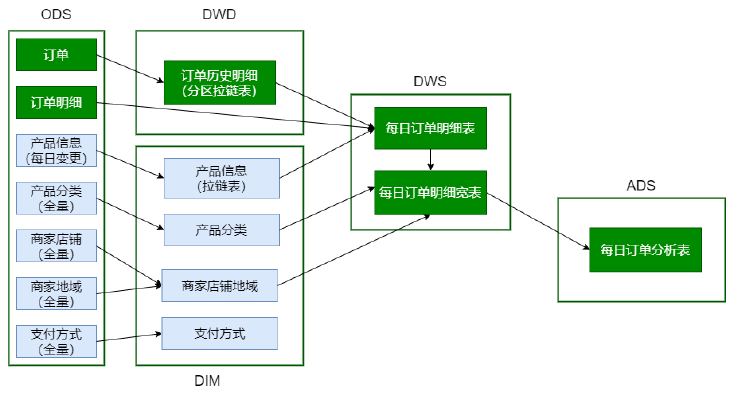
脚本调用次序:
# 加载ODS数据(含DataX迁移数据)
/data/lagoudw/script/trade/ods_load_trade.sh
# 加载DIM层数据
/data/lagoudw/script/trade/dim_load_product_cat.sh
/data/lagoudw/script/trade/dim_load_shop_org.sh
/data/lagoudw/script/trade/dim_load_payment.sh
/data/lagoudw/script/trade/dim_load_product_info.sh
# 加载DWD层数据
/data/lagoudw/script/trade/dwd_load_trade_orders.sh
# 加载DWS层数据
/data/lagoudw/script/trade/dws_load_trade_orders.sh
# 加载ADS层数据
/data/lagoudw/script/trade/ads_load_trade_order_analysis.sh
主要技术点:
拉链表。创建、使用与回滚;商品信息表、订单表(周期性事实表;分区表+拉链表)
宽表(逆规范化):商品分类表、商品地域组织表、订单明细及订单明细宽表(轻度汇总的事实表)
第五部分 数据可视化
ADS => DataX => MySQL => 浏览器呈现
对统计数据进行展示,一般都是以图、表方式呈现;常见方式有 ECharts、
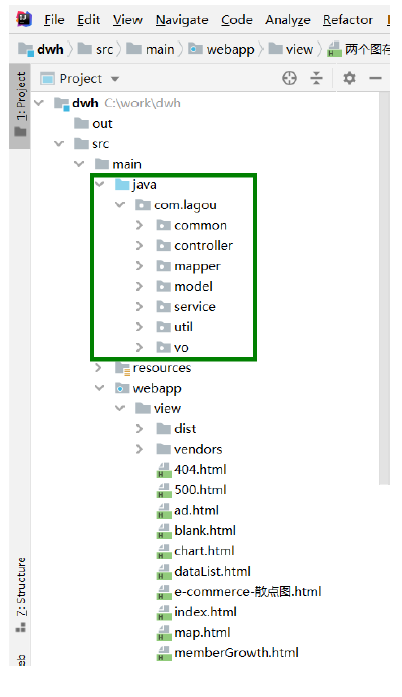
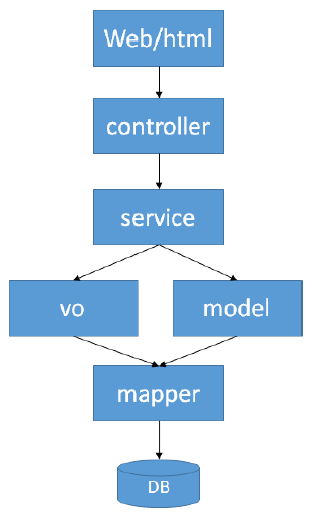
HighCharts、G2、Chart.js 、FineBI等。本项目使用SSM(Spring + SpringMVC +MyBatis)、EChars。
- src/main/resources/jdbc.properties:jdbc连接信息
- src/main/resources/log4j.properties:日志存放位置
- MySQL中创建user表,添加信息
- http://localhost:8080/dwh/login.html
- admin/admin
第六部分 项目总结与回顾
1、数据仓库概念
数据仓库是一个面向主题的、集成的、相对稳定的、反映历史变化的数据集合,用于支持管理决策。
OLAP(数据仓库)与OLTP(数据库)的区别;
数据仓库分层:ODS、DWD、DWS、ADS
为什么要分层:
- 清晰的数据结构
- 将复杂的问题简单化
- 减少重复开发
- 屏蔽原始数据的异常
- 数据血缘的追踪
数据仓库建模:维度建模、ER建模
维度建模的4个步骤:
选择业务
定义粒度
选定维度
确定事实
集群的规划:
集群可以做水平扩展
初始时可依据数据量估算集群规模
框架版本的选型:CDH国内选用最多的版本
2、数据采集模块
Flume采集日志数据、DataX采集业务数据(数据的全量或增量);
Flume组成、Put事务(Source到Channel是Put事务)、Take事务(Channel到Sink是Take事务)
Taildir Source:断点续传、监控多目录。Flume1.6以前需要自己自定义Source记录每次读取文件位置,实现断点续传。
File Channel:数据存储在磁盘,宕机数据可以保存。但是传输速率慢。适合对数据传输可靠性要求高的场景,比如,金融行业;
Memory Channel:数据存储在内存中,宕机数据丢失。传输速率快。适合对数据传输可靠性要求不高的场景,比如,普通的日志数据;
Kafka Channel:减少了Flume的Sink阶段,提高了传输效率;
HDFS Sink:如何避免小文件(HDFS文件的滚动方式)
Flume自定义拦截器:
- initialize 初始化
- intercept(Event event) 处理单个Event【实现的重点】
- intercept(List events) 处理多个Event
- close 方法
设置Agent JVM heap为4G或更高,部署在单独的服务器上;
-Xmx与-Xms设置一致,减少内存抖动带来的性能影响,设置不一致容易导致频繁full gc;
3、主题分析模块【重点】
会员活跃度分析、广告业务分析、核心交易分析;
Json数据的处理、动态分区、拉链表、宽表(逆规范化)、Tez引擎(缺点:对资源要
求高)
ODS、DWD、DWS、ADS、DIM各层模型如何建立;
4、调度系统
5、元数据管理数据、数据质量监控(扩展)
6、数据可视化

若有收获,就点个赞吧
0 人点赞


