- 迁移前操作步骤
- # Global variables are applied to all deployments and used as the default value of
- # the deployments if a specific deployment value is missing.
- # The following configs are used to overwrite the
server_configs.tidbvalues. - ssh_port: 22
- port: 20160
- status_port: 20180
- deploy_dir: “/tidb-deploy/tikv-20160”
- data_dir: “/tidb-data/tikv-20160”
- log_dir: “/tidb-deploy/tikv-20160/log”
- numa_node: “0,1”
- # The following configs are used to overwrite the
server_configs.tikvvalues. - config:
- server.grpc-concurrency: 4
- server.labels: { zone: “zone1”, dc: “dc1”, host: “host1” }
- The following configs are used to overwrite the
server_configs.drainervalues. - If drainer doesn’t have a checkpoint, use initial commitTS as the initial checkpoint.
- Will get a latest timestamp from pd if commit_ts is set to -1 (the default value).
- The following configs are used to overwrite the
server_configs.drainervalues. - 三、备份 v3.0 数据恢复到 v4.0
- 查看现在 GC life time
- 修改 GC life time
- 转换数据的并发数,默认为逻辑 CPU 数量,不需要配置。
- 混合部署的情况下可以配置为逻辑 CPU 的 75% 大小。
- region-concurrency =
- 日志
- 是否启用断点续传。
- 导入数据时,TiDB Lightning 会记录当前表导入的进度。
- 所以即使 Lightning 或其他组件异常退出,在重启时也可以避免重复再导入已完成的数据。
- 存储断点的数据库名称。
- 存储断点的方式。
- - file:存放在本地文件系统。
- - mysql:存放在兼容 MySQL 的数据库服务器。
- 设置本地临时存储路径
- sorted-kv-dir = “/home/tidb/backup/tmpdir”
- Mydumper 源数据目录。
- 目标集群的信息。tidb-server 的监听地址,填一个即可。
- 表架构信息在从 TiDB 的“状态端口”获取。
- downstream storage, equal to —dest-db-type
- Valid values are “mysql”, “file”, “tidb”, “kafka”.
- the downstream MySQL protocol database
迁移前步骤
一、增加 v3.0 集群 binlog 同步组件——Pump
二、通过 tiup 部署 tidb v4.0
三、备份 v3.0 数据到 v4.0
四、增加 v3.0 集群 binlog 同步组件——Drainer
迁移中步骤
一、停止 v3.0 集群,校验数据
二、配置 v4.0 集群同步到 v3.0
三、迁移业务窗口到 v4.0
迁移后步骤
观察系统状态:
一、系统正常
二、系统异常需要回退步骤
迁移前操作步骤
一、增加 v3.0 集群 binlog 同步组件——Pump
1. 部署 Pump
- 修改 tidb-ansible/inventory.ini 文件
设置 enable_binlog = True,表示 TiDB 集群开启 binlog。
## binlog triggerenable_binlog = True
为 pump_servers 主机组添加部署机器 IP。
## Binlog Part[pump_servers]pump1 ansible_host=192.168.251.168 deploy_dir=/home/tidb/deploy/pump
(默认 Pump 保留 7 天数据,确保路径中有足够的空间)
2. 部署并启动含 Pump 组件的 TiDB 集群
部署 pump_servers 和 node_exporters
ansible-playbook deploy.yml --tags=pump -l 192.168.251.168
启动 pump_servers
ansible-playbook start.yml --tags=pump
更新并重启 tidb_servers
ansible-playbook rolling_update.yml --tags=tidb
更新监控信息
ansible-playbook rolling_update_monitor.yml --tags=prometheus
3. 查看 pump 服务状态
/home/tidb/tidb-ansible-3.0.7/resources/bin/binlogctl -pd-urls=http://192.168.251.168:2379 -cmd pumps
注意: 把 pd-urls 地址替换为实际环境的 pd 地址
出现类型输出,说明 binlog 正常
node="{NodeID: dev01:8250, Addr: 192.168.251.168:8250, State: online

二、通过 tiup 部署 tidb v4.0
1. 按照文档检查系统配置
2. 在中控机安装 tiup 组件
使用普通用户登录中控机,以 tidb 用户为例,后续安装 TiUP 及集群管理操作均通过该用户完成:
执行如下命令安装 TiUP 工具:
curl --proto '=https' --tlsv1.2 -sSf https://tiup-mirrors.pingcap.com/install.sh | sh
按如下步骤设置 TiUP 环境变量:
重新声明全局环境变量:source .bash_profile
确认 TiUP 工具是否安装:
which tiup
安装 TiUP cluster 组件
tiup cluster
预期输出
“Update successfully!”字样。验证当前 TiUP cluster 版本信息。执行如下命令查看 TiUP cluster 组件版本:
tiup --binary cluster
3. 编辑初始化配置文件
新建配置文件
topology.yaml
需要打开 binlog 配置
配置文件示例,详细配置实例 ```shell# Global variables are applied to all deployments and used as the default value of
# the deployments if a specific deployment value is missing.
global: user: “tidb” ssh_port: 22 deploy_dir: “/home/tidb-deploy” data_dir: “/home/tidb-data”
server_configs: tidb: log.slow-threshold: 300 alter-primary-key: true binlog.enable: true new_collations_enabled_on_first_bootstrap: true binlog.ignore-error: true tikv: readpool.storage.use-unified-pool: false readpool.coprocessor.use-unified-pool: true pd: replication.enable-placement-rules: true tiflash: logger.level: “info”
pd_servers:
- host: 192.168.20.200 name: “pd-1” client_port: 2379 peer_port: 2380 deploy_dir: “/tidb-deploy/pd-2379” data_dir: “/tidb-data/pd-2379” log_dir: “/tidb-deploy/pd-2379/log”
tidb_servers:
- host: 192.168.20.200
ssh_port: 22
port: 4000
status_port: 10080
deploy_dir: “/tidb-deploy/tidb-4000”
log_dir: “/tidb-deploy/tidb-4000/log”
numa_node: “0,1”
# The following configs are used to overwrite the
config: log.level: warn log.slow-query-file: tidb-slow-overwrited.logserver_configs.tidbvalues.
tikv_servers:
- host: 192.168.20.200
ssh_port: 22
port: 20160
status_port: 20180
deploy_dir: “/tidb-deploy/tikv-20160”
data_dir: “/tidb-data/tikv-20160”
log_dir: “/tidb-deploy/tikv-20160/log”
numa_node: “0,1”
# The following configs are used to overwrite the
server_configs.tikvvalues.config:
server.grpc-concurrency: 4
server.labels: { zone: “zone1”, dc: “dc1”, host: “host1” }
- host: 192.168.20.201
- host: 192.168.20.202
pump_servers:
- host: 192.168.20.201
ssh_port: 22
port: 8250
deploy_dir: “/tidb-deploy/pump-8249”
data_dir: “/tidb-data/pump-8249”
The following configs are used to overwrite the
config: gc: 7 drainer_servers:server_configs.drainervalues. - host: 192.168.20.202
port: 8249
data_dir: “/tidb-data/drainer-8249”
If drainer doesn’t have a checkpoint, use initial commitTS as the initial checkpoint.
Will get a latest timestamp from pd if commit_ts is set to -1 (the default value).
commit_ts: -1 deploy_dir: “/tidb-deploy/drainer-8249”The following configs are used to overwrite the
config: syncer.db-type: “tidb” syncer.to.host: “10.0.1.12” syncer.to.user: “root” syncer.to.password: “” syncer.to.port: 4000server_configs.drainervalues.
monitoring_servers:
- host: 192.168.20.200
grafana_servers:
- host: 192.168.20.200
alertmanager_servers:
- host: 192.168.20.200
<a name="bCSca"></a>### 4. 执行部署命令```shelltiup cluster deploy ${cluster-name} v4.0.4 ./topology.yaml
5. 启动集群
tiup cluster start ${cluster-name}
6. 暂时关闭 drainer_servers 节点
检查节点状态tiup cluster stop ${cluster-name} -R drainer
三、备份 v3.0 数据恢复到 v4.0
1. mydumper 全量备份 v3.0 集群
下载 TiDB 官方备份工具包
wget https://download.pingcap.org/tidb-enterprise-tools-nightly-linux-amd64.tar.gztar -zxf tidb-enterprise-tools-nightly-linux-amd64.tar.gz
修改 GC life time ```shell
查看现在 GC life time
SELECT * FROM mysql.tidb WHERE VARIABLE_NAME = ‘tikv_gc_life_time’;
修改 GC life time
update mysql.tidb set VARIABLE_VALUE = ‘720h’ where VARIABLE_NAME = ‘tikv_gc_life_time’;
3. **进行备份**```shellnohup ./mydumper -h 127.0.0.1 -P 4000 -u root -p xxx -t 32 -F 256 --skip-tz-utc -o /var/backup > mydumper.log 2>&1 &
- 把备份传输到 TiDB v4.0 的 tidb-server 节点
- 恢复之前的 GC life time
update mysql.tidb set VARIABLE_VALUE = '10min' where VARIABLE_NAME = 'tikv_gc_life_time';
在数据更新频繁的场景下,如果将 tikv_gc_life_time 设置得比较大(如数天甚至数月),可能会有一些潜在的问题,如:
- 磁盘空间占用较多。
- 大量的历史版本会在一定程度上影响性能,尤其是范围查询(如 select count(*) from t)。
2. 恢复 v3.0 数据到 v4.0
备份所有 schema 文件
mkdir /tmp/edoc2v5_schemacp *schema.sql /tmp/edoc2v5_schema
修改所有表结构为
utf8字符集和utf8_general_ci
注意:需要根究实际 schema.sql 情况进行修改配置
sed -i "s/DEFAULT CHARSET=utf8/DEFAULT CHARSET=utf8 COLLATE=utf8_general_ci/g" *schema.sql
进入数据库,提前创建好需要导入的数据库,例如
edoc2v5_new,记得指定排序规则(这一步是为了避免 schema.sql 文件中,没有设置默认字符集的表,就不会在上一步添加上排序规则)MySQL [(none)]> create database edoc2v5_new default collate utf8_general_ci;
配置 tidb-lightning.toml 导入文件(需要导入到其他库,还需修改配置) ```shell [lightning]
转换数据的并发数,默认为逻辑 CPU 数量,不需要配置。
混合部署的情况下可以配置为逻辑 CPU 的 75% 大小。
region-concurrency =
日志
level = “info” file = “tidb-lightning.log”
[checkpoint]
是否启用断点续传。
导入数据时,TiDB Lightning 会记录当前表导入的进度。
所以即使 Lightning 或其他组件异常退出,在重启时也可以避免重复再导入已完成的数据。
enable = true
存储断点的数据库名称。
schema = “tidb_lightning_checkpoint”
存储断点的方式。
- file:存放在本地文件系统。
- mysql:存放在兼容 MySQL 的数据库服务器。
driver = “file”
[tikv-importer] backend = “tidb” on-duplicate = “replace”
设置本地临时存储路径
sorted-kv-dir = “/home/tidb/backup/tmpdir”
[mydumper]
Mydumper 源数据目录。
data-source-dir = “/tidb-backup/tidb-backup/backup” filter = [‘edoc2v5.‘,’!.rpt_fileoperationcount’]
[tidb]
目标集群的信息。tidb-server 的监听地址,填一个即可。
host = “127.0.0.1” port = 4000 user = “root” password = “”
表架构信息在从 TiDB 的“状态端口”获取。
status-port = 10080
5. 进行恢复<a name="H9rnZ"></a>## 四、增加 v3.0 集群 binlog 同步组件——Drainer<a name="NV5x8"></a>### 1. 部署 Drainer1. 获取 initial_commit_ts 的值查看备份文件中 metada 文件 Pos 值就是 initial_commit_ts 值<br />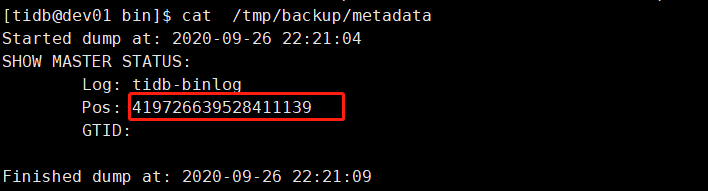2. 修改 inventory.ini 文件```shell[drainer_servers]drainer_tidb 192.168.251.168 initial_commit_ts="419726639528411139"
- 修改配置文件
```shell [syncer]cd /home/tidb/tidb-ansible-3.0.7/conf &&cp drainer.toml drainer_mysql_drainer.toml &&vi drainer_tidb_drainer.toml
downstream storage, equal to —dest-db-type
Valid values are “mysql”, “file”, “tidb”, “kafka”.
db-type = “tidb”
the downstream MySQL protocol database
[syncer.to] host = “192.168.251.133” user = “root” password = “” port = 4000
3. 部署 Drainer```shellansible-playbook deploy_drainer.yml

若有收获,就点个赞吧
0 人点赞


