文档资料
导入导出
# 导出库$ mysqldump -u 用户名 -p 数据库名 > 导出的文件名$ mysqlpump -u root -p dbName > /home/data/dbName.sql# 导出表$ mysqldump -u root -p dbName tableName > sqlFilePath# 导入$ mysql -u 用户名 -p 密码 数据库名 < 数据库名.sql$ mysql -u root -p root dbName < dbName.sql
允许root远程连接
# 开启3306端口$ mysql> use mysql;$ mysql> select `host`, `user` from user; // 查看$ mysql> update user set host='%' where user='root' and host='localhost';$ mysql> flush privileges;$ exit;$ service mysqld restart;
windows系统修改 mysql 数据库 user 表中 root 为 %: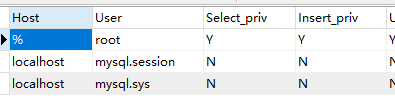
修改密码
$ mysql> use mysql;$ mysql> update user set authentication_string=password("test") where user='root';$ mysql> flush privileges;$ exit;
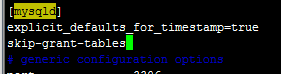
若忘记密码,可在 [mysqld] 后面任意一行添加 “skip-grant-tables” 用来跳过密码验证:
$ vi /etc/my.cnf:# ... 添加 skip-grant-tables$ service mysqld restart;
Windows操作
net start mysql #启动net stop mysql #关闭
中国地区SQL表
时间戳 时间 转换
select from_unixtime(1451997924) as new_time# 结果:2016-01-05 20:45:24select from_unixtime(1451997924,'%Y-%m-%d %H:%i:%s') as new_time# 结果:2016-01-05 20:45:24select unix_timestamp('2016-01-02')# 结果:1451664000
设置字段
设置字段命令示例:
# irm_influencer# create: brandALTER TABLE `irm_influencer` ADD `brand` varchar(50) NOT NULL DEFAULT '' COMMENT '所属品牌' AFTER `operator`;# irm_activity_to_influencer# update: brand,product_number# delete: belong_brand、cooperation_brandALTER TABLE irm_activity_to_influencer MODIFY `brand` varchar(50) NOT NULL DEFAULT '' COMMENT '合作品牌';ALTER TABLE irm_activity_to_influencer MODIFY `product_number` int(11) NOT NULL DEFAULT '1';ALTER TABLE irm_activity_to_influencer DROP `belong_brand`;ALTER TABLE irm_activity_to_influencer DROP `product_number`;
自动备份
备份数据脚本示例:
time=us_songmics_dev_$(date '+%Y-%m-%d-%H-%M-%S')###################数据库配置信息#######################user=songmicspasswd='Songmics!@#123'dbname=us_songmics_devmysql_back_path=/home/data##################执行备份#############################mysqldump -u$user -p$passwd $dbname > $mysql_back_path/$time.sql
可加入到定时任务中。
创建只读账号
mysql -u root -p# 其中,百分号“%”表示用户可以从任何ip的客户端登陆,如果要限定指定的ip登陆,只需要把百分号"%"改为指定的ip即可。CREATE USER 'demo'@'%' IDENTIFIED BY 'demo123';# 授权用户只能在irm数据库中执行select语句GRANT SELECT ON irm.* TO 'demo'@'%';# 刷新权限FLUSH PRIVILEGES;

若有收获,就点个赞吧
0 人点赞


