- 一、性能优化概述
- 二、Explain 概述
- 三、Explain 详解
- 3.1 id: select查询的序列号,包含一组数字,表示查询中执行select子句或操作表的顺序
- 3.2 select_type:查询的类型,主要用于区别普通查询、联合查询、子查询等复杂查询 [一共六种]
- 3.3 table:显示这一行的数据是关于哪张表的
- 3.4 type**:访问类型排列,显示查询使用了何种类型**
- 3.5 possible_keys**:**显示可能应用在这张表中的索引,一个或多个。查询涉及的字段上若存在索引,则该索引将被列出,但不一定被查询实际使用
- 3.6 key**: **实际使用的索引。如果为null则没有使用索引,.查询中若使用了覆盖索引,则索引和查询的select字段重叠
- 3.8 key_len
- 3.9 ref**
- 3.10 rows
- 3.11 Extra:包含不适合在其他列中显示但十分重要的额外信息
- 四、Explain 热身 Case
- 五、索引优化
- 六、索引失效准则
- 七、索引失效总结
一、性能优化概述
1.1 MySQL Query Optimizer 的作用
- MySQL 中有专门负责优化SELECT语句的优化器模块,主要功能:通过计算分析系统中收集到的统计信息,为客户端请求的Query提供他认为最优的执行计划(MySQL认为最优的数据检索方式,但不见得是DBA认为是最优的,这部分最耗费时间)
- 当客户端向MySQL 请求一条Query,命令解析器模块完成请求分类,区别出是SELECT并转发给MySQL Query Optimizer时,MySQL Query Optimizer 首先会对整条Query进行优化,处理掉一些常量表达式的预算,直接换算成常量值。并对Query中的查询条件进行简化和转换,如去掉一些无用或显而易见的条件、结构调整等。然后分析 Query中的Hint信息(如果有),看显示Hint信息是否可以完全确定该Query的执行计划。如果没有Hint 或Hint 信息还不足以完全确定执行计划,则会读取所涉及对象的统计信息,根据Query进行写相应的计算分析,然后再得出最后的执行计划。
1.2 MySQL 常见瓶颈
- CPU 瓶颈:CPU在饱和的时候一般发生在数据装入在内存或从磁盘上读取数据时候
- IO 瓶颈:磁盘I/O瓶颈发生在装入数据远大于内存容量时
- 服务器硬件的性能瓶颈:top、free、iostat和vmstat来查看系统的性能状态
二、Explain 概述
1、是什么?Explain 是查看执行计划
- 使用EXPLAIN关键字可以模拟优化器执行SQL语句,从而知道MySQL是如何处理你的SQL语句的。分析你的查询语句或是结构的性能瓶颈
- 官网地址:https://dev.mysql.com/doc/refman/8.0/en/explain-output.html
2、能干嘛?
- 表的读取顺序(id 字段)
- 数据读取操作的操作类型(select_type 字段)
- 哪些索引可以使用(possible_keys 字段)
- 哪些索引被实际使用(keys 字段)
- 表之间的引用(ref 字段)
- 每张表有多少行被优化器查询(rows 字段)
3、怎么玩?
- Explain + SQL语句
mysql> explain select * from tbl_emp;+----+-------------+---------+------------+------+---------------+------+---------+------+------+----------+-------+| id | select_type | table | partitions | type | possible_keys | key | key_len | ref | rows | filtered | Extra |+----+-------------+---------+------------+------+---------------+------+---------+------+------+----------+-------+| 1 | SIMPLE | tbl_emp | NULL | ALL | NULL | NULL | NULL | NULL | 8 | 100.00 | NULL |+----+-------------+---------+------------+------+---------------+------+---------+------+------+----------+-------+1 row in set, 1 warning (0.01 sec)
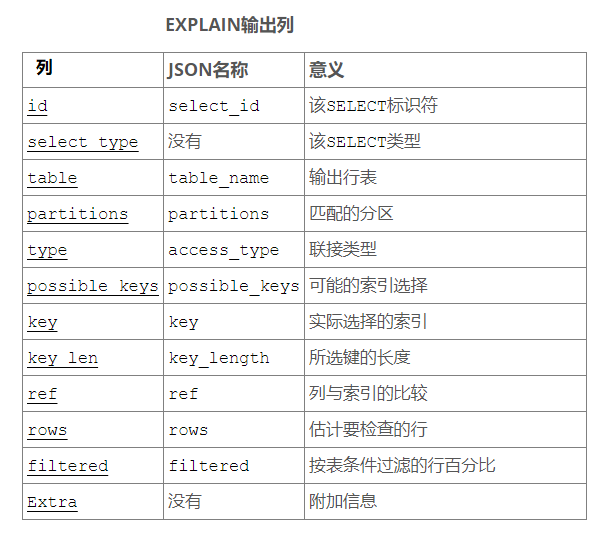
面试中至少答出: id, table, type, key, ref, extra三、Explain 详解
3.1 id: select查询的序列号,包含一组数字,表示查询中执行select子句或操作表的顺序
id 取值的三种情况:1、id相同,执行顺序由上至下
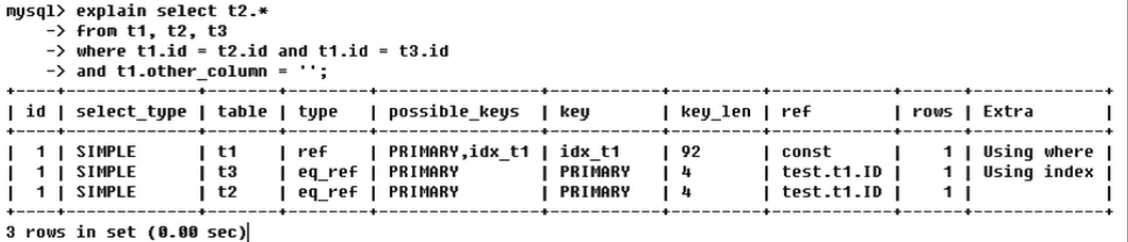
2、id不同,如果是子查询,id的序号会递增,id值越大优先级越高,越先被执行
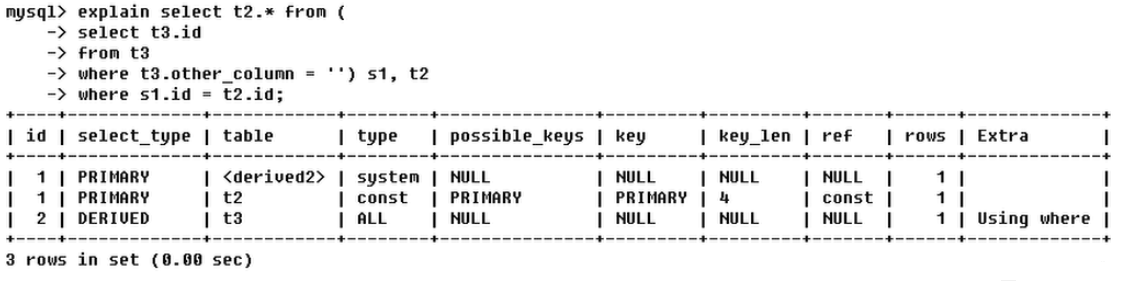
3、id相同不同,同时存在:id如果相同,可以认为是一组,从上往下顺序执行;在所有组中,id值越大,优先级越高,越先执行;衍生=DERIVED
3.2 select_type:查询的类型,主要用于区别普通查询、联合查询、子查询等复杂查询 [一共六种]

- SIMPLE:简单的select查询,查询中不包含子查询或者UNION
- PRIMARY:查询中若包含任何复杂的子部分,最外层查询则被标记为PRIMARY
- SUBQUERY:在SELECT或者WHERE列表中包含了子查询
- DERIVED:在FROM列表中包含的子查询被标记为DERIVED(衍生)MySQL会递归执行这些子查询,把结果放在临时表里
- UNION:若第二个SELECT出现在UNION之后,则被标记为UNION;若UNION包含在FROM子句的子查询中,外层SELECT将被标记为:DERIVED
- UNION RESULT**:**从UNION表获取结果的SELECT
Eg: UNION 和 UNION RESULT举例
mysql> explain-> select * from tbl_emp e left join tbl_dept d on e.deptId = d.id-> union-> select * from tbl_emp e right join tbl_dept d on e.deptId = d.id;+----+--------------+------------+------------+------+---------------+------+---------+------+------+----------+----------------------------------------------------+| id | select_type | table | partitions | type | possible_keys | key | key_len | ref | rows | filtered | Extra |+----+--------------+------------+------------+------+---------------+------+---------+------+------+----------+----------------------------------------------------+| 1 | PRIMARY | e | NULL | ALL | NULL | NULL | NULL | NULL | 8 | 100.00 | NULL || 1 | PRIMARY | d | NULL | ALL | PRIMARY | NULL | NULL | NULL | 5 | 100.00 | Using where; Using join buffer (Block Nested Loop) || 2 | UNION | d | NULL | ALL | NULL | NULL | NULL | NULL | 5 | 100.00 | NULL || 2 | UNION | e | NULL | ALL | fk_dept_Id | NULL | NULL | NULL | 8 | 100.00 | Using where; Using join buffer (Block Nested Loop) || NULL | UNION RESULT | <union1,2> | NULL | ALL | NULL | NULL | NULL | NULL | NULL | NULL | Using temporary |+----+--------------+------------+------------+------+---------------+------+---------+------+------+----------+----------------------------------------------------+5 rows in set, 1 warning (0.02 sec)
3.3 table:显示这一行的数据是关于哪张表的
3.4 type**:访问类型排列,显示查询使用了何种类型**
- type显示的是访问类型,是较为重要的一个指标,结果值从最好到最坏依次是:
system > const > eq_ref > ref > fulltext> ref_or_null > index_merge > unique_subquery > index_subquery > range > index > all
- 挑重要的来说:
system > const > eq_ref > ref > range > index > all,一般来说,得保证查询至少达到range级别,最好能达到ref。
1、system:表只有一行记录(等于系统表),这是const类型的特例,平时不会出现,这个也可以忽略不计
2、const:表示通过索引一次就找到了,const用于比较primary key或者unique索引。因为只匹配一行数据,所以很快。如将主键置于where列表中,MySQL就能将该查询转换为一个常量
3、eq_ref:唯一性索引,对于每个索引键,表中只有一条记录与之匹配,常见于主键或唯一索引扫描
4、ref:非唯一索引扫描,返回匹配某个单独值的所有行。本质上也是一种索引访问,它返回所有匹配某个单独值的行,然而,它可能会找到多个符合条件的行,所以他应该属于查找和扫描的混合体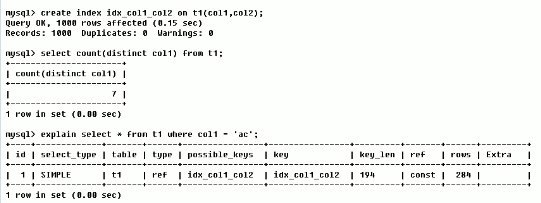
5、range 只检索给定范围的行,使用一个索引来选择行。key列显示使用了哪个索引一般就是在你的where语句中出现了between、<、>、in等的查询这种范围扫描索引扫描比全表扫描要好,因为他只需要开始索引的某一点,而结束语另一点,不用扫描全部索引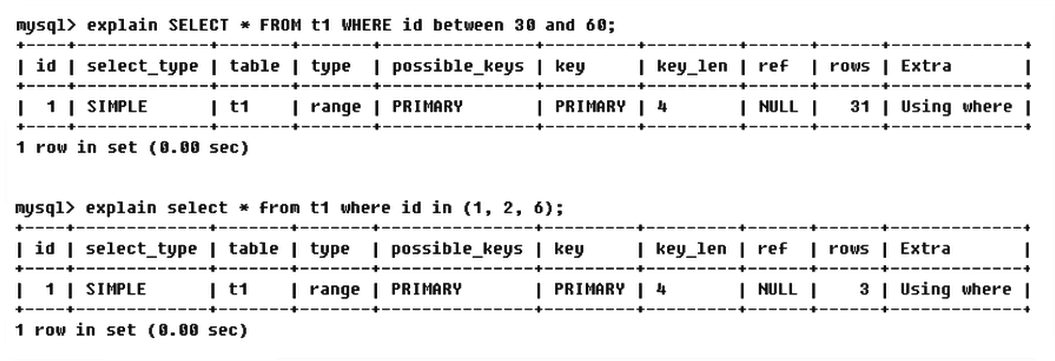
6、index:Full Index Scan,index与ALL区别为index类型只遍历索引树。这通常比ALL快,因为索引文件通常比数据文件小。(也就是说虽然all和index都是读全表,但index是从索引中读取的,而all是从硬盘数据库文件中读的)
7、all:FullTable Scan,将遍历全表以找到匹配的行(全表扫描) 备注:一般来说,得保证查询只是达到range级别,最好达到ref
system > const > eq_ref > ref > range > index > all3.5 possible_keys**:**显示可能应用在这张表中的索引,一个或多个。查询涉及的字段上若存在索引,则该索引将被列出,但不一定被查询实际使用
3.6 key**: **实际使用的索引。如果为null则没有使用索引,.查询中若使用了覆盖索引,则索引和查询的select字段重叠
3.8 key_len

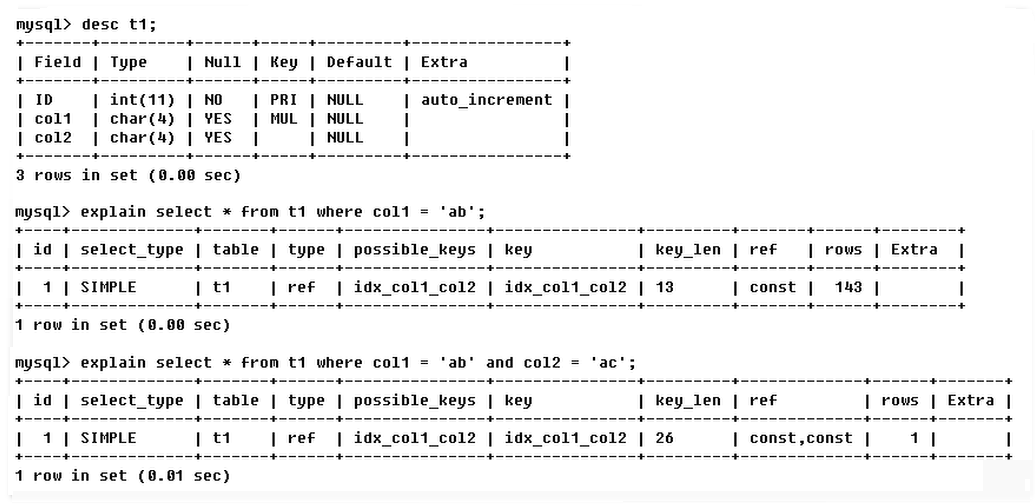
- 表示索引中使用的字节数,可通过该列计算查询中使用的索引的长度。在不损失精确性的情况下,长度越短越好
- key_len显示的值为索引最大可能长度,并非实际使用长度,即key_len是根据表定义计算而得,不是通过表内检索出的
3.9 ref**
- 显示索引哪一列被使用了,如果可能的话,最好是一个常数。哪些列或常量被用于查找索引列上的值
- 由key_len可知t1表的索引idx_col1_col2被充分使用,t1表的col1匹配t2表的col1,t1表的col2匹配了一个常量,即’ac’

3.10 rows
根据表统计信息及索引选用情况,大致估算出找到所需的记录所需要读取的行数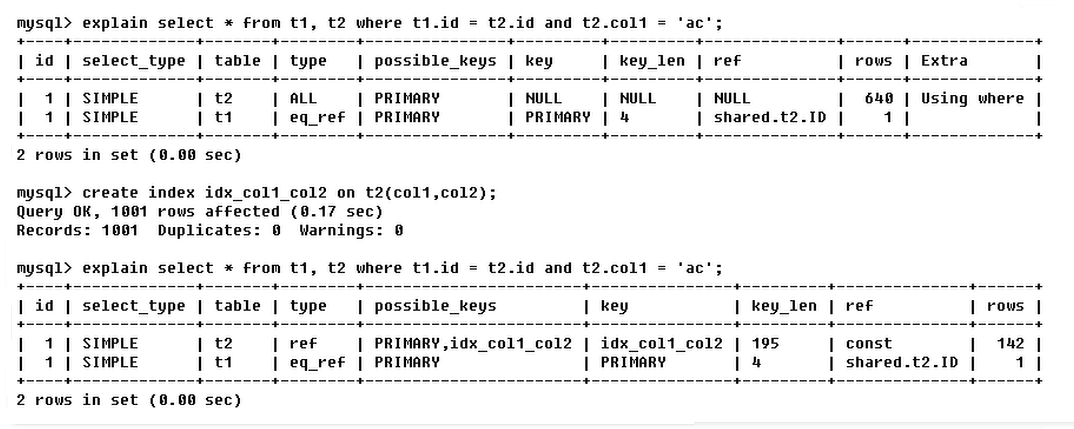
3.11 Extra:包含不适合在其他列中显示但十分重要的额外信息
1、Using filesort(文件排序):
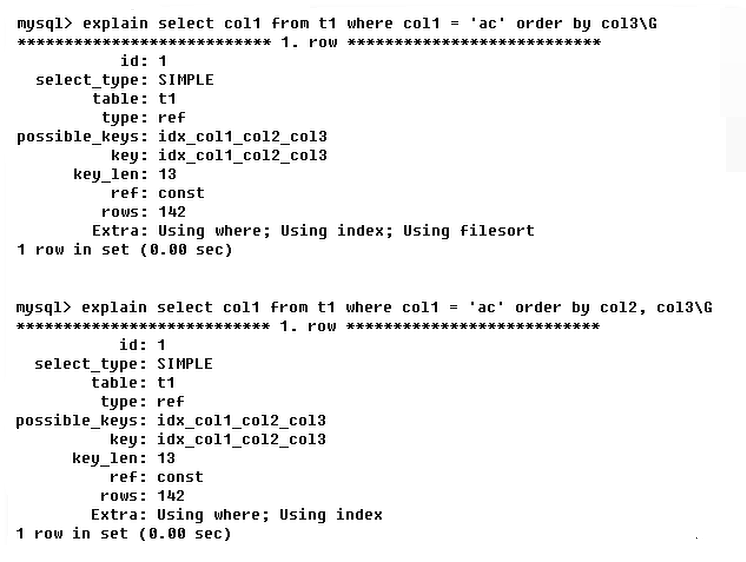
- 说明mysql会对数据使用一个外部的索引排序,而不是按照表内的索引顺序进行读取
- 出现 Using filesort 不好(九死一生),需要尽快优化 SQL
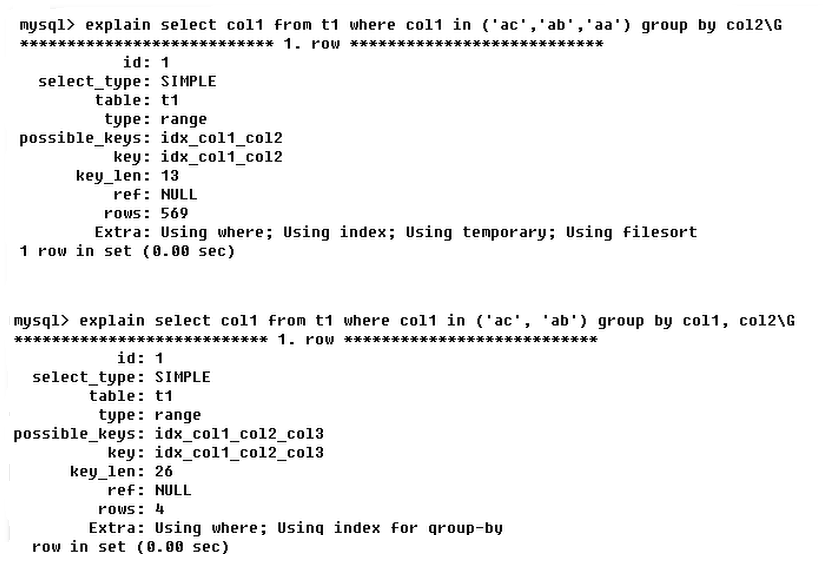
- 示例中第一个查询只使用了 col1 和 col3,原有索引派不上用场,所以进行了外部文件排序
- 示例中第二个查询使用了 col1、col2 和 col3,原有索引派上用场,无需进行文件排序
2、Using temporary(创建临时表)
- 使用了临时表保存中间结果,MySQL在对查询结果排序时使用临时表。常见于排序 order by 和分组查询 group by
- 出现 Using temporary 超级不好(十死无生),需要立即优化 SQL
- 示例中第一个查询只使用了 col1,原有索引派不上用场,所以创建了临时表进行分组
- 示例中第二个查询使用了 col1、col2,原有索引派上用场,无需创建临时表
3、Using index(覆盖索引)
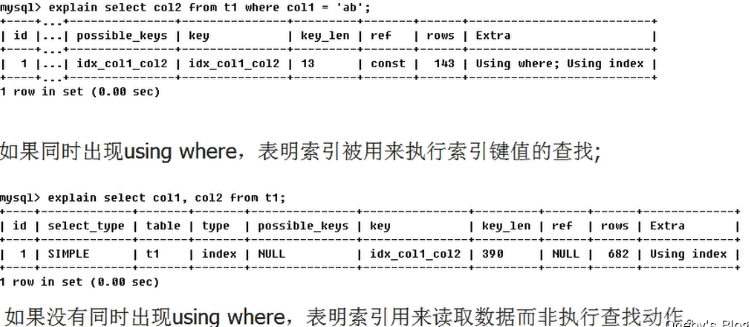
- 表示相应的select操作中使用了覆盖索引(Coveing Index),避免访问了表的数据行,效率不错!
- 如果同时出现using where,表明索引被用来执行索引键值的查找
- 如果没有同时出现using where,表明索引用来读取数据而非执行查找动作
4、using where:表明使用了where过滤
5、using join buffer 表明使用了连接缓存
6、impossible where:where子句的值总是false,不能用来获取任何元组
7.select tables optimized away
在没有GROUPBY子句的情况下,基于索引优化MIN/MAX操作或者对于MyISAM存储引擎优化COUNT(*)操作,不必等到执行阶段再进行计算,查询执行计划生成的阶段即完成优化。
8.distinct
优化distinct,在找到第一匹配的元组后即停止找同样值的工作
四、Explain 热身 Case
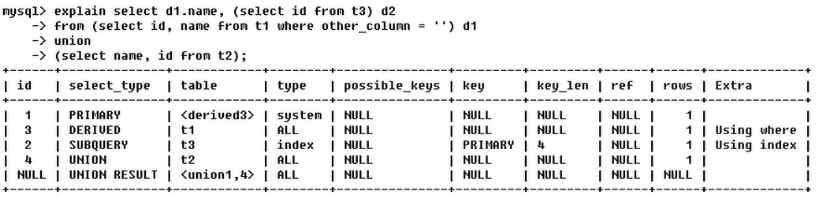
- 第一行(执行顺序4):id列为1,表示是union里的第一个select,select_type列的primary表示该查询为外层查询,table列被标记为
,表示查询结果来自一个衍生表,其中derived3中3代表该查询衍生自第三个select查询,即id为3的select。【select d1.name …】 - 第二行(执行顺序2):id为3,是整个查询中第三个select的一部分。因查询包含在from中,所以为derived。【select id, name from t1 where other_column= ‘ ‘】
- 第三行(执行顺序3):select列表中的子查询select_type为subquery,为整个查询中的第二个select。【select id from t3】
- 第四行(执行顺序1):select_type为union,说明第四个select是union里的第二个select,最先执行【select name, id from t2】
- 第五行(执行顺序5):代表从union的临时表中读取行的阶段,table列的
五、索引优化
1、单表索引优化分析
创建表
CREATE TABLE IF NOT EXISTS article(id INT(10) UNSIGNED NOT NULL PRIMARY KEY AUTO_INCREMENT,author_id INT(10) UNSIGNED NOT NULL,category_id INT(10) UNSIGNED NOT NULL,views INT(10) UNSIGNED NOT NULL,comments INT(10) UNSIGNED NOT NULL,title VARCHAR(255) NOT NULL,content TEXT NOT NULL);INSERT INTO article(author_id,category_id,views,comments,title,content)VALUES(1,1,1,1,'1','1'),(2,2,2,2,'2','2'),(1,1,3,3,'3','3');
查询案例:【查询category_id为1且comments 大于1的情况下,views最多的article_id】
mysql> SELECT id, author_id FROM article WHERE category_id = 1 AND comments > 1 ORDER BY views DESC LIMIT 1;+----+-----------+| id | author_id |+----+-----------+| 3 | 1 |+----+-----------+1 row in set (0.00 sec)
此时 article 表中只有一个主键索引
mysql> show index from article;+---------+------------+----------+--------------+-------------+-----------+-------------+----------+--------+------+------------+---------+---------------+| Table | Non_unique | Key_name | Seq_in_index | Column_name | Collation | Cardinality | Sub_part | Packed | Null | Index_type | Comment | Index_comment |+---------+------------+----------+--------------+-------------+-----------+-------------+----------+--------+------+------------+---------+---------------+| article | 0 | PRIMARY | 1 | id | A | 3 | NULL | NULL | | BTREE | | |+---------+------------+----------+--------------+-------------+-----------+-------------+----------+--------+------+------------+---------+---------------+1 row in set (0.00 sec)
使用 explain 分析 SQL 语句的执行效率:EXPLAIN SELECT id, author_id FROM article WHERE category_id = 1 AND comments > 1 ORDER BY views DESC LIMIT 1;``<br />
mysql> EXPLAIN SELECT id, author_id FROM article WHERE category_id = 1 AND comments > 1 ORDER BY views DESC LIMIT 1;+----+-------------+---------+------------+------+---------------+------+---------+------+------+----------+-----------------------------+| id | select_type | table | partitions | type | possible_keys | key | key_len | ref | rows | filtered | Extra |+----+-------------+---------+------------+------+---------------+------+---------+------+------+----------+-----------------------------+| 1 | SIMPLE | article | NULL | ALL | NULL | NULL | NULL | NULL | 3 | 33.33 | Using where; Using filesort |+----+-------------+---------+------------+------+---------------+------+---------+------+------+----------+-----------------------------+1 row in set, 1 warning (0.00 sec)
结论:
- 很显然,type是ALL,即最坏的情况。
- Extra 里还出现了Using filesort,也是最坏的情况。
- 优化是必须的。
开始优化:新建索引
- 创建索引的 SQL 命令 [ 在 category_id 列、comments 列和 views 列上建立联合索引 ]
# ALTER TABLE article ADD INDEX idx_article_ccv('category_id', 'comments', 'views'); create index idx_article_ccv on article(category_id, comments, views);
mysql> SHOW INDEX FROM article;+---------+------------+-----------------+--------------+-------------+-----------+-------------+----------+--------+------+------------+---------+---------------+| Table | Non_unique | Key_name | Seq_in_index | Column_name | Collation | Cardinality | Sub_part | Packed | Null | Index_type | Comment | Index_comment |+---------+------------+-----------------+--------------+-------------+-----------+-------------+----------+--------+------+------------+---------+---------------+| article | 0 | PRIMARY | 1 | id | A | 3 | NULL | NULL | | BTREE | | || article | 1 | idx_article_ccv | 1 | category_id | A | 2 | NULL | NULL | | BTREE | | || article | 1 | idx_article_ccv | 2 | comments | A | 3 | NULL | NULL | | BTREE | | || article | 1 | idx_article_ccv | 3 | views | A | 3 | NULL | NULL | | BTREE | | |+---------+------------+-----------------+--------------+-------------+-----------+-------------+----------+--------+------+------------+---------+---------------+4 rows in set (0.00 sec)
- 再次执行查询:type变成了range,说明使用了索引。但是extra里使用Using filesort仍是无法接受的。 ```sql
mysql> EXPLAIN SELECT id, author_id FROM article WHERE category_id = 1 AND comments > 1 ORDER BY views DESC LIMIT 1; +——+——————-+————-+——————+———-+————————-+————————-+————-+———+———+—————+———————————————————-+ | id | select_type | table | partitions | type | possible_keys | key | key_len | ref | rows | filtered | Extra | +——+——————-+————-+——————+———-+————————-+————————-+————-+———+———+—————+———————————————————-+ | 1 | SIMPLE | article | NULL | range | idx_article_ccv | idx_article_ccv | 8 | NULL | 1 | 100.00 | Using index condition; Using filesort | +——+——————-+————-+——————+———-+————————-+————————-+————-+———+———+—————+———————————————————-+ 1 row in set, 1 warning (0.00 sec)
分析:- 但是我们已经建立了索引,为啥没用呢?- 这是因为按照B+Tree索引的工作原理,先排序 category_id,如果遇到相同的 category_id 则再排序comments,如果遇到相同的 comments 则再排序 views。- 当comments字段在联合索引里处于中间位置时,因为comments>1条件是一个范围值(所谓 range),MySQL 无法利用索引再对后面的views部分进行检索,即 range 类型查询字段后面的索引无效。- 将查询条件中的 comments > 1 改为 comments = 1 ,发现 Use filesort 神奇地消失了,从这点可以验证:**范围后的索引会导致索引失效**```sqlmysql> EXPLAIN SELECT id, author_id FROM article WHERE category_id = 1 AND comments = 1 ORDER BY views DESC LIMIT 1;+----+-------------+---------+------------+------+-----------------+-----------------+---------+-------------+------+----------+-------------+| id | select_type | table | partitions | type | possible_keys | key | key_len | ref | rows | filtered | Extra |+----+-------------+---------+------------+------+-----------------+-----------------+---------+-------------+------+----------+-------------+| 1 | SIMPLE | article | NULL | ref | idx_article_ccv | idx_article_ccv | 8 | const,const | 1 | 100.00 | Using where |+----+-------------+---------+------------+------+-----------------+-----------------+---------+-------------+------+----------+-------------+1 row in set, 1 warning (0.00 sec)
- 删除刚才创建的 idx_article_ccv 索引 [ DROP INDEX idx_article_ccv ON article; ] ```sql mysql> DROP INDEX idx_article_ccv ON article; Query OK, 0 rows affected (0.28 sec) Records: 0 Duplicates: 0 Warnings: 0
mysql> SHOW INDEX FROM article; +————-+——————+—————+———————+——————-+—————-+——————-+—————+————+———+——————+————-+———————-+ | Table | Non_unique | Key_name | Seq_in_index | Column_name | Collation | Cardinality | Sub_part | Packed | Null | Index_type | Comment | Index_comment | +————-+——————+—————+———————+——————-+—————-+——————-+—————+————+———+——————+————-+———————-+ | article | 0 | PRIMARY | 1 | id | A | 3 | NULL | NULL | | BTREE | | | +————-+——————+—————+———————+——————-+—————-+——————-+—————+————+———+——————+————-+———————-+ 1 row in set (0.00 sec)
**再次创建索引**`# ALTER TABLE article ADD INDEX idx_article_ccv('category_id', 'views'); ``create index idx_article_ccv on article(category_id, views);`- 由于 range 后(`comments > 1`)的索引会失效,这次我们建立索引时,直接抛弃 comments 列,先利用 category_id 和 views 的联合索引查询所需要的数据,再从其中取出 `comments > 1` 的数据```sqlmysql> EXPLAIN SELECT id, author_id FROM article WHERE category_id = 1 AND comments > 1 ORDER BY views DESC LIMIT 1;+----+-------------+---------+------------+------+-----------------+-----------------+---------+-------+------+----------+-------------+| id | select_type | table | partitions | type | possible_keys | key | key_len | ref | rows | filtered | Extra |+----+-------------+---------+------------+------+-----------------+-----------------+---------+-------+------+----------+-------------+| 1 | SIMPLE | article | NULL | ref | idx_article_ccv | idx_article_ccv | 4 | const | 2 | 33.33 | Using where |+----+-------------+---------+------------+------+-----------------+-----------------+---------+-------+------+----------+-------------+1 row in set, 1 warning (0.00 sec)
- 为了不影响之后的测试,删除该表的 idx_article_ccv 索引
DROP INDEX idx_article_ccv ON article;
mysql> DROP INDEX idx_article_ccv ON article;Query OK, 0 rows affected (0.05 sec)Records: 0 Duplicates: 0 Warnings: 0mysql> SHOW INDEX FROM article;+---------+------------+----------+--------------+-------------+-----------+-------------+----------+--------+------+------------+---------+---------------+| Table | Non_unique | Key_name | Seq_in_index | Column_name | Collation | Cardinality | Sub_part | Packed | Null | Index_type | Comment | Index_comment |+---------+------------+----------+--------------+-------------+-----------+-------------+----------+--------+------+------------+---------+---------------+| article | 0 | PRIMARY | 1 | id | A | 3 | NULL | NULL | | BTREE | | |+---------+------------+----------+--------------+-------------+-----------+-------------+----------+--------+------+------------+---------+---------------+1 row in set (0.01 sec)
2、两表索引优化 [两表索引优化分析:主外键]
建表
CREATE TABLE IF NOT EXISTS class(id INT(10) UNSIGNED NOT NULL AUTO_INCREMENT,card INT(10) UNSIGNED NOT NULL,PRIMARY KEY(id));CREATE TABLE IF NOT EXISTS book(bookid INT(10) UNSIGNED NOT NULL AUTO_INCREMENT,card INT(10) UNSIGNED NOT NULL,PRIMARY KEY(bookid));INSERT INTO class(card) VALUES(FLOOR(1+(RAND()*20)));INSERT INTO class(card) VALUES(FLOOR(1+(RAND()*20)));INSERT INTO class(card) VALUES(FLOOR(1+(RAND()*20)));INSERT INTO class(card) VALUES(FLOOR(1+(RAND()*20)));INSERT INTO class(card) VALUES(FLOOR(1+(RAND()*20)));INSERT INTO class(card) VALUES(FLOOR(1+(RAND()*20)));INSERT INTO class(card) VALUES(FLOOR(1+(RAND()*20)));INSERT INTO class(card) VALUES(FLOOR(1+(RAND()*20)));INSERT INTO class(card) VALUES(FLOOR(1+(RAND()*20)));INSERT INTO class(card) VALUES(FLOOR(1+(RAND()*20)));INSERT INTO class(card) VALUES(FLOOR(1+(RAND()*20)));INSERT INTO class(card) VALUES(FLOOR(1+(RAND()*20)));INSERT INTO class(card) VALUES(FLOOR(1+(RAND()*20)));INSERT INTO class(card) VALUES(FLOOR(1+(RAND()*20)));INSERT INTO class(card) VALUES(FLOOR(1+(RAND()*20)));INSERT INTO class(card) VALUES(FLOOR(1+(RAND()*20)));INSERT INTO class(card) VALUES(FLOOR(1+(RAND()*20)));INSERT INTO class(card) VALUES(FLOOR(1+(RAND()*20)));INSERT INTO class(card) VALUES(FLOOR(1+(RAND()*20)));INSERT INTO class(card) VALUES(FLOOR(1+(RAND()*20)));INSERT INTO class(card) VALUES(FLOOR(1+(RAND()*20)));INSERT INTO book(card) VALUES(FLOOR(1+(RAND()*20)));INSERT INTO book(card) VALUES(FLOOR(1+(RAND()*20)));INSERT INTO book(card) VALUES(FLOOR(1+(RAND()*20)));INSERT INTO book(card) VALUES(FLOOR(1+(RAND()*20)));INSERT INTO book(card) VALUES(FLOOR(1+(RAND()*20)));INSERT INTO book(card) VALUES(FLOOR(1+(RAND()*20)));INSERT INTO book(card) VALUES(FLOOR(1+(RAND()*20)));INSERT INTO book(card) VALUES(FLOOR(1+(RAND()*20)));INSERT INTO book(card) VALUES(FLOOR(1+(RAND()*20)));INSERT INTO book(card) VALUES(FLOOR(1+(RAND()*20)));INSERT INTO book(card) VALUES(FLOOR(1+(RAND()*20)));INSERT INTO book(card) VALUES(FLOOR(1+(RAND()*20)));INSERT INTO book(card) VALUES(FLOOR(1+(RAND()*20)));INSERT INTO book(card) VALUES(FLOOR(1+(RAND()*20)));INSERT INTO book(card) VALUES(FLOOR(1+(RAND()*20)));INSERT INTO book(card) VALUES(FLOOR(1+(RAND()*20)));INSERT INTO book(card) VALUES(FLOOR(1+(RAND()*20)));INSERT INTO book(card) VALUES(FLOOR(1+(RAND()*20)));INSERT INTO book(card) VALUES(FLOOR(1+(RAND()*20)));INSERT INTO book(card) VALUES(FLOOR(1+(RAND()*20)));
查询案例:
- 实现两表的连接,连接条件是 class.card = book.card;
- SELECT * FROM class LEFT JOIN book ON class.card = book.card;
使用 explain 分析 SQL 语句的性能,可以看到:驱动表是左表 class 表
mysql> EXPLAIN SELECT * FROM class LEFT JOIN book ON class.card = book.card;+----+-------------+-------+------+---------------+------+---------+------+------+----------------------------------------------------+| id | select_type | table | type | possible_keys | key | key_len | ref | rows | Extra |+----+-------------+-------+------+---------------+------+---------+------+------+----------------------------------------------------+| 1 | SIMPLE | class | ALL | NULL | NULL | NULL | NULL | 21 | NULL || 1 | SIMPLE | book | ALL | NULL | NULL | NULL | NULL | 20 | Using where; Using join buffer (Block Nested Loop) |+----+-------------+-------+------+---------------+------+---------+------+------+----------------------------------------------------+2 rows in set (0.00 sec)
结论:
type 有 All ,rows 为表中数据总行数,说明 class 和 book 进行了全表检索
- 即每次 class 表对 book 表进行左外连接时,都需要在 book 表中进行一次全表检索
添加索引:在右表添加索引**
- 添加索引的 SQL 指令
ALTER TABLE 'book' ADD INDEX Y ('card'); - 在 book 的 card 字段上添加索引
ALTER TABLE book ADD INDEX Y (card);
测试结果:可以看到第二行的type变为了ref,rows也变成了优化比较明显。
mysql> EXPLAIN SELECT * FROM class LEFT JOIN book ON class.card = book.card;+----+-------------+-------+------+---------------+------+---------+-----------------+------+-------------+| id | select_type | table | type | possible_keys | key | key_len | ref | rows | Extra |+----+-------------+-------+------+---------------+------+---------+-----------------+------+-------------+| 1 | SIMPLE | class | ALL | NULL | NULL | NULL | NULL | 21 | NULL || 1 | SIMPLE | book | ref | Y | Y | 4 | db01.class.card | 1 | Using index |+----+-------------+-------+------+---------------+------+---------+-----------------+------+-------------+2 rows in set (0.00 sec)
分析:
- 这是由左连接特性决定的。LEFT JOIN条件用于确定如何从右表搜索行,左边一定都有,所以右边是我们的关键点,一定需要建立索引。
- 左表连接右表,则需要拿着左表的数据去右表里面查,索引需要在右表中建立索引
添加索引:在右表添加索引**
- 删除之前 book 表中的索引
DROP INDEX Y ON book; - 在 class 表的 card 字段上建立索引
ALTER TABLE class ADD INDEX X(card); 再次执行左连接,凉凉
mysql> EXPLAIN SELECT * FROM class LEFT JOIN book ON class.card = book.card;+----+-------------+-------+-------+---------------+------+---------+------+------+----------------------------------------------------+| id | select_type | table | type | possible_keys | key | key_len | ref | rows | Extra |+----+-------------+-------+-------+---------------+------+---------+------+------+----------------------------------------------------+| 1 | SIMPLE | class | index | NULL | X | 4 | NULL | 21 | Using index || 1 | SIMPLE | book | ALL | NULL | NULL | NULL | NULL | 20 | Using where; Using join buffer (Block Nested Loop) |+----+-------------+-------+-------+---------------+------+---------+------+------+----------------------------------------------------+2 rows in set (0.00 sec)
当执行右连接:可以看到第二行的type变为了ref,rows也变成了优化比较明显。
mysql> EXPLAIN SELECT * FROM class RIGHT JOIN book ON class.card = book.card;+----+-------------+-------+------+---------------+------+---------+----------------+------+-------------+| id | select_type | table | type | possible_keys | key | key_len | ref | rows | Extra |+----+-------------+-------+------+---------------+------+---------+----------------+------+-------------+| 1 | SIMPLE | book | ALL | NULL | NULL | NULL | NULL | 20 | NULL || 1 | SIMPLE | class | ref | X | X | 4 | db01.book.card | 1 | Using index |+----+-------------+-------+------+---------------+------+---------+----------------+------+-------------+2 rows in set (0.00 sec)
分析:
这是因为RIGHT JOIN条件用于确定如何从左表搜索行,右边一定都有,所以左边是我们的关键点,一定需要建立索引。
- class RIGHT JOIN book :book 里面的数据一定存在于结果集中,我们需要拿着 book 表中的数据,去 class 表中搜索,所以索引需要建立在 class 表中
- 为了不影响之后的测试,删除该表的 idx_article_ccv 索引
DROP INDEX X ON class;
3、Join 语句优化的结论
将 left join 看作是两层嵌套 for 循环
- 尽可能减少Join语句中的NestedLoop的循环总次数;
- 永远用小结果集驱动大的结果集(在大结果集中建立索引,在小结果集中遍历全表);
- 优先优化NestedLoop的内层循环;
- 保证Join语句中被驱动表上Join条件字段已经被索引;
- 当无法保证被驱动表的Join条件字段被索引且内存资源充足的前提下,不要太吝惜JoinBuffer的设置;
六、索引失效准则
建表sql``sql CREATE TABLE staffs( id INT PRIMARY KEY AUTO_INCREMENT,nameVARCHAR(24)NOT NULL DEFAULT'' COMMENT'姓名',ageINT NOT NULL DEFAULT 0 COMMENT'年龄',posVARCHAR(20) NOT NULL DEFAULT'' COMMENT'职位',add_time` TIMESTAMP NOT NULL DEFAULT CURRENT_TIMESTAMP COMMENT’入职时间’ )CHARSET utf8 COMMENT’员工记录表’;
INSERT INTO staffs(name,age,pos,add_time) VALUES(‘z3’,22,’manager’,NOW());
INSERT INTO staffs(name,age,pos,add_time) VALUES(‘July’,23,’dev’,NOW());
INSERT INTO staffs(name,age,pos,add_time) VALUES(‘2000’,23,’dev’,NOW());
ALTER TABLE staffs ADD INDEX index_staffs_nameAgePos(name,age,pos);
<a name="rSKQe"></a>### 1、索引失效准则1. **全值匹配我最爱**1. **最佳左前缀法则:如果索引了多例,要遵守最左前缀法则。指的是查询从索引的最左前列开始并且不跳过索引中的列。**1. **不在索引列上做任何操作(计算、函数、(自动or手动)类型转换),会导致索引失效而转向全表扫描**1. **存储引擎不能使用索引中范围条件右边的列**1. **尽量使用覆盖索引(只访问索引的查询(索引列和查询列一致)),减少select ***1. **mysql在使用不等于(!=或者<>)的时候无法使用索引会导致全表扫描**1. **is null,is not null 也无法使用索引(早期版本不能走索引,后续版本应该优化过,可以走索引)**1. **like以通配符开头(’%abc…’)mysql索引失效会变成全表扫描操作**1. **字符串不加单引号索引失效**1. **少用or,用它连接时会索引失效**<a name="TzMo9"></a>#### 最佳左匹配法则:带头大哥不能死,中间兄弟不能断- 只有带头大哥 name 时- key = index_staffs_nameAgePos 表明索引生效- ref = const :这个常量就是查询时的 ‘July’ 字符串常量```sqlmysql> EXPLAIN SELECT * FROM staffs WHERE name = 'July';+----+-------------+--------+------+-------------------------+-------------------------+---------+-------+------+-----------------------+| id | select_type | table | type | possible_keys | key | key_len | ref | rows | Extra |+----+-------------+--------+------+-------------------------+-------------------------+---------+-------+------+-----------------------+| 1 | SIMPLE | staffs | ref | index_staffs_nameAgePos | index_staffs_nameAgePos | 74 | const | 1 | Using index condition |+----+-------------+--------+------+-------------------------+-------------------------+---------+-------+------+-----------------------+1 row in set (0.00 sec)
带头大哥 name 带上小弟 age
- key = index_staffs_nameAgePos 表明索引生效
- ref = const,const:两个常量分别为 ‘July’ 和 23
mysql> EXPLAIN SELECT * FROM staffs WHERE name = 'July'AND age = 23;+----+-------------+--------+------+-------------------------+-------------------------+---------+-------------+------+-----------------------+| id | select_type | table | type | possible_keys | key | key_len | ref | rows | Extra |+----+-------------+--------+------+-------------------------+-------------------------+---------+-------------+------+-----------------------+| 1 | SIMPLE | staffs | ref | index_staffs_nameAgePos | index_staffs_nameAgePos | 78 | const,const | 1 | Using index condition |+----+-------------+--------+------+-------------------------+-------------------------+---------+-------------+------+-----------------------+1 row in set (0.00 sec)
带头大哥 name 挂了
- key = NULL 说明索引失效
- ref = null 表示 ref 也失效
mysql> EXPLAIN SELECT * FROM staffs WHERE age = 23 AND pos = 'dev';+----+-------------+--------+------+---------------+------+---------+------+------+-------------+| id | select_type | table | type | possible_keys | key | key_len | ref | rows | Extra |+----+-------------+--------+------+---------------+------+---------+------+------+-------------+| 1 | SIMPLE | staffs | ALL | NULL | NULL | NULL | NULL | 3 | Using where |+----+-------------+--------+------+---------------+------+---------+------+------+-------------+1 row in set (0.00 sec)
带头大哥 name 没挂,小弟 age 跑了
- key = index_staffs_nameAgePos 说明索引没有失效
- ref = const 表明只使用了一个常量,即第二个常量(pos = ‘dev’)没有生效
mysql> EXPLAIN SELECT * FROM staffs WHERE name = 'July'AND pos = 'dev';+----+-------------+--------+------+-------------------------+-------------------------+---------+-------+------+-----------------------+| id | select_type | table | type | possible_keys | key | key_len | ref | rows | Extra |+----+-------------+--------+------+-------------------------+-------------------------+---------+-------+------+-----------------------+| 1 | SIMPLE | staffs | ref | index_staffs_nameAgePos | index_staffs_nameAgePos | 74 | const | 1 | Using index condition |+----+-------------+--------+------+-------------------------+-------------------------+---------+-------+------+-----------------------+1 row in set (0.00 sec)
在索引列上进行计算,会导致索引失效,进而转向全表扫描
不对带头大哥 name 进行任何操作:key = index_staffs_nameAgePos 表明索引生效
mysql> EXPLAIN SELECT * FROM staffs WHERE name = 'July';+----+-------------+--------+------+-------------------------+-------------------------+---------+-------+------+-----------------------+| id | select_type | table | type | possible_keys | key | key_len | ref | rows | Extra |+----+-------------+--------+------+-------------------------+-------------------------+---------+-------+------+-----------------------+| 1 | SIMPLE | staffs | ref | index_staffs_nameAgePos | index_staffs_nameAgePos | 74 | const | 1 | Using index condition |+----+-------------+--------+------+-------------------------+-------------------------+---------+-------+------+-----------------------+1 row in set (0.00 sec)
对带头大哥 name 进行操作:使用 LEFT 函数截取子串
- key = NULL 表明索引生效
- type = ALL 表明进行了全表扫描
mysql> EXPLAIN SELECT * FROM staffs WHERE LEFT(name,4) = 'July';+----+-------------+--------+------+---------------+------+---------+------+------+-------------+| id | select_type | table | type | possible_keys | key | key_len | ref | rows | Extra |+----+-------------+--------+------+---------------+------+---------+------+------+-------------+| 1 | SIMPLE | staffs | ALL | NULL | NULL | NULL | NULL | 3 | Using where |+----+-------------+--------+------+---------------+------+---------+------+------+-------------+1 row in set (0.00 sec)
范围之后全失效
精确匹配
- type = ref 表示非唯一索引扫描,SQL 语句将返回匹配某个单独值的所有行。
- key_len = 140 表明表示索引中使用的字节数
mysql> EXPLAIN SELECT * FROM staffs WHERE name = 'July'AND age = 23 AND pos = 'dev';+----+-------------+--------+------+-------------------------+-------------------------+---------+-------------------+------+-----------------------+| id | select_type | table | type | possible_keys | key | key_len | ref | rows | Extra |+----+-------------+--------+------+-------------------------+-------------------------+---------+-------------------+------+-----------------------+| 1 | SIMPLE | staffs | ref | index_staffs_nameAgePos | index_staffs_nameAgePos | 140 | const,const,const | 1 | Using index condition |+----+-------------+--------+------+-------------------------+-------------------------+---------+-------------------+------+-----------------------+1 row in set (0.00 sec)
将 age 改为范围匹配
- type = range 表示范围扫描
- key = index_staffs_nameAgePos 表示索引并没有失效
- key_len = 78 ,ref = NULL 均表明范围搜索使其后面的索引均失效
mysql> EXPLAIN SELECT * FROM staffs WHERE name = 'July' AND age > 23 AND pos = 'dev';+----+-------------+--------+-------+-------------------------+-------------------------+---------+------+------+-----------------------+| id | select_type | table | type | possible_keys | key | key_len | ref | rows | Extra |+----+-------------+--------+-------+-------------------------+-------------------------+---------+------+------+-----------------------+| 1 | SIMPLE | staffs | range | index_staffs_nameAgePos | index_staffs_nameAgePos | 78 | NULL | 1 | Using index condition |+----+-------------+--------+-------+-------------------------+-------------------------+---------+------+------+-----------------------+1 row in set (0.00 sec)
尽量使用覆盖索引(只访问索引的查询(索引列和查询列一致)),减少
select *
SELECT *的写法mysql> EXPLAIN SELECT * FROM staffs WHERE name = 'July'AND age > 23 AND pos = 'dev';+----+-------------+--------+-------+-------------------------+-------------------------+---------+------+------+-----------------------+| id | select_type | table | type | possible_keys | key | key_len | ref | rows | Extra |+----+-------------+--------+-------+-------------------------+-------------------------+---------+------+------+-----------------------+| 1 | SIMPLE | staffs | range | index_staffs_nameAgePos | index_staffs_nameAgePos | 78 | NULL | 1 | Using index condition |+----+-------------+--------+-------+-------------------------+-------------------------+---------+------+------+-----------------------+1 row in set (0.00 sec)
覆盖索引的写法:Extra = Using where; Using index ,Using index 表示使用索引列进行查询,将大大提高查询的效率
mysql> EXPLAIN SELECT name, age, pos FROM staffs WHERE name = 'July'AND age = 23 AND pos = 'dev';+----+-------------+--------+------+-------------------------+-------------------------+---------+-------------------+------+--------------------------+| id | select_type | table | type | possible_keys | key | key_len | ref | rows | Extra |+----+-------------+--------+------+-------------------------+-------------------------+---------+-------------------+------+--------------------------+| 1 | SIMPLE | staffs | ref | index_staffs_nameAgePos | index_staffs_nameAgePos | 140 | const,const,const | 1 | Using where; Using index |+----+-------------+--------+------+-------------------------+-------------------------+---------+-------------------+------+--------------------------+1 row in set (0.00 sec)
覆盖索引中包含 range 条件:type = ref 并且 Extra = Using where; Using index ,虽然在查询条件中使用了 范围搜索,但是由于我们只需要查找索引列,所以无需进行全表扫描
mysql> EXPLAIN SELECT name, age, pos FROM staffs WHERE name = 'July'AND age > 23 AND pos = 'dev';+----+-------------+--------+------+-------------------------+-------------------------+---------+-------+------+--------------------------+| id | select_type | table | type | possible_keys | key | key_len | ref | rows | Extra |+----+-------------+--------+------+-------------------------+-------------------------+---------+-------+------+--------------------------+| 1 | SIMPLE | staffs | ref | index_staffs_nameAgePos | index_staffs_nameAgePos | 74 | const | 1 | Using where; Using index |+----+-------------+--------+------+-------------------------+-------------------------+---------+-------+------+--------------------------+1 row in set (0.00 sec)
mysql在使用不等于(!=或者<>)的时候无法使用索引会导致全表扫描
在使用 != 会 <> 时会导致索引失效:
- key = null 表示索引失效
- rows = 3 表示进行了全表扫描 ```sql mysql> EXPLAIN SELECT * FROM staffs WHERE name != ‘July’; +——+——————-+————+———+————————————-+———+————-+———+———+——————-+ | id | select_type | table | type | possible_keys | key | key_len | ref | rows | Extra | +——+——————-+————+———+————————————-+———+————-+———+———+——————-+ | 1 | SIMPLE | staffs | ALL | index_staffs_nameAgePos | NULL | NULL | NULL | 3 | Using where | +——+——————-+————+———+————————————-+———+————-+———+———+——————-+ 1 row in set (0.00 sec)
mysql> EXPLAIN SELECT * FROM staffs WHERE name <> ‘July’; +——+——————-+————+———+————————————-+———+————-+———+———+——————-+ | id | select_type | table | type | possible_keys | key | key_len | ref | rows | Extra | +——+——————-+————+———+————————————-+———+————-+———+———+——————-+ | 1 | SIMPLE | staffs | ALL | index_staffs_nameAgePos | NULL | NULL | NULL | 3 | Using where | +——+——————-+————+———+————————————-+———+————-+———+———+——————-+ 1 row in set (0.00 sec)
<a name="NC7fK"></a>#### is null,is not null 也无法使用索引```sqlysql> EXPLAIN SELECT * FROM staffs WHERE name is null;+----+-------------+-------+------+---------------+------+---------+------+------+------------------+| id | select_type | table | type | possible_keys | key | key_len | ref | rows | Extra |+----+-------------+-------+------+---------------+------+---------+------+------+------------------+| 1 | SIMPLE | NULL | NULL | NULL | NULL | NULL | NULL | NULL | Impossible WHERE |+----+-------------+-------+------+---------------+------+---------+------+------+------------------+1 row in set (0.00 sec)mysql> EXPLAIN SELECT * FROM staffs WHERE name is not null;+----+-------------+--------+------+-------------------------+------+---------+------+------+-------------+| id | select_type | table | type | possible_keys | key | key_len | ref | rows | Extra |+----+-------------+--------+------+-------------------------+------+---------+------+------+-------------+| 1 | SIMPLE | staffs | ALL | index_staffs_nameAgePos | NULL | NULL | NULL | 3 | Using where |+----+-------------+--------+------+-------------------------+------+---------+------+------+-------------+1 row in set (0.00 sec)
like % 写最右
- like % 写在左边的情况
- type = All ,rows = 3 表示进行了全表扫描
- key = null 表示索引失效 ```sql mysql> EXPLAIN SELECT * FROM staffs WHERE name like ‘%July’; +——+——————-+————+———+———————-+———+————-+———+———+——————-+ | id | select_type | table | type | possible_keys | key | key_len | ref | rows | Extra | +——+——————-+————+———+———————-+———+————-+———+———+——————-+ | 1 | SIMPLE | staffs | ALL | NULL | NULL | NULL | NULL | 3 | Using where | +——+——————-+————+———+———————-+———+————-+———+———+——————-+ 1 row in set (0.00 sec)
mysql> EXPLAIN SELECT * FROM staffs WHERE name like ‘%July%’; +——+——————-+————+———+———————-+———+————-+———+———+——————-+ | id | select_type | table | type | possible_keys | key | key_len | ref | rows | Extra | +——+——————-+————+———+———————-+———+————-+———+———+——————-+ | 1 | SIMPLE | staffs | ALL | NULL | NULL | NULL | NULL | 3 | Using where | +——+——————-+————+———+———————-+———+————-+———+———+——————-+ 1 row in set (0.00 sec)
- like % 写在右边的情况:key = index_staffs_nameAgePos 表示索引未失效```sqlmysql> EXPLAIN SELECT * FROM staffs WHERE name like 'July%';+----+-------------+--------+-------+-------------------------+-------------------------+---------+------+------+-----------------------+| id | select_type | table | type | possible_keys | key | key_len | ref | rows | Extra |+----+-------------+--------+-------+-------------------------+-------------------------+---------+------+------+-----------------------+| 1 | SIMPLE | staffs | range | index_staffs_nameAgePos | index_staffs_nameAgePos | 74 | NULL | 1 | Using index condition |+----+-------------+--------+-------+-------------------------+-------------------------+---------+------+------+-----------------------+1 row in set (0.00 sec)
少用or,用它连接时会索引失效
mysql> SHOW INDEX FROM staffs;+--------+------------+-------------------------+--------------+-------------+-----------+-------------+----------+--------+------+------------+---------+---------------+| Table | Non_unique | Key_name | Seq_in_index | Column_name | Collation | Cardinality | Sub_part | Packed | Null | Index_type | Comment | Index_comment |+--------+------------+-------------------------+--------------+-------------+-----------+-------------+----------+--------+------+------------+---------+---------------+| staffs | 0 | PRIMARY | 1 | id | A | 3 | NULL | NULL | | BTREE | | || staffs | 1 | index_staffs_nameAgePos | 1 | name | A | 3 | NULL | NULL | | BTREE | | || staffs | 1 | index_staffs_nameAgePos | 2 | age | A | 3 | NULL | NULL | | BTREE | | || staffs | 1 | index_staffs_nameAgePos | 3 | pos | A | 3 | NULL | NULL | | BTREE | | |+--------+------------+-------------------------+--------------+-------------+-----------+-------------+----------+--------+------+------------+---------+---------------+4 rows in set (0.00 sec)mysql> explain select * from staffs where name='z3' or name = 'July';+----+-------------+--------+------+-------------------------+------+---------+------+------+-------------+| id | select_type | table | type | possible_keys | key | key_len | ref | rows | Extra |+----+-------------+--------+------+-------------------------+------+---------+------+------+-------------+| 1 | SIMPLE | staffs | ALL | index_staffs_nameAgePos | NULL | NULL | NULL | 3 | Using where |+----+-------------+--------+------+-------------------------+------+---------+------+------+-------------+1 row in set (0.00 sec)
七、索引失效总结
1、一般性建议
- 对于单键索引,尽量选择针对当前query过滤性更好的索引
- 在选择组合索引的时候,当前query中过滤性最好的字段在索引字段顺序中,位置越靠左越好。
- 在选择组合索引的时候,尽量选择可以能包含当前query中的where子句中更多字段的索引
- 尽可能通过分析统计信息和调整query的写法来达到选择合适索引的目的
2、索引优化的总结
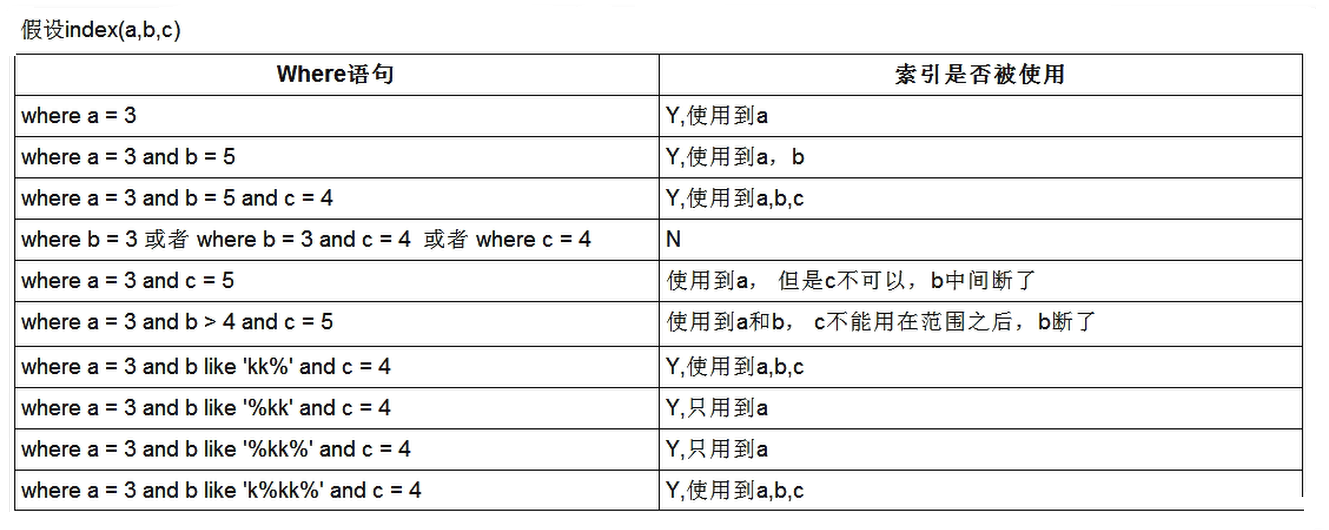
- like 后面以常量开头,比如 like ‘kk%’ 和 like ‘k%kk%’ ,可以理解为就是常量
3、索引优化的总结
全值匹配我最爱, 最左前缀要遵守;
带头大哥不能死, 中间兄弟不能断;
索引列上少计算, 范围之后全失效;
LIKE 百分写最右, 覆盖索引不写 *;
不等空值还有 OR, 索引影响要注意;
VAR 引号不可丢, SQL 优化有诀窍。

若有收获,就点个赞吧
0 人点赞


