下载
Centos-7-x86_64的镜像文件
http://mirrors.aliyun.com/centos/7/isos/x86_64/
VMware
https://zhuanlan.zhihu.com/p/115931121
https://blog.csdn.net/qq_39135287/article/details/83993574
网络设置
三种连接方式区别:https://www.cnblogs.com/aeolian/p/8882790.html https://blog.csdn.net/AloneCoding/article/details/106809384 https://blog.csdn.net/u010486658/article/details/70871940 https://blog.csdn.net/q290994/article/details/61643500 https://blog.csdn.net/lvtula/article/details/82016884
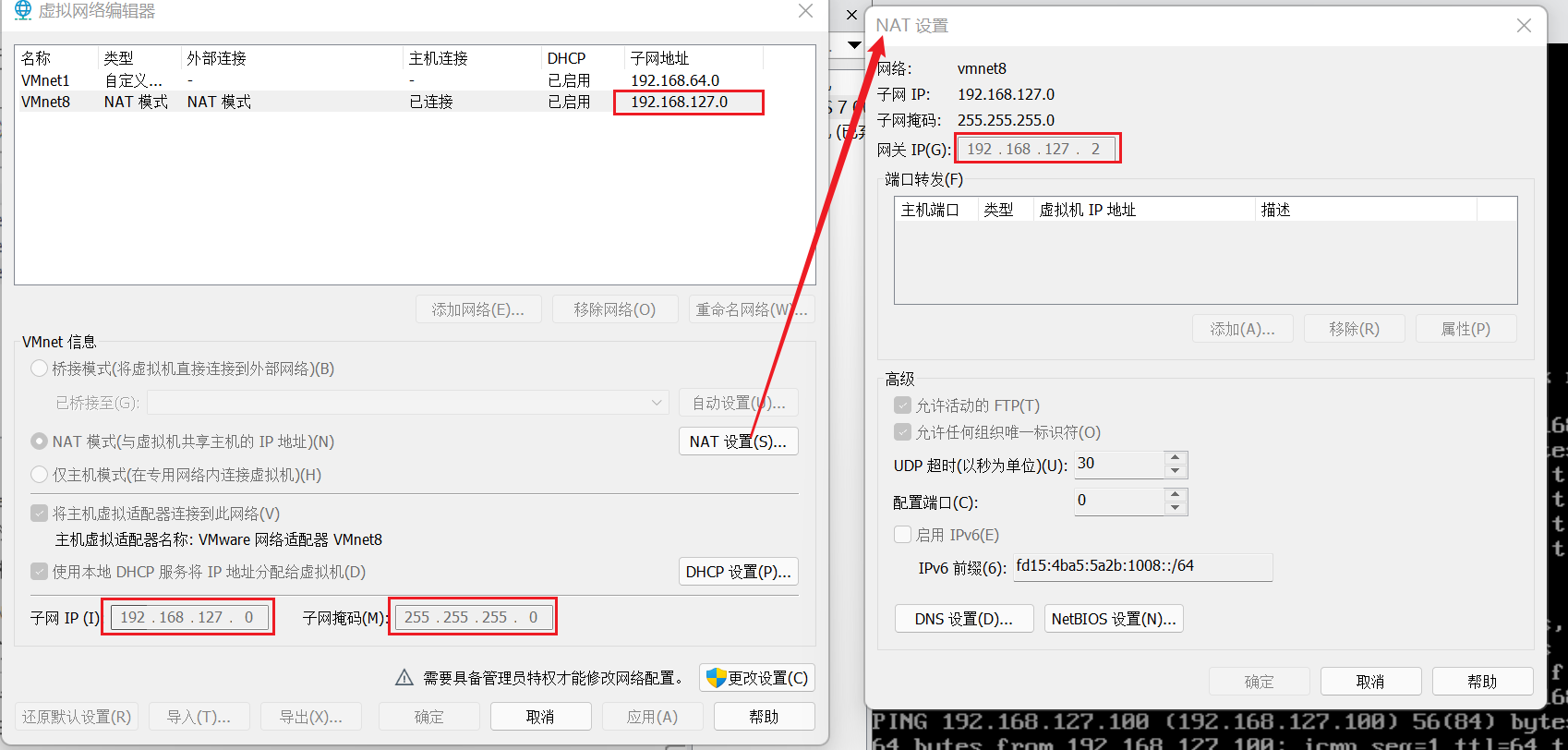
- IPADDR地址需要根据创建虚拟机时选择的网卡模式来配置
- 如果是桥接模式,就根据你自己路由器的IP网段来设置,一般跟物理机网段相同就行
- 如果是NAT模式需要在VMware主界面选择编辑==>虚拟网络编辑器==>NAT模式来查看IP网段
cd /etc/sysconfig/network-scripts/vi ifcfg-ens33
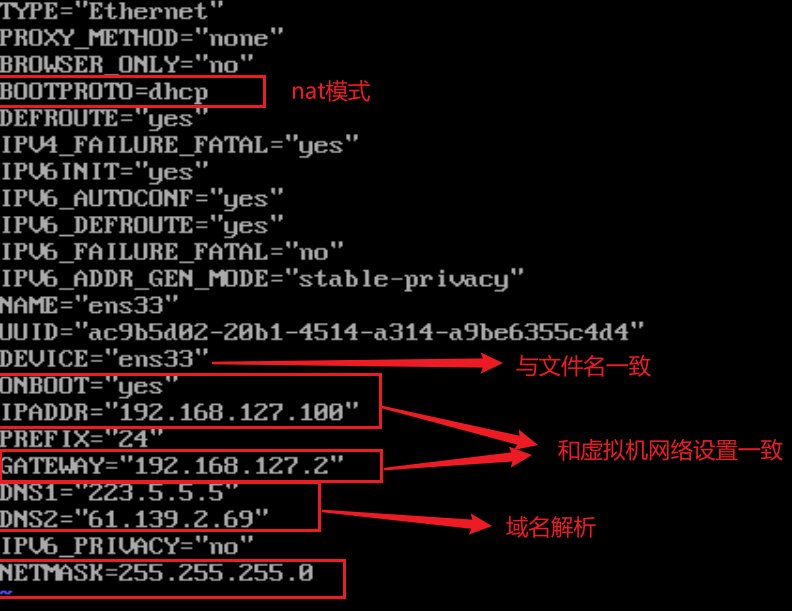
#保存退出后使用命令重启网络服务
systemctl restart network.service
service network restart
输入systemctl restart network 重启虚拟机网络
输入systemctl stop firewalld 关闭防火墙
输入systemctl disable firewalld 移除防火墙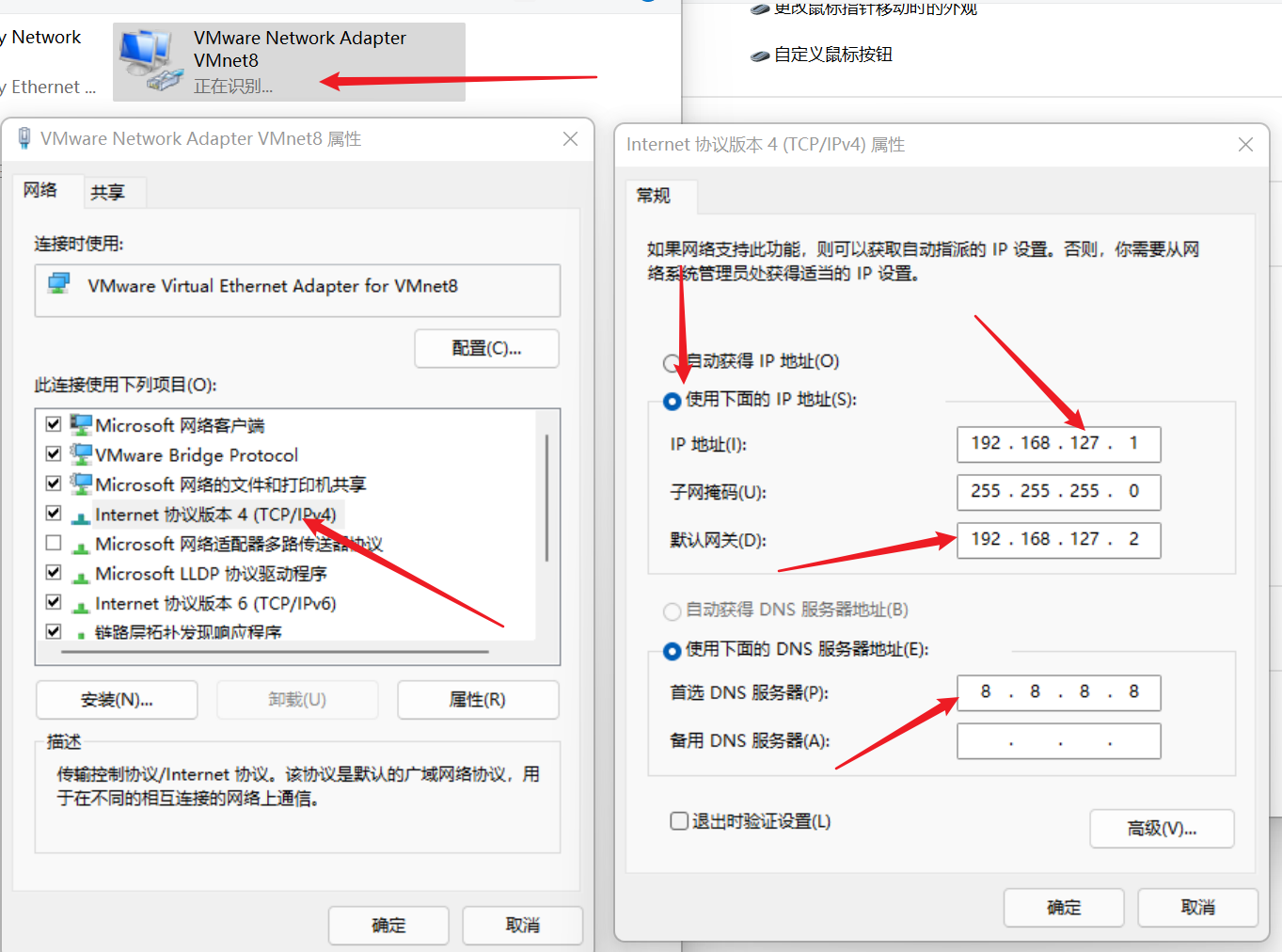
然后试着虚拟机ping www.baidu.com
windows内ping 192.168.127.100ssh 连接
安装后配置
配置yum源
curl -o /etc/yum.repos.d/CentOS-Base.repo http://mirrors.aliyun.com/repo/Centos-7.repowget -O /etc/yum.repos.d/epel.repo http://mirrors.aliyun.com/repo/epel-7.repo
[root@centos7 ~]# cat /etc/yum.repos.d/CentOS-Base.repo# CentOS-Base.repo## The mirror system uses the connecting IP address of the client and the# update status of each mirror to pick mirrors that are updated to and# geographically close to the client. You should use this for CentOS updates# unless you are manually picking other mirrors.## If the mirrorlist= does not work for you, as a fall back you can try the# remarked out baseurl= line instead.##[base]name=CentOS-$releasever - Base - mirrors.aliyun.comfailovermethod=prioritybaseurl=http://mirrors.aliyun.com/centos/$releasever/os/$basearch/http://mirrors.aliyuncs.com/centos/$releasever/os/$basearch/http://mirrors.cloud.aliyuncs.com/centos/$releasever/os/$basearch/gpgcheck=1gpgkey=http://mirrors.aliyun.com/centos/RPM-GPG-KEY-CentOS-7#released updates[updates]name=CentOS-$releasever - Updates - mirrors.aliyun.comfailovermethod=prioritybaseurl=http://mirrors.aliyun.com/centos/$releasever/updates/$basearch/http://mirrors.aliyuncs.com/centos/$releasever/updates/$basearch/http://mirrors.cloud.aliyuncs.com/centos/$releasever/updates/$basearch/gpgcheck=1gpgkey=http://mirrors.aliyun.com/centos/RPM-GPG-KEY-CentOS-7#additional packages that may be useful[extras]name=CentOS-$releasever - Extras - mirrors.aliyun.comfailovermethod=prioritybaseurl=http://mirrors.aliyun.com/centos/$releasever/extras/$basearch/http://mirrors.aliyuncs.com/centos/$releasever/extras/$basearch/http://mirrors.cloud.aliyuncs.com/centos/$releasever/extras/$basearch/gpgcheck=1gpgkey=http://mirrors.aliyun.com/centos/RPM-GPG-KEY-CentOS-7#additional packages that extend functionality of existing packages[centosplus]name=CentOS-$releasever - Plus - mirrors.aliyun.comfailovermethod=prioritybaseurl=http://mirrors.aliyun.com/centos/$releasever/centosplus/$basearch/http://mirrors.aliyuncs.com/centos/$releasever/centosplus/$basearch/http://mirrors.cloud.aliyuncs.com/centos/$releasever/centosplus/$basearch/gpgcheck=1enabled=0gpgkey=http://mirrors.aliyun.com/centos/RPM-GPG-KEY-CentOS-7#contrib - packages by Centos Users[contrib]name=CentOS-$releasever - Contrib - mirrors.aliyun.comfailovermethod=prioritybaseurl=http://mirrors.aliyun.com/centos/$releasever/contrib/$basearch/http://mirrors.aliyuncs.com/centos/$releasever/contrib/$basearch/http://mirrors.cloud.aliyuncs.com/centos/$releasever/contrib/$basearch/gpgcheck=1enabled=0gpgkey=http://mirrors.aliyun.com/centos/RPM-GPG-KEY-CentOS-7
[root@centos7 ~]# cat /etc/yum.repos.d/epel.repo[epel]name=Extra Packages for Enterprise Linux 7 - $basearchbaseurl=http://mirrors.aliyun.com/epel/7/$basearchfailovermethod=priorityenabled=1gpgcheck=0gpgkey=file:///etc/pki/rpm-gpg/RPM-GPG-KEY-EPEL-7[epel-debuginfo]name=Extra Packages for Enterprise Linux 7 - $basearch - Debugbaseurl=http://mirrors.aliyun.com/epel/7/$basearch/debugfailovermethod=priorityenabled=0gpgkey=file:///etc/pki/rpm-gpg/RPM-GPG-KEY-EPEL-7gpgcheck=0[epel-source]name=Extra Packages for Enterprise Linux 7 - $basearch - Sourcebaseurl=http://mirrors.aliyun.com/epel/7/SRPMSfailovermethod=priorityenabled=0gpgkey=file:///etc/pki/rpm-gpg/RPM-GPG-KEY-EPEL-7gpgcheck=0
安装必要的软件包
yum install bash-completionyum install -y vim tree telnet nc nmap net-tools wget bash-completion lrzsz chrony bc net-tools
设置快速远程连接
[root@centos71 ~]# cat /etc/ssh/sshd_config | grep -i "dns"UseDNS no[root@centos71 ~]# cat /etc/ssh/sshd_config | grep -i "GSSAPIauth"GSSAPIAuthentication no

若有收获,就点个赞吧
0 人点赞


