原文链接:https://testerhome.com/topics/18753 作者:zivyangll Github HomePage:https://github.com/zivyangll
引言
在编程测试用例的过程中,一款好的测试报告器能帮忙我们一览用例全貌,并且快速定位问题。目前市面上的报告器大多功能较为单一,随着对报告器的要求不断提升,现有测试报告器已经无法满足飞速发展的业务。本文从如何获取 Mocha 数据到渲染 HTML 报告器,分享如何开发一款测试报告器,最后介绍一款蚂蚁国际出品的测试报告器 Macaca Reporter。
一、获取 Mocha 数据
1.1 处理数据
通过监听 Mocha 用例处理事件,对 Mocha 的数据进行二次加工,可以获取我们需要的数据结构。具体代码见 GitHub。
function MacacaReporter(runner, options) {// 用例结束的钩子函数,对数据 output 进行处理this.done = (failures, exit) => done(this.output, options, this.config, failures, exit);this.config = {reportFilename: 'report',saveJson: true};Base.call(this, runner);new Spec(runner);// 测试用例开始执行的时候,获取 Mocha 数据的引用runner.on('start', () => {this._originSuiteData = runner.suite;});// 每次用例结束后,对 Mocha 数据进行处理runner.on('test end', test => {test.uuid = _.uuid();handleTestEnd();});// 所有用例结束后,打印数据,输出报告器runner.on('end', test => {handleTestEnd(true);});}
数据处理过程中需要注意对 circle json 的处理,Mocha 数据中每个 test 会引用 suit,导致普通 JSON.stringify 处理会抛异常,这里采用 safe-json-stringify 对其进行处理。
在数据处理数据后,得到 Mocha 测试数据
- JSON 文件保存到本地一份,以供其他测试框架集成使用。
- 同时通过转码后内嵌到 html 报告器中,作为 html 报告器的原始数据:见 GitHub
1.2 用例截图
用例截图使用 macaca 框架提供的能力,基于 electron 的截图功能,能够在用例结束前自动产生截图
// https://github.com/macacajs/macaca-wd/blob/master/lib/helper.js#L183wd.addPromiseChainMethod('saveScreenshots', function(context) {const reportspath = path.join(cwd, 'reports');const filepath = path.join(reportspath, 'screenshots', `${uuid()}.png`);mkdir(path.dirname(filepath));return this.saveScreenshot(filepath).then(() => {appendToContext(context, `${path.relative(reportspath, filepath)}`);});});
生成截图后,可以将图片上传到 CDN 中,将路径保存到每个 test 数据中。
// https://github.com/macacajs/macaca-reporter/blob/master/lib/macaca-reporter.js#L130MacacaReporter.appendToContext = function (mocha, content) {try {const test = mocha.currentTest || mocha.test;if (!test.context) {test.context = content;} else if (Array.isArray(test.context)) {test.context.push(content);} else {test.context = [test.context];test.context.push(content);}} catch (e) {console.log('error', e);}};
二、开发 HTML 报告器
有了测试原始数据后,我们开始着手开发 HTML 报告器,报告器应该有以下两个要素:
- 直观显示用例总数、成功和失败用例数量、耗时
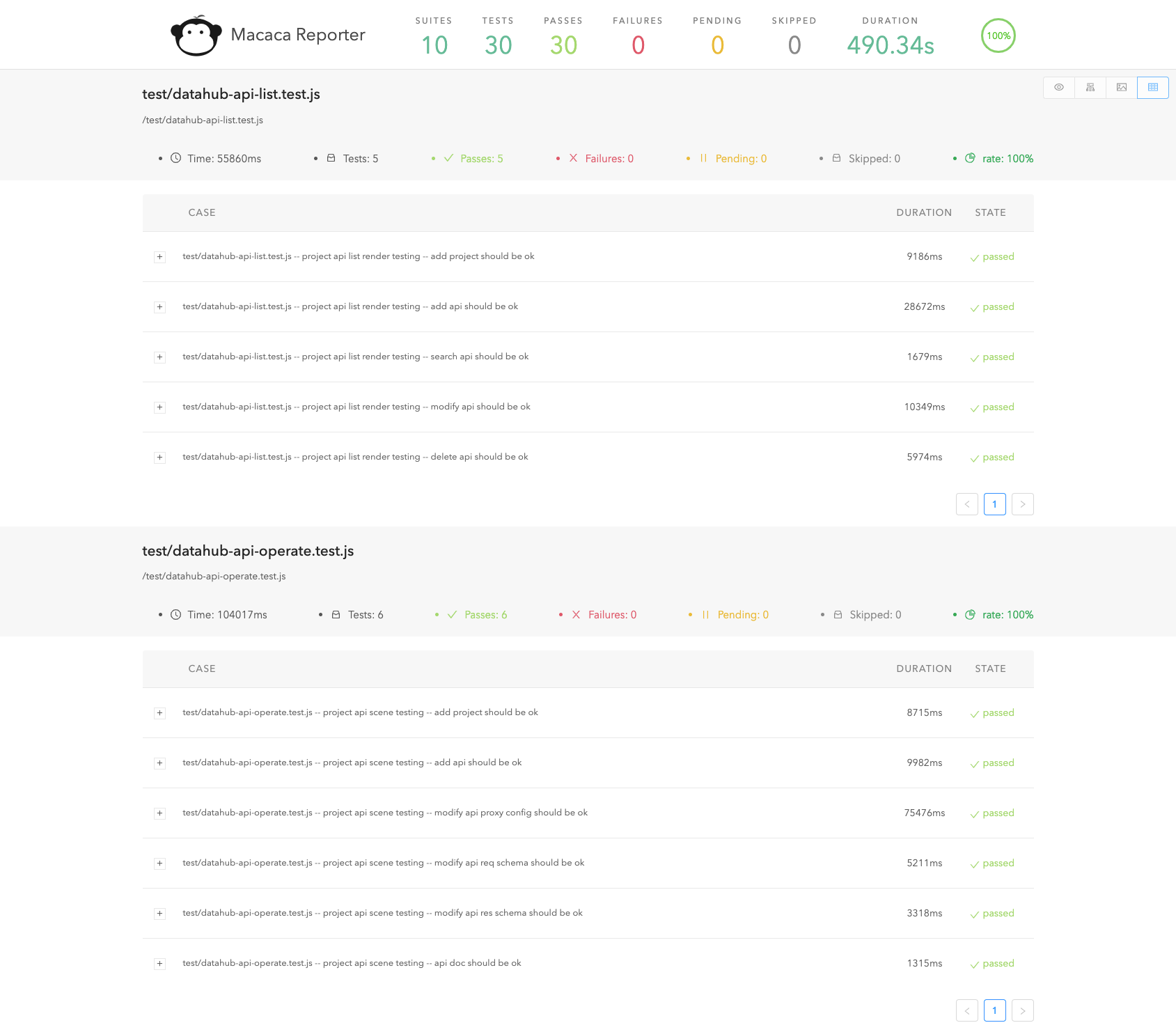
- 显示每个用例的具体名称、状态、耗时
在此基础上,为了方便开发者直观的看到每个用例的情况以及用例的整体情况,我们添加了链路树模式、脑图模式和全图模式。
2.1 链路树模式
Mocha 测试用例编写是 suit 中嵌套 suit,叶子节点是 test(describle -> describle -> it),非常适合用链路图的形式开表达用例的关系。我们基于 D3 开发了 d3-tree,用来展示链路树结构。链路树模式是最常用的也是默认的展示模式,将用例的组织结构按照树来展示,链路树模式方便还原业务产品的测试执行路径。
// https://github.com/macacajs/macaca-reporter/blob/master/assets/components/Suite.js#L107const d3tree = new D3Tree({selector: selector,data: d3Data,width: document.querySelector('ul.head').clientWidth,height: this.maxD3Height * 300,duration: 500,imageHeight: 200,imageWidth: 200,imageMargin: 10,itemConfigHandle: () => {return {isVertical: false};}});d3tree.init();
传入对应数据结构就能绘制出下图:
2.2 脑图模式
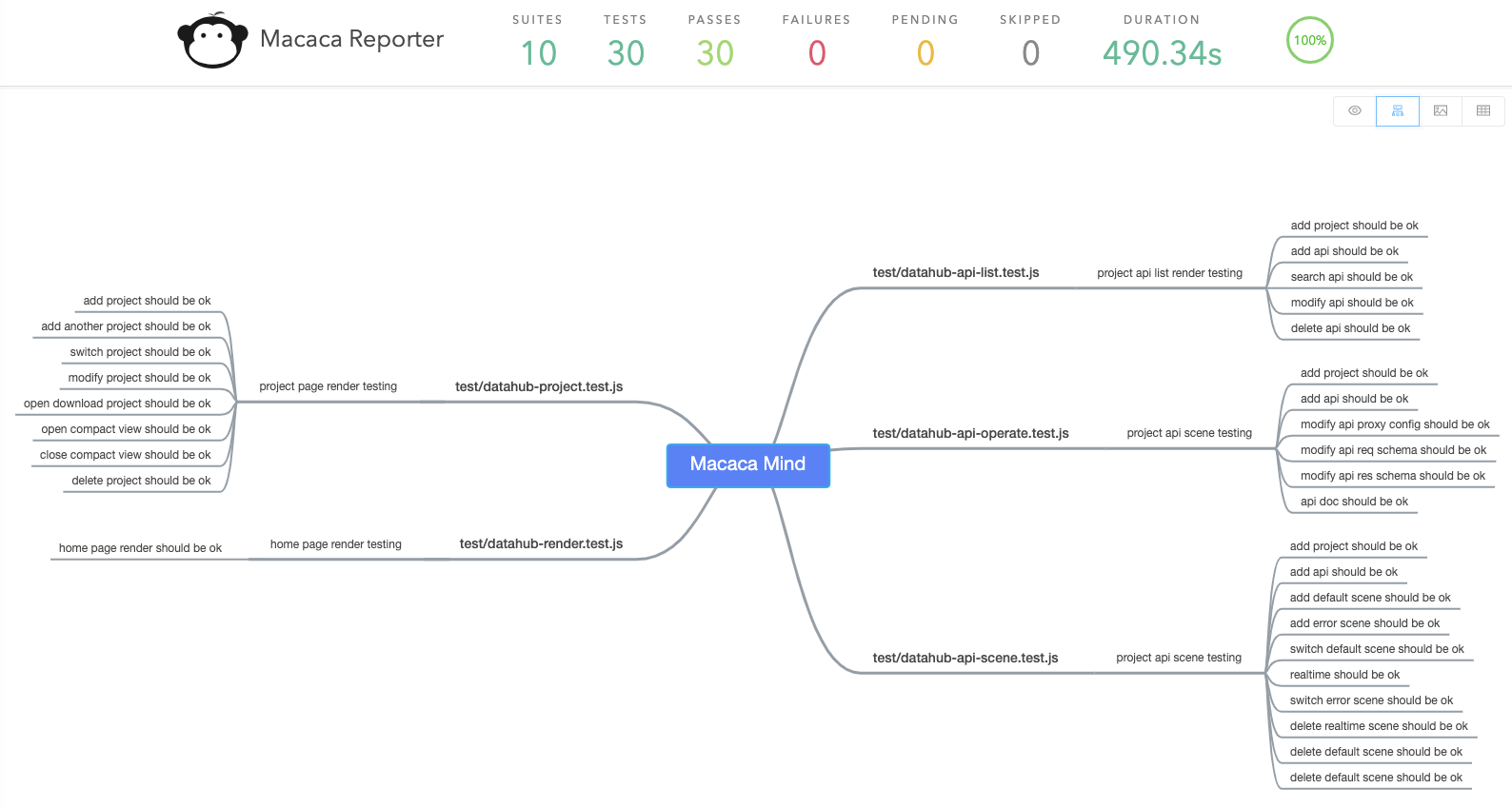
通过使用 @antv/g6-editor 提供的 Mind 可以非常方便的绘制脑图。脑图模式可以认为是全部用例的概览,这个视图更方便用户整理和组织用例,在改进、补充新用例前可作为分析依据。
// https://github.com/macacajs/macaca-reporter/blob/master/assets/components/Mind.js#L77new Editor.Mind({defaultData: mindSuite,labelEditable: false,mode: 'readOnly',graph: {container: 'mind-node',height: window.innerHeight - 100,width: window.innerWidth,},});

2.3 全图模式
全图模式提取了测试过程中的全部截图,更适用于偏渲染展示型的功能测试。在交付下一阶段前可以用做质量依据从而降低成本。但不建议每次通过人工看报告的形式来避免问题,推荐使用 像素判断 和异常捕获等自动化手段辅助断言当前渲染是否正常。
三、Macaca Reporter
蚂蚁国际的前端同学在业务实践过程中,基于 Mocha 沉淀了 macaca-reporter,经过近两年的不断打磨,已经在阿里多个 BU 中广泛使用。我们先看看 Macaca Reporter 具有哪些能力,能够做哪些事情:
- 配合自动截图功能能够刻画完整的链路
- 能够支持成功、失败、跳过等类型的用例展示
- 支持计算通过率
- 支持脑图模型展示用例链路
- 支持图片模式直观展示用例截图
- 支持二次定制开发,添加功能
3.1 深度刻画链路
效果图(页面太长,只截取了一小部分):
3.2 脑图模式
3.3 图片模式

3.4 表格模式
四、体验 Macaca Reporter
通过 DataHub 项目体验下 Macaca Repoter:
$ git clone git@github.com:macacajs/macaca-datahub.git$ cd macaca-datahub$ npm i$ npm run dev:test$ npm run test
等测试用例跑完之后,控制台会输出:
>> >> html reporter generated: /github/macacajs/datahub-view/reports/index.html>> >> json reporter generated: /github/macacajs/datahub-view/reports/json-final.json>> >> reporter config generated:/github/macacajs/datahub-view/reports/config.json>> >> coverage reporter generated: /github/macacajs/datahub-view/coverage/index.html
打开 HTML 报告器即可。
五、结语
Macaca Reporter 作为一款功能强大的报告器,欢迎大家来使用,来共建。
项目主页:https://macacajs.github.io/macaca-reporter/zh/
GitHub:https://github.com/macacajs/macaca-reporter
问题反馈:https://github.com/macacajs/macaca-reporter/issues
BTW,欢迎成为 Macaca 项目的贡献者,Macaca 是一套面向用户端软件的测试解决方案,提供了自动化驱动,环境配套,周边工具,集成方案,旨在解决终端上的测试、自动化、性能等方面的问题。

若有收获,就点个赞吧
0 人点赞


