[QtGui module]
该QDialogButtonBox类是一个小部件,呈现在布局是适合当前控件样式按钮。More…
继承QWidget。
Types
enum ButtonLayout { WinLayout, MacLayout, KdeLayout, GnomeLayout }enum ButtonRole { InvalidRole, AcceptRole, RejectRole, DestructiveRole, ..., ApplyRole }enum StandardButton { NoButton, Ok, Save, SaveAll, ..., RestoreDefaults }class **[StandardButtons](docs_index.htm)**
Methods
__init__ (self, QWidget parent = None)__init__ (self, Qt.Orientation orientation, QWidget parent = None)__init__ (self, StandardButtons buttons, Qt.Orientation orientation = Qt.Horizontal, QWidget parent = None)addButton (self, QAbstractButton button, ButtonRole role)QPushButton addButton (self, QString text, ButtonRole role)QPushButton addButton (self, StandardButton button)QPushButton button (self, StandardButton which)ButtonRole buttonRole (self, QAbstractButton button)list-of-QAbstractButton buttons (self)bool centerButtons (self)changeEvent (self, QEvent event)clear (self)bool event (self, QEvent event)Qt.Orientation orientation (self)removeButton (self, QAbstractButton button)setCenterButtons (self, bool center)setOrientation (self, Qt.Orientation orientation)setStandardButtons (self, StandardButtons buttons)StandardButton standardButton (self, QAbstractButton button)StandardButtons standardButtons (self)
Qt Signals
void accepted ()void clicked (QAbstractButton *)void helpRequested ()void rejected ()
Detailed Description
该QDialogButtonBox类是一个小部件,呈现在布局是适合当前控件样式按钮。
在布局符合该平台的界面指南对话框和消息框通常存在按钮。不变的是,不同的平台有不同的布局他们的对话。 QDialogButtonBox允许开发人员添加按钮,并会自动使用适当的布局,为用户的桌面环境。
大多数按钮的对话框遵循一定的角色。这样的角色包括:
- Accepting or rejecting the dialog.
- Asking for help.
- Performing actions on the dialog itself (such as resetting fields or applying changes).
此外,还可以解僱这可能会导致破坏性的结果的对话框的替代方式。
大多数对话框有一个几乎可以被认为是标准的(比如按钮OK和Cancel按钮)。它有时是方便的,以一种标准的方式创建这些按钮。
有使用QDialogButtonBox的几种方法。其中一个方法是创建按钮(或按钮文本)自己并把它们添加到按钮盒,指定他们的角色。
findButton = new [QPushButton](docs_qpushbutton.html)(tr("&Find"));findButton->setDefault(true);moreButton = new [QPushButton](docs_qpushbutton.html)(tr("&More"));moreButton->setCheckable(true);moreButton->setAutoDefault(false);buttonBox = new QDialogButtonBox([Qt](docs_qt.html).Vertical);buttonBox->addButton(findButton, QDialogButtonBox.ActionRole);buttonBox->addButton(moreButton, QDialogButtonBox.ActionRole);
另外, QDialogButtonBox提供了几个标准按钮(例如确定,取消,保存),您可以使用。他们共同存在的标志使你可以或它们的构造函数。
buttonBox = new QDialogButtonBox(QDialogButtonBox.Ok| QDialogButtonBox.Cancel);connect(buttonBox, SIGNAL(accepted()), this, SLOT(accept()));connect(buttonBox, SIGNAL(rejected()), this, SLOT(reject()));
你可以混合和匹配正常的按钮和标准按钮。
目前的按钮被布置在下面的方式,如果该按钮框是水平的:
|  | Button box laid out in horizontal GnomeLayout |
|  | Button box laid out in horizontal KdeLayout |
|  | Button box laid out in horizontal MacLayout |
|  | Button box laid out in horizontal WinLayout |
这些按钮的布局方式如下,如果按钮盒是垂直的:
| GnomeLayout | KdeLayout | MacLayout | WinLayout |
| 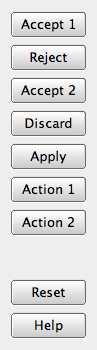 |
|  |
| 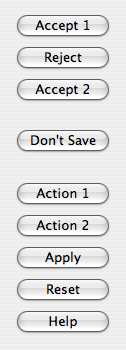 |
| 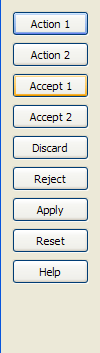 |
|
此外,按钮盒仅包含有按钮ActionRole or HelpRole可以考虑无模式,并有备用看看Mac OS X上:
| modeless horizontal MacLayout |  |
|
当单击该按钮中的按钮时,clicked()信号被发射的实际按钮被按下。为方便起见,如果按钮有AcceptRole,RejectRole或HelpRole时,accepted( )rejected() ,或helpRequested()信号被分别发射。
如果你想要一个特定的按钮被默认你需要调用QPushButton.setDefault( )就可以了你自己。但是,如果没有默认按钮设置,并保存在使用哪个按钮是默认按钮跨平台的QPushButton.autoDefault物业,第一按钮与接受角色成为默认按钮QDialogButtonBox显示时,
Type Documentation
QDialogButtonBox.ButtonLayout
该枚举描述配置中包含的按钮中的按钮时所要使用的布局策略。
| Constant | Value | Description |
|---|---|---|
QDialogButtonBox.WinLayout |
0 |
使用原则适用于在Windows应用程序。 |
QDialogButtonBox.MacLayout |
1 |
使用策略适用于Mac OS X上的应用 |
QDialogButtonBox.KdeLayout |
2 |
使用策略适合在KDE应用程序。 |
QDialogButtonBox.GnomeLayout |
3 |
使用策略适合在GNOME应用程序。 |
按键布局由指定的current style。然而, X11的平台上,也可以通过在桌面环境的影响。
QDialogButtonBox.ButtonRole
该枚举描述了可用于描述按键在按钮框的作用。这些角色的组合作为标志用来形容他们的行为的不同方面。
| Constant | Value | Description |
|---|---|---|
QDialogButtonBox.InvalidRole |
-1 |
该按钮是无效的。 |
QDialogButtonBox.AcceptRole |
0 |
单击该按钮被接受的对话框(如确定)。 |
QDialogButtonBox.RejectRole |
1 |
单击该按钮会导致被拒绝的对话框(例如取消) 。 |
QDialogButtonBox.DestructiveRole |
2 |
单击该按钮会导致破坏性的变化(例如,用于舍弃变更) ,然后关闭对话框。 |
QDialogButtonBox.ActionRole |
3 |
单击该按钮使更改对话框中的元素。 |
QDialogButtonBox.HelpRole |
4 |
该按钮可点击,请求帮助。 |
QDialogButtonBox.YesRole |
5 |
该按钮是一个“是”形按钮。 |
QDialogButtonBox.NoRole |
6 |
该按钮是一个“无”形按钮。 |
QDialogButtonBox.ApplyRole |
8 |
按钮适用电流的变化。 |
QDialogButtonBox.ResetRole |
7 |
按钮重置对话框的字段默认值。 |
See also StandardButton。
QDialogButtonBox.StandardButton
这些枚举描述了标准按钮标志。每个按钮都有一个定义ButtonRole。
| Constant | Value | Description |
|---|---|---|
QDialogButtonBox.Ok |
0x00000400 |
与定义的一个“OK”按钮AcceptRole 。 |
QDialogButtonBox.Open |
0x00002000 |
与定义的“打开”按钮AcceptRole 。 |
QDialogButtonBox.Save |
0x00000800 |
与定义的“保存”按钮AcceptRole 。 |
QDialogButtonBox.Cancel |
0x00400000 |
“取消”的按钮定义RejectRole 。 |
QDialogButtonBox.Close |
0x00200000 |
与定义的“关闭”按钮RejectRole 。 |
QDialogButtonBox.Discard |
0x00800000 |
A“放弃”或“不保存”按钮,根据不同的平台上,与定义DestructiveRole 。 |
QDialogButtonBox.Apply |
0x02000000 |
一个“应用”的定义的按钮ApplyRole 。 |
QDialogButtonBox.Reset |
0x04000000 |
“复位”的定义的按钮ResetRole 。 |
QDialogButtonBox.RestoreDefaults |
0x08000000 |
A“还原为默认值”的定义的按钮ResetRole 。 |
QDialogButtonBox.Help |
0x01000000 |
与定义的“帮助”按钮HelpRole 。 |
QDialogButtonBox.SaveAll |
0x00001000 |
与定义的“全部保存”按钮AcceptRole 。 |
QDialogButtonBox.Yes |
0x00004000 |
与定义的“Yes”按钮YesRole 。 |
QDialogButtonBox.YesToAll |
0x00008000 |
与定义的“全是”按钮YesRole 。 |
QDialogButtonBox.No |
0x00010000 |
与定义的“否”按钮NoRole 。 |
QDialogButtonBox.NoToAll |
0x00020000 |
与定义的“全否”按钮NoRole 。 |
QDialogButtonBox.Abort |
0x00040000 |
与定义的“中止”按钮RejectRole 。 |
QDialogButtonBox.Retry |
0x00080000 |
与定义的“重试”按钮AcceptRole 。 |
QDialogButtonBox.Ignore |
0x00100000 |
一个“忽略”的定义的按钮AcceptRole 。 |
QDialogButtonBox.NoButton |
0x00000000 |
无效的按钮。 |
该StandardButtons类型是一个typedef为QFlags\u003cStandardButton\u003e 。它存储StandardButton值的或组合。
See also ButtonRole和standardButtons。
Method Documentation
QDialogButtonBox.__init__ (self, QWidget parent = None)
该parent的说法,如果不是没有,原因self通过Qt的,而不是PyQt的拥有。
构造一个空,水平按钮盒给定的parent。
See also orientation和addButton( ) 。
QDialogButtonBox.__init__ (self, Qt.Orientation orientation, QWidget parent = None)
该parent的说法,如果不是没有,原因self通过Qt的,而不是PyQt的拥有。
构造一个空按钮盒给定的orientation和parent。
See also orientation和addButton( ) 。
QDialogButtonBox.__init__ (self, StandardButtons buttons, Qt.Orientation orientation = Qt.Horizontal, QWidget parent = None)
该parent的说法,如果不是没有,原因self通过Qt的,而不是PyQt的拥有。
构造一个按钮盒给定的orientation和parent,包含由指定的标准按钮buttons。
See also orientation和addButton( ) 。
QDialogButtonBox.addButton (self, QAbstractButton button, ButtonRole role)
该button说法有它的所有权转移给Qt的。
将给定button与指定的按钮盒role。如果该角色是无效的,不添加该按钮。
如果按钮已经被添加,它被删除,并以新的角色再次添加。
Note:按钮盒采用按钮的所有权。
See also removeButton()和clear( ) 。
QPushButton QDialogButtonBox.addButton (self, QString text, ButtonRole role)
[
创建一个按钮与给定的text,将其添加到该按钮框对指定role,并返回相应的按钮。如果role是无效的,则不会创建按钮,则返回0。
](docs_qpushbutton.html)
See also removeButton()和clear( ) 。
QPushButton QDialogButtonBox.addButton (self, StandardButton button)
[
增加了一个标准button在按钮框,如果它是有效的话,并返回一个按钮。如果button是无效的,它不被添加到该按钮的框,并返回0。
](docs_qpushbutton.html)
See also removeButton()和clear( ) 。
QPushButton QDialogButtonBox.button (self, StandardButton which)
返回QPushButton对应于标准按钮which,或者0,如果标准按钮不能在这个按钮盒存在。
See also standardButton( )standardButtons()和buttons( ) 。
ButtonRole QDialogButtonBox.buttonRole (self, QAbstractButton button)
返回指定按钮的作用button。这个函数返回InvalidRole如果button是0或未被添加到按钮框。
See also buttons()和addButton( ) 。
list-of-QAbstractButton QDialogButtonBox.buttons (self)
返回所有已被添加到按钮中的按钮的列表。
See also buttonRole( )addButton()和removeButton( ) 。
bool QDialogButtonBox.centerButtons (self)
QDialogButtonBox.changeEvent (self, QEvent event)
从重新实现QWidget.changeEvent( ) 。
QDialogButtonBox.clear (self)
清除按钮盒,删除其中的所有按钮。
See also removeButton()和addButton( ) 。
bool QDialogButtonBox.event (self, QEvent event)
从重新实现QObject.event( ) 。
Qt.Orientation QDialogButtonBox.orientation (self)
[
QDialogButtonBox.removeButton (self, QAbstractButton button)
该button争论
移除button从而不删除它,并设置其父零按钮盒。
](docs_qt.html#Orientation-enum)
See also clear( )buttons()和addButton( ) 。
QDialogButtonBox.setCenterButtons (self, bool center)
QDialogButtonBox.setOrientation (self, Qt.Orientation orientation)
QDialogButtonBox.setStandardButtons (self, StandardButtons buttons)
StandardButton QDialogButtonBox.standardButton (self, QAbstractButton button)
返回对应于给定的标准按钮枚举值button或NoButton如果给定的button不是一个标准的按钮。
See also button( )buttons()和standardButtons( ) 。
StandardButtons QDialogButtonBox.standardButtons (self)
[
Qt Signal Documentation
void accepted ()
这是该信号的默认超载。
](docs_index.htm)
按钮盒内部的按钮被点击时,只要它被定义与这个信号被发射AcceptRole or YesRole。
See also rejected( )clicked()和helpRequested( ) 。
void clicked (QAbstractButton *)
这是该信号的默认超载。
单击该按钮盒内的按钮时,这个信号被发射。被指定的被按下的特定键button。
See also accepted( )rejected()和helpRequested( ) 。
void helpRequested ()
这是该信号的默认超载。
按钮盒内部的按钮被点击时,只要它被定义与这个信号被发射HelpRole。
See also accepted( )rejected()和clicked( ) 。
void rejected ()
这是该信号的默认超载。
按钮盒内部的按钮被点击时,只要它被定义与这个信号被发射RejectRole or NoRole。
See also accepted( )helpRequested()和clicked( ) 。

若有收获,就点个赞吧
0 人点赞


