注:参考了刘帅的部分题型及答案 链接 https://www.yuque.com/lius/java/lnfe54#JVM
1、JDK
1、 JAVA集合
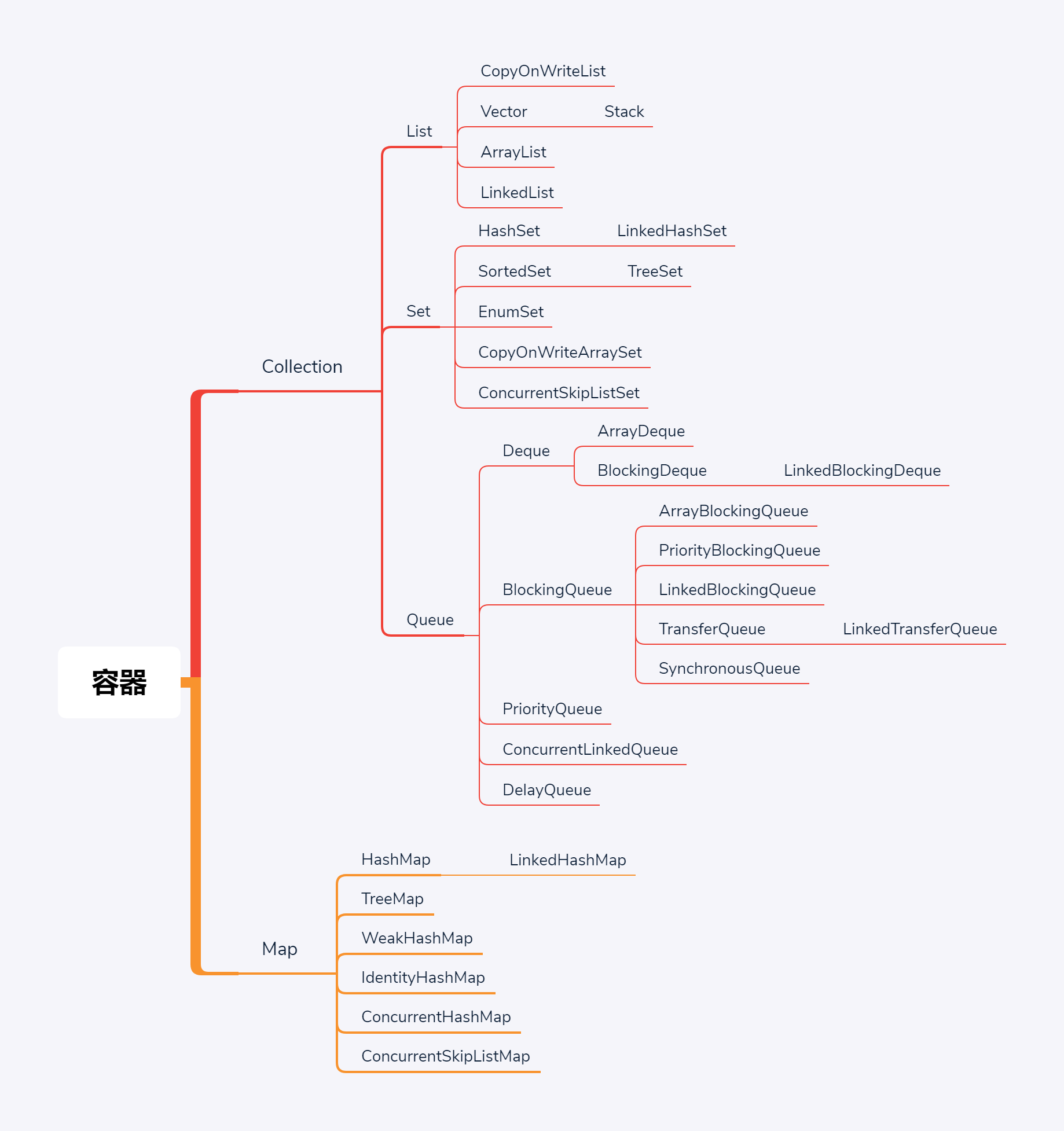
2、HashMap底层数据结构以及如何解决Hash碰撞
1、JDK1.7中底层实现是数组+链表,JDK1.8中底层实现是数组+链表+红黑树
3、HashMap为什么要使用红黑树
4、泛型
5、IO
IO主要是程序跟外部(也可以是内部,比如类的持久化存储)进行交互的手段,例如读取外部文件、图片、音乐等等。在JAVA中,所有的I/O操作都是单个字节的移动,主要通过Stream对象去一次移动一个字节,比如读取txt中的文字,或者将文本写入到txt中。
目前java主要分为:
1、BlockIO:传统的同步阻塞式流。也是使用最广泛的流。
特点:简单,易使用;
阻塞式:当一个线程去调用他的时候,必须等待这个io操作完成才能去干别的事情。比如一个线程调用到read或write方式时,该线程被阻塞,直到有数据被读取或者被写入,该线程在此期间不能再干任何事情了。也就是说线程在调用read或者write方法之前都不知道会不会被阻塞。
面向流:意味着每次从流中读一个或多个字节,直至读取所有字节,它不能前后移动流中的数。
适用场景:BIO方式适用于连接数目比较小且固定的架构,这种方式对服务器资源要求比较高,并发局限于应用中,JDK1.4以前的唯一选择,但程序直观简单易理解。
代码案列:
package com.longtong.APITrain.IO;import org.apache.commons.io.FileUtils;import org.apache.commons.io.IOUtils;import java.io.*;/*** @author: jikang* @description:* @date: 2021/6/12 23:48* @Modified By:*/public class BlockIO {public static void main(String args[]){User user = new User();user.setName("小明");user.setAddress("江苏省淮安市");user.setAge(21);File file = new File("C:\\Users\\11987\\Desktop\\123123.txt");ObjectOutputStream objectOutputStream = null;try {objectOutputStream = new ObjectOutputStream(new FileOutputStream(file));objectOutputStream.writeObject(user);}catch (IOException e){e.printStackTrace();}finally {IOUtils.closeQuietly(objectOutputStream);}//Read Obj from FileFile file1 = new File("C:\\Users\\11987\\Desktop\\123123.txt");ObjectInputStream ois = null;try {ois = new ObjectInputStream(new FileInputStream(file1));User newUser = (User) ois.readObject();System.out.println(newUser);} catch (IOException e) {e.printStackTrace();} catch (ClassNotFoundException e) {e.printStackTrace();} finally {IOUtils.closeQuietly(ois);try {FileUtils.forceDelete(file);} catch (IOException e) {e.printStackTrace();}}}}
2、NIO:
特点:Channel(通道)、Buffer(缓冲)、Selected(多路复用器);面向块。
非阻塞式:NIO基于Channel和Buffer(缓冲区)进行操作,数据总是从通道读取到缓冲区中,或者从缓冲区写入到通道中。Selector(多路复用器)用于监听多个通道的事件(连接打开,数据到达)。因此,单个线程可以监听多个数据通道。
解析:NIO模式中,一个线程去通道中发送请求获取数据,通道内的数据变得可读取之前,线程可以去干其他事情,而不是像IO那样一直阻塞。线程通常将非阻塞IO的空闲时间用于在其它通道上执行IO操作,所以一个单独的线程现在可以管理多个输入和输出通道。
适用场景:NIO方式适用于连接数目多且连接比较短(轻操作)的架构,比如聊天服务器,并发局限于应用中,编程比较复杂,JDK1.4开始支持。
代码案例
static void readNIO() {String pathname = "C:\\Users\\adew\\Desktop\\jd-gui.cfg";FileInputStream fin = null;try {fin = new FileInputStream(new File(pathname));FileChannel channel = fin.getChannel();int capacity = 100;// 字节ByteBuffer bf = ByteBuffer.allocate(capacity);System.out.println("限制是:" + bf.limit() + "容量是:" + bf.capacity()+ "位置是:" + bf.position());int length = -1;while ((length = channel.read(bf)) != -1) {/** 注意,读取后,将位置置为0,将limit置为容量, 以备下次读入到字节缓冲中,从0开始存储*/bf.clear();byte[] bytes = bf.array();System.out.write(bytes, 0, length);System.out.println();System.out.println("限制是:" + bf.limit() + "容量是:" + bf.capacity()+ "位置是:" + bf.position());}channel.close();} catch (FileNotFoundException e) {e.printStackTrace();} catch (IOException e) {e.printStackTrace();} finally {if (fin != null) {try {fin.close();} catch (IOException e) {e.printStackTrace();}}}}static void writeNIO() {String filename = "out.txt";FileOutputStream fos = null;try {fos = new FileOutputStream(new File(filename));FileChannel channel = fos.getChannel();ByteBuffer src = Charset.forName("utf8").encode("你好你好你好你好你好");// 字节缓冲的容量和limit会随着数据长度变化,不是固定不变的System.out.println("初始化容量和limit:" + src.capacity() + ","+ src.limit());int length = 0;while ((length = channel.write(src)) != 0) {/** 注意,这里不需要clear,将缓冲中的数据写入到通道中后 第二次接着上一次的顺序往下读*/System.out.println("写入长度:" + length);}} catch (FileNotFoundException e) {e.printStackTrace();} catch (IOException e) {e.printStackTrace();} finally {if (fos != null) {try {fos.close();} catch (IOException e) {e.printStackTrace();}}}}
Channel:可以通过配置实现非阻塞式通道;作为双向通道,可以同时进行读和写。
Buffer:缓冲区,一个容器,实际是连续的数组;本质上是一块可以写入数据,然后可以从中读取数据的内存;
三个属性:
Capacity:容量,即buffer的大小;可以通过allocate(int capacity)给buffer赋予指定字节大小;
Position:位置,初试为0,当写一个字节到buffer中,Position会向前移动到下一个buffer单元,最大值为Capacity-1;
Limit:限制值,即能读的最多数据或能写的最多数据;写模式值为Capacity,读模式值为写模式的Position(最后写入的位置,就是能读到的最多数据)
方法:
2种读写数据的方式:
一是从channel读数据到buffer中
int bytes = channel.read(buffer);//将channel中数据读到buffer中
二是通过put方法
buffer.put(bytes);//将数据写入到buffer
flip();这个方法会将buffer从写模式转换为读模式,position置为0,limit设置为之前position的值
2种读数据的方式:
一是从buffer中读数据到channel中
int bytes = channel.write(buffer);//将buffer的数据读到channel中
二是通过get方法
byte bt = buffer.get();//通过get()方法从buffer中读一个byte
rewind()方法,Buffe.rewind()可以将Position置为0,重新读取buffer中所有的数据。
clear()方法,将Postion置为0,未读数据被遗忘。
compact()方法,同上,但是不会遗忘数据,而是将数据拷贝到初试处,并将Position设置为未读数据的最后面。
mark()与reset()方法:通过调用Buffer.mark()方法可以标记一个特定的position,之后可以通过调用Buffer.reset()恢复到这个position上。
Selector(多路复用器)
Selector与Channel是相互配合使用的,将Channel注册在Selector上之后,才可以正确的使用Selector,但此时Channel必须为非阻塞模式。Selector可以监听Channel的四种状态(Connect、Accept、Read、Write),当监听到某一Channel的某个状态时,才允许对Channel进行相应的操作。
6、面向对象的基本特征
7、ConcurrentHashMap底层实现原理

8、String、StringBuffer、StringBuild
9、反射机制
10、Object类
2、JVM
1、JVM的内存模型,以及各自的存储内容
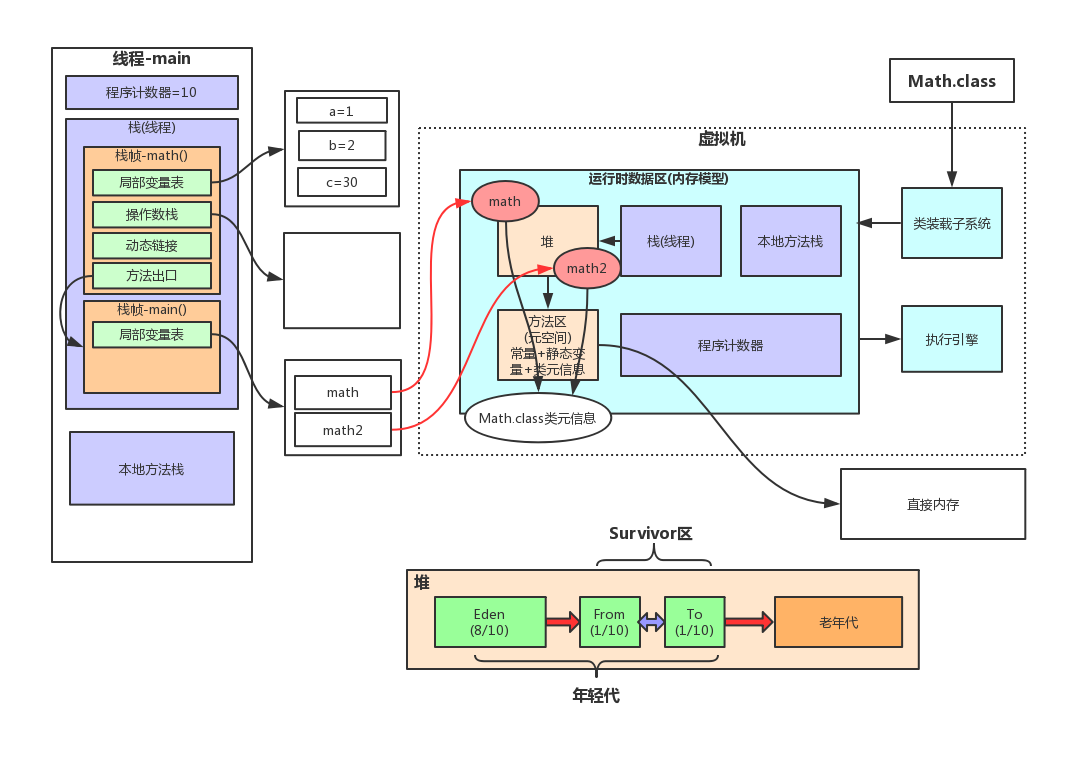
2、堆的垃圾回收机制
3、JVM调优,GC问题
4、类的初始化过程
5、内存溢出的原因,如何排查线上问题
6、类加载模型

7、JVM为甚要元空间
3、多线程
1、实现多线程的方式
2、多线程之间如何通信
3、synchronized底层实现,跟lock有什么区别

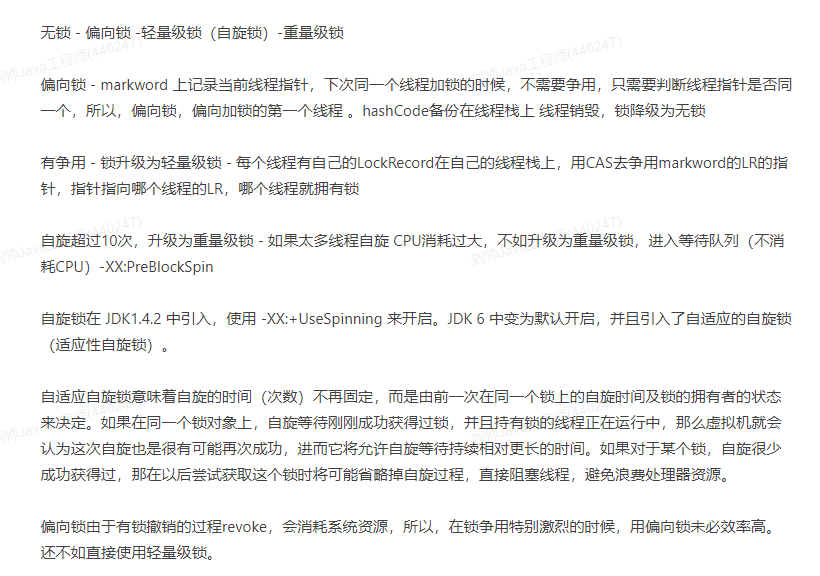
4、synchronized 修饰静态方法跟实例方法有什么区别
5、线程池
6、多线程的各个状态以及如何切换
7、wait 和 sleep 的区别

8、ThreadLocal的底层实现以及数据结构
9、synchronized和ReentryLock的区别
4、Mysql
5、Spring
6、Springboot
7、Mybaits
8、Redis
9、Shiro
10、数据结构与算法
11、分布式
12、集群
13、项目部署、linux操作
14、git使用

若有收获,就点个赞吧
0 人点赞


