地址
包地址:https://pan.baidu.com/s/15F0qEAZGjqp9Ot-3X3WzmA
提取码:go1c
什么是helm
我们在实际操作k8s的时候,会发现要部署一个应用必须先编写deployment,daemonset,service的资源文件,非常麻烦。项目多的时候,非常难于管理,这个时候helm就出现了,他的作用可以看作类似于centos的yum工具,或者ubuntu的apt。都是包管理器。他的作用就是对应用程序做封装,进行版本管理和依赖检查,然后对应用程序进行分发。helm主要由两部分组成,一个是elm客户端、一个是Tiller服务端。
helm有三个主要概念:
1.chart:定义应用所需要的资源。
2.Repository:在仓库中下载chart
3.release:k8s中的chart实例,每个实例都是一个版本。
安装helm
现在我们来安装helm
系统约定
- kubernetes1.18.6
- 可访问镜像仓库
- helm安装在k8s集群的机器中
我们先去官网下载下来
https://get.helm.sh/helm-v3.2.4-linux-amd64.tar.gz
[root@adm-master ~]# tar -zxvf helm-v3.2.4-linux-amd64.tar.gz
linux-amd64/
linux-amd64/helm
linux-amd64/README.md
linux-amd64/LICENSE
[root@adm-master ~]# cp linux-amd64/helm /usr/local/bin/
[root@adm-master ~]# chmod +x /usr/local/bin/helm
[root@adm-master ~]# he
head helm helm2 help hexdump
[root@adm-master ~]# helm version
version.BuildInfo{Version:”v3.2.4”, GitCommit:”0ad800ef43d3b826f31a5ad8dfbb4fe05d143688”, GitTreeState:”clean”, GoVersion:”go1.13.12”}
由于helm3比helm2方便很多,不再需要安装tiller,所以这样就算安装好了
那么helm怎么用呢?
创建一个chart、
helm create testnginx
查看里面的结构
为了方便测试,改一下暴露方式。

安装这个chart
[root@adm-master ~]# helm install ./testnginx --generate-nameNAME: testnginx-1598707352LAST DEPLOYED: Sat Aug 29 21:22:32 2020NAMESPACE: defaultSTATUS: deployedREVISION: 1NOTES:1. Get the application URL by running these commands:export NODE_PORT=$(kubectl get --namespace default -o jsonpath="{.spec.ports[0].nodePort}" services testnginx-1598707352)export NODE_IP=$(kubectl get nodes --namespace default -o jsonpath="{.items[0].status.addresses[0].address}")echo http://$NODE_IP:$NODE_PORT
查看是否安装成功
我们访问一下
至此,我们用helm安装一个应用就成功了。
当然这个是我们自己自定义的一个应用,现在网上有很多成熟的应用,我们也可以直接拿来用,下面简单说一说用法。
添加仓库
helm repo add stable http://aliacs-k8s-cn-hangzhou.oss-cn-hangzhou.aliyuncs.com/app/charts/helm repo add incubator http://aliacs-k8s-cn-hangzhou.oss-cn-hangzhou.aliyuncs.com/app/charts-incubator/
查看仓库
helm repo list
查找应用
[root@adm-master ~]# helm search repo nginxNAME CHART VERSION APP VERSION DESCRIPTIONincubator/ack-ingress-nginx 1.34.2 0.30.0 An Nginx Ingress Controller that uses ConfigMap
拉取应用
helm pull incubator/ack-ingress-nginx
修改配置文件
[root@adm-master ~]# cd ack-ingress-nginx/[root@adm-master ack-ingress-nginx]# lsChart.yaml ci README.md templates values.yaml[root@adm-master ack-ingress-nginx]# vim values.yaml
启用宿主机网络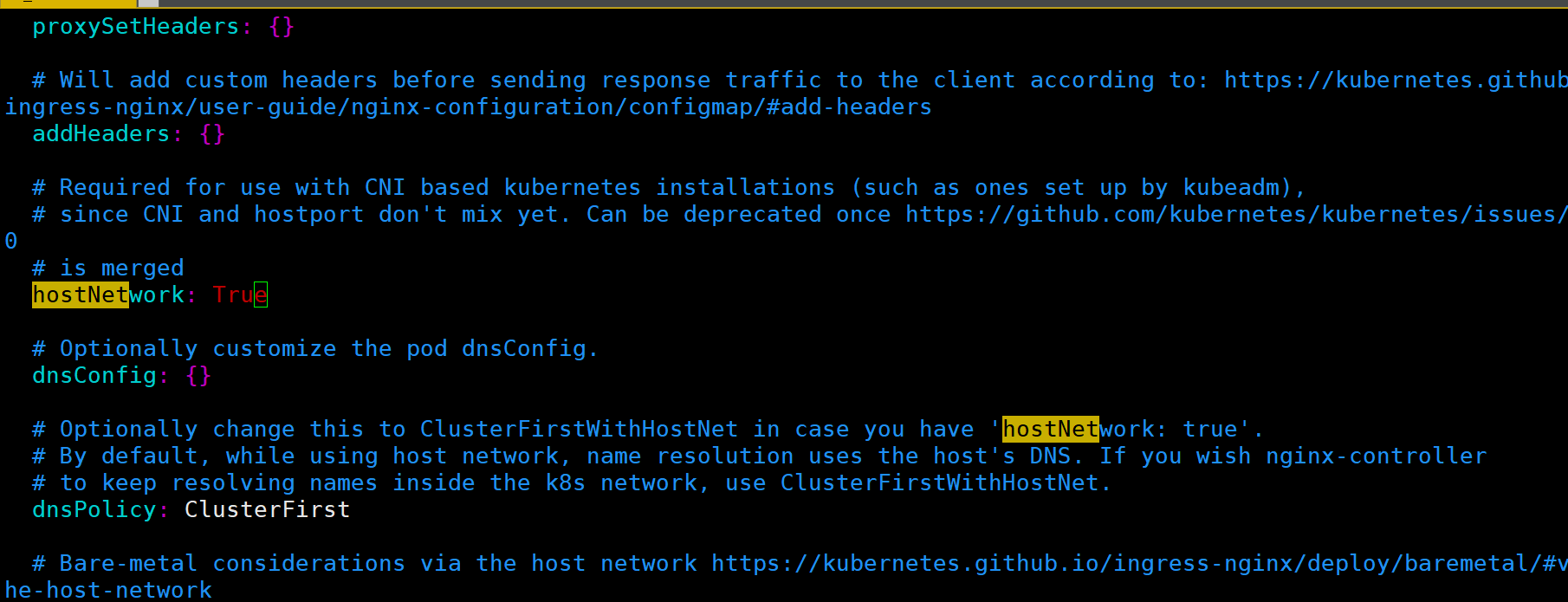
安装
[root@adm-master ~]# helm install ./ack-ingress-nginx --generate-nameNAME: ack-ingress-nginx-1598707957LAST DEPLOYED: Sat Aug 29 21:32:37 2020NAMESPACE: defaultSTATUS: deployedREVISION: 1TEST SUITE: NoneNOTES:The nginx-ingress controller has been installed.It may take a few minutes for the LoadBalancer IP to be available.You can watch the status by running ‘kubectl --namespace default get services -o wide -w ack-ingress-nginx-1598707957-controller‘An example Ingress that makes use of the controller:apiVersion: extensions/v1beta1kind: Ingressmetadata:annotations:kubernetes.io/ingress.class: nginxname: examplenamespace: foospec:rules:- host: www.example.comhttp:paths:- backend:serviceName: exampleServiceservicePort: 80path: /# This section is only required if TLS is to be enabled for the Ingresstls:- hosts:- www.example.comsecretName: example-tlsIf TLS is enabled for the Ingress, a Secret containing the certificate and key must also be provided:apiVersion: v1kind: Secretmetadata:name: example-tlsnamespace: foodata:tls.crt: <base64 encoded cert>tls.key: <base64 encoded key>type: kubernetes.io/tls
创建好了
除了上面的一些命令,下面再介绍一些常用的几个命令。
查看安装的应用
[root@adm-master ~]# helm listNAME NAMESPACE REVISION UPDATED STATUS CHART APP VERSIONack-ingress-nginx-1598707957 default 1 2020-08-29 21:32:37.485600339 +0800 CST deployed ack-ingress-nginx-1.34.2 0.30.0ack-ingress-nginx-1598748240 default 1 2020-08-30 08:44:00.160214613 +0800 CST deployed ack-ingress-nginx-1.34.2 0.30.0nginx-1598703649 default 1 2020-08-29 20:20:49.161478619 +0800 CST deployed nginx-0.1.0 1.16.0test-1598706678 default 1 2020-08-29 21:11:18.658604777 +0800 CST deployed test-0.1.0 1.16.0test1-1598706774 default 1 2020-08-29 21:12:54.102423232 +0800 CST deployed test1-0.1.0 1.16.0testnginx-1598707352 default 1 2020-08-29 21:22:32.666499735 +0800 CST deployed testnginx-0.1.0 1.16.0
查看应用状态
[root@adm-master ~]# helm status testnginx-1598707352NAME: testnginx-1598707352LAST DEPLOYED: Sat Aug 29 21:22:32 2020NAMESPACE: defaultSTATUS: deployedREVISION: 1NOTES:1. Get the application URL by running these commands:export NODE_PORT=$(kubectl get --namespace default -o jsonpath="{.spec.ports[0].nodePort}" services testnginx-1598707352)export NODE_IP=$(kubectl get nodes --namespace default -o jsonpath="{.items[0].status.addresses[0].address}")echo http://$NODE_IP:$NODE_PORT
应用更新升级
[root@adm-master ~]# helm upgrade ack-ingress-nginx-1598748240 ./ack-ingress-nginxRelease "ack-ingress-nginx-1598748240" has been upgraded. Happy Helming!NAME: ack-ingress-nginx-1598748240LAST DEPLOYED: Sun Aug 30 09:15:31 2020NAMESPACE: defaultSTATUS: deployedREVISION: 2TEST SUITE: NoneNOTES:The nginx-ingress controller has been installed.Get the application URL by running these commands:export HTTP_NODE_PORT=32080export HTTPS_NODE_PORT=32443export NODE_IP=$(kubectl --namespace default get nodes -o jsonpath="{.items[0].status.addresses[1].address}")echo "Visit http://$NODE_IP:$HTTP_NODE_PORT to access your application via HTTP."echo "Visit https://$NODE_IP:$HTTPS_NODE_PORT to access your application via HTTPS."An example Ingress that makes use of the controller:apiVersion: extensions/v1beta1kind: Ingressmetadata:annotations:kubernetes.io/ingress.class: nginxname: examplenamespace: foospec:rules:- host: www.example.comhttp:paths:- backend:serviceName: exampleServiceservicePort: 80path: /# This section is only required if TLS is to be enabled for the Ingresstls:- hosts:- www.example.comsecretName: example-tlsIf TLS is enabled for the Ingress, a Secret containing the certificate and key must also be provided:apiVersion: v1kind: Secretmetadata:name: example-tlsnamespace: foodata:tls.crt: <base64 encoded cert>tls.key: <base64 encoded key>type: kubernetes.io/tls
应用回滚
[root@adm-master ~]# helm hist ack-ingress-nginx-1598748240REVISION UPDATED STATUS CHART APP VERSION DESCRIPTION1 Sun Aug 30 08:44:00 2020 superseded ack-ingress-nginx-1.34.2 0.30.0 Install complete2 Sun Aug 30 09:15:31 2020 deployed ack-ingress-nginx-1.34.2 0.30.0 Upgrade complete[root@adm-master ~]# helm rollback ack-ingress-nginx-1598748240 1Rollback was a success! Happy Helming!
应用删除
[root@adm-master ~]# helm delete ack-ingress-nginx-1598707957release "ack-ingress-nginx-1598707957" uninstalled

若有收获,就点个赞吧
0 人点赞


