一、什么是JQuery
1.1 JQuery 介绍
jQuery 是一个快速、小型且功能丰富的 JavaScript 库。它使像HTML文档的遍历和操作,事件处理,动画和Ajax的东西简单得多,一个易于使用的API,适用于众多浏览器。jQuery 结合了多功能性和可扩展性,改变了数百万人编写 JavaScript 的方式。
1.2 资料

官网 https://jquery.com/
API 手册 https://jquery.cuishifeng.cn/
1.3 JQuery 使用方法
1.3.1 下载Jquery库

1.3.2 在线CDNY引入
- Google CDN
- Microsoft CDN
- CDNJS CDN
- jsDelivr CDN
二、JQuery 选择器
jquery 选择元素的方法就是css选择器,除外还提供了更加灵活的选择方法。2.1 常用选择器
$('#id') //id选择器$('.className')// 类选择器$('tagName') //元素选择器$("selector[attr='value']") //属性选择器
2.2 其他选择器
```javascript $(“selector:first”)
$(“selector:last”) $(“selector:eq(index)”)
//表单选择器 $(“input:text”) $(“input:checkbox”)
//状态选择器 $(“input:checked”) $(“input:disabled”)
<a name="jGibh"></a>### 选择器练习题```javascript<!DOCTYPE html><html lang="en"><head><meta charset="UTF-8"><title>Title</title><script src="./lib/jquery-3.6.0.js"></script></head><body><hr>使用 层级选择器(1把li设置为红色 2使用过滤选择器把HTML改为绿色 )<ul><li>JAVA</li><li>CSS</li><li>HTML</li><li>JAVASCRIPT</li><li>MYSQL</li></ul><hr/>使用ID选择(1 给第一段话设置一个红色边框 2 给第二段话设置蓝色边框)<p id="x">好好学习天天向上!</p><p id="y">好好学习天天向上!</p><hr/>使用表单类别选择器 把密码框设置 灰色背景<div><input name="hello"><input type="password" ><input type="password" ></div></div><hr/>使用属性选择器,把href属性值为abc的链接设置红色字体 把连接中包含f的元素设置绿色背景<a href="abc.com">连接A</a><a href="dnf.com">连接B</a><a href="kfc.com">连接C</a><a href="fuck.com">连接D</a><script type="text/javascript">$("ul li ").css("color","red");$("ul li:eq(2) ").css("color","green");$("#x").css("border","1px solid red");$("#y").css("border","1px solid blue");$("input:password").css("background-color"," #ccc");$("a[href='abc.com']").css("color","red");$("a[href*='f']").css("background-color","green");//*=表示以包含</script></body></html>
三、JQuery 事件
3.1事件绑定
obj.on('事件类型',回调函数)obj.on('click',function(e){此处写点击后需要做的逻辑代码。})//原生jsobj.addeventLinsterner( 'click', 回调 )obj.on('click', 回调)
3.2 off 取消事件 以及 trigger触发器
<button id="btn">点击按钮有惊喜</button><button id="btn-off">关闭</button><button id="trigger">模拟点击按钮</button><div id="box" style="width: 300px;height: 300px;background-color: green;"></div><script>/* 1 通用事件绑定 */$("#btn").on('click',function (e){var colors= ['red','green','blue','pink','gray','yellow'];var index = Math.round(Math.random()*colors.length);$('body').css('background-color', colors[index] );});/* 事件移除*/$("#btn-off").on('click', (e)=>{ $("#btn").off('click') } )/* 事件触发 */$('#trigger').on('click',()=>{ $("#btn").trigger('click') })</script>
hover事件 融合了 mouseover 以及 mouseenter
<div style="display: flex;justify-content: flex-start; height: 300px; "><div class="bar" style="width: 20px ; height: 100px; border: 1px solid #ccc"></div><div class="bar" style="width: 20px ; height: 100px; border: 1px solid #ccc"></div><div class="bar" style="width: 20px ; height: 100px; border: 1px solid #ccc"></div><div class="bar" style="width: 20px ; height: 100px; border: 1px solid #ccc"></div><div class="bar" style="width: 20px ; height: 100px; border: 1px solid #ccc"></div><div class="bar" style="width: 20px ; height: 100px; border: 1px solid #ccc"></div><div class="bar" style="width: 20px ; height: 100px; border: 1px solid #ccc"></div><div class="bar" style="width: 20px ; height: 100px; border: 1px solid #ccc"></div><div class="bar" style="width: 20px ; height: 100px; border: 1px solid #ccc"></div></div><script>$(".bar").hover(function () {//这里this 是事件源对象, lambda 中不不支持this对象$(this).css('height', '200px').css('transition', 'height 2s');},function (){$(this).css('height','50px').css('transition','height 2s');})</script>
3.3 快捷事件
- blur([[data],fn])
- change([[data],fn])
- click([[data],fn])
- dblclick([[data],fn])
- focus([[data],fn])
- keydown([[data],fn])
- keypress([[data],fn])
- keyup([[data],fn])
- mousedown([[data],fn])
- mouseenter([[data],fn])
- mouseleave([[data],fn])
- mousemove([[data],fn])
- mouseout([[data],fn])
- mouseover([[data],fn])
- mouseup([[data],fn])
- resize([[data],fn])
- scroll([[data],fn])
- submit([[data],fn])
四、JQuery Dom编程
4.2 样式控制
```javascript

<a name="gX0l2"></a>#### 4.2.1 css( )类似于与style属性的作用<a name="vwQKE"></a>#### 4.2.2 单个样式```javascript$("div").css('color','green').css('background-color','red'); //控制单个属性可级联调用
4.2.3 多个样式
$("div").css({'color':'green','background-color':'red' }); //控制多个属性
4.2.4 addClass() removeClass() toggleClass()(有就移除 没有就添加)
<style>#box{ width: 500px; height: 40px;background-color: rgba(0,0,0,.5);display: flex;justify-content: space-between}.active{background-color: orange;}</style><div id="box"><button class="active">女人</button><button>科技</button><button>数码</button></div><script>// $("#box button").hover(// function (){// //获得当前事件源 this// $(this).addClass("active");// } ,// function (){// //获得当前事件源 this// $(this).removeClass("active");// }// )$("#box button:first").toggleClass("active"); //这里第一个button有了active 就会被移除掉$("#box button:eq(1)").toggleClass("active"); //第二个botton没有active就会加上一个</script>
4.3 赋值 取值内容
类与 innerText innerHTML value 的作用
4.3.1 text( [content] ) html([content]) val([content])
<div id="a" >hello fuck !</div><div id="b"> <span>hello fuck !</span></div><input id="c" value="admin" ><script>console.log($("#a").text()) //text() 里面有内容就相当于赋值 没有就是取值 下同$("#a").text("hello java");console.log( $("#b").html() )$("#b").html( "<ul><li>aaaa</li><li>dddddd</li><li>dddddd</li><li>dddddddd</li></ul>" );console.log($("#c").val())$("#c").val("6666")</script>
存取值 综合练习题
<!DOCTYPE html><html lang="en"><head><meta charset="UTF-8"><title>Title</title><script src="../lib/jquery-3.6.0.js" type="text/javascript"></script><style type="text/css">.ys{font-size: 1.25rem;background-color: #A52A2A;border: 1px solid #A52A2A;box-shadow: 1px 2px 1px 3px rgba(1,1,1,.1);}</style></head><body><hr/><button id="a" >点击按钮对出下联填入输入框中</button><input id="b" type="text" value="上海自来水来自海上"> <!-- 提示val()--><input id="c" type="text" placeholder="填写下联处"> <!--提示val(content)--><hr/><button id="bt">点击按钮设置div的 添加一个样式 nb 改样式定义了字体大小 颜色 背景 投影 </button><div id="box" style="width: 300px;height: 40px;border: 1px solid #ccc" > 需要改变样式的div </div> <!--提示addClass()--><hr/><button id="bt2">点击按钮获取 span中的文本</button> <!--提示 text(content)--><button id="bt3">点击按钮获取 span中的添加一个图片</button> <!--提示html(content)--><span>span中测试文本</span><script type="text/javascript">$("#a").click(function(){$("#c").val("海南自来水来自海南");})$("#bt").click(function(){$("#box").addClass("ys");})$("#bt2").click(function(){console.log($(this).text());})$("#bt3").click(function(){$(this).html("<img src='img/0.jpg' >");})</script></body></html>
4,4 属性
attr() prop() removeAttr
对于boolean属性值修改使用 prop()
<!DOCTYPE html><html lang="en"><script src="../libs/jquery-3.6.0.js"></script><head><meta charset="UTF-8"><title>Title</title></head><body><input type="checkbox" value="java">Java高级<div id="box" cc="cls"></div><button onclick="setAttr()" >修改/设置</button><button onclick="getAttr()" >获取</button><script>function setAttr(){$("#box").attr("abc","刘德华");//设置值$("#box").attr("cc","波多xxx");//修改值$("input").prop("checked",true); //对于boolean属性值修改使用 prop()}function getAttr(){var id = $("#box").attr("id");var cc = $("#box").attr("cc");var prop = $("input").prop("checked");console.log( id ,cc ,prop);$("#box").removeAttr("cc"); //移除}</script></body></html>
4.5 查找
4.5.1 children()
先找到父级节点,通过次方法可以获得该节点全部的后代节点
$(function(){//全部的子节点var arr= $("ul").children();$( arr[0] ).css('color','red');})
4.5.2 parent()
先找到其中的一个子节点,通过次方法可以获得该子节点的直接父级节点,全部的父级节点通过示例中其他方法也可获得。
$(function(){$("#son").parent().css('border','1px solid red'); //直接父级$("#son").parents().css('border','1px solid red'); //全部父级$("#son").parentsUntil("html").css('border','1px solid red'); //全部父级直到 什么为止。}
4.5.3 prev()
先找到其中的一个子节点,通过次方法可以获得该子节点前一个节点,前面的全部节点通过示例中其他方法也可获得。
$(function(){$("#son").prev().css('color','red'); //前一个$("#son").prevAll().css('color','red');//前全部$("#son").prevUntil('.x').css('color','red');//前全部直到 .x为止})
4.5.3 next()
先找到其中的一个子节点,通过次方法可以获得该子节点后一个节点,后面的全部节点通过示例中其他方法也可获得。
$("#son").next().css('color','red'); // 后一个$("#son").nextAll().css('color','red');//后全部$("#son").nextUntil('.x').css('color','red');//后全部直到 .x为止
4.5.4 siblings()
先找到其中的一个子节点,通过次方法可以获得该子节点同级的其他节点。
$("#son").siblings().css('border','1px solid red');
4.5.5 find( 选择器 )
obj.find(“td”) 在obj内部选择td元素
4.6 添加
4.6.1 内部添加
指的是在指定容器的内部添加新的节点
append( content ) & prepend( content )
obj.append("html代码" ) //内容追加obj.prepend("html代码" ) //顶部插入
appendTo( selector ) & prependTo( selector )
$("html代码").appendTo( '.box' );$("html代码").prependTo( '.box' );
两组api 作用一致, 第一组是容器调用api 添加新增节点 , 第二组是 新增节点调用api 添加到指定的选择器中。
4.6.2 外部添加
指的是在指定容器外部同级,前后添加新节点。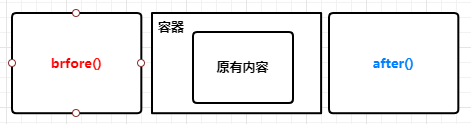
after() & before()
obj.after( "html代码" ) //在obj后面添加新节点obj.before("html代码" ) //在obj前面添加新节点
insertAfter() insertBefore()
$( "html代码" ).insertAfter("选择器") //在obj后面添加新节点$( "html代码" ).insertBefore("选择器") //在obj前面添加新节
这两组api 作用也是一样的,区别在于前者是容器节点调用,后者是新增节点调用。
4.7 替换 删除 复制 包裹
- replaceWith( content )
- replaceAll( selector )
删除
- remove() //移除obj,移除自身。
- empty() //清空obj的内容, 移除的是全部儿子,自己会保留。
复制
- clone()
包裹
wrap()
wrapAll()
<!DOCTYPE html><html lang="en"><head><meta charset="UTF-8"><title>Title</title><script src="../libs/jquery-3.6.0.js"></script></head><body><div id="box" style="width: 800px;height: 120px;background-color: green;margin-bottom: 10px"><img src="../images/a.jpeg" width="100" height="100"><img src="../images/b.jpeg" width="100" height="100"><img src="../images/c.jpg" width="100" height="100"></div><button id="btn">替换</button><button id="btn-del">删除</button><button id="btn-del-all">清空</button><button id="btn-copy">copy</button><button id="btn-warp">包裹</button><script>//替换$("#btn").click( ()=>{替换//$("img:first").replaceWith("<img src='../images/bj.jpeg' width='100' height='100'>")//$("#box img:eq(0)").replaceWith("<img src='../images/bj.jpeg' width='100' height='100'>");$("<img src='../images/bj.jpeg' width='100' height='100'>").replaceAll("img");});//移除$("#btn-del").click(()=>{$("img:first").remove();});//清空$("#btn-del-all").click( ()=>{$("#box").empty();});var count=0;//拷贝$("#btn-copy").click( ()=>{var mycopy = $("#box").clone();mycopy.attr('id','box-'+(++count) );mycopy.insertAfter("div:last");});//包裹$("#btn-warp").click( function (){// $("#box img").wrap("<div style='padding: 4px;border: 1px solid #ccc;display: inline-block;background-color: white ';></div>");$("#box img").wrapAll( "<div style='padding: 4px;border: 1px solid #ccc;display: inline-block;background-color: white ';></div>" );});</script></body></html>
五、JQuery 动画
5.1 可见性 淡入淡出 展开折叠 自定义
<!DOCTYPE html><html lang="en"><head><meta charset="UTF-8"><title>Title</title><style>#box{width: 800px;height: 400px;background-color: pink;}</style><script src="../libs/jquery-3.6.0.js"></script></head><body><div id="box"></div><button id="btn-1" >显示</button><button id="btn-2">隐藏</button><button id="btn-3">隐藏/显示</button><button id="btn-4" >淡入</button><button id="btn-5">淡出</button><button id="btn-6">淡到</button><button id="btn-7" >上滑</button><button id="btn-8">下拉</button><button id="btn-9">滑动切换</button><button id="btn-10">自定义动画</button><script>//隐藏$("#btn-2").click( ()=>{ $("#box").hide(1000) } );//显示$("#btn-1").click( ()=>{ $("#box").show(1000) } );//显示切换$("#btn-3").click( ()=>{ $("#box").toggle(1000) } );//$("#btn-4").click( ()=>{ $("#box").fadeIn(1000) } );//$("#btn-5").click( ()=>{ $("#box").fadeOut(1000) } );//$("#btn-6").click( ()=>{ $("#box").fadeTo(1000,0.4) } );//$("#btn-7").click( ()=>{ $("#box").slideUp(1000) } );//$("#btn-8").click( ()=>{ $("#box").slideDown(1000) } );//$("#btn-9").click( ()=>{ $("#box").slideToggle(1000) } );//$("#btn-10").click( ()=>{ $("#box").animate({ 'width':'100px','opacity':'0.1'} ,1000 ) } );</script></body></html>
旅游路线
<!DOCTYPE html><html><head><meta charset="utf-8"><title></title><script src="../lib/jquery-3.6.0.js" type="text/javascript" charset="utf-8"></script><link rel="stylesheet" type="text/css" href="new_file.css"/></head><body><div class="kuangkuang"><!-- 创建第一个层面 --><div class="first"><div class="address1"><input name="di" type="text" value="" /></div><div class="add1"><button id="mybt" type="button">继续添加</button></div></div></div><div class="route"><button type="button">生成线路图</button></div><div class="luxiantu"><p> </p></div><script type="text/javascript">var count=0;$("#mybt").click(function(){//克隆的domvar cloneDom = $(".first").clone(true);cloneDom.attr('class','class-'+(++count))//插入到其他位置cloneDom.addClass('firstt')cloneDom.appendTo(".kuangkuang");})//打印路线图$(".route button").click(function(){var arr = $(".address1").children()//拼接路线var str = "";for (var i = 0; i < arr.length; i++) {str+=($(arr[i]).val());str+="==>";}$(".luxiantu p").text(str);})</script></body></html>

若有收获,就点个赞吧
0 人点赞


