1.前置概念
1.1 基本概念
Hystrix是netflix开源的容错框架,包含常用的容错方法:线程池隔离,信号量隔离,熔断,降级回退。
在分布式系统中,每个服务都可能会调用很多其他服务,被调用的服务就是系统依赖的服务。hystrix可以让我们在分布式系统中对服务间的调用进行控制,加入一些调用延迟或者依赖故障等容错机制。举个例子,hsytrix通过将依赖服务进行资源隔离,进而阻止某个依赖服务出现故障的时候在整个系统所有的依赖服务调用中进行蔓延;同时hystrix还提供故障时的fallback降级机制。
1.2 设计原则
- 对依赖服务调用时出现的调用延迟和调用失败进行控制和容错保护
- 在复杂的分布式系统中,阻止某一个依赖服务的故障在整个系统中蔓延,比如某个服务故障了,导致其他服务也跟着故障。
- 提供fail-fast和快速恢复的支持
- 支持近实时的监控、报警以及运维操作。
举例说明:
有这样一个分布式系统,服务 A 依赖于服务 B,服务 B 依赖于服务 C/D/E。在这样一个成熟的系统内,比如说最多可能只有 100 个线程资源。正常情况下,40 个线程并发调用服务 C,各 30 个线程并发调用 D/E。
调用服务C,只需要20ms,但是现在服务C故障了,比如延迟,或者挂了,此时线程会hang住2s左右,40个线程全部卡住,同时剩下的60个线程调用完服务D,E之后,再来调用服务C,同样也会被卡住。长时间的hang住,这样导致服务B的线程资源被耗尽,无法接收新的请求,甚至会导致自己的宕机,进而服务A也挂了。
使用hystrix可以对其进行资源隔离,比如限制服务B只有40个线程调用服务C,当此40个线程被hang住时,可以通过熔断限流的操作,保证其他60个线程依旧能正常调用工作,从而确保整个系统不会被拖垮。
1.3 更加细节的设计原则
- 阻止任何一个依赖服务耗尽所有的资源,比如tomcat中的所有线程资源。
- 避免请求排队和积压,采用限流和fast-fail进行熔断操作控制故障蔓延
- 提供fallback降级机制来应对故障
- 使用资源隔离技术,比如bulkhead(舱壁隔离技术),swimlane(泳道技术)、circuit breaker(断路技术)来限制任何一个依赖服务的故障的影响。
- 通过近实时的统计、监控、报警功能,来提高故障发现的速度
- 通过近实时的属性和配置热修改功能,提高故障处理和恢复的速度
- 保护依赖服务调用的所有故障情况,而不仅仅只是网络故障情况。
2.系统背景介绍及case
以电商网站为例,当商品数据变更时,会将变更消息压入MQ消息队列中,缓存服务从消息队列中消费这条消息时,感知到有数据发生变更,通过调用数据服务接口,获取变更后的数据,然后将整合好的数据推送到redis中。nginx本地缓存的数据是有一定的时间期限的,比如说10分钟,当数据过期后,他就会从redis获取到最新的缓存数据,并缓存到自己本地。用户在浏览网页时,动态将nginx本地数据渲染到本地html模板并返回给用户。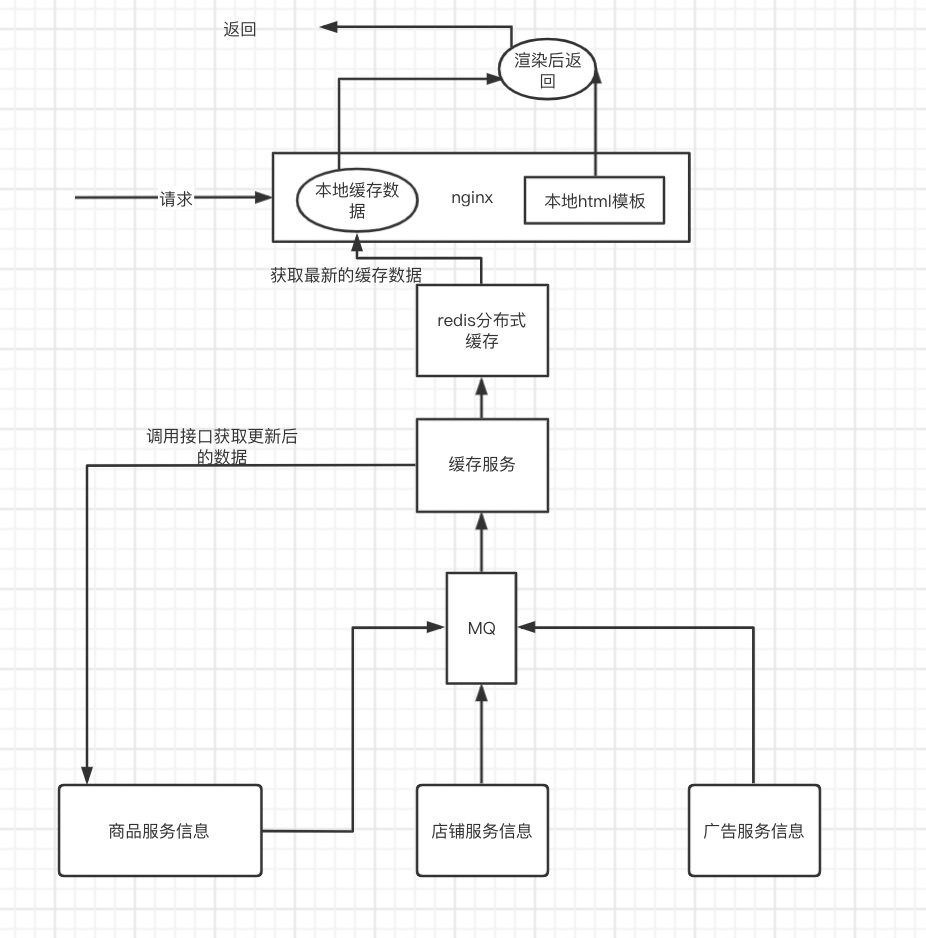
虽然没有直接返回 html 页面那么快,但是因为数据在本地缓存,所以也很快,其实耗费的也就是动态渲染一个 html 页面的性能。如果 html 模板发生了变更,不需要将所有的页面重新静态化,也不需要发送请求,没有网络请求的开销,直接将数据渲染进最新的 html 页面模板后响应即可。
在这种架构下,我们需要保证系统的高可用性
如果系统访问量过高,nginx本地缓存过期失效,redis中的缓存也被LRU算法给清理掉了,那么会有较高的访问量,从缓存服务调用商品服务。但如果此时商品服务的接口出现故障,调用出现了延时,缓存服务全部的线程都被这个调用商品服务的接口给耗尽了,每个线程去调用商品服务的时候,会hang住很长时间,后面的请求会卡在这里,此时缓存服务没有足够的线程去调用其他的一些服务的接口,从而导致整个大量商品详情页无法正常显示。
这其实就是一个商品接口故障导致的缓存服务资源耗尽现象。
3.实现资源隔离的两种方式
3.1 基于线程池实现资源隔离
资源隔离,就是说,你如果要把对某个依赖服务的所有调用请求,全部隔离在同一份资源池内,不会去用其他资源了。比如说商品服务,现在同时发起的调用量已经到了1000,但是线程池内就10个线程,最多只会用这10个线程去执行。其他请求只能排队,不会因为接口调用延迟,而将tomcat内部所有的线程资源全部耗尽。
hystrix通过command(命令模式),将每个类型的业务请求封装成对应的命令请求。比如查询订单->订单command,查询商品->商品command,查询用户-> 用户command。每个类型的command对应一个线程池。创建好的线程池是被放到ConcurrentHashMap中的。
以订单请求为例:
final static ConcurrentHashMap<String, HystrixThreadPool> threadPools = new ConcurrentHashMap<String, HystrixThreadPool>();threadPools.put(“hystrix-order”, new HystrixThreadPoolDefault(threadPoolKey, propertiesBuilder));
当第二次查询订单请求过来的时候,可以直接从Map中获取该线程池,具体流程如下: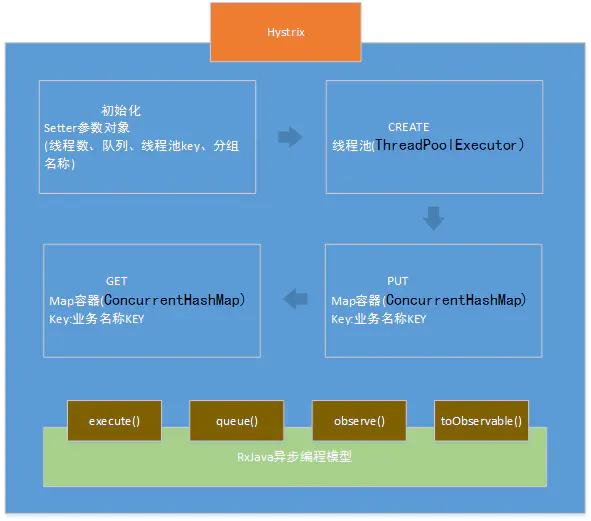
创建线程池中的线程的方法,查看源代码如下:
public ThreadPoolExecutor getThreadPool(final HystrixThreadPoolKey threadPoolKey, HystrixProperty<Integer> corePoolSize, HystrixProperty<Integer> maximumPoolSize, HystrixProperty<Integer> keepAliveTime, TimeUnit unit, BlockingQueue<Runnable> workQueue) {ThreadFactory threadFactory = null;if (!PlatformSpecific.isAppEngineStandardEnvironment()) {threadFactory = new ThreadFactory() {protected final AtomicInteger threadNumber = new AtomicInteger(0);@Overridepublic Thread newThread(Runnable r) {Thread thread = new Thread(r, "hystrix-" + threadPoolKey.name() + "-" + threadNumber.incrementAndGet());thread.setDaemon(true);return thread;}};} else {threadFactory = PlatformSpecific.getAppEngineThreadFactory();}final int dynamicCoreSize = corePoolSize.get();final int dynamicMaximumSize = maximumPoolSize.get();if (dynamicCoreSize > dynamicMaximumSize) {logger.error("Hystrix ThreadPool configuration at startup for : " + threadPoolKey.name() + " is trying to set coreSize = " +dynamicCoreSize + " and maximumSize = " + dynamicMaximumSize + ". Maximum size will be set to " +dynamicCoreSize + ", the coreSize value, since it must be equal to or greater than the coreSize value");return new ThreadPoolExecutor(dynamicCoreSize, dynamicCoreSize, keepAliveTime.get(), unit, workQueue, threadFactory);} else {return new ThreadPoolExecutor(dynamicCoreSize, dynamicMaximumSize, keepAliveTime.get(), unit, workQueue, threadFactory);}}
执行Command的方式一共四种,直接看官方文档(https://github.com/Netflix/Hystrix/wiki/How-it-Works),具体区别如下:
- execute():以同步堵塞方式执行run()。调用execute()后,hystrix先创建一个新线程运行run(),接着调用程序要在execute()调用处一直堵塞着,直到run()运行完成。
- queue():以异步非堵塞方式执行run()。调用queue()就直接返回一个Future对象,同时hystrix创建一个新线程运行run(),调用程序通过Future.get()拿到run()的返回结果,而Future.get()是堵塞执行的。
- observe():事件注册前执行run()/construct()。第一步是事件注册前,先调用observe()自动触发执行run()/construct()(如果继承的是HystrixCommand,hystrix将创建新线程非堵塞执行run();如果继承的是HystrixObservableCommand,将以调用程序线程堵塞执行construct()),第二步是从observe()返回后调用程序调用subscribe()完成事件注册,如果run()/construct()执行成功则触发onNext()和onCompleted(),如果执行异常则触发onError()。
- toObservable():事件注册后执行run()/construct()。第一步是事件注册前,调用toObservable()就直接返回一个Observable
对象,第二步调用subscribe()完成事件注册后自动触发执行run()/construct()(如果继承的是HystrixCommand,hystrix将创建新线程非堵塞执行run(),调用程序不必等待run();如果继承的是HystrixObservableCommand,将以调用程序线程堵塞执行construct(),调用程序等待construct()执行完才能继续往下走),如果run()/construct()执行成功则触发onNext()和onCompleted(),如果执行异常则触发onError()
注:
execute()和queue()是HystrixCommand中的方法,observe()和toObservable()是HystrixObservableCommand 中的方法。从底层实现来讲,HystrixCommand其实也是利用Observable实现的(如果我们看Hystrix的源码的话,可以发现里面大量使用了RxJava),虽然HystrixCommand只返回单个的结果,但HystrixCommand的queue方法实际上是调用了toObservable().toBlocking().toFuture(),而execute方法实际上是调用了queue().get()。
3.2 线程池隔离技术实际代码中的应用
实际代码中的应用:
package myHystrix.threadpool;import com.netflix.hystrix.*;import org.junit.Test;import java.util.List;import java.util.concurrent.Future;/*** Created by qule on 2021/9/4.*/public class GetOrderCommand extends HystrixCommand<List> {OrderService orderService;public GetOrderCommand(String name){super(Setter.withGroupKey(HystrixCommandGroupKey.Factory.asKey("ThreadPoolTestGroup")).andCommandKey(HystrixCommandKey.Factory.asKey("testCommandKey")).andThreadPoolKey(HystrixThreadPoolKey.Factory.asKey(name)).andCommandPropertiesDefaults(HystrixCommandProperties.Setter().withExecutionTimeoutInMilliseconds(5000)).andThreadPoolPropertiesDefaults(HystrixThreadPoolProperties.Setter().withMaxQueueSize(10) //配置队列大小.withCoreSize(2) // 配置线程池里的线程数));}@Overrideprotected List run() throws Exception {return orderService.getOrderList();}public static class UnitTest {@Testpublic void testGetOrder(){// 同步获取,阻塞式获取请求结果// new GetOrderCommand("hystrix-order").execute();// 异步获取,调用queue方法,仅仅是将command放入线程池的一个等待队列,// 并立即返回,拿到一个future对象。之后从future.get()获取即可。Future<List> future =new GetOrderCommand("hystrix-order").queue();}}}
3.3 线程池隔离小结
执行依赖代码的线程与请求线程(比如Tomcat线程)分离,请求线程可以自由控制离开的时间,这也是我们通常说的异步编程,Hystrix是结合RxJava来实现的异步编程。通过设置线程池大小来控制并发访问量,当线程饱和的时候可以拒绝服务,防止依赖问题扩散。
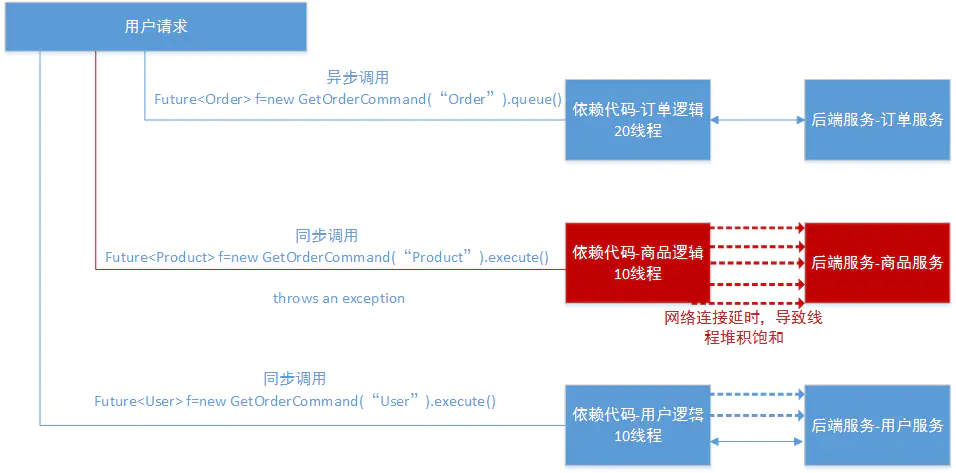
线程池隔离的优点:
- 应用程序会被完全保护起来,即使依赖的一个服务的线程池满了,也不会影响到应用程序的其他部分。
- 我们给应用程序引入一个新的风险较低的客户端lib的时候,如果发生问题,也是在本lib中,并不会影响到其他内容,因此我们可以大胆的引入新lib库。
- 当依赖的一个失败的服务恢复正常时,应用程序会立即恢复正常的性能。
- 如果我们的应用程序一些参数配置错误了,线程池的运行状况将会很快显示出来,比如延迟、超时、拒绝等。同时可以通过动态属性实时执行来处理纠正错误的参数配置。
- 如果服务的性能有变化,从而需要调整,比如增加或者减少超时时间,更改重试次数,就可以通过线程池指标动态属性修改,而且不会影响到其他调用请求。
- 除了隔离优势外,hystrix拥有专门的线程池可提供内置的并发功能,使得可以在同步调用之上构建异步的外观模式,这样就可以很方便的做异步编程(Hystrix引入了Rxjava异步框架)。
尽管线程池提供了线程隔离,我们的客户端底层代码也必须要有超时设置,不能无限制的阻塞以致线程池一直饱和。
线程池隔离缺点:
- 线程池的主要缺点就是它增加了计算的开销,每个业务请求(被包装成命令)在执行的时候,会涉及到请求排队,调度和上下文切换。不过Netflix公司内部认为线程隔离开销足够小,不会产生重大的成本或性能的影响。
- 对于不依赖网络访问的服务,比如只依赖内存缓存这种情况下,就不适合用线程池隔离技术,而是采用信号量隔离。
信号量机制
3.4 基于信号量机制实现资源隔离
信号量的资源隔离只是起到一个开关的作用,比如,服务A的信号量大小是10,那么就是说他同时只允许10个tomcat线程来访问A,其他的请求都会被拒绝,从而达到资源隔离和限流保护的作用。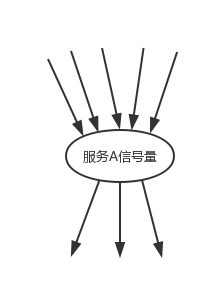
线程池和信号量的区别
线程池隔离技术,并不是去控制类似tomcat这类web容器的线程,更加严格意义上来看,hystrix的线程池隔离技术,控制的是tomcat线程的执行。hystrix线程池满后,会确保说,tomcat的线程不会因为依赖服务的接口调用延迟或故障而被hang住,tomcat其他的线程不会卡死,可以快速返回,支持其他请求。
线程池隔离技术,是用hystrix自己的线程去执行调用。而信号量隔离技术,是直接让tomcat线程去调用依赖服务。信号量隔离,只是一道关卡,信号量有多少,就允许多少个tomcat线程通过它,然后去执行。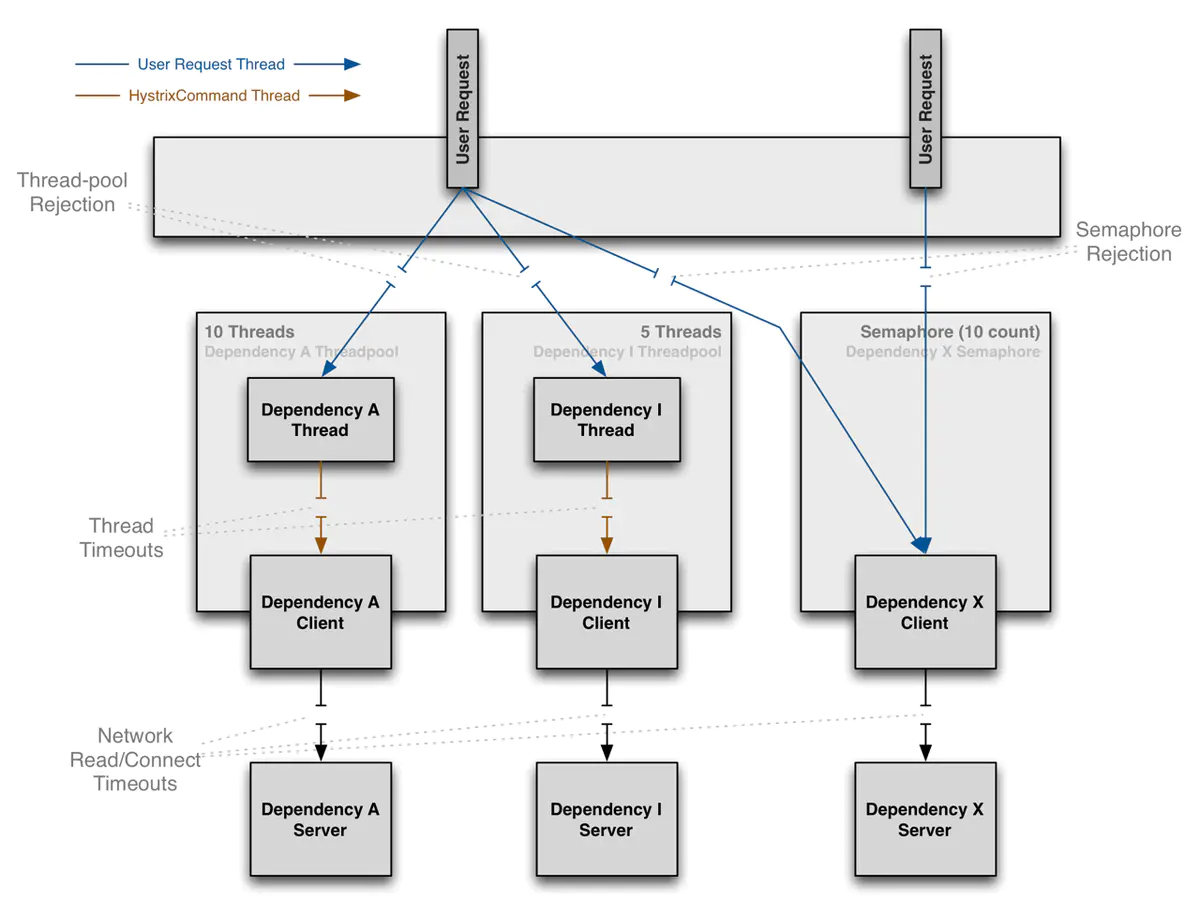
适用场景
线程池技术
适合绝大多数场景,比如说我们对依赖服务的网络请求的调用和访问,需要对调用的timeout进行控制(捕捉timeout超时异常)
信号量技术
对内部的一些比较复杂的业务逻辑的访问,因为系统内部的代码,不涉及任何的网络请求,那么只要做信号量的普通限流就可以了,因为不需要去捕获timeout类似的问题。或者说,我们依赖的服务是极低延迟的,比如访问内存缓存,就没必要使用线程池的方式,这样会得不偿失的。
总结
线程池方式下业务请求线程和执行依赖的服务的线程不是同一个线程;
信号量方式下业务请求线程和执行依赖服务的线程是同一个线程。
3.5 信号量实现的Demo
将属性execution.isolation.strategy设置为SEMAPHORE,像这样,ExecutionIsolationStrategy.SEMAPHORE,则hystrix使用信号量而不是默认的线程池来做隔离
场景:
一般我们在获取商品数据之后,都要去获取商品是属于哪个地理位置,省,市,卖家等。在自己的纯内存中,比如就一个map去获取数据,对于这种直接访问本地内存的逻辑,比较适合用信号量做一下简单的隔离。
优点在于,不用自己管理线程池,不用care timeout,同样也不需要进行线程上下文切换。信号量做隔离,性能相对会高很多。
假设,读取的是本地缓存,可以通过cityId拿到cityName
public class LocationCache {private static Map<Long, String> cityMap = new HashMap<>();static {cityMap.put(1L, "北京");}/*** 通过cityId 获取 cityName** @param cityId 城市id* @return 城市名*/public static String getCityName(Long cityId) {return cityMap.get(cityId);}}
写一个 GetCityNameCommand,策略设置为信号量。run() 方法中获取本地缓存。我们目的就是对获取本地缓存的代码进行资源隔离
public class GetCityNameCommand extends HystrixCommand<String> {private Long cityId;public GetCityNameCommand(Long cityId) {// 设置信号量隔离策略super(Setter.withGroupKey(HystrixCommandGroupKey.Factory.asKey("GetCityNameGroup")).andCommandPropertiesDefaults(HystrixCommandProperties.Setter().withExecutionIsolationStrategy(HystrixCommandProperties.ExecutionIsolationStrategy.SEMAPHORE)));this.cityId = cityId;}@Overrideprotected String run() {// 需要进行信号量隔离的代码return LocationCache.getCityName(cityId);}}
在接口层,通过创建getcityNameCommand,传入cityId,执行execute()方法,那么获取本地cityName缓存的代码会进行信号量的资源隔离。
@RequestMapping("/getProductInfo")@ResponseBodypublic String getProductInfo(Long productId) {HystrixCommand<ProductInfo> getProductInfoCommand = new GetProductInfoCommand(productId);// 通过command执行,获取最新商品数据ProductInfo productInfo = getProductInfoCommand.execute();Long cityId = productInfo.getCityId();GetCityNameCommand getCityNameCommand = new GetCityNameCommand(cityId);// 获取本地内存(cityName)的代码会被信号量进行资源隔离String cityName = getCityNameCommand.execute();productInfo.setCityName(cityName);System.out.println(productInfo);return "success";}
信号量隔离的方式是限制了总的并发数,每一次请求过来,请求线程和调用依赖服务的线程是同一个线程,那么如果不涉及远程RPC调用(没有网络开销)则使用信号量来隔离,更为轻量,开销更小。
3.6 隔离策略细粒度控制
3.7 hystrix执行时内部原理
4.熔断
4.1 熔断器(circuit breaker)介绍
hystrix中的熔断器起到fast-fail的作用,hystrix在运行过程中会向每个commandKey对应的熔断器报告成功,失败,超时和拒绝的状态,熔断器维护计算统计的数据,根据这些统计数据来确定熔断器是否打开,如果打开,后续的请求都会被截断,然后隔一段时间默认是5s,尝试半开,放入一部分流量请求进来,相当于对依赖服务进行一次健康检查,如果恢复,熔断器关闭,随后完全恢复调用。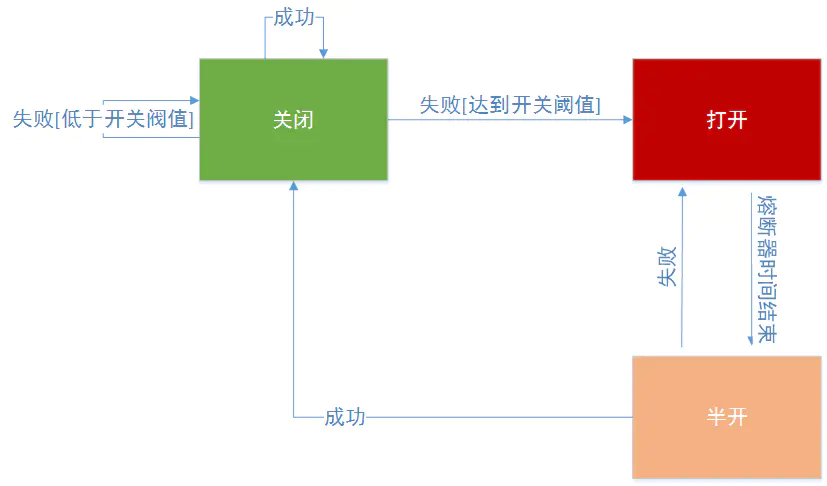
从上述的状态机图可以看出,上面说的commandKey,就是在初始化的时候设置的 andCommandKey(HystrixCommandKey.Factory.asKey(“testCommandKey”))
接着看一下熔断器在整个hystrix流程图中的位置,从步骤4开始,如下图:
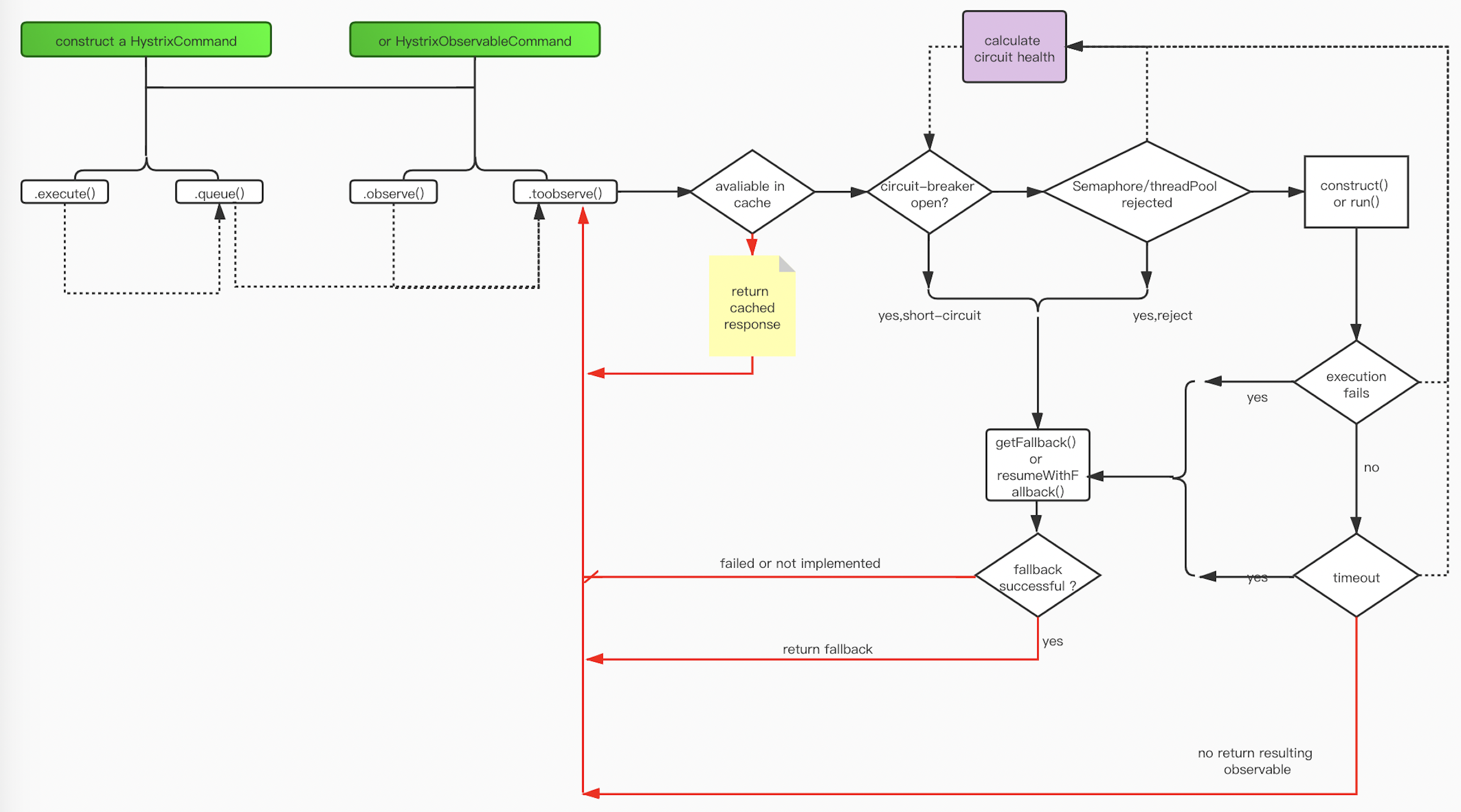
hystrix会检查circuit breaker的状态,如果circuit breaker的状态为开启状态,hystrix将不会执行对应指令,而是直接进入失败状态。如果circuit-breaker的状态为关闭状态,hystrix会继续进行线程池、任务队列和信号量检查。
4.2 如何使用熔断器
由于hystrix是一个容错框架,在使用的时候,要达到熔断的目的,需要配置一些参数。circuit breaker一共包括6个参数:
- circuitBreaker.enabled 是否启用熔断器,默认是true
- circuitBreaker.forceOpen 熔断器强制打开,始终保持打开状态,默认为FALSE
- circuitBreaker.forceClosed 熔断器强制关闭,始终保持关闭状态,默认是FALSE
- circuitBreaker.errorThresholdPercentage 设定错误百分比,默认是50%,例如一段时间(10s)内有100个请求,其中有55个超时或者异常返回了,那么这段时间内的错误百分比是55%,大于了默认值50%,这种情况下,触发熔断器打开。
- circuitBreaker.requestVolumeThreshold 默认值是20,意思是至少有20个请求才进行errorThresholdPercentage错误百分比计算。比如一段时间(10s)内有19个请求全部失败了。错误百分比是100%,但熔断器不会打开,因为requestVolumeThreshold的值是20. 这个参数非常重要,熔断器是否打开首先要满足这个条件,源代码如下: ```java // check if we are past the statisticalWindowVolumeThreshold if (health.getTotalRequests() < properties.circuitBreakerRequestVolumeThreshold().get()) { // we are not past the minimum volume threshold // for the statisticalWindow so we’ll return false // immediately and not calculate anything return false; }
if (health.getErrorPercentage() < properties.circuitBreakerErrorThresholdPercentage().get()) { return false; }
- circuitBreaker.sleepWindowInMilliseconds半开试探休眠时间,默认值是5000ms。当熔断器开启一段时间之后,。会尝试放过去一部分流量进行试探,确定依赖服务是否恢复。测试代码```javapackage myHystrix.threadpool;import com.netflix.hystrix.*;import org.junit.Test;import java.util.Random;/*** Created by wangxindong on 2017/8/15.*/public class GetOrderCircuitBreakerCommand extends HystrixCommand<String> {public GetOrderCircuitBreakerCommand(String name){super(Setter.withGroupKey(HystrixCommandGroupKey.Factory.asKey("ThreadPoolTestGroup")).andCommandKey(HystrixCommandKey.Factory.asKey("testCommandKey")).andThreadPoolKey(HystrixThreadPoolKey.Factory.asKey(name)).andCommandPropertiesDefaults(HystrixCommandProperties.Setter().withCircuitBreakerEnabled(true)//默认是true,本例中为了展现该参数.withCircuitBreakerForceOpen(false)//默认是false,本例中为了展现该参数.withCircuitBreakerForceClosed(false)//默认是false,本例中为了展现该参数.withCircuitBreakerErrorThresholdPercentage(5)//(1)错误百分比超过5%.withCircuitBreakerRequestVolumeThreshold(10)//(2)10s以内调用次数10次,同时满足(1)(2)熔断器打开.withCircuitBreakerSleepWindowInMilliseconds(5000)//隔5s之后,熔断器会尝试半开(关闭),重新放进来请求// .withExecutionTimeoutInMilliseconds(1000)).andThreadPoolPropertiesDefaults(HystrixThreadPoolProperties.Setter().withMaxQueueSize(10) //配置队列大小.withCoreSize(2) // 配置线程池里的线程数));}@Overrideprotected String run() throws Exception {Random rand = new Random();//模拟错误百分比(方式比较粗鲁但可以证明问题)if(1==rand.nextInt(2)){// System.out.println("make exception");throw new Exception("make exception");}return "running: ";}@Overrideprotected String getFallback() {// System.out.println("FAILBACK");return "fallback: ";}public static class UnitTest{@Testpublic void testCircuitBreaker() throws Exception{for(int i=0;i<25;i++){Thread.sleep(500);HystrixCommand<String> command = new GetOrderCircuitBreakerCommand("testCircuitBreaker");String result = command.execute();//本例子中从第11次,熔断器开始打开System.out.println("call times:"+(i+1)+" result:"+result +" isCircuitBreakerOpen: "+command.isCircuitBreakerOpen());//本例子中5s以后,熔断器尝试关闭,放开新的请求进来}}}}
4.3 熔断器(circuit breaker)源码 HystrixCircuitBreaker.java分析
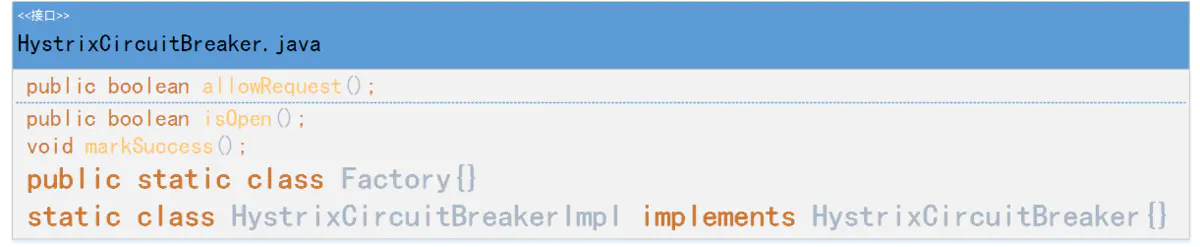
Factory 是一个工厂类,提供hystrixCircuitBreaker实例
public static class Factory {
        //用一个ConcurrentHashMap来保存HystrixCircuitBreaker对象
        private static ConcurrentHashMap<String, HystrixCircuitBreaker> circuitBreakersByCommand = new ConcurrentHashMap<String, HystrixCircuitBreaker>();

//Hystrix首先会检查ConcurrentHashMap中有没有对应的缓存的断路器,如果有的话直接返回。如果没有的话就会新创建一个HystrixCircuitBreaker实例,将其添加到缓存中并且返回
        public static HystrixCircuitBreaker getInstance(HystrixCommandKey key, HystrixCommandGroupKey group, HystrixCommandProperties properties, HystrixCommandMetrics metrics) {

            HystrixCircuitBreaker previouslyCached = circuitBreakersByCommand.get(key.name());
            if (previouslyCached != null) {
                return previouslyCached;
            }


            HystrixCircuitBreaker cbForCommand = circuitBreakersByCommand.putIfAbsent(key.name(), new HystrixCircuitBreakerImpl(key, group, properties, metrics));
            if (cbForCommand == null) {
                return circuitBreakersByCommand.get(key.name());
            } else {
                return cbForCommand;
            }
        }


        public static HystrixCircuitBreaker getInstance(HystrixCommandKey key) {
            return circuitBreakersByCommand.get(key.name());
        }

        static void reset() {
            circuitBreakersByCommand.clear();
        }
}
HystrixCircuitBreakerImpl是HystrixCircuitBreaker的实现,allowRequest()、isOpen()、markSuccess()都会在HystrixCircuitBreakerImpl有默认的实现。
static class HystrixCircuitBreakerImpl implements HystrixCircuitBreaker {
        private final HystrixCommandProperties properties;
        private final HystrixCommandMetrics metrics;

        /* 变量circuitOpen来代表断路器的状态,默认是关闭 */
        private AtomicBoolean circuitOpen = new AtomicBoolean(false);

        /* 变量circuitOpenedOrLastTestedTime记录着断路恢复计时器的初始时间,用于Open状态向Close状态的转换 */
        private AtomicLong circuitOpenedOrLastTestedTime = new AtomicLong();

        protected HystrixCircuitBreakerImpl(HystrixCommandKey key, HystrixCommandGroupKey commandGroup, HystrixCommandProperties properties, HystrixCommandMetrics metrics) {
            this.properties = properties;
            this.metrics = metrics;
        }

        /*用于关闭熔断器并重置统计数据*/
        public void markSuccess() {
            if (circuitOpen.get()) {
                if (circuitOpen.compareAndSet(true, false)) {
                    //win the thread race to reset metrics
                    //Unsubscribe from the current stream to reset the health counts stream.  This only affects the health counts view,
                    //and all other metric consumers are unaffected by the reset
                    metrics.resetStream();
                }
            }
        }

        @Override
        public boolean allowRequest() {
            //是否设置强制开启
            if (properties.circuitBreakerForceOpen().get()) {
                return false;
            }
            if (properties.circuitBreakerForceClosed().get()) {//是否设置强制关闭
                isOpen();
                // properties have asked us to ignore errors so we will ignore the results of isOpen and just allow all traffic through
                return true;
            }
            return !isOpen() || allowSingleTest();
        }

        public boolean allowSingleTest() {
            long timeCircuitOpenedOrWasLastTested = circuitOpenedOrLastTestedTime.get();
            //获取熔断恢复计时器记录的初始时间circuitOpenedOrLastTestedTime,然后判断以下两个条件是否同时满足:
            // 1) 熔断器的状态为开启状态(circuitOpen.get() == true)
            // 2) 当前时间与计时器初始时间之差大于计时器阈值circuitBreakerSleepWindowInMilliseconds(默认为 5 秒)
            //如果同时满足的话,表示可以从Open状态向Close状态转换。Hystrix会通过CAS操作将circuitOpenedOrLastTestedTime设为当前时间,并返回true。如果不同时满足,返回false,代表熔断器关闭或者计时器时间未到。
            if (circuitOpen.get() && System.currentTimeMillis() > timeCircuitOpenedOrWasLastTested + properties.circuitBreakerSleepWindowInMilliseconds().get()) {
                // We push the 'circuitOpenedTime' ahead by 'sleepWindow' since we have allowed one request to try.
                // If it succeeds the circuit will be closed, otherwise another singleTest will be allowed at the end of the 'sleepWindow'.
                if (circuitOpenedOrLastTestedTime.compareAndSet(timeCircuitOpenedOrWasLastTested, System.currentTimeMillis())) {
                    // if this returns true that means we set the time so we'll return true to allow the singleTest
                    // if it returned false it means another thread raced us and allowed the singleTest before we did
                    return true;
                }
            }
            return false;
        }

        @Override
        public boolean isOpen() {
            if (circuitOpen.get()) {//获取断路器的状态
                // if we're open we immediately return true and don't bother attempting to 'close' ourself as that is left to allowSingleTest and a subsequent successful test to close
                return true;
            }

            // Metrics数据中获取HealthCounts对象
            HealthCounts health = metrics.getHealthCounts();

            // 检查对应的请求总数(totalCount)是否小于属性中的请求容量阈值circuitBreakerRequestVolumeThreshold,默认20,如果是的话表示熔断器可以保持关闭状态,返回false
            if (health.getTotalRequests() < properties.circuitBreakerRequestVolumeThreshold().get()) {

                return false;
            }

            //不满足请求总数条件,就再检查错误比率(errorPercentage)是否小于属性中的错误百分比阈值(circuitBreakerErrorThresholdPercentage,默认 50),如果是的话表示断路器可以保持关闭状态,返回 false
            if (health.getErrorPercentage() < properties.circuitBreakerErrorThresholdPercentage().get()) {
                return false;
            } else {
                // 如果超过阈值,Hystrix会判定服务的某些地方出现了问题,因此通过CAS操作将断路器设为开启状态,并记录此时的系统时间作为定时器初始时间,最后返回 true
                if (circuitOpen.compareAndSet(false, true)) {
                    circuitOpenedOrLastTestedTime.set(System.currentTimeMillis());
                    return true;
                } else {
                    return true;
                }
            }
        }

    }
5.回退降级
5.1 降级
所谓降级,是指在hystrix执行非核心链路功能失败的情况下,我们如何处理。比如返回默认值等。如果需要回退或者降级处理,代码上需要实现HystrixCommand.getFallback()方法或者是HystrixObservableCommand.HystrixObservableCommand().
自定义一个带降级方法的command类
public class CommandHelloFailure extends HystrixCommand<String> {

    private final String name;

    public CommandHelloFailure(String name) {
        super(HystrixCommandGroupKey.Factory.asKey("ExampleGroup"));
        this.name = name;
    }

    @Override
    protected String run() {
        throw new RuntimeException("this command always fails");
    }

    @Override
    protected String getFallback() {
        return "Hello Failure " + name + "!";
    }
}
5.2 Hystrix降级回退方式
5.2.1 fail fast快速失败
 @Override
    protected String run() {
        if (throwException) {
            throw new RuntimeException("failure from CommandThatFailsFast");
        } else {
            return "success";
        }
    }
如果我们实现的是HystrixObservableCommand.java则重写resumeWithFallback方法
@Override
    protected Observable<String> resumeWithFallback() {
        if (throwException) {
            return Observable.error(new Throwable("failure from CommandThatFailsFast"));
        } else {
            return Observable.just("success");
        }
    }
5.2.2 fail silent无声失败
返回null,空map,空list
@Override
    protected String getFallback() {
        return null;
    }
@Override
    protected List<String> getFallback() {
        return Collections.emptyList();
    }
@Override
    protected Observable<String> resumeWithFallback() {
        return Observable.empty();
    }
5.2.3 Fallback:Static 返回默认值
回退的时候返回静态嵌入代码中的默认值,这样就不会导致功能以及fail silent的方式的混淆。按照一个默认的方式展示。
@Override
    protected Boolean getFallback() {
        return true;
    }
@Override
    protected Observable<Boolean> resumeWithFallback() {
        return Observable.just( true );
    }
5.2.4 Fallback:Stubbed 自己组装一个值返回
当我们执行返回的结果是一个包含多个字段的对象时,则会以Stubbed 的方式回退。Stubbed 值我们建议在实例化Command的时候就设置好一个值。以countryCodeFromGeoLookup为例,countryCodeFromGeoLookup的值,是在我们调用的时候就注册进来初始化好的。CommandWithStubbedFallback command = new CommandWithStubbedFallback(1234, “china”);主要代码如下
public class CommandWithStubbedFallback extends HystrixCommand<UserAccount> {

protected CommandWithStubbedFallback(int customerId, String countryCodeFromGeoLookup) {
        super(HystrixCommandGroupKey.Factory.asKey("ExampleGroup"));
        this.customerId = customerId;
        this.countryCodeFromGeoLookup = countryCodeFromGeoLookup;
    }
    @Override
    protected UserAccount getFallback() {
        /**
         * Return stubbed fallback with some static defaults, placeholders,
         * and an injected value 'countryCodeFromGeoLookup' that we'll use
         * instead of what we would have retrieved from the remote service.
         */
        return new UserAccount(customerId, "Unknown Name",
                countryCodeFromGeoLookup, true, true, false);
    }
5.2.5 fallback:cache via network 利用远程缓存
通过远程缓存的方式,在失败的情况下在发起一次remote请求,不过这次请求的是一个缓存比如redis。由于是有发起一次远程调用,所以会重新封装一次Command,这个时候要注意,执行fallback的线程一定是要跟主线程分开,也就是重新命名一个ThreadPoolKey.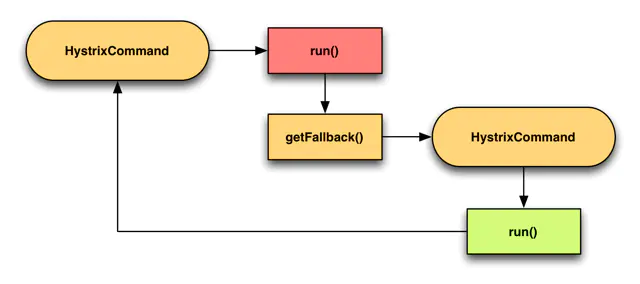
public class CommandWithFallbackViaNetwork extends HystrixCommand<String> {
    private final int id;

    protected CommandWithFallbackViaNetwork(int id) {
        super(Setter.withGroupKey(HystrixCommandGroupKey.Factory.asKey("RemoteServiceX"))
                .andCommandKey(HystrixCommandKey.Factory.asKey("GetValueCommand")));
        this.id = id;
    }

    @Override
    protected String run() {
        //        RemoteServiceXClient.getValue(id);
        throw new RuntimeException("force failure for example");
    }

    @Override
    protected String getFallback() {
        return new FallbackViaNetwork(id).execute();
    }

    private static class FallbackViaNetwork extends HystrixCommand<String> {
        private final int id;

        public FallbackViaNetwork(int id) {
            super(Setter.withGroupKey(HystrixCommandGroupKey.Factory.asKey("RemoteServiceX"))
                    .andCommandKey(HystrixCommandKey.Factory.asKey("GetValueFallbackCommand"))
                    // use a different threadpool for the fallback command
                    // so saturating the RemoteServiceX pool won't prevent
                    // fallbacks from executing
                    .andThreadPoolKey(HystrixThreadPoolKey.Factory.asKey("RemoteServiceXFallback")));
            this.id = id;
        }

        @Override
        protected String run() {
            MemCacheClient.getValue(id);
        }

        @Override
        protected String getFallback() {
            // the fallback also failed
            // so this fallback-of-a-fallback will
            // fail silently and return null
            return null;
        }
    }
}
5.2.6 Primary+Secondary with Fallback 主次方式回退(主要和次要)
这个有点类似日常开发中需要上线一个新功能,但为了防止新功能上线失败可以回退到老的代码。我们可以做一个开关,比如使用zk做一个配置开关,可以动态切换到老代码的功能。hystrix是使用通过一个配置来在两个command中进行切换。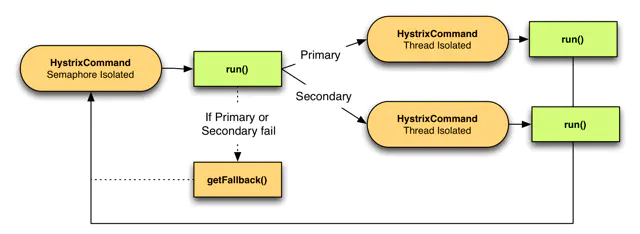
/**
 * Sample {@link HystrixCommand} pattern using a semaphore-isolated command
 * that conditionally invokes thread-isolated commands.
 */
public class CommandFacadeWithPrimarySecondary extends HystrixCommand<String> {

    private final static DynamicBooleanProperty usePrimary = DynamicPropertyFactory.getInstance().getBooleanProperty("primarySecondary.usePrimary", true);

    private final int id;

    public CommandFacadeWithPrimarySecondary(int id) {
        super(Setter
                .withGroupKey(HystrixCommandGroupKey.Factory.asKey("SystemX"))
                .andCommandKey(HystrixCommandKey.Factory.asKey("PrimarySecondaryCommand"))
                .andCommandPropertiesDefaults(
                        // we want to default to semaphore-isolation since this wraps
                        // 2 others commands that are already thread isolated
                        // 采用信号量的隔离方式
                        HystrixCommandProperties.Setter()
                                .withExecutionIsolationStrategy(ExecutionIsolationStrategy.SEMAPHORE)));
        this.id = id;
    }

    //通过DynamicPropertyFactory来路由到不同的command
    @Override
    protected String run() {
        if (usePrimary.get()) {
            return new PrimaryCommand(id).execute();
        } else {
            return new SecondaryCommand(id).execute();
        }
    }

    @Override
    protected String getFallback() {
        return "static-fallback-" + id;
    }

    @Override
    protected String getCacheKey() {
        return String.valueOf(id);
    }

    private static class PrimaryCommand extends HystrixCommand<String> {

        private final int id;

        private PrimaryCommand(int id) {
            super(Setter
                    .withGroupKey(HystrixCommandGroupKey.Factory.asKey("SystemX"))
                    .andCommandKey(HystrixCommandKey.Factory.asKey("PrimaryCommand"))
                    .andThreadPoolKey(HystrixThreadPoolKey.Factory.asKey("PrimaryCommand"))
                    .andCommandPropertiesDefaults(
                            // we default to a 600ms timeout for primary
                            HystrixCommandProperties.Setter().withExecutionTimeoutInMilliseconds(600)));
            this.id = id;
        }

        @Override
        protected String run() {
            // perform expensive 'primary' service call
            return "responseFromPrimary-" + id;
        }

    }

    private static class SecondaryCommand extends HystrixCommand<String> {

        private final int id;

        private SecondaryCommand(int id) {
            super(Setter
                    .withGroupKey(HystrixCommandGroupKey.Factory.asKey("SystemX"))
                    .andCommandKey(HystrixCommandKey.Factory.asKey("SecondaryCommand"))
                    .andThreadPoolKey(HystrixThreadPoolKey.Factory.asKey("SecondaryCommand"))
                    .andCommandPropertiesDefaults(
                            // we default to a 100ms timeout for secondary
                            HystrixCommandProperties.Setter().withExecutionTimeoutInMilliseconds(100)));
            this.id = id;
        }

        @Override
        protected String run() {
            // perform fast 'secondary' service call
            return "responseFromSecondary-" + id;
        }

    }

    public static class UnitTest {

        @Test
        public void testPrimary() {
            HystrixRequestContext context = HystrixRequestContext.initializeContext();
            try {
                //将属性"primarySecondary.usePrimary"设置为true,则走PrimaryCommand;设置为false,则走SecondaryCommand
                ConfigurationManager.getConfigInstance().setProperty("primarySecondary.usePrimary", true);
                assertEquals("responseFromPrimary-20", new CommandFacadeWithPrimarySecondary(20).execute());
            } finally {
                context.shutdown();
                ConfigurationManager.getConfigInstance().clear();
            }
        }

        @Test
        public void testSecondary() {
            HystrixRequestContext context = HystrixRequestContext.initializeContext();
            try {
                //将属性"primarySecondary.usePrimary"设置为true,则走PrimaryCommand;设置为false,则走SecondaryCommand
                ConfigurationManager.getConfigInstance().setProperty("primarySecondary.usePrimary", false);
                assertEquals("responseFromSecondary-20", new CommandFacadeWithPrimarySecondary(20).execute());
            } finally {
                context.shutdown();
                ConfigurationManager.getConfigInstance().clear();
            }
        }
    }
}
小结
降级的处理方式,返回默认值,返回缓存里面的值(包括远程缓存比如redis和本地缓存比如jvmcache)。
但回退的处理方式也有不适合的场景:
1、写操作
2、批处理
3、计算
以上几种情况如果失败,则程序就要将错误返回给调用者。

若有收获,就点个赞吧
0 人点赞


