一、属性的分解

memor:对内存的占用
navigation:网页导航相关数据
1、redirectCount:重定向的数量(只读),这个接口有同源策略限制,即仅能检测同源的重定向;
2、type:返回0,1,2
0:TYPE_NAVIGATE(用户通过常规导航方式访问页面,列如点一个链接、或者一般get方式)
1:TYPE_RELOAD(用户通过刷新,包括通过js调运接口方式访问页面)
2:TYPE_BACK_FORWARD (用户通过后退按钮访问本页面)
timing 整体结构如下
- navigationStart:部分浏览器实现为startTime。代表浏览器开始unload前一个页面文档的开始时间节点,比如我们正在浏览器访问baidu.com ,在地址栏输入google.com地址并回车,浏览器的执行动作依次为:unload当前文档(即baidu.com)->请求下一文档(即google.com)navigationStart的值便是触发unload当前文档的时间节点;
- redirectStart 和 redirectEnd:如果页面是由重定向(redirect)而来,则redirectStart 和 redirectEnd分别代表redirect开始和结束的时间节点;
- unloadEventStart 和 unloadEventEnd:如果前一个文档和请求的文档是同一个域,则unloadEventStart 和 unloadEventEnd分别代表浏览器unload前一个文档的开始和结束时间节点。负责两者都为0;
- fetchStart:指浏览器发起任何请求值的时间值。在fetchStart 和 domainLookupStart之间,浏览器会检查当前文档的缓存;
- domainLookupStart 和 domainLookupEnd:分别代表DNS查询的开始和结束时间。如果浏览器没有进行DNS查询(比如使用了cache),则两个值都为fetchStart;
- connectStart 和 connectEnd:分别代表TCP建立连接和连接成功的时间节点。如果浏览器没有进行TCP连接(比如使用持久化链接websocket),这两个值都为domainLookupEnd;
- secureConnectionStart:可选。如果页面使用HTTPS,它的值时安全连接握手之前的时刻。如果该属性不可用,则返回undefined。如国该属性可用,但没有使用HTTPS,则返回0;
- responseStart 和 responseEnd:分别代表浏览器收到服务器端(或缓存、本地资源)响应回的第一个字节和最后一个字节数据的时间;
- domLoading:代表浏览器开始解析html文档的时间节点。IE浏览器下的document有readyStart属性,domLoading的值就等于readyStart改变为loading的时间节点;
- domInteractive:代表浏览器解析html文档的状态为interactive时的时间节点。domInteractive并非DOMReady,,它早于DOMReady触发,代表htm文档解析完毕(dom tree创建完成)但是内嵌资源(外链css、js)还未加载的时间点
- domContentLoadedEventStart:代表DOMContentLoaded事件触发时间节点;
- domContentLoadedEventEnd:代表DOMContentLoaded事件完成的时间节点,此时用户可以对页面操作了
- domComplete:html文档完全解析完毕的时间节点
- loadEventStart 和 loadEventEnd:分别代表onload事件触发和结束的时间节点;
- 检测网络带宽 navigator.connection.downlink * 1024 /8 // KB/s
使用该api时需要在页面完全加载完成之后才能使用,最简单的办法是在window.onload事件中读取各种数据,因为很多值必须在页面完全加载之后才能得出**
需要再页面onload之后才能获取到的时间节点
domInteractive
** domContentLoadedEventEnd
** loadEventEnd
loadEventStart
performance.getEntries()
**
二、计算性能指标
performance.timing
1、区间阶段耗时
DNS 解析耗时 = domainLookupEnd - domainLookupStart
TCP 链接耗时 = connectEnd - connectStart
SSL 安全连接耗时 = **connectEnd- **secureConnectionStart
TTFB 网络请求耗时 = responseStart- requestStart
数据传输耗时 = responseEnd- responseStart
DOM 解析耗时 = domInteractive- responseEnd (**需在onload之后)
资源加载耗时 = loadEventStart- domContentLoadedEventEnd **(需在onload之后)
2、关键性能指标
首包时间 = responseStart- domainLookupStart** 白屏时间 = responseEnd- fetchStart
首次可交互时间 = domInteractive- fetchStart (需在onload之后)
HTML加载完成时间 = domContentLoadedEventEnd- fetchStart (需在onload之后)
页面完全加载时间 = loadEventEnd- fetchStart **(需在onload之后)
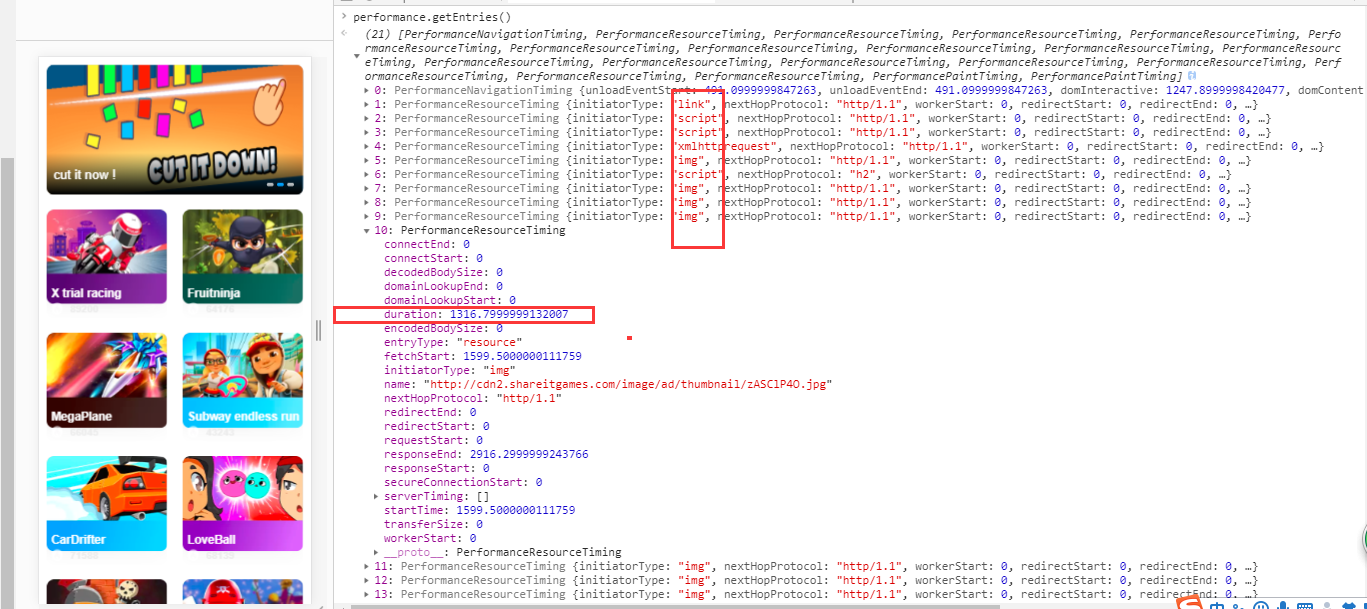
performance.getEntries()
返回所有静态资源信息(如下图),返回类型为数组。initiatorType为资源类型,durtaion为请求时间
// 标记一个开始点const performance = window.performance;const navigator = window.navigator;// 操作系统const os = navigator.userAgent.split("(")[1].split(";")[0];const navigationType = ["导航方式", "刷新", "后退按钮"];// 根据名称生成高精度时间戳(打点)performance.mark("loading-start");// 以下时间节点以及性能计算不需要在onload时获取const {domainLookupStart,// 请求连接被发送到网络时的时间戳connectStart,// 网络建立的时间节点connectEnd,secureConnectionStart,responseEnd,responseStart,requestStart,fetchStart,domainLookupEnd,// 加载页面的起始时间navigationStart,domComplete,redirectStart,redirectEnd,} = performance.timing;const {// 返回地理定位信息geolocation,// 是否连接互联网,true未断网onLine,// 所在平台,返回win32platform,// 网络情况connection,} = navigator;const {totalJSHeapSize,usedJSHeapSize} = performance.memory;let info = {// 内存占用情况memory: performance.memory,// 重定向耗时Redirect: redirectEnd - redirectStart,// DNS查找耗时DNSLookup: domainLookupEnd - domainLookupStart,// SSL 安全连接耗时ssl: connectEnd - secureConnectionStart,// TCP链接耗时TCPLink: connectEnd - connectStart,// Time to First Byte(TTFB)// 网络请求耗时 TTFB 有多种计算方式,ARMS 以 Google Development 定义为准ttfb: responseStart - requestStart,// 数据传输耗时HTTPResponse: responseEnd - responseStart,// 白屏耗时WhiteScreen: responseStart - navigationStart,// 2.关键性能指标// 首包时间Firstbyte: responseStart - domainLookupStart,// First Paint Time, 首次渲染时间 / 白屏时间FPT: responseEnd - fetchStart,//页面的来源信息navigation: performance.navigation,// 表示网页的加载来源,type: navigationType[performance.navigation.type] || "其他来源",// http请求抓取文档之时的时间戳fetchStart,// 如果大于0,表示有可能出现了内存泄漏JSHeapSize: usedJSHeapSize - totalJSHeapSize, // 使用过的堆栈内存 - js堆栈内存总大小os,geolocation,onLine,platform,connection};window.onload = function () {// 以下时间节点以及性能计算需要在onload时获取const {domInteractive,domContentLoadedEventEnd,loadEventEnd,loadEventStart,} = performance.timing;// console.log(loadEventEnd , fetchStart) 这里loadEventEnd获取一直为0,待解决let info = {// dom树解析耗时DOMParse: domInteractive - responseEnd,// HTML 加载完成时间, 即 DOM Ready 耗时DOMready: domContentLoadedEventEnd - fetchStart,// 资源加载耗时res: loadEventStart - domContentLoadedEventEnd,// onload耗时// Loaded: loadEventEnd - fetchStart,这里loadEventEnd获取一直为0,待解决// Time to Interact,首次可交互时间TTI: domInteractive - fetchStart,// 资源测速duration: performance.getEntries(),};let time = 0;let result = [];let duration = info.duration;if (duration) {duration.map((item) => {result.push({'资源名称': item.name,'资源类型': item.entryType,'谁发起的请求': item.initiatorType,'加载时间': item.duration});if (item.entryType == "resource") {// 加载静态资源总耗时time += item.duration;}});console.table(result);console.log("加载静态资源总耗时", time);} else {console.log("不支持");}// 标记一个结束点performance.mark("loading-end");// 标记指定开始点和结束点之间的时间戳(连线)performance.measure("loading","loading-start","loading-end");// 获取所有名称为loading的measuresvar measures = performance.getEntriesByName("loading");var measure = measures[0];console.log("loading time:", measure.duration);console.log(info)// 获取之后清除标记performance.clearMarks();performance.clearMeasures();};// 获取IP地址function getIPs(callback) {// var ip_dups = {};//兼容firefox chromevar RTCPeerConnection = window.RTCPeerConnection ||window.mozRTCPeerConnection ||window.webkitRTCPeerConnection;if (!RTCPeerConnection) {var iframe = document.createElement('iframe');iframe.sandbox = 'allow-same-origin';iframe.style.display = 'none';document.body.appendChild(iframe);var win = iframe.contentWindow;window.RTCPeerConnection = win.RTCPeerConnection;window.mozRTCPeerConnection = win.mozRTCPeerConnection;window.webkitRTCPeerConnection = win.webkitRTCPeerConnection;RTCPeerConnection = window.RTCPeerConnection ||window.mozRTCPeerConnection ||window.webkitRTCPeerConnection;}let pc = new RTCPeerConnection({iceServers: [{urls: "stun:stun.services.mozilla.com"}]});let noop = () => {};let localIPs = {};let ipRegex = /([0-9]{1,3}(\.[0-9]{1,3}){3}|[a-f0-9]{1,4}(:[a-f0-9]{1,4}){7})/g;let iterateIP = (ip) => {if (!localIPs[ip]) callback(ip);localIPs[ip] = true;};pc.createDataChannel('');pc.createOffer().then((sdp) => {sdp.sdp.split('\n').forEach(function (line) {if (line.indexOf('candidate') < 0) return;line.match(ipRegex).forEach(iterateIP);});pc.setLocalDescription(sdp, noop, noop);}).catch((reason) => {console.log(reason);});pc.onicecandidate = (ice) => {if (!ice || !ice.candidate || !ice.candidate.candidate || !ice.candidate.candidate.match(ipRegex)) return;ice.candidate.candidate.match(ipRegex).forEach(iterateIP);};}getIPs((ip) => {console.log(ip);});

若有收获,就点个赞吧
0 人点赞


