一、不控制goroutine数量引发的问题
我们都知道Goroutine具备如下两个特点
- 体积轻量
- 优质的GMP调度
那么goroutine是否可以无限开辟呢,如果做一个服务器或者一些高业务的场景,能否随意的开辟goroutine并且放养不管呢?让他们自生自灭,毕竟有强大的GC和优质的调度算法支撑?
那么我可以先看如下一个问题。
package mainimport ("fmt""math""runtime")func main() {//模拟用户需求业务的数量task_cnt := math.MaxInt64for i := 0; i < task_cnt; i++ {go func(i int) {//... do some busi...fmt.Println("go func ", i, " goroutine count = ", runtime.NumGoroutine())}(i)}}
结果

最后被操作系统以kill信号,强制终结该进程。
signal: killed
所以,我们迅速的开辟goroutine(不控制并发的 goroutine 数量 )会在短时间内占据操作系统的资源(CPU、内存、文件描述符等)。
- CPU 使用率浮动上涨
- Memory 占用不断上涨。
- 主进程崩溃(被杀掉了)
这些资源实际上是所有用户态程序共享的资源,所以大批的goroutine最终引发的灾难不仅仅是自身,还会关联其他运行的程序。
所以在编写逻辑业务的时候,限制goroutine是我们必须要重视的问题。
二、一些简单方法控制goroutines数量
方法一:只是用有buffer的channel来限制
package mainimport ("fmt""math""runtime")func busi(ch chan bool, i int) {fmt.Println("go func ", i, " goroutine count = ", runtime.NumGoroutine())<-ch}func main() {//模拟用户需求业务的数量task_cnt := math.MaxInt64//task_cnt := 10ch := make(chan bool, 3)for i := 0; i < task_cnt; i++ {ch <- truego busi(ch, i)}}
结果
...go func 352277 goroutine count = 4go func 352278 goroutine count = 4go func 352279 goroutine count = 4go func 352280 goroutine count = 4go func 352281 goroutine count = 4go func 352282 goroutine count = 4go func 352283 goroutine count = 4go func 352284 goroutine count = 4go func 352285 goroutine count = 4go func 352286 goroutine count = 4go func 352287 goroutine count = 4go func 352288 goroutine count = 4go func 352289 goroutine count = 4go func 352290 goroutine count = 4go func 352291 goroutine count = 4go func 352292 goroutine count = 4go func 352293 goroutine count = 4go func 352294 goroutine count = 4go func 352295 goroutine count = 4go func 352296 goroutine count = 4go func 352297 goroutine count = 4go func 352298 goroutine count = 4go func 352299 goroutine count = 4go func 352300 goroutine count = 4go func 352301 goroutine count = 4go func 352302 goroutine count = 4...
从结果看,程序并没有出现崩溃,而是按部就班的顺序执行,并且go的数量控制在了3,(4的原因是因为还有一个main goroutine)那么从数字上看,是不是在跑的goroutines有几十万个呢?
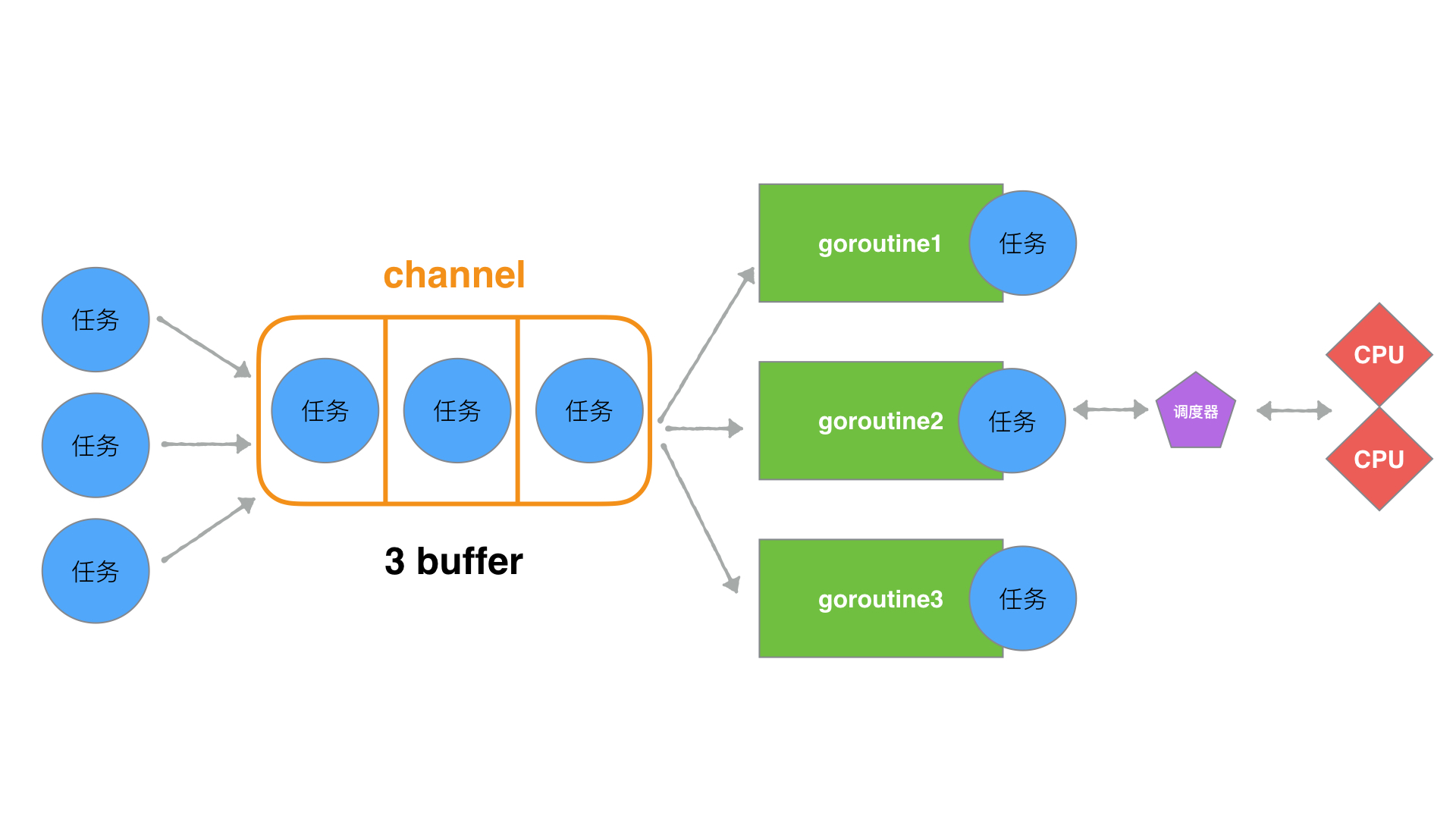
这里我们用了,buffer为3的channel, 在写的过程中,实际上是限制了速度。限制的是
 for i := 0; i < go_cnt; i++ { //循环速度

        ch <- true

        go busi(ch, i)
}
for循环的速度,因为这个速度决定了go的创建速度,而go的结束速度取决于 busi()函数的执行速度。 这样实际上,我们就能够保证了,同一时间内运行的goroutine的数量与buffer的数量一致。从而达到了限定效果。
但是这段代码有一个小问题,就是如果我们把go_cnt的数量变的小一些,会出现打出的结果不正确。
package main

import (
    "fmt"
    //"math"
    "runtime"
)

func busi(ch chan bool, i int) {

    fmt.Println("go func ", i, " goroutine count = ", runtime.NumGoroutine())
    <-ch
}

func main() {
    //模拟用户需求业务的数量
    //task_cnt := math.MaxInt64
    task_cnt := 10

    ch := make(chan bool, 3)

    for i := 0; i < task_cnt; i++ {

        ch <- true

        go busi(ch, i)
    }

}
结果
go func  2  goroutine count =  4
go func  3  goroutine count =  4
go func  4  goroutine count =  4
go func  5  goroutine count =  4
go func  6  goroutine count =  4
go func  1  goroutine count =  4
go func  8  goroutine count =  4
是因为main将全部的go开辟完之后,就立刻退出进程了。所以想全部go都执行,需要在main的最后进行阻塞操作。
方法二:只使用sync同步机制
import (
    "fmt"
    "math"
    "sync"
    "runtime"
)

var wg = sync.WaitGroup{}

func busi(i int) {

    fmt.Println("go func ", i, " goroutine count = ", runtime.NumGoroutine())
    wg.Done()
}

func main() {
    //模拟用户需求业务的数量
    task_cnt := math.MaxInt64


    for i := 0; i < task_cnt; i++ {
        wg.Add(1)
        go busi(i)
    }

      wg.Wait()
}
很明显,单纯的使用sync依然达不到控制goroutine的数量,所以最终结果依然是崩溃。
结果
...
go func  7562  goroutine count =  7582
go func  24819  goroutine count =  17985
go func  7685  goroutine count =  7582
go func  24701  goroutine count =  17984
go func  7563  goroutine count =  7582
go func  24821  goroutine count =  17983
go func  24822  goroutine count =  17983
go func  7686  goroutine count =  7582
go func  24703  goroutine count =  17982
go func  7564  goroutine count =  7582
go func  24824  goroutine count =  17981
go func  7687  goroutine count =  7582
go func  24705  goroutine count =  17980
go func  24706  goroutine count =  17980
go func  24707  goroutine count =  17979
go func  7688  goroutine count =  7582
go func  24826  goroutine count =  17978
go func  7566  goroutine count =  7582
go func  24709  goroutine count =  17977
go func  7689  goroutine count =  7582
go func  24828  goroutine count =  17976
go func  24829  goroutine count =  17976
go func  7567  goroutine count =  7582
go func  24711  goroutine count =  17975
//操作系统停止响应
方法三:channel与sync同步组合方式
package main

import (
    "fmt"
    "math"
    "sync"
    "runtime"
)

var wg = sync.WaitGroup{}

func busi(ch chan bool, i int) {

    fmt.Println("go func ", i, " goroutine count = ", runtime.NumGoroutine())

    <-ch

    wg.Done()
}

func main() {
    //模拟用户需求go业务的数量
    task_cnt := math.MaxInt64

    ch := make(chan bool, 3)

    for i := 0; i < task_cnt; i++ {
        wg.Add(1)

        ch <- true

        go busi(ch, i)
    }

      wg.Wait()
}
结果
//...
go func  228851  goroutine count =  4
go func  228852  goroutine count =  4
go func  228853  goroutine count =  4
go func  228854  goroutine count =  4
go func  228855  goroutine count =  4
go func  228856  goroutine count =  4
go func  228857  goroutine count =  4
go func  228858  goroutine count =  4
go func  228859  goroutine count =  4
go func  228860  goroutine count =  4
go func  228861  goroutine count =  4
go func  228862  goroutine count =  4
go func  228863  goroutine count =  4
go func  228864  goroutine count =  4
go func  228865  goroutine count =  4
go func  228866  goroutine count =  4
go func  228867  goroutine count =  4
//...
这样我们程序就不会再造成资源爆炸而崩溃。而且运行go的数量控制住了在buffer为3的这个范围内。
方法四:利用无缓冲channel与任务发送/执行分离方式
package main

import (
    "fmt"
    "math"
    "sync"
    "runtime"
)

var wg = sync.WaitGroup{}

func busi(ch chan int) {

    for t := range ch {
        fmt.Println("go task = ", t, ", goroutine count = ", runtime.NumGoroutine())
        wg.Done()
    }
}

func sendTask(task int, ch chan int) {
    wg.Add(1)
    ch <- task
}

func main() {

    ch := make(chan int)   //无buffer channel

    goCnt := 3              //启动goroutine的数量
    for i := 0; i < goCnt; i++ {
        //启动go
        go busi(ch)
    }

    taskCnt := math.MaxInt64 //模拟用户需求业务的数量
    for t := 0; t < taskCnt; t++ {
        //发送任务
        sendTask(t, ch)
    }

      wg.Wait()
}
结构
//...
go task =  130069 , goroutine count =  4
go task =  130070 , goroutine count =  4
go task =  130071 , goroutine count =  4
go task =  130072 , goroutine count =  4
go task =  130073 , goroutine count =  4
go task =  130074 , goroutine count =  4
go task =  130075 , goroutine count =  4
go task =  130076 , goroutine count =  4
go task =  130077 , goroutine count =  4
go task =  130078 , goroutine count =  4
go task =  130079 , goroutine count =  4
go task =  130080 , goroutine count =  4
go task =  130081 , goroutine count =  4
go task =  130082 , goroutine count =  4
go task =  130083 , goroutine count =  4
go task =  130084 , goroutine count =  4
go task =  130085 , goroutine count =  4
go task =  130086 , goroutine count =  4
go task =  130087 , goroutine count =  4
go task =  130088 , goroutine count =  4
go task =  130089 , goroutine count =  4
go task =  130090 , goroutine count =  4
go task =  130091 , goroutine count =  4
go task =  130092 , goroutine count =  4
go task =  130093 , goroutine count =  4
...
执行流程大致如下,这里实际上是将任务的发送和执行做了业务上的分离。使得消息出去,输入SendTask的频率可设置、执行Goroutine的数量也可设置。也就是既控制输入(生产),又控制输出(消费)。使得可控更加灵活。这也是很多Go框架的Worker工作池的最初设计思想理念。
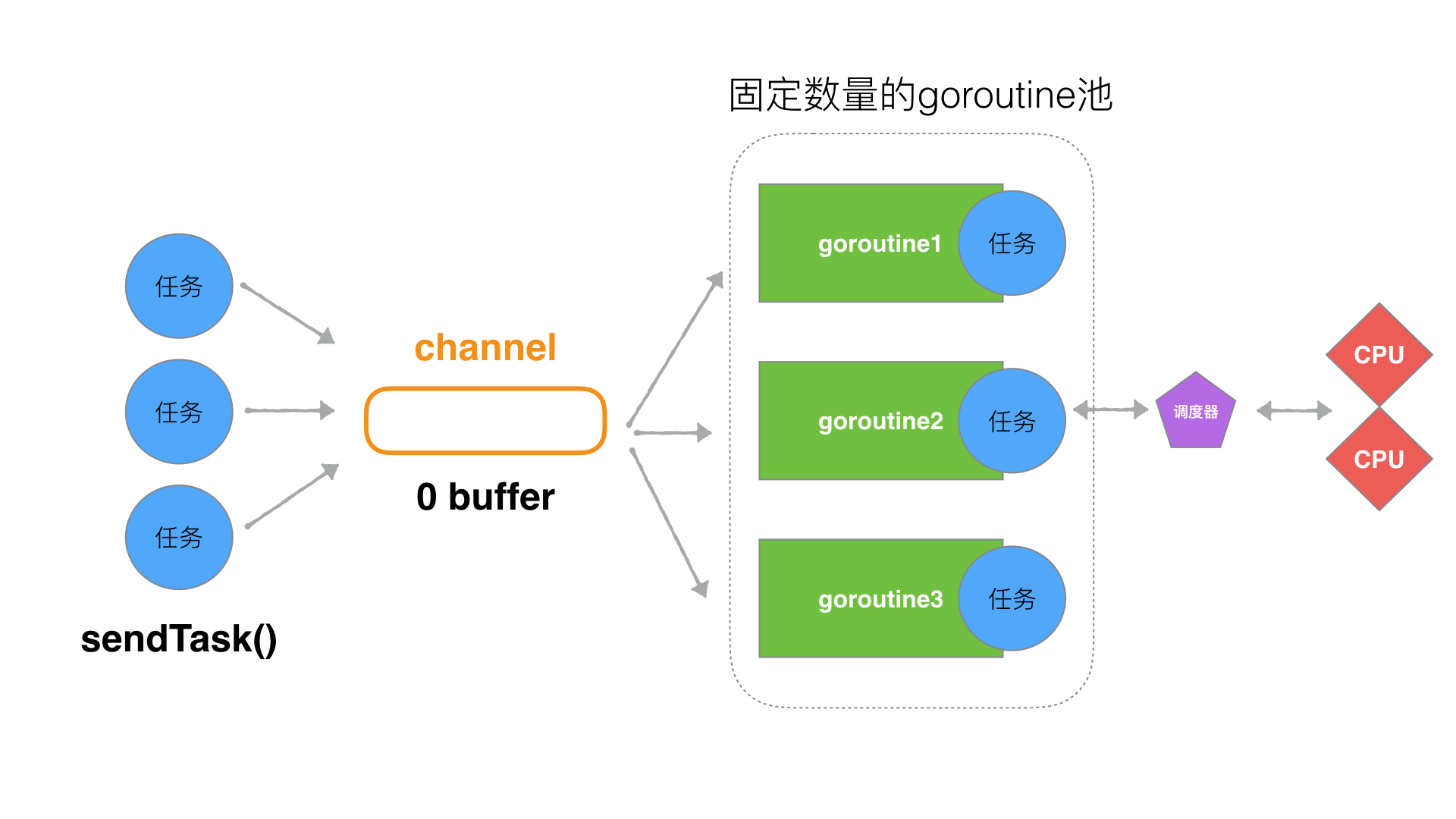
以上便是目前有关限定goroutine基础设计思路。
参考:
http://team.jiunile.com/blog/2019/09/go-control-goroutine-number.html

若有收获,就点个赞吧
0 人点赞


