非阻塞I/O操作
现在我们知道如何在一个指定I/O调度器上来调度一个任务,我们可以修改storeBitmap()函数并再次检查StrictMode的不合规做法。为了这个例子,我们可以在新的blockingStoreBitmap()函数中重排代码。
private static void blockingStoreBitmap(Context context, Bitmap bitmap, String filename) {FileOutputStream fOut = null;try {fOut = context.openFileOutput(filename, Context.MODE_PRIVATE);bitmap.compress(Bitmap.CompressFormat.PNG, 100, fOut);fOut.flush();fOut.close();} catch (Exception e) {throw new RuntimeException(e);} finally {try {if (fOut != null) {fOut.close();}} catch (IOException e) {throw new RuntimeException(e);}}}
现在我们可以使用Schedulers.io()创建非阻塞的版本:
public static void storeBitmap(Context context, Bitmap bitmap, String filename) {Schedulers.io().createWorker().schedule(() -> {blockingStoreBitmap(context, bitmap, filename);});}
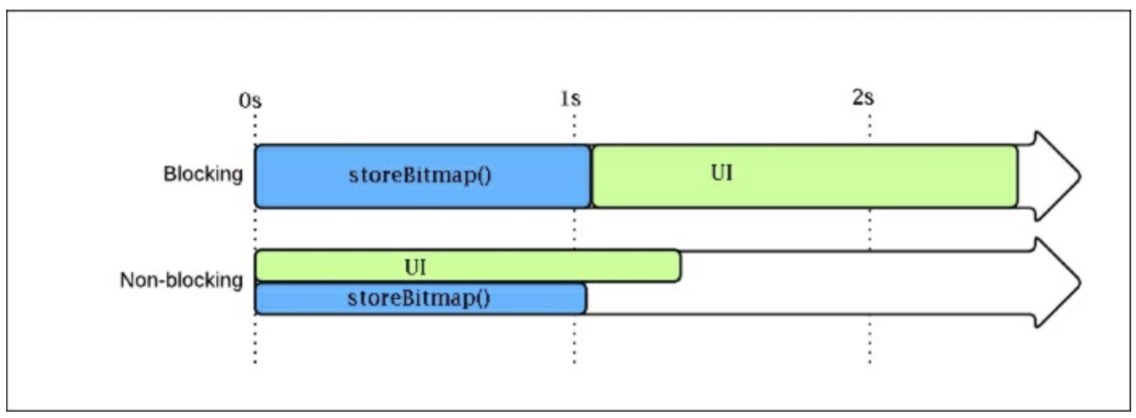
每次我们调用storeBitmap(),RxJava处理创建所有它需要从I / O线程池一个特定的I/ O线程执行我们的任务。所有要执行的操作都避免在UI线程执行并且我们的App比之前要快上1秒:logcat上也不再有StrictMode的不合规做法。
下图展示了我们在storeBitmap()场景看到的两种方法的不同:

若有收获,就点个赞吧
0 人点赞


