1. 准备
准备两张表,用于测试
CREATE TABLE `userT0` (`id` int(11) unsigned NOT NULL AUTO_INCREMENT,`name` varchar(20) NOT NULL DEFAULT '' COMMENT '用户名',`pwd` varchar(26) NOT NULL DEFAULT '' COMMENT '密码',`isDeleted` tinyint(1) NOT NULL DEFAULT '0',`created` varchar(13) NOT NULL DEFAULT '0',`updated` varchar(13) NOT NULL DEFAULT '0',PRIMARY KEY (`id`),KEY `name` (`name`)) ENGINE=InnoDB DEFAULT CHARSET=utf8mb4;CREATE TABLE `story_t0` (`id` int(11) unsigned NOT NULL AUTO_INCREMENT,`userId` int(20) unsigned NOT NULL DEFAULT '0' COMMENT '作者的userID',`name` varchar(20) NOT NULL DEFAULT '' COMMENT '作者名',`title` varchar(26) NOT NULL DEFAULT '' COMMENT '密码',`story` text COMMENT '故事内容',`is_deleted` tinyint(1) NOT NULL DEFAULT '0',`create_at` varchar(13) NOT NULL DEFAULT '0',`update_at` varchar(13) NOT NULL DEFAULT '0',`tag` int(11) DEFAULT NULL,PRIMARY KEY (`id`),KEY `userId` (`userId`)) ENGINE=InnoDB DEFAULT CHARSET=utf8mb4;
请注意,上面两张表的命名格式并不一样,有的是驼峰,有的是下划线(主要为了演示不同表名,对于生成代码的影响)
2. 配置依赖
首先需要在我们的xml文件中,添加相关的依赖
<dependencies><dependency><groupId>com.baomidou</groupId><artifactId>mybatis-plus-generator</artifactId><version>3.3.1.tmp</version></dependency><dependency><groupId>org.freemarker</groupId><artifactId>freemarker</artifactId></dependency><dependency><groupId>mysql</groupId><artifactId>mysql-connector-java</artifactId></dependency><!-- 下面两个,用于测试生成后的代码,在生成代码时,可以不需要--><dependency><groupId>org.springframework.boot</groupId><artifactId>spring-boot-starter-web</artifactId></dependency><dependency><groupId>com.baomidou</groupId><artifactId>mybatis-plus-boot-starter</artifactId><version>3.2.0</version></dependency></dependencies>
3. 代码生成类
写一个代码生成类方法,主要逻辑如下
public class CodeGenerator {public static void main(String[] args) {// 代码生成器AutoGenerator mpg = new AutoGenerator();// 全局配置GlobalConfig gc = new GlobalConfig();String projectPath = System.getProperty("user.dir") + "/spring-boot/106-mybatis-plus-generator";gc.setOutputDir(projectPath + "/src/main/java");gc.setAuthor("ruangh");gc.setOpen(false);// 覆盖写gc.setFileOverride(false);mpg.setGlobalConfig(gc);// 数据源配置DataSourceConfig dsc = new DataSourceConfig();dsc.setUrl("jdbc:mysql://127.0.0.1:3306/story?useSSL=false&serverTimezone=UTC");// dsc.setSchemaName("public");dsc.setDriverName("com.mysql.jdbc.Driver");dsc.setUsername("root");dsc.setPassword("123456");mpg.setDataSource(dsc);// 包配置PackageConfig pc = new PackageConfig();// 不额外指定模块,如果指定为 test,则生成的xml会在 mapper/test/ 目录下pc.setModuleName("");pc.setParent("com.ruangh.mybatisplus.generator");mpg.setPackageInfo(pc);// 自定义配置InjectionConfig cfg = new InjectionConfig() {@Overridepublic void initMap() {// to do nothing}};// 如果模板引擎是 freemarkerString templatePath = "/templates/mapper.xml.ftl";// 自定义输出配置List<FileOutConfig> focList = new ArrayList<>();// 自定义配置会被优先输出focList.add(new FileOutConfig(templatePath) {@Overridepublic String outputFile(TableInfo tableInfo) {// 自定义输出文件名 , 如果你 Entity 设置了前后缀、此处注意 xml 的名称会跟着发生变化!!return projectPath + "/src/main/resources/mapper/" + pc.getModuleName() + "/" +tableInfo.getEntityName() + "Mapper" + StringPool.DOT_XML;}});cfg.setFileOutConfigList(focList);mpg.setCfg(cfg);// 配置模板TemplateConfig templateConfig = new TemplateConfig();templateConfig.setXml(null);// 不自动生成controller类templateConfig.setController(null);mpg.setTemplate(templateConfig);// 策略配置StrategyConfig strategy = new StrategyConfig();strategy.setNaming(NamingStrategy.underline_to_camel);strategy.setColumnNaming(NamingStrategy.underline_to_camel);// strategy.setSuperEntityClass("你自己的父类实体,没有就不用设置!");strategy.setEntityLombokModel(true);strategy.setRestControllerStyle(true);// 公共父类// strategy.setSuperControllerClass("你自己的父类控制器,没有就不用设置!");// 写于父类中的公共字段// strategy.setSuperEntityColumns("id");// 设置需要生成的表名strategy.setInclude("userT0", "story_t0");strategy.setControllerMappingHyphenStyle(true);// strategy.setTablePrefix(pc.getModuleName() + "_");mpg.setStrategy(strategy);mpg.setTemplateEngine(new FreemarkerTemplateEngine());mpg.execute();}}
上面的代码,绝大部分都是通用的,下面着重说明需要注意的点
GlobalConfig#setOutputDir: 设置代码输出的项目根路径,请根据具体的项目要求进行指定,不包含包名哦
: 设置为true,则每次生成都会覆盖之前生成的代码,适用于表结构发生变化的场景GlobalConfig#setFileOverride(true)
- 注意:会导致之前添加的业务代码被覆盖掉,需要额外注意
- 通常希望设置为false,当表结构发生变化时,手动介入
DataSourceConfig: 数据源的设置,上面设置的是mysql的相关配置
: 包信息PackageConfig
setParent: java包路径setModuleName: 设置模块名,如设置为test,则xml在mapper/test/目录下; parent包自动加上.test
FileOutConfig: xml文件名
: 模板配置TemplateConfig
- 可用默认的代码生成模板,也可以使用自定义的模板
- 不想生成某个模板类时,设置为null即可(如上面的不生成controller)
: 策略配置StrategyConfig
- 可以指定db->pojo字段名的映射规则
- 可以指定POJO/Controller继承自定义的基类
在IDEA中,直接右键执行上面的代码,就会生成目标类,如下截图
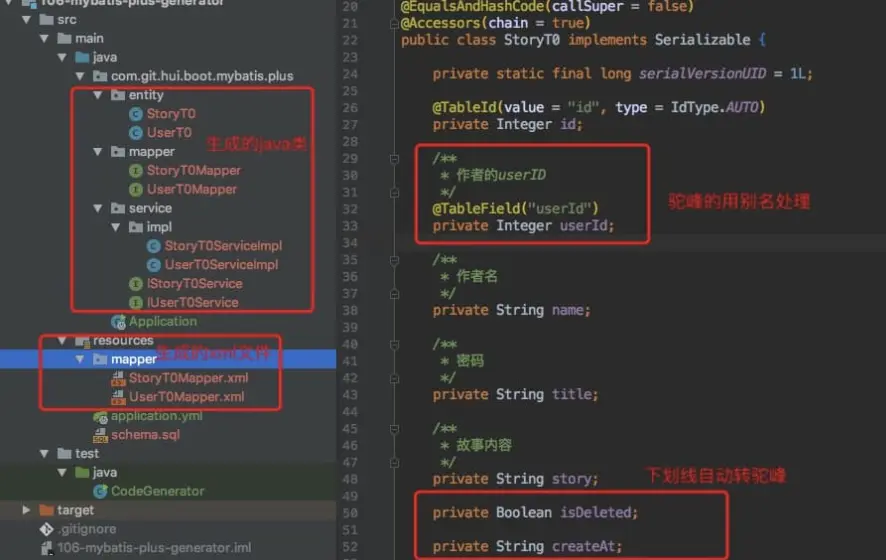
4. 输出测试
测试我们生成的类,是否可以对db进行操作,则有必要写一个启动类
@RestController@SpringBootApplication@MapperScan("com.ruangh.mybatisplus.generator.mapper")public class Application {@Autowiredprivate IUserT0Service userT0Service;@GetMappingpublic UserT0 hello(int id) {return userT0Service.getById(id);}public static void main(String[] args) {SpringApplication.run(Application.class);}}
请注意上面的@MapperScan注解,其次对应的application.yml配置文件内容如下
spring:datasource:# 注意指定时区url: jdbc:mysql://127.0.0.1:3306/story?useUnicode=true&characterEncoding=UTF-8&useSSL=false&serverTimezone=Asia/Shanghaiusername: rootpassword:mybatis-plus:configuration:# 执行的sql语句日志输出log-impl: org.apache.ibatis.logging.stdout.StdOutImpl
在db中插入一条数据
INSERT INTO `userT0` (`id`, `name`, `pwd`, `isDeleted`, `created`, `updated`)VALUEStrue(1, '一灰灰', 'yihuihuiblog', 0, '2020-04-06 15', '2020-04-06 15');
访问url: http://localhost:8080/?id=1
控制台输出如下:

5. 特殊场景说明
上面的代码生成,针对首次执行生成打码时,问题不大;但是后续的业务开发中,总会有一些其他的情况,下面分别说明
5.1 表结构修改
当表的结构发生变化时,我们需要一般需要重新生成对应的Entity,这个时候,需要GlobalConfig#setFileOverride(true)
5.2 继承公用POJO
我们可以定义一个通用的PO类,希望所有的表生成的POJO继承它
@Datapublic class BasePo implements Serializable {private static final long serialVersionUID = -1136173266983480386L;@TableId(value = "id", type = IdType.AUTO)private Integer id;}
在代码自动生成类的策略配置中,添加下面的两行设置即可
// 所有实体类继承自 BasePo, 且id在父类中StrategyConfig strategy = new StrategyConfig();strategy.setSuperEntityClass(BasePo.class);strategy.setSuperEntityColumns("id");
5.3 生成部分代码
有些时候,我并不希望生成service,xml,可能就只需要实体类 + mapper接口,这个时候可以设置TemplateConfig
TemplateConfig templateConfig = new TemplateConfig();templateConfig.setController(null);templateConfig.setEntityKt(null);templateConfig.setService(null);templateConfig.setServiceImpl(null);

若有收获,就点个赞吧
0 人点赞


