1.什么是DOM?
W3C 文档对象模型 (DOM) 是中立于平台和语言的接口,它允许程序和脚本动态地访问和更新文档的内容、样 式和结构。
HTML Dom是关于如何增,删,改,查 HTML 元素的标准。
1.查询DOM
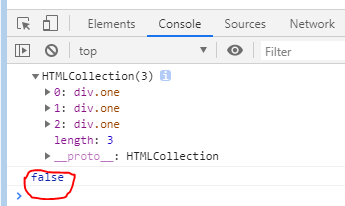
<div class="one">hello world</div><div class="one">hello world</div><div class="one">hello world</div><script>/* 通过class获取的是HTMLCollection,html的集合,它长得像数组length 获取集合的长度可以通过下标去读取 */var one=document.getElementsByClassName("one");console.log(one)console.log(Array.isArray(one))</script>
2.html标签 —>节点
DOM树 就是由一个个节点组成<br /> 节点的关系:父子关系,兄弟关系
1.如何获取节点
getElementById()getElementsByTagName() //元素getElementsByClassName() //classgetElementsByName()querySelectorAll() //选择器 var one = document.querySelectorAll('.one');
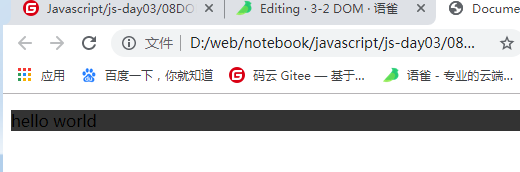
<p id="test">hello world</p><script>/*1.获取一个DOM 如何获取一个html元素 */var test=document.getElementById("test");/* 2.改变背景色 */test.style.backgroundColor="#333";console.log(test);</script>
实现以下例子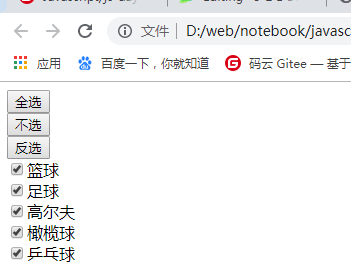
eg:<button id="all">全选</button><br><button id="noAll">不选</button><br><button id="reverse">反选</button><br><input type="checkbox">篮球<br><input type="checkbox">足球<br><input type="checkbox">高尔夫<br><input type="checkbox">橄榄球<br><input type="checkbox">乒乓球<br><script>/* 有一个时间必然有一个结果 执行onclick,后面就有一个=function(){}*/var all=document.getElementById("all"); //首先选中这个按钮var noAll=document.getElementById("noAll")var reverse=document.getElementById("reverse")var inputs=document.getElementsByTagName("input");all.onclick=function(){for(var i=0;i<inputs.length;i++){inputs[i].checked=true; //input输入框的每一项}}noAll.onclick=function(){for(var i=0;i<inputs.length;i++){inputs[i].checked=false;}}reverse.onclick=function(){for(var i=0;i<inputs.length;i++){// console.log(inputs[i].checked)// inputs[i].checked=(inputs[i].checked==true)?false:true;inputs[i].checked=!inputs[i].checked;}}</script>
实现:
点击button按钮,如果div是显示的则隐藏,如果隐藏则显示
<head><style>#div{width:100px;height:100px;background: red}</style></head><body><div id="div" style="display:block"></div><button id="btn">切换</button><script>var div = document.getElementById("div");var btn = document.getElementById("btn");btn.onclick = function () {var value = div.style.display;if (value == "block") {div.style.display = "none"}else{div.style.display = "block"}}</script>
Chrome下获取外部样式
getComputedStyle(div,null)[attr]
2.修改元素节点的内容,样式
- 修改元素节点的内容
innerHTML
- 修改样式
object.style.color="pink";object.style["color"]="pink";
- 隔行变色
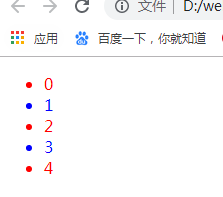
<!-- 偶数项 字体颜色为红色 奇数项字体颜色为蓝色 -->思路:对li进行遍历,if判断是偶数为红色,否则为蓝色<ul><li>0</li><li>1</li><li>2</li><li>3</li><li>4</li></ul><script>var lis=document.getElementsByTagName("li")console.log(lis)for(var i=0;i<lis.length;i++){ //1.对li进行遍历if(i%2==0){ //2.下标值取余%2 为零的情况为偶数// console.log(lis[i])lis[i].style.color="red"}else{lis[i].style.color="blue"}}</script>
- className 如何判断一个元素是否拥有某个class? classList.contains()
效果:点击一下变黄色,再点击一下恢复<style>.current{color:orange;}</style><div id="test">hello world</div><script>var test=document.getElementById("test");// test.className="one"test.onclick=function(){if(this.classList.contains("current")){this.className=""}else{this.className="current"}}</script>
3.节点的分类nodeType
a.nodeType==1 为元素节点b.nodeType==2 为属性节点c.nodeType==3 为文本节点getAttributeNode("id") //返回元素的id属性
<div id="parent"> //元素节点 nodeType==1 id:属性节点 //nodeType==2ffsfd //文本节点 nodeType==3<p>hello world</p></div>/*firstChild -->输出第一个节点firstElementChild -->输出第一个元素节点*/<script>var parent=document.getElementById("parent")var tNode =parent.firstChildvar aNode=parent.getAttributeNode("id")console.log(parent.nodeType) //1console.log(tNode.nodeType) //3console.log(aNode.nodeType) //2</script>
4.增加获取节点
- appendChild()
createElement(); //创建元素节点createTextNode(); //创建文本节点createAttribute(); //创建属性节点<script>var p=document.createElement("p"); //创建元素节点pvar txt=document.createTextNode("hello world"); //创建文本节点var attr=document.createAttribute("class"); //创建属性节点attr.value="democlass" //class="democlass"p.setAttributeNode(attr) //把属性添加给pp.appendChild(txt); //把文本添加给pdocument.body.appendChild(p) //把p添加给body</script>

<div id="parent"><p>第一个</p></div><script>/*从父元素的前面插入节点insertBefore(newChild,oldChild) */var parent=document.getElementById("parent")var p=document.createElement("p"); //创建一个pvar txt=document.createTextNode("第零个") //第二种方法给p增加内容 1.h2.innerHTML="标题";p.appendChild(txt)parent.insertBefore(p,parent.firstElementChild)</script>
- parentNode.insertBefore(newNode,targetElementNode)
<ul id="parent"><li>hello world</li></ul><script>var parent = document.getElementById("parent");for(let i=0;i<3;i++){let li = document.createElement("li");li.innerHTML = "java"+i;parent.insertBefore(li,parent.firstElementChild)}</script>
5.删除节点 removeChild()
<div id="parent"><div id="good">good</div></div><script>var parent=document.getElementById("parent");var good=document.getElementById("good")var p=document.createElement("p");p.innerHTML="hello world";// console.log(p)/* appendChild() 给元素增加节点 */parent.appendChild(p);/* romoveChild() 从DOM树上移除一个元素 */parent.removeChild(good);</script>
6.DOM的修改-替换 replaceChild(newChild,oldChild)
<div id="parent"><p id="good">good</p><!-- 改为<h2>标题</h2> --></div><script>/* DOM就是增删改元素的标准,可以动态的修改元素的内容,样式,结构 */var parent=document.getElementById("parent")var p=document.getElementsByTagName("p")[0];var h2=document.createElement("h2");h2.innerHTML="标题";parent.replaceChild(h2,p)/*修改--替换DOM节点replaceChild(newChild,oldChild)*/</script>
7.自定义属性:dataset
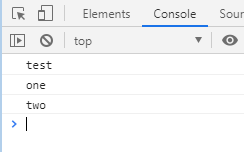
<div id="test" class="one" data-uid="two">hello world</div><script>var test=document.getElementById("test")console.log(test.id)console.log(test.className)console.log(test.dataset.uid)</script>
8.克隆节点
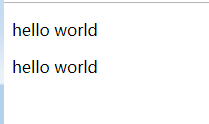
<p class="test">hello world</p><script>/* 克隆节点 */var test=document.getElementsByClassName("test")[0]; //不能直接对数组进行操作,要选中中间的一个元素var cTest=test.cloneNode(true);document.body.appendChild(cTest)</script>
9.点击跳转nav
<head><style>.container>div{height:800px;margin-top: 30px;}.container>div:nth-child(1){background: red;}.container>div:nth-child(2){background: blue;}.container>div:nth-child(3){background: yellow;}.container>div:nth-child(4){background: green;}.nav{position:fixed;line-height: 50px;background: #eee;top:0;}</style></head><body><div class="nav"><a href="#html">html</a><a href="#css">css</a><a href="#js">javascript</a><a href="#vue">vue</a></div><div class="container"><div id="html">html</div><div id="css">css</div><div id="js">javascript</div><div id="vue">vue</div></div><script>/* obj.offset().top 获取元素距离顶部的距离attr(param) 获取元素的属性$("html,body").animate({scroolTop:params*/$(".nav a").click(function(){/* 1.获取当前元素对应跳转的元素距离顶部的高度 */var attr=$(this).attr("href");var top=$(attr).offset().topconsole.log(attr)console.log(top)$("html,body").animate({scrollTop:top})return false;})</script></body>

若有收获,就点个赞吧
0 人点赞


