和路由模式八成相似,不同的方面,一是使用了topic类型的交换机,二是对于路由key做了格式要求,根据业务含义单词需要以【**.**】相隔。
匹配规则如下:
1)什么都不加,等值匹配;
2)使用【*】,单个单词的匹配;
3)使用【#】,多个单词的匹配;
在common模块下新建一个【Constant4】存储本次的常量:
package com.zhaoxy.study.common;/*** rabbitmq,主题模式*/public interface Constant4 {String exchangeName = "study_topic_exchange";String routeName1 = "user.back.success";String routeName2 = "user.back.error";String routeName3 = "user.list";String queueName1 = "Constant4-Queue_1";String queueName2 = "Constant4-Queue_2";}
重新修改消费者的逻辑,主要体现三种路由key的匹配方式:
package com.zhaoxy.mqconsumer;import com.zhaoxy.study.common.Constant4;import org.springframework.amqp.core.ExchangeTypes;import org.springframework.amqp.rabbit.annotation.Exchange;import org.springframework.amqp.rabbit.annotation.Queue;import org.springframework.amqp.rabbit.annotation.QueueBinding;import org.springframework.amqp.rabbit.annotation.RabbitListener;import org.springframework.stereotype.Component;@Componentpublic class MqConsumerListener {@RabbitListener(// bindings 支持多个配置bindings = {// 队列绑定,绑定交换机【Constant4.exchangeName】数据推送到这个队列的【Constant4.queueName1】@QueueBinding(value = @Queue(value = Constant4.queueName1, durable = "true"),exchange = @Exchange(value = Constant4.exchangeName, type = ExchangeTypes.TOPIC),// 声明我只接收路由key为【Constant4.routeName2】,以及路由key以【user.任意一个字符】的数据key = {"user.*", Constant4.routeName2})})public void listener1(String message) throws InterruptedException {System.out.println("接收到了【"+Constant4.queueName1+"】队列的消息:" + message);}@RabbitListener(bindings = {@QueueBinding(value = @Queue(value = Constant4.queueName2, durable = "true"),exchange = @Exchange(value = Constant4.exchangeName, type = ExchangeTypes.TOPIC),// 声明我只接收路由key以【user.一个或多个字符】的数据key = {"user.#"})})public void listener2(String message) throws InterruptedException {System.out.println("接收到了【"+Constant4.queueName2+"】队列的消息:" + message);}}
按照逻辑设定:
1)listener1接受路由key为【Constant4.routeName2】(等值)以及key格式为【user.任意一个字符】的数据(Constant4.routeName3),经过交换机存储到【Constant4.queueName1】队列中的数据。
2)listener2接受路由key格式为【user.任意一个或多个字符】(Constant4.routeName1,Constant4.routeName2,Constant4.routeName3),经过交换机存储到【Constant4.queueName2】队列中的数据。
两个监听程序之间最大的差别在于listener1会不会订阅并输出【Constant4.routeName1】的数据。
然后修改生产者代码,向交换机内推送三个路由key的数据。
package com.zhaoxy.mqprod;import com.zhaoxy.study.common.Constant4;import org.springframework.amqp.rabbit.core.RabbitTemplate;import org.springframework.stereotype.Component;import javax.annotation.PostConstruct;import javax.annotation.Resource;import java.util.UUID;@Componentpublic class MqProdService {@Resourceprivate RabbitTemplate rabbitTemplate;/*** 消息生产者,用途就是每次项目启动后都生成一次消息。** 一遍两遍三四遍,五遍六遍七八遍,* 九遍十遍十一遍,学习完毕全不见。*/@PostConstructpublic void prodMessage(){// 模式4,给指定交换机发送一个uuid,带有路由规则推送到队列中for (int i = 0; i < 5; i++) {rabbitTemplate.convertAndSend(Constant4.exchangeName, Constant4.routeName1, Constant4.routeName1+"的"+UUID.randomUUID());rabbitTemplate.convertAndSend(Constant4.exchangeName, Constant4.routeName2, Constant4.routeName2+"的"+UUID.randomUUID());rabbitTemplate.convertAndSend(Constant4.exchangeName, Constant4.routeName3, Constant4.routeName3+"的"+UUID.randomUUID());}}}
启动消费者后再启动生产者查看输出结果:
=====校验listener1是否错误的订阅到了【Constant4.routeName1】路由key的数据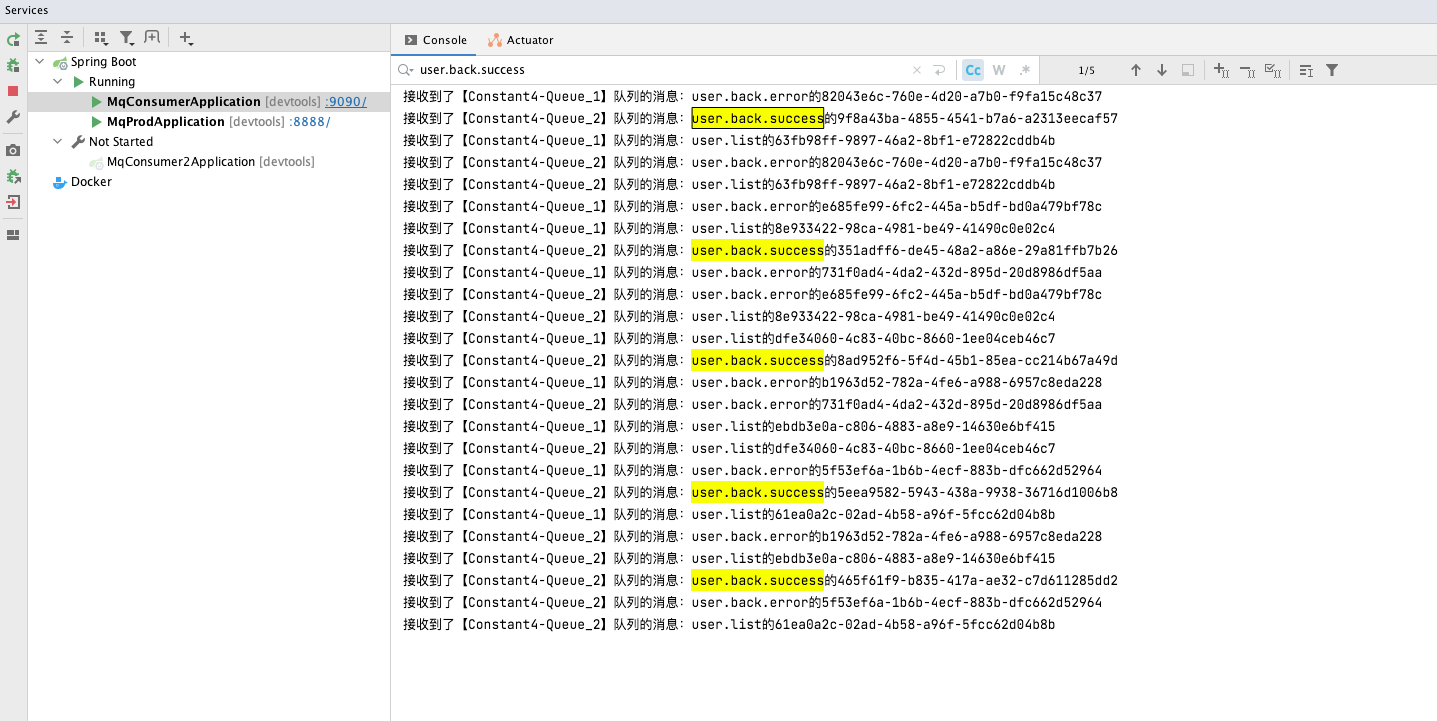
可以看出情况如设想所料,一切正常,listener1没有错误的订阅到【Constant4.routeName1】路由key的数据。
也就是说,这个消息并没有推送到对应的队列里,那么查看下两个监听程序是否都匹配到了【Constant4.routeName3】的数据

若有收获,就点个赞吧
0 人点赞


