背景
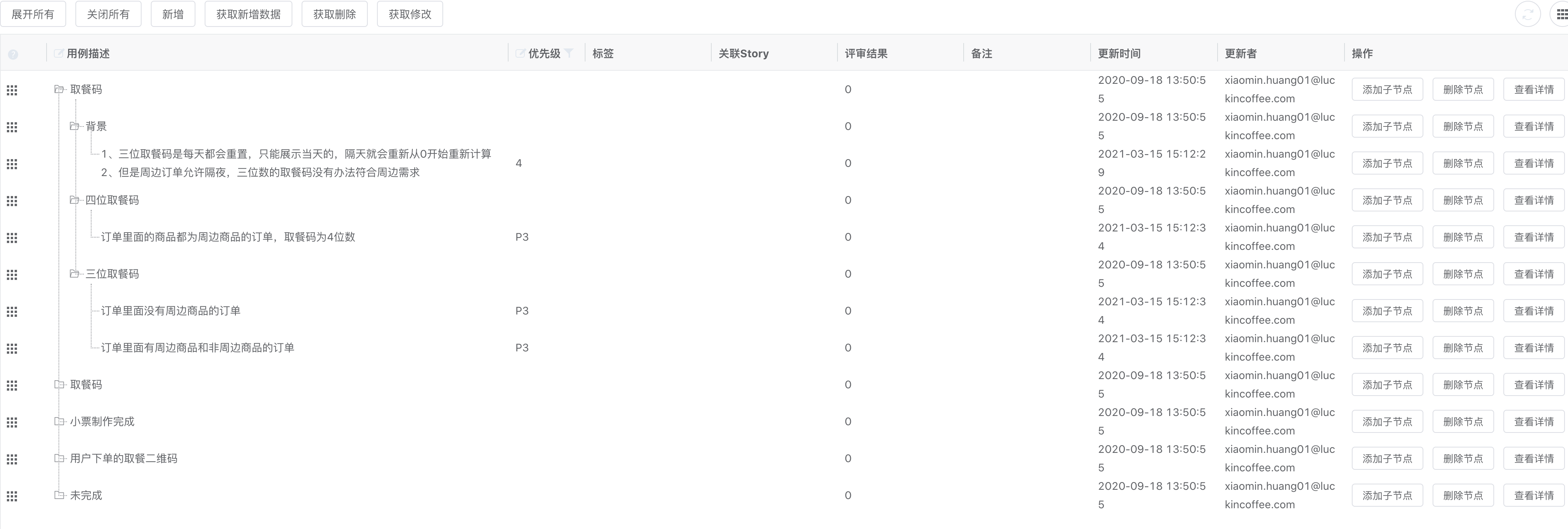
脑图可以很好的展示层级结构,但展示信息有限,并且当前的脑图无法做到真正的增量,每次保存都是整个脑图数据。而树形的表格可以根据需要展示更多节点相关的信息,如更新者、更新时间、关联的Stroy等等都能更加直观,且能做到时时增量保存。
Elemen UI 的table 自身提供了不错的功能支持,但经过一番对比,最终选取了第三方组件 Vxe-table , 下面就直接以 Vxe-table 演示下。
效果:
全局安装
npm install xe-utils@3 vxe-table@3
main.js 添加引入,同时也可以根据需要按需引入,可以减少文件大小
import 'xe-utils'import VXETable from 'vxe-table'import 'vxe-table/lib/style.css'Vue.use(VXETable)
Demo 使用
创建Data.js 格式如下:
{"code": "200","message": "成功","data": {"spaceId": "5453","template": "right","theme": "fresh-green","mapVersion": "1.4.43","root": {"data": {"createUser": "xiaomin.huang01@luckincoffee.com","createTime": "2020-09-15 20:50:39","updateUser": "xiaomin.huang01@luckincoffee.com","updateTime": "2020-09-18 13:50:55","id": "c5nyfcxxfc00","text": "取餐方式","note": "","progress": null,"priority": null,"hyberlinks": {"link": "","title": ""},"testResult": 0,"auto": 0,"resource": null,"leafNode": 0,"presentationJson": "{\"created\":1600174238683,\"expandState\":\"expand\"}","storyNo": "","latestTestResult": 0,"latestReviewResult": 0,"testCount": "0"},"children": [{"data": {"createUser": "xiaomin.huang01@luckincoffee.com","createTime": "2020-09-15 20:56:25","updateUser": "xiaomin.huang01@luckincoffee.com","updateTime": "2020-09-18 13:50:55","id": "c5nyjpjpwo00","text": "取餐码","note": "","progress": null,"priority": null,"hyberlinks": {"link": "","title": ""},"testResult": null,"auto": null,"resource": null,"leafNode": 0,"presentationJson": "{\"created\":1600174579578,\"expandState\":\"expand\"}","storyNo": "","latestTestResult": 0,"latestReviewResult": 0,"testCount": "0"},"children": [{"data": {"createUser": "xiaomin.huang01@luckincoffee.com","createTime": "2020-09-15 22:04:27","updateUser": "xiaomin.huang01@luckincoffee.com","updateTime": "2020-09-18 13:50:55","id": "c5nzzt1xf680","text": "取餐码制作完成","note": "","progress": null,"priority": null,"hyberlinks": {"link": "","title": ""},"testResult": null,"auto": null,"resource": null,"leafNode": 0,"presentationJson": "{\"created\":1600178662146,\"expandState\":\"expand\"}","storyNo": "","latestTestResult": 0,"latestReviewResult": 0,"testCount": "0"},"children": [{"data": {"createUser": "xiaomin.huang01@luckincoffee.com","createTime": "2020-09-15 22:12:03","updateUser": "xiaomin.huang01@luckincoffee.com","updateTime": "2020-09-18 13:50:55","id": "c5o05mduurk0","text": "制作成功","note": "","progress": null,"priority": null,"hyberlinks": {"link": "","title": ""},"testResult": null,"auto": null,"resource": null,"leafNode": 0,"presentationJson": "{\"created\":1600179117815,\"expandState\":\"expand\"}","storyNo": "","latestTestResult": 0,"latestReviewResult": 0,"testCount": "0"},"children": [{"data": {"createUser": "xiaomin.huang01@luckincoffee.com","createTime": "2020-09-15 22:14:40","updateUser": "xiaomin.huang01@luckincoffee.com","updateTime": "2021-03-15 15:13:15","id": "c5o07infjls0","text": "toast提示","note": "","progress": null,"priority": 2,"hyberlinks": {"link": "","title": ""},"testResult": null,"auto": null,"resource": null,"leafNode": 1,"presentationJson": "{\"created\":1600179266415,\"expandState\":\"expand\",\"updated\":1615792395856}","storyNo": "","latestTestResult": 0,"latestReviewResult": 0,"testCount": "0"},"children": []},{"data": {"createUser": "xiaomin.huang01@luckincoffee.com","createTime": "2020-09-15 22:14:40","updateUser": "xiaomin.huang01@luckincoffee.com","updateTime": "2020-09-18 13:50:55","id": "c5o07klqfvs0","text": "提示语","note": "","progress": null,"priority": null,"hyberlinks": {"link": "","title": ""},"testResult": null,"auto": null,"resource": null,"leafNode": 0,"presentationJson": "{\"created\":1600179270666,\"expandState\":\"expand\"}","storyNo": "","latestTestResult": 0,"latestReviewResult": 0,"testCount": "0"},"children": [{"data": {"createUser": "xiaomin.huang01@luckincoffee.com","createTime": "2020-09-15 22:14:40","updateUser": "xiaomin.huang01@luckincoffee.com","updateTime": "2021-03-15 15:13:18","id": "c5o07klr4xc0","text": "取餐码xxx的订单已制作完成","note": "","progress": null,"priority": 2,"hyberlinks": {"link": "","title": ""},"testResult": null,"auto": null,"resource": null,"leafNode": 1,"presentationJson": "{\"created\":1600179270667,\"expandState\":\"expand\",\"updated\":1615792398055}","storyNo": "","latestTestResult": 0,"latestReviewResult": 0,"testCount": "0"},"children": []}]}]}]}]}]}}}
HTML
<template><div><vxe-toolbar :refresh="{query: reload}" custom><template #buttons><vxe-button @click="$refs.xTree.setAllTreeExpand(true)">展开所有</vxe-button><vxe-button @click="$refs.xTree.clearTreeExpand()">关闭所有</vxe-button><vxe-button @click="insertEvent()">新增</vxe-button><!-- <vxe-button @click="getInsertEvent">获取新增</vxe-button>--><vxe-button @click="getNewData">获取新增数据</vxe-button><vxe-button @click="getRemoveEvent">获取删除</vxe-button><vxe-button @click="getUpdateEvent">获取修改</vxe-button></template></vxe-toolbar><vxe-tableref="xTree"height="1024"resizablerow-key:data="tableData"highlight-hover-rowhighlight-current-rowhighlight-hover-columnhighlight-current-columnkeep-source:keyboard-config="{isArrow: true, isEnter: true}":tree-config="{children: 'children',iconClose: 'el-icon-folder',iconOpen: 'el-icon-folder-opened',line: true}":edit-config="{trigger: 'dblclick', mode: 'cell',showStatus: true}"@edit-closed="editClosedEvent"><!-- <vxe-column type="seq"></vxe-column>--><!-- 行拖拽--><vxe-table-column width="60"><template v-slot><span class="drag-btn"><i class="vxe-icon--menu"></i></span></template><template v-slot:header><vxe-tooltip v-model="showHelpTip" content="按住后可以上下拖动排序!" enterable><i class="vxe-icon--question" @click="showHelpTip = !showHelpTip"></i></vxe-tooltip></template></vxe-table-column><vxe-columnfield="data.text"title="用例描述"width="600"tree-node:edit-render="{name: 'input', attrs: {type: 'text'}}"/><vxe-columnfield="data.priority"title="优先级"width="100":edit-render="{name: '$select', options: priorityList, optionProps: {value: 'value', label: 'label'}}":filters="[{label: 'P0', value: '0'}, {label: 'P1', value: '1'},{label: 'P2', value: '2'},{label: 'P3', value: '3'}]"/><vxe-column field="data.resource" title="标签"/><vxe-column field="data.storyNo" title="关联Story"/><vxe-column field="data.latestReviewResult" title="评审结果"/><vxe-column field="data.note" title="备注"/><vxe-column field="data.updateTime" title="更新时间"/><vxe-column field="data.updateUser" title="更新者"/><!-- <vxe-column field="data.createTime" title="创建时间" />--><!-- <vxe-column field="data.createUser" title="创建者" />--><!-- <vxe-table-column field="attr3" title="Image"><template #default><img src="/vxe-table/static/other/img1.gif" height="50"></template></vxe-table-column>--><vxe-table-column title="操作" fixed="right" width="300"><template v-slot="scope"><vxe-button size="small" @click="handleAddChildren(scope.rowIndex, scope.row)">添加子节点</vxe-button><vxe-button size="small" @click="removeNode(scope.rowIndex, scope.row)">删除节点</vxe-button><vxe-button size="small" @click="showNodeData(scope.rowIndex, scope.row)">查看详情</vxe-button></template></vxe-table-column></vxe-table></div></template>
JavaScript:
import {TREE_DATA} from './data'import Sortable from 'sortablejs'import XEUtils from 'xe-utils'export default {name: "TreeTable",data() {return {tableData: TREE_DATA.data.root.children,showHelpTip: false,priorityList: [{label: 'P0', value: '0'},{label: 'P1', value: '1'},{label: 'P2', value: '2'},{label: 'P3', value: '3'}],}},created() {// 行拖动 https://xuliangzhan_admin.gitee.io/vxe-table/#/table/other/sortableRowthis.rowDrop()},beforeDestroy() {if (this.sortable) {this.sortable.destroy()}},methods: {reload() {console.info('清除数据')// 清除所有状态this.$refs.xTree.clearAll();return this.getNewRow();},// 自动保存editClosedEvent({row, column}) {const $table = this.$refs.xTreeconst field = column.propertyconst arr = field.toString().split(".");const cellValue = row.data[arr[1]]// 判断单元格值是否被修改if ($table.isUpdateByRow(row, field)) {setTimeout(() => {console.info(row);this.$notify({title: '保存成功',message: `局部保存成功! ${field}=${cellValue}`,type: 'success'})// 局部更新单元格为已保存状态$table.reloadRow(row, null, field)console.info(row);}, 300)}},//移除节点removeNode(index, row) {// 删除可能需要后端帮忙, 前端告知删除的ID 后端遍历,然后返回最新数据console.info(index, row);this.tableData.splice(index, index);// const $table = this.$refs.xTree// $table.remove(row)// console.info(this.tableData)},// 查看节点详情showNodeData(index, row) {console.info(row);},//获取所有的新增数据getNewData() {const insertRecords = this.tableData.filter(row => row.data._isNew)console.info(insertRecords);},insertEvent(row) {// 从最后新增this.tableData.push(this.getNewRow())},// 添加子节点 https://codesandbox.io/s/vxe-table-charuzijiedianwentiyanshi-forked-3t0k4?file=/src/views/Demo1.vue:562-797handleAddChildren(index, row) {console.info("row", row)if (!row.children) {this.$set(row, "children", [this.getNewRow()]);} else {row.children.push(this.getNewRow());}this.tableData = [...this.tableData];},// 插入节点信息getNewRow() {// 通过_isNew 来判断是否是新增节点return {"data": {"_isNew": true,"createUser": "shijin.huang01@luckincoffee.com","createTime": new Date().getTime(),"updateUser": "shijin.huang@luckincoffee.com","updateTime": new Date().getTime(),"id": new Date().getTime(),"text": "","note": "","progress": null,"priority": null,"hyberlinks": {"link": "","title": ""},"testResult": null,"auto": null,"resource": null,"leafNode": 0,"presentationJson": "{\"created\":" + new Date().getTime() + ",\"expandState\":\"expand\"}","storyNo": "","latestTestResult": 0,"latestReviewResult": 0,"testCount": "0"},"children": []}},// 获取插入的数据, 这个对数子节点不适用getInsertEvent() {const $table = this.$refs.xTreeconst insertRecords = $table.getInsertRecords()console.info(insertRecords.length)},// 获取删除的数据, 这个对树子节点不适用getRemoveEvent() {const $table = this.$refs.xTreeconst removeRecords = $table.getRemoveRecords()console.info(removeRecords.length)},// 获取更新的数据, 这个对树子节点不适用getUpdateEvent() {// 需要 表格设置加入 keep-sourceconst $table = this.$refs.xTreeconst updateRecords = $table.getUpdateRecords()console.info(updateRecords)console.info(updateRecords.length)},// 拖拽 后保存怎么处理?rowDrop() {this.$nextTick(() => {const xTable = this.$refs.xTreethis.sortable = Sortable.create(xTable.$el.querySelector('.body--wrapper>.vxe-table--body tbody'), {handle: '.drag-btn',onEnd: ({item, oldIndex}) => {const options = {children: 'children'}const targetTrElem = itemconst wrapperElem = targetTrElem.parentNodeconst prevTrElem = targetTrElem.previousElementSiblingconst tableTreeData = this.tableDataconst selfRow = xTable.getRowNode(targetTrElem).itemconst selfNode = XEUtils.findTree(tableTreeData, row => row === selfRow, options)if (prevTrElem) {// 移动到节点const prevRow = xTable.getRowNode(prevTrElem).itemconst prevNode = XEUtils.findTree(tableTreeData, row => row === prevRow, options)if (XEUtils.findTree(selfRow[options.children], row => prevRow === row, options)) {// 错误的移动const oldTrElem = wrapperElem.children[oldIndex]wrapperElem.insertBefore(targetTrElem, oldTrElem)return this.$notify({message: '不允许自己给自己拖动!',type: 'error',duration: 3000});}const currRow = selfNode.items.splice(selfNode.index, 1)[0]if (xTable.isTreeExpandByRow(prevRow)) {// 移动到当前的子节点prevRow[options.children].splice(0, 0, currRow)} else {// 移动到相邻节点prevNode.items.splice(prevNode.index + (selfNode.index < prevNode.index ? 0 : 1), 0, currRow)}} else {// 移动到第一行const currRow = selfNode.items.splice(selfNode.index, 1)[0]tableTreeData.unshift(currRow)}// 如果变动了树层级,需要刷新数据this.tableData = [...tableTreeData]console.info(this.tableData)}})})}}}
CSS;
.sortable-row-demo .drag-btn {cursor: move;font-size: 12px;}.sortable-row-demo .vxe-body--row.sortable-ghost,.sortable-row-demo .vxe-body--row.sortable-chosen {background-color: #dfecfb;}

若有收获,就点个赞吧
0 人点赞


