一、介绍
经常我们要用到Python进行读取PDF+提取里面的文字信息等。但是PDF的处理还是比较棘手的。这里尝试着使用相关包对PDF进行提取信息和裁剪生成新的PDF。
二、安装相关包
1. 在cmd中输入这一句:
pip install -U pdfminer3k -i https://pypi.tuna.tsinghua.edu.cn/simple --user
注意:这里安装的是pdfminer3k 而不是pdfminer。不小心安装了pdfminer(pip install pdfminer)的同学,请回到你安装包的文件夹中(类似这个文件夹:….\Python\Python37\site-packages),手动把含有PDF的包删光,再重新回到cmd输入安装代码。
2. pdfminer的使用
2.1 简要介绍PDF的结构
PDF和word、HTML均不同,因为pdf更像一个图形代表。PDF就是一群指令的集合、用来声明了在哪里放置这些图形以及文字。因此PDFminer是尝试“猜”对象的位置、进行解析结构,但不能保证一定起作用。
PDFminer采用的是懒惰的解析方式。至少需要用到两个类 PDFParser 以及 PDFDocument。这两个类相互关联。PDFParser 从文件中抽取数据,PDFDocument 用来储存数据。同时,需要用到PDFPageInterpreter 处理页面内容,以及使用PDFDevice 将其转化为用户最终需要的东西。以及PDFResourceManager 用来储存共享资源,例如字体和图片。
分析器返回的是PDF文件中的每一个的LTPage对象。这个对象包含了子类对象,储存了该页的所有结构。
- LTPage:代表是一个完整的页码,子类包含了LTTextBox, LTFigure, LTImage, LTRect, LTCurve and LTLine。
- LTTextBox:表示的是文本块,一般储存在矩形区域。LTTextBox中又包含了LTTextLine的列表,通过.get_text()方法能够将整个text抽出来。
- LTTextLine:包含了LTChar对象,表示的是一行文本,通过.get_text()将文本抽出来。
- LTChar:是一行中一个字。
- LTFigure:是被嵌在该pdf中的区域,可以递归出现。
- LTImage:代表是图片对象,可以是JEPG或者其他格式。
- LTLine:表示直线,用于分隔区域。
- LTRect:代表矩形,用于框住某个对象。
- LTCurve:Bezier curve
2.2 PDFMiner基本语法
```python from pdfminer.pdfparser import PDFParser from pdfminer.pdfdocument import PDFDocument from pdfminer.pdfpage import PDFPage from pdfminer.pdfpage import PDFTextExtractionNotAllowed from pdfminer.pdfinterp import PDFResourceManager from pdfminer.pdfinterp import PDFPageInterpreter from pdfminer.pdfdevice import PDFDevice
打开pdf
path = r”…/某个.pdf” fp = open(pdf, ‘rb’)
创建和该文件对象相关的PDF分析器。
parser = PDFParser(fp)
通过PDFDocument创建PDF文件对象,储存该文件的结构。
document = PDFDocument()
连接分析器与文档对象
parser.set_document(document) document.set_parser(parser)
提供初始化密码doc.initialize(password)
如果没有密码 就创建一个空的字符串
doc.initialize()
检测文档是否提供txt转化;不允许的话只能够终止转化。
if not doc.is_extractable: raise PDFTextExtractionNotAllowed
如果可以txt转化
else:
# 创建pdf资源管理器,管理该pdf的共享资源rsrcmgr = PDFResourceManager()# 创建用于分析的参数laparams = LAParams()# 创建一个pdf页面整合器device = PDFPageAggregator(rsrcmgr, laparams=laparams)# 创建一个pdf转换对象interpreter = PDFPageInterpreter(rsrcmgr, device)# 循环遍历列表,每次处理一页page的内容total_page = doc.get_pages()for page in total_page:#在第page页中,解析该页的所有结构interpreter.process_page(page)# 接受该页的整体布局layout对象layout = device.get_result()# layout是一个LTPage对象,里面存着这个page解析出来的各种对象,# 包括了LTTextBox, LTFigure, LTImage, LTTextBoxHorizontal 等for x in layout:if isinstance(x, LTTextBox):# 那么这里只关注是不是储存文本的box,如果是的话,那么输出该页的文本。print(x.get_text())
在使用pdfminer的时候,往往会出现这种警告<br />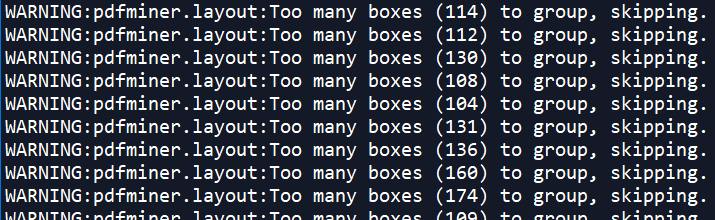<br />如果介意并且不想要输出的话,找到...\Python\Python37\site-packages\pdfminer的文件夹,然后修改layout.py文件中的源代码。定位到layout.py文件的第624行,原始代码如下```pythonif len(boxes) > 100:# Grouping this many boxes would take too long and it doesn't make much sense to do so# considering the type of grouping (nesting 2-sized subgroups) that is done here.logger.warning("Too many boxes (%d) to group, skipping.", len(boxes))
把”>100”改成”>10000”,修改后如下链接
if len(boxes) > 10000:# Grouping this many boxes would take too long and it doesn't make much sense to do so# considering the type of grouping (nesting 2-sized subgroups) that is done here.logger.warning("Too many boxes (%d) to group, skipping.", len(boxes))
三、一个小实验
例如找出整个pdf中含有某个关键字的几页,再把包含了这几页的页面提取出来生成一个新的PDF。
1. 安装并修改PyPDF2
裁剪pdf需要用到PyPDF2包。先通过cmd安装。
pip install -U PyPDF2 -i https://pypi.tuna.tsinghua.edu.cn/simple --user
在安装好了PyPDF2之后、调用PyPDF2之前, 需要修改PyPDF2的某些源代码,因为裁剪中文的PDF会出现乱码现象,例如出现“PdfReadError Illegal character in Name Object”的报错,就是因为中文字符裁剪乱码问题。
找到...\Python37\site-packages\PyPDF2的文件夹,然后修改两个.py文件——generic.py以及utils.py。
首先,定位到generic.py的第483行,原始的代码如下:
try:return NameObject(name.decode('utf-8'))except (UnicodeEncodeError, UnicodeDecodeError) as e:# Name objects should represent irregular characters# with a '#' followed by the symbol's hex numberif not pdf.strict:warnings.warn("Illegal character in Name Object", utils.PdfReadWarning)return NameObject(name)else:raise utils.PdfReadError("Illegal character in Name Object")
需要将其修改为
try:return NameObject(name.decode('utf-8'))except (UnicodeEncodeError, UnicodeDecodeError) as e:try:return NameObject(name.decode('gbk'))except (UnicodeEncodeError, UnicodeDecodeError) as e:# Name objects should represent irregular characters# with a '#' followed by the symbol's hex numberif not pdf.strict:warnings.warn("Illegal character in Name Object", utils.PdfReadWarning)return NameObject(name)else:raise utils.PdfReadError("Illegal character in Name Object")
保存并退出。
然后修改第二个文件utils.py。找到第238行。原始代码如下:
r = s.encode('latin-1')if len(s) < 2:bc[s] = rreturn r
需要将其修改为
try:r = s.encode('latin-1')except Exception as e:r = s.encode('utf-8')if len(s) < 2:bc[s] = rreturn r
保存并退出。
然后打开python编辑器。
2. 完整代码
- 完整代码 ```python from PyPDF2 import PdfFileWriter, PdfFileReader from pdfminer.pdfparser import PDFParser, PDFDocument from pdfminer.pdfinterp import PDFResourceManager, PDFPageInterpreter from pdfminer.converter import PDFPageAggregator from pdfminer.layout import LAParams, LTTextBox from pdfminer.pdfinterp import PDFTextExtractionNotAllowed
def get_new_pdf_by_keyword(i_path, o_path, keyword):
# i_path:是原始待处理的pdf文件所在路径# o_path:是即将最终生成的pdf的路径# keyword:是一个list,存放各种关键词fp = open(i_path, 'rb')parser = PDFParser(fp)doc = PDFDocument()parser.set_document(doc)doc.set_parser(parser)doc.initialize()if not doc.is_extractable:raise PDFTextExtractionNotAllowedelse:rsrcmgr = PDFResourceManager()laparams = LAParams()device = PDFPageAggregator(rsrcmgr, laparams=laparams)interpreter = PDFPageInterpreter(rsrcmgr, device)total_page = doc.get_pages()list_pages = []for i, page in enumerate(total_page):interpreter.process_page(page)layout = device.get_result()for x in layout:if isinstance(x, LTTextBox):text = x.get_text()for kw in keyword:if kw in text:list_pages.append(i)# 把页码排个序,且保留唯一页码list_pages = sorted(set(list_pages))print(list_pages)if len(list_pages) > 0:# 使用PyPDF2进行裁剪pdf 并且输出新的pdf。# 打开pdf文件# 只有在页码超过1个,才进行裁剪;否则没有内容裁剪pdf_file = PdfFileReader(fp)# 创建一个pdf文档,这个只是代表pdf文档的值,并没有创建实际的文档。pdf_writer = PdfFileWriter()for i in list_pages:pageobj = pdf_file.getPage(i)pdf_writer.addPage(pageobj)try:pdfoutputfile = open(o_path, 'wb')pdf_writer.write(pdfoutputfile)pdfoutputfile.close()fp.close()# 解析成功返回的是1return 1except:fp.close()return 0else:# 没有找到页码的时候,返回2。fp.close()return 2
if name == “main“:
get_new_pdf_by_keyword(r’…\待解析的文件.pdf’, r’…\解析好的结果.pdf’, [‘关键词1’, ‘关键词2’])
```
以上~

若有收获,就点个赞吧
0 人点赞


