一、CSS尺寸
height() 获得 或 设置 高度 //不包括内边距、边框和外边距width() 获得 或 设置 宽度
//修改未满18岁的高度$("div").css("border","1px solid red");alert($("div").height()); //数字类型alert($("div").width());$("div").height("100px"); //设置高度,值可以是数字也可以是字符串// 获取可视区宽度$(window).width();// 获取可视区高度$(window).height();//css获取到的宽高是带 px 的var width=parseInt($("#dv").css("width"));var height=parseInt($("#dv").css("height"))*2;//css设置样式也需要带px$("#dv").css("width",width+"px");$("#dv").css("height",height+"px");
二、innerWidth/outerWidth
innerWidth()/innerHeight() 方法返回元素的宽度/高度(包括内边距)。 --->clientWidthouterWidth()/outerHeight() 方法返回元素的宽度/高度(包括内边距和边框)。 --->offsetWidthouterWidth(true)/outerHeight(true) 方法返回元素的宽度/高度(包括内边距、边框和外边距)。
三、scrollTop与scrollLeft
// 获取页面被卷曲的高度$(window).scrollTop();// 获取页面被卷曲的宽度$(window).scrollLeft();
示例:
固定导航栏
<div class="top"><img src="images/top.png" /></div><div class="nav"><img src="images/nav.png" /></div><div class="main"><img src="images/main.png" /></div><style type="text/css">* {margin: 0;padding: 0;}.main {width: 1000px;margin: 0 auto;}</style><script>$(function () {//滚动条事件$(document).scroll(function () {//判断向上卷曲出去的距离是否大于等于 应用类样式top的div的高度if($(document).scrollTop()>=$(".top").height()){//获取导航栏的元素 .nav 脱离文档流$(".nav").css("position","fixed").css("top",0);$(".main").css("marginTop",$(".nav").height());}else{$(".nav").css("position","static");$(".main").css("marginTop",0);}});});</script>
四、offset方法与position方法
## 1.offset方法获取元素距离document的位置
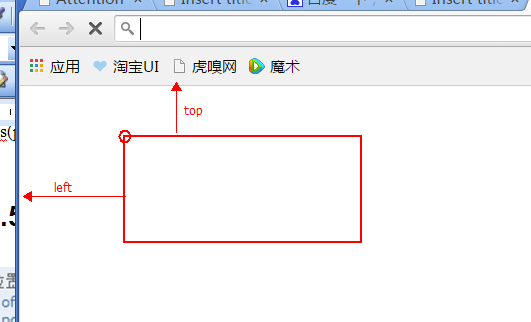
##2.position方法获取的是元素距离第一个定位了的父元素(offsetParent)的位置。
// 获取元素距离document的位置,返回值为对象:{left:100, top:100}$(selector).offset();// offset使用alert(JSON.stringify($("div").offset()));$("div").offset({"top":0,"left":0});//注意:此处不需要px// 获取相对于其最近的有定位的父元素的位置。// 这边position仅用于获取当前元素相对于父元素的位置,不可以设置。如果非要设置,需要引入jquery-ui.js$(selector).position();

若有收获,就点个赞吧
0 人点赞


